1. Sigurnosne informacije i upozorenja
Read all safety warnings and instructions carefully before operating this device. Failure to follow these instructions may result in serious injury or property damage.
- Držite sigurnu udaljenost: Always maintain a certain distance from the nozzle while installing and operating the machine.
- Do Not Aim at Persons: Never aim the nozzle directly towards any person when the machine is working.
- Potreban nadzor odrasle osobe: This appliance must be grounded. Use only with adult supervision.
- Samo za upotrebu na otvorenom: Dizajniran za upotrebu na otvorenom.
- Držite dalje od djece: Keep all serviceable parts away from children.
- ventilacija: Uvek koristite u dobro provetrenom prostoru.
- CO2 Tank Handling: Ensure CO2 tanks are secured and handled according to manufacturer guidelines.
- Otpuštanje pritiska: Before disassembling, always turn off the CO2 bottle valve first, allow residual gas in the pipe to escape, then turn off the power, and finally disconnect the gas bottle.

2. Proizvod je gotovview
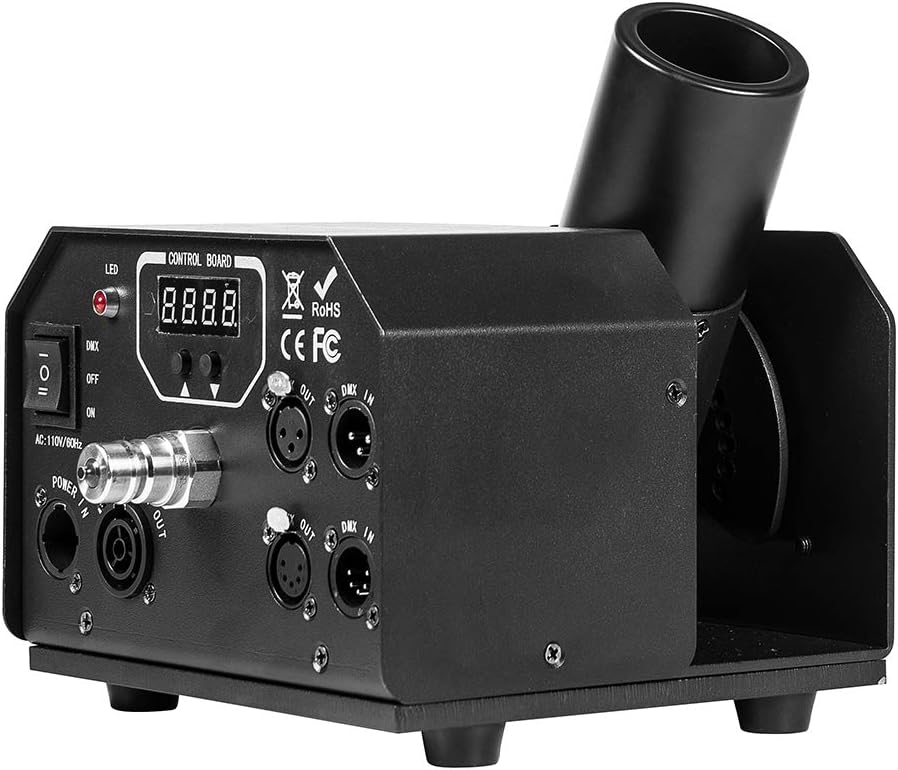
The MOKA SFX DMX 512 Cryo CO2 Cannon is a professional-grade special effects machine designed to produce powerful CO2 fog jets for stage performances, DJ events, and other entertainment applications. It features adjustable spray angle and multiple control modes for versatile operation.
Ključne karakteristike:
- Podesivi ugao prskanja: The CO2 jet machine offers a 180° adjustable spray angle for flexible effect direction.
- Sigurnosni kanal: Incorporates a safety channel that must be activated to prevent accidental spraying.
- Brzi konektori: Built-in quick connectors ensure a swift, secure, and leak-free connection to the CO2 tank.
- High-Pressure Valve: Equipped with a 1400 psi upgraded valve, capable of spraying CO2 fog 10-12 meters high.
- Ice-Free Operation: Produces strong CO2 fog without generating ice.

3. Tehničke specifikacije
| Feature | Specifikacija |
|---|---|
| Voltage | AC110V, 60HZ / 50HZ |
| Snaga | 30W |
| Dužina creva | 20ft (Length customizable) |
| Hose Pressure Valve | 2600 psi |
| Control Mode | DMX512 and Manual Control |
| Vrijeme prskanja | Continuous injection (Suggestions for 20 seconds) |
| Ugao prskanja | 0-180 degree adjustable |
| Max Pressure | 1400 psi |
| Visina prskanja | 10-12m |
| Bruto težina | 5.8kg |
| Težina isporuke | 9.5kg |
| Veličina proizvoda | 30 x 22 x 16 cm |
| Certifikati | CE / ROHS / FCC |
4. Upute za postavljanje
Follow these steps to properly set up your MOKA SFX DMX 512 Cryo CO2 Cannon:
- Pozicioniranje jedinice: Place the CO2 Cannon on a stable, level surface in the desired location. Ensure there is adequate clearance around the nozzle and that the spray path is clear of people and obstructions.
- Connect CO2 Hose to Tank: Connect one end of the provided CO2 hose to your CO2 gas bottle. Ensure a tight and secure connection.
- Position CO2 Bottle: Lay the CO2 bottle down flat in a secure position to prevent it from tipping over.
- Connect CO2 Hose to Machine: Connect the other end of the CO2 hose to the quick-connector inlet on the CO2 Cannon. Ensure this connection is also tight and secure.
- Open Gas Bottle Valve: Slowly and carefully turn on the valve of the CO2 gas bottle. Listen for any leaks.
- Connect Power and DMX (Optional):
- Connect the power cable to the machine's 'POWER IN' port and then to a suitable power outlet (AC110V).
- If using DMX control, connect a DMX cable from your DMX console to the 'DMX IN' port on the CO2 Cannon. If linking multiple units, connect from 'DMX OUT' of the first unit to 'DMX IN' of the next.


5. Uputstvo za upotrebu
The MOKA SFX DMX 512 Cryo CO2 Cannon can be operated via DMX512 control or manual control.
5.1. Ručna kontrola
- Ensure the CO2 gas bottle valve is open and the unit is powered on.
- Set the DMX/OFF/ON switch to 'ON' for manual operation.
- Press the manual trigger button on the control panel to activate the CO2 jet. Release to stop.
- Važno: Observe the recommended continuous injection time (e.g., 20 seconds) to prevent freezing or damage to the unit.
5.2. DMX512 Control
- Ensure the CO2 gas bottle valve is open and the unit is powered on.
- Set the DMX/OFF/ON switch to 'DMX'.
- Configure the DMX address on the unit's control board using the up/down buttons. Refer to your DMX console's manual for channel assignments.
- Activate the corresponding DMX channel on your console to trigger the CO2 jet.
- Sigurnosni kanal: The unit features a safety channel. Ensure this channel is activated (e.g., set to a specific value) on your DMX console before the CO2 jet can be triggered. This prevents unintended activation.

6. Održavanje
Regular maintenance ensures the longevity and reliable performance of your CO2 Cannon.
- čišćenje: Periodically wipe down the exterior of the unit with a soft, dry cloth. Do not use harsh chemicals or abrasive cleaners.
- Pregled mlaznica: Regularly check the CO2 nozzle for any obstructions or ice buildup. Ensure it is clear before operation.
- Crijevo i priključci: Inspect the CO2 hose and all connections for signs of wear, damage, or leaks before each use. Replace any damaged components immediately.
- Skladištenje: When not in use, store the unit in a dry, cool place, disconnected from the CO2 tank and power supply.
- Profesionalna usluga: For any internal repairs or complex issues, contact qualified service personnel. Do not attempt to open the unit yourself.
7. Otkrivanje problema
If you encounter issues with your CO2 Cannon, refer to the following common problems and solutions:
- No CO2 Jet:
- Ensure the CO2 gas bottle valve is fully open.
- Provjerite sve spojeve crijeva na nepropusnost.
- Verify the unit is powered on and the DMX/OFF/ON switch is set correctly (ON for manual, DMX for DMX control).
- If using DMX, confirm the DMX address is correct and the safety channel is activated on your console.
- Check if the CO2 tank is empty.
- Weak CO2 Jet:
- Ensure the CO2 tank has sufficient pressure.
- Check for any partial obstructions in the nozzle.
- Verify the hose is not kinked or damaged.
- Curenja na spojevima:
- Dobro zategnite sve spojeve.
- Inspect O-rings and seals for damage and replace if necessary.
- Jedinica se ne uključuje:
- Check the power cable connection to both the unit and the power outlet.
- Provjerite je li utičnica funkcionalna.
- Check the unit's power switch.
8. Garancija i podrška
For warranty information, technical support, or service inquiries, please refer to the documentation provided with your purchase or contact MOKA SFX customer service directly. Keep your purchase receipt as proof of purchase for warranty claims.
MOKA SFX Store: Visit the MOKA SFX Store on Amazon