1. Uvod
This instruction manual provides detailed guidance for the installation, operation, and maintenance of your Beghelli Dom-e Wi-Fi Full HD Pan/Tilt Surveillance Camera. Please read this manual thoroughly before using the product to ensure proper functionality and safety. Keep this manual for future reference.

Figure 1: Beghelli Dom-e Wi-Fi Full HD Pan/Tilt Surveillance Camera.
2. Proizvod je gotovview
The Beghelli Dom-e Wi-Fi Camera is a versatile surveillance device designed for indoor use, offering Full HD 1080p resolution and comprehensive monitoring capabilities. It integrates seamlessly into your smart home system via the Dom-e Beghelli application.
Ključne karakteristike:
- Full HD 1080p rezolucija: Pruža jasan i detaljan video zapistage.
- Funkcionalnost panoramiranja i naginjanja: Motorized rotation of 355° horizontally and 85° vertically, controllable via the app.
- noćni vid: Equipped with IR LEDs for clear visibility up to 10 meters in low-light conditions.
- Detekcija pokreta: Sends real-time push notifications to your smartphone upon detecting movement, including specific person detection.
- Automatsko praćenje: The "Tracking" function enables the camera to automatically follow moving subjects.
- Dvosmjerni zvuk: Built-in microphone and speaker allow for hands-free communication.
- Fleksibilne opcije snimanja: Record directly to your smartphone, to a MicroSD card (up to 128GB, not included), or via optional cloud storage.
- Wi-Fi povezivanje: Connects to your home Wi-Fi network (2.4 GHz).
- Šifriranje podataka: Ensures the security of your video data.
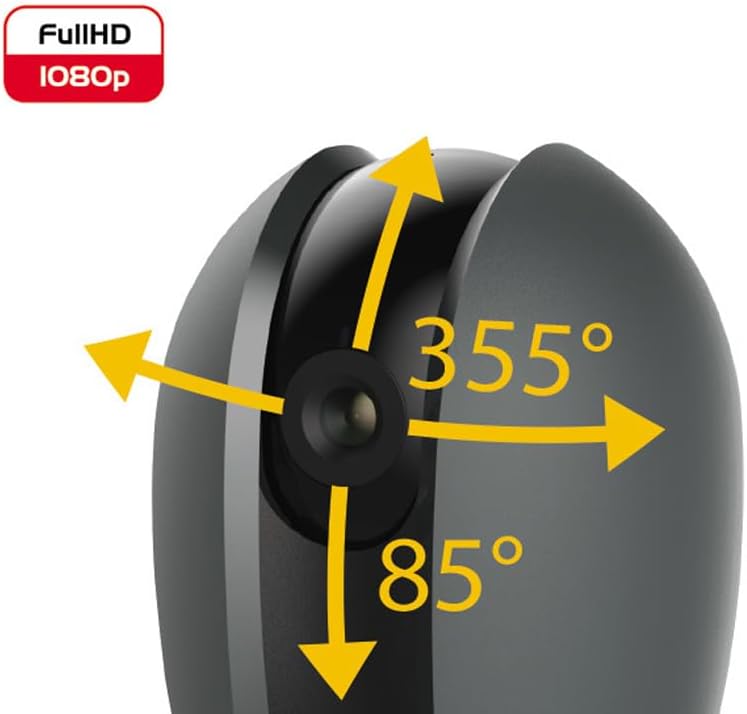
Figure 2: Camera's pan and tilt capabilities.
3. Sadržaj paketa
Provjerite da li su sve stavke prisutne u paketu:
- Beghelli Dom-e Wi-Fi Full HD Pan/Tilt Surveillance Camera
- USB Power Adapter (230V – DC 5V/1A)
- Mounting accessories (if included, not explicitly listed but implied by "wall or ceiling installation")
- Uputstvo za upotrebu (ovaj dokument)

Figure 3: Product packaging for the Beghelli Dom-e Camera.
4. Podešavanje
4.1 Uključivanje kamere
- Connect the provided USB power adapter to the camera's power input.
- Plug the adapter into a standard 230V power outlet. The camera will power on and initiate its startup sequence.
4.2 Instalacija mobilne aplikacije
The Beghelli Dom-e camera is controlled via the dedicated "Dom-e Beghelli" mobile application.
- Download the "Dom-e Beghelli" app from the Apple App Store (for iOS 8.0 or later) or Google Play Store (for Android 4.2 or later).
- Instalirajte aplikaciju na svoj pametni telefon ili tablet.
- Registrujte se za novi račun ili se prijavite ako ga već imate.
4.3 Connecting to Wi-Fi and Pairing
Ensure your Wi-Fi network is 2.4 GHz (IEEE802.11 b/g/n). The camera does not support 5 GHz networks.
- Open the Dom-e Beghelli app and follow the on-screen instructions to add a new device.
- Select the Beghelli Dom-e camera from the list of available devices.
- Enter your Wi-Fi network name (SSID) and password when prompted.
- The app will guide you through the pairing process, which typically involves scanning a QR code displayed on your phone with the camera, or listening for an audio prompt.
- Nakon uspješnog uparivanja, indikator statusa kamere će se promijeniti i vidjet ćete prijenos uživo u aplikaciji.

Figure 4: Simplified setup steps via the Dom-e Beghelli app.
4.4 Montiranje kamere
The camera can be installed on a wall or ceiling. Choose a location that provides the desired viewugao i nalazi se u dometu vaše Wi-Fi mreže i električne utičnice.
- Mark the drilling points on the desired surface using the mounting template (if provided).
- Izbušite rupe i po potrebi umetnite tiple u zid.
- Secure the mounting bracket (if provided) to the surface.
- Pričvrstite kameru na montažni nosač.
- Adjust the camera's angle manually or via the app after installation.
5. Uputstvo za upotrebu
5.1 Uživo View i kontrola panoramiranja/nagiba
- Open the Dom-e Beghelli app and select your camera to view live feed.
- Use the directional controls within the app to pan the camera horizontally (355°) and tilt it vertically (85°) to adjust the viewing area.
5.2 Detekcija pokreta i obavještenja
- Navigate to the camera settings in the app to enable motion detection.
- Konfigurišite nivoe osjetljivosti i zone detekcije po potrebi.
- Omogućite push obavještenja da biste primali upozorenja na pametnom telefonu kada se detektuje kretanje.
- The camera also features person detection for more accurate alerts.
5.3 Dvosmjerni audio
- Dok viewTokom prijenosa uživo, dodirnite ikonu mikrofona u aplikaciji da biste govorili preko zvučnika kamere.
- The camera's built-in microphone will capture audio from the monitored area, allowing you to listen in.
5.4 Snimanje i pohranjivanje
- Snimanje na MicroSD karticu: Insert a MicroSD card (up to 128GB, not included) into the camera's slot for continuous recording or event-triggered recording.
- Smartphone Recording: You can manually record video clips directly to your smartphone while viewprijenos uživo.
- Cloud Storage: An optional cloud storage service is available via subscription for off-site video backup. Refer to the app for details.
- Planirano snimanje: Set up specific times for the camera to record automatically through the app settings.
5.5 Noćni vid
The camera automatically switches to night vision mode in low-light conditions, utilizing its IR LEDs to provide clear black-and-white footage up to 10 meters.
6. Mobile Application (Dom-e Beghelli App)
The Dom-e Beghelli app is the central control interface for your camera and other compatible smart home devices. It allows for:
- Remote control of camera pan and tilt.
- Access to live video feed and recorded footage.
- Configuration of motion detection, notifications, and recording schedules.
- Dvosmjerna audio komunikacija.
- Integration with other Dom-e smart home devices (e.g., alarms, smart plugs, lighting).
- Voice control compatibility with Google Assistant and Amazon Alexa (if associated with a compatible smartphone).

Figure 5: The Dom-e Beghelli app interface for camera control.
7. Specifikacije
| Feature | Specifikacija |
|---|---|
| Broj modela | 60021 |
| Rezolucija | Full HD 1080p (2 Megapixels) |
| Senzor | CMOS 1/2.9" |
| Objektiv | 3.6 mm / f2.0 / 105° |
| Brzina zatvarača | 1/25 - 1/100,000 sec |
| Pan Rotation | 355 ° vodoravno |
| Tilt Rotation | 85 ° okomito |
| Noćni vid | Do 10 metara (IR LED diode) |
| Audio | Two-way, hands-free (in/out) |
| Skladištenje | MicroSD card up to 128GB (not included), Smartphone, Cloud (optional subscription) |
| Wi-Fi Standard | IEEE802.11 b/g/n (2.4 GHz) |
| Frekvencijski opseg | 2.4 GHz - 2.4835 GHz |
| Power Input | 230V – DC 5V/1A (USB adapter included) |
| Maksimalna potrošnja energije | 4.5 W |
| Dimenzije (D x Š x V) | 63 x 58 x 96 mm (Product description) / 7 x 7 x 11 cm (Specifications) |
| Težina | 330 grama |
| Materijal | Plastika |
| Kompatibilnost operativnog sistema | Apple iPhone iOS 8.0 or later / Android 4.2 or later |
| Preporučena upotreba | Unutrašnja sigurnost |
Note: Some dimensions may vary slightly between product description and specifications list.
8. Održavanje
8.1 Čišćenje
- Prije čišćenja provjerite je li kamera isključena i iskopčana iz struje.
- Koristite meku, suhu krpu za brisanje kućišta fotoaparata.
- Za čišćenje objektiva koristite specijaliziranu krpu za čišćenje objektiva kako biste izbjegli ogrebotine.
- Ne koristite tekuća sredstva za čišćenje, aerosole ili abrazivne rastvarače.
8.2 Ažuriranja softvera
Periodically check the Dom-e Beghelli app for firmware updates. Keeping your camera's firmware updated ensures optimal performance, security, and access to new features.
9. Otkrivanje problema
| Problem | Rješenje |
|---|---|
| Kamera se ne uključuje | Ensure the USB power adapter is securely connected to the camera and a working power outlet. Verify the outlet has power. |
| Nije moguće povezati se na Wi-Fi |
|
| Nema prijenosa videa uživo |
|
| Detekcija pokreta ne radi |
|
| Cannot reconnect after Wi-Fi password change | If your Wi-Fi password changes, you will likely need to reset the camera and re-pair it with the app using the new Wi-Fi credentials. Refer to the app for device reset instructions. |
10. Garancija i podrška
For warranty information and technical support, please refer to the documentation provided with your purchase or contact Beghelli customer service directly. You can typically find contact details on the Beghelli official website or within the Dom-e Beghelli application.
Manufacturer: Beghelli
Model: 60021


