Uvod
This manual provides detailed instructions for the safe and effective operation of the AOPUTTRIVER AP-7200APP Professional True-RMS Clamp Meter. This device is designed for measuring AC/DC current, AC/DC voltage, resistance, capacitance, continuity, and temperature, and features non-contact voltage (NCV) detection and Bluetooth connectivity for mobile app integration.
Sigurnosne informacije
Always adhere to safety precautions when using electrical testing equipment. This device complies with IEC 61010-1, CAT III 600V safety standards and features double insulation for enhanced protection.
- Ne prekoračujte maksimalne ulazne vrijednosti navedene za svaki mjerni opseg.
- Budite izuzetno oprezni pri radu s strujnim krugovima pod naponom.
- Ensure the test leads are in good condition and properly connected before use.
- Do not operate the meter if it appears damaged or if the casing je otvoren.
- Refer to local and national safety codes for proper electrical work procedures.
Sadržaj paketa
Provjerite da li se u vašem paketu nalaze sve dolje navedene stavke:
- AOPUTTRIVER AP-7200APP Clamp Meter
- Temperaturna sonda
- Test Leads (Red/Black)
- Batteries (AAA type, typically 2)
- Uputstvo za upotrebu

Image: Contents of the AP-7200APP package, including the clamp meter, temperature probe, test leads, batteries, and instruction manual.
Product Overview
Familiarize yourself with the components of the AP-7200APP Clamp metar:

Image: Labeled diagram of the AP-7200APP Clamp Meter, highlighting its main components and controls.
- Clamp čeljusti: Opens 26mm to enclose conductors for current measurement.
- Jaw-opening Handle: Koristi se za otvaranje i zatvaranje clamp čeljusti.
- NCV Detection Area: Located at the top, used for non-contact voltage detekcija.
- Lamp svjetlo: Illuminates the measurement area. Press the "HOLD" key for over 2 seconds to activate.
- Okretni prekidač: Selects measurement functions and ranges.
- LCD ekran: 6000 counts display, showing measurement values and function symbols.
- Tipka HOLD: Freezes the current display reading. Press for >2 seconds to activate backlight.
- SEL Key: Used to change measurement modes within a function (e.g., AC/DC, Diode/Continuity/Capacitance).
- MAX/MIN Key: Records maximum and minimum measured values. Press for >2 seconds to exit.
- Hz/Duty Key: Odabira mjerenje frekvencije ili radnog ciklusa.
- REL Key: Activates relative measurement mode.
- COM ulazni priključak: Common terminal for test leads and temperature probe.
- VΩHz°C°F Input Jack: Ulazni terminal za voltage, mjerenja otpora, frekvencije, kapaciteta i temperature.
Setup
1. Instalacija baterije
The meter requires two AAA batteries. Open the battery compartment cover on the back of the device, insert the batteries according to the polarity indicators, and securely close the cover. A low battery indicator will appear on the LCD when replacement is needed.
2. Bluetooth Connection (AiLink App)
The AP-7200APP can connect to a mobile device via Bluetooth for remote monitoring and data analysis. The effective control distance is approximately 10-15 meters.
- Preuzmite aplikaciju: Scan the QR code provided in the manual or search for "AiLink" in the Google Play Store (for Android) or Apple App Store (for iOS). Download and install the application. You can also download it from aicare.net.cn/app/ailink/download/.
- Otvorite aplikaciju: Launch the AiLink application on your mobile phone.
- Povežite se na uređaj: Within the app, press the "ADD" or "Connect" button to search for nearby devices. Select the "Clamp Meter" from the list to establish a connection.
- Podaci monitora: Once connected, the app will display real-time measurement data from the clamp meter. You can analyze and save this data.

Image: Visual guide for Bluetooth connection and app usage, showing the AiLink app interface.
Uputstvo za upotrebu
Before any measurement, ensure the rotary switch is set to the OFF position when not in use.
1. Mjerenje AC/DC struje (Clamp)
- Okretni prekidač postavite na 60A~ or 400A~ position for AC current, or 60A= or 400A= for DC current.
- Press the jaw-opening handle to open the clamp čeljusti.
- Ogradite jedan provodnik sa clamp jaws. Ensure the conductor is centered within the jaws for accurate readings.
- Očitajte trenutnu vrijednost na LCD zaslonu.
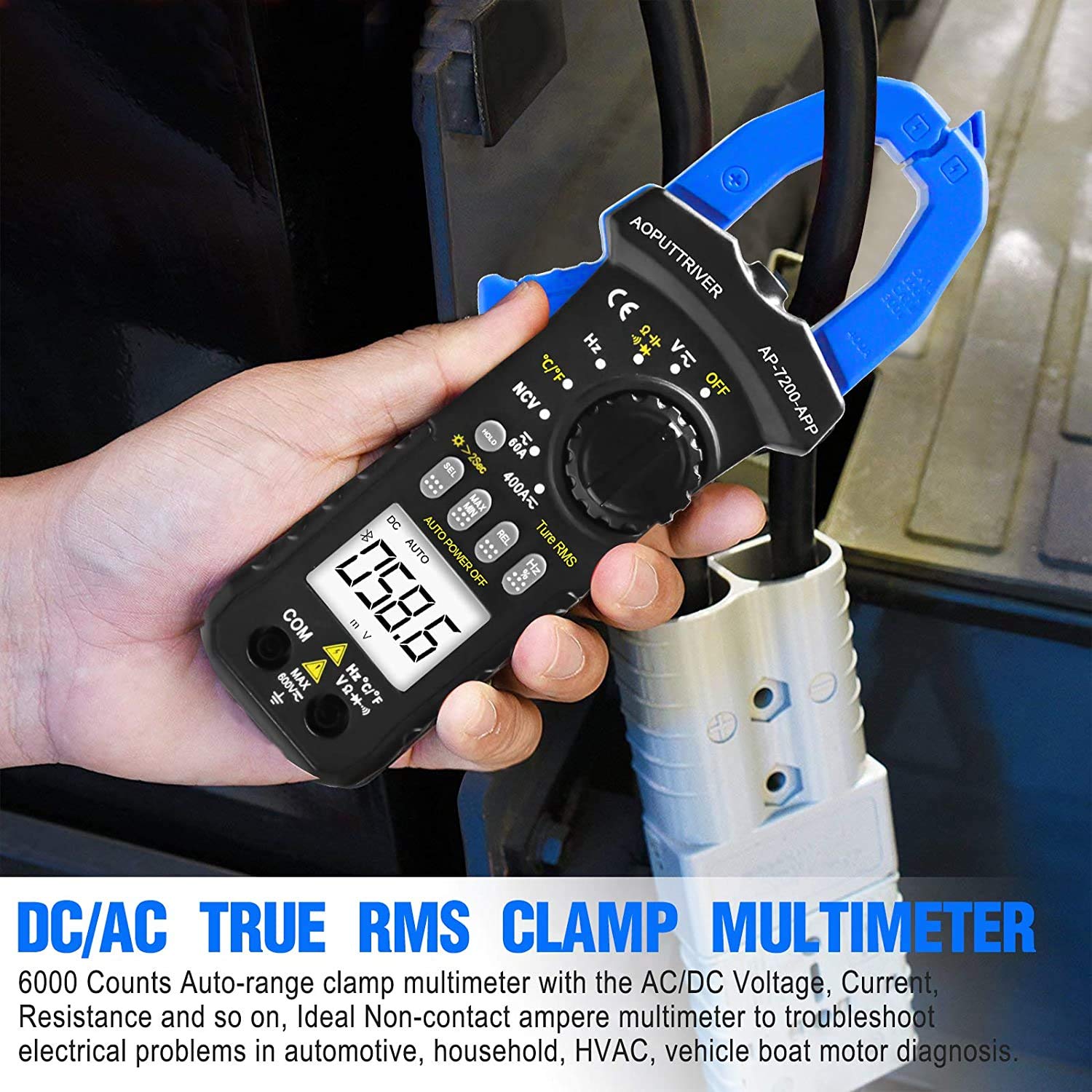
Image: Demonstrating current measurement using the clamp jaws on an electrical cable.
2. AC/DC Voltage Measurement
- Insert the red test lead into the VΩHz°C°F jack and the black test lead into the COM jack.
- Okretni prekidač postavite na V~ (AC Voltage) ili V= (DC Voltage) položaj.
- Spojite mjerne kabele paralelno s krugom ili komponentom koja se testira.
- Pročitajte voltage vrijednost na LCD zaslonu.
3. Resistance, Capacitance, Continuity, Diode Measurement
- Insert the red test lead into the VΩHz°C°F jack and the black test lead into the COM jack.
- Okretni prekidač postavite na Ω pozicija.
- Pritisnite SEL key to cycle through Resistance (Ω), Continuity (buzzer icon), Diode (diode icon), and Capacitance (F) modes.
- Connect the test leads to the component. For resistance and capacitance, ensure the component is de-energized.
- Read the measurement on the LCD. For continuity, a beep indicates a continuous circuit.
4. Non-Contact Voltage (NCV) Detekcija
- Okretni prekidač postavite na NCV pozicija.
- Place the NCV detection area (top of the clamp jaws) near the conductor or outlet to be tested.
- Ako je AC voltage ≥ 90V RMS is detected, the lamp light will illuminate, and an audible alarm will sound.

Image: Demonstrations of temperature measurement, NCV detection, continuity testing, and current measurement.
5. Mjerenje temperature
- Insert the temperature probe into the VΩHz°C°F and COM jacks, observing polarity.
- Okretni prekidač postavite na ° C / ° F pozicija.
- Postavite vrh temperaturne sonde na ili blizu predmeta čija se temperatura mjeri.
- Read the temperature value on the LCD display. Press the SEL key to switch between Celsius (°C) and Fahrenheit (°F).

Image: Temperature measurement using the included probe, with display examples in Celsius and Fahrenheit.
6. Funkcija pozadinskog osvjetljenja
To activate the backlight for improved visibility in dim environments, press and hold the HOLD key for more than 2 seconds. Press and hold again for 2 seconds to turn it off.

Slika: Clamp meter's backlight feature in action, enhancing readability in low-light conditions.
Održavanje
1. Čišćenje
Obrišite c mjeračaasing s oglasomamp cloth and mild detergent. Do not use abrasives or solvents. Ensure the meter is completely dry before storage or use.
2. Zamjena baterije
Kada se na ekranu pojavi indikator slabe baterije, odmah zamijenite baterije kako biste osigurali tačna mjerenja. Za upute pogledajte odjeljak "Instaliranje baterija".
3. Skladištenje
If the meter is not used for an extended period, remove the batteries to prevent leakage. Store the device in a cool, dry place, away from direct sunlight and extreme temperatures.
Rješavanje problema
| Problem | Mogući uzrok | Rješenje |
|---|---|---|
| Mjerač se ne uključuje. | Prazne ili nepravilno instalirane baterije. | Provjerite polaritet baterija; zamijenite baterije. |
| Netačna očitavanja. | Odabrana pogrešna funkcija; loša veza mjernog kabla; vanjske smetnje. | Verify rotary switch setting; ensure secure test lead connection; move away from strong electromagnetic fields. |
| Bluetooth veza nije uspjela. | Meter too far from phone; Bluetooth off on phone; app not installed correctly. | Ensure meter is within 10-15m range; enable Bluetooth on phone; reinstall AiLink app. |
| NCV detection not working. | Not in NCV mode; voltage ispod praga. | Set rotary switch to NCV; ensure voltage is ≥ 90V AC RMS. |
Specifikacije
| Feature | Specifikacija |
|---|---|
| Broj modela | AP-7200APP |
| Display | LCD ekran sa 6000 brojeva |
| AC Voltage domet | 6V ~ 600V |
| DC Voltage domet | 600mV ~ 600V |
| Raspon izmjenične struje | 60A~400A |
| Raspon istosmjerne struje | 60A~400A |
| Opseg otpora | 600Ω ~ 60MΩ |
| Capacitance Range | 6nF ~ 60mF (Inferred from 6000 counts and common multimeter ranges) |
| Temperaturni opseg | -20°C ~ 1000°C |
| NCV Detection Threshold | ≥ 90V AC RMS |
| Sigurnosni standard | IEC 61010-1, CAT III 600V |
| Izvor napajanja | Battery Powered |
| Dimenzije | 207 x 75 x 37 mm |
| Težina artikla | 390 grama |
| Bluetooth domet | 10-15m (cca.) |
Garancija i podrška
AOPUTTRIVER provides a 48-mjesečna garancija na proizvod for the AP-7200APP Clamp Meter. For any product issues or technical assistance, please contact our customer service. We offer Korisnička podrška 7/24 to resolve your concerns promptly.
Contact information can typically be found on the product packaging or the official AOPUTTRIVER website.


