1. Uvod
The Aputure Amaran 200d is a high-output 200W LED video light designed for professional and enthusiast filmmakers and photographers. It offers exceptional color fidelity, versatile control options, and a robust build, making it suitable for various lighting scenarios. This manual provides detailed instructions for the safe and effective use of your Amaran 200d.

Figure 1.1: The Amaran 200d LED Video Light with its standard reflector mounted on a light stand.
2. Sigurnosne informacije
Molimo vas da pročitate i razumjete sva sigurnosna upozorenja i upute prije upotrebe ovog proizvoda. Nepoštivanje ovih uputa može dovesti do strujnog udara, požara ili ozbiljnih ozljeda.
- Do not expose the light to water or high humidity.
- Do not disassemble or modify the light. Refer all servicing to qualified personnel.
- Ensure the power supply is compatible with the local voltage (100-240V).
- Do not block the ventilation openings on the light fixture. Overheating can cause damage.
- Avoid direct eye exposure to the LED light source when it is powered on.
- Always secure the light fixture properly on a stable light stand before operation.
3. Šta se nalazi u kutiji
Provjerite da li su sve komponente prisutne nakon raspakivanja:
- Amaran 200d LED Lamp Glava
- Standard Bowens Mount Reflector
- Jedinica za napajanje naizmeničnom strujom
- Kabel za naizmjeničnu struju

Figure 3.1: Included components of the Amaran 200d package.
4. Podešavanje
4.1 Mounting the Light Head
- Attach the Amaran 200d lamp head to a compatible light stand using the integrated mounting bracket.
- Secure the light head by tightening the locking knob on the mounting bracket.

Figure 4.1: The Amaran 200d securely mounted on a light stand.
4.2 Attaching the Reflector
- Align the three mounting prongs of the standard reflector with the Bowens Mount on the front of the lamp glava.
- Insert the reflector into the mount and twist clockwise until it locks securely into place.
4.3 Priključak za napajanje
The Amaran 200d supports both AC and DC (48V) power input.
- Connect the AC power cable to the power supply unit.
- Connect the power supply unit's output cable to the 48V DC input port on the rear of the Amaran 200d lamp glava.
- Plug the AC power cable into a suitable wall outlet.
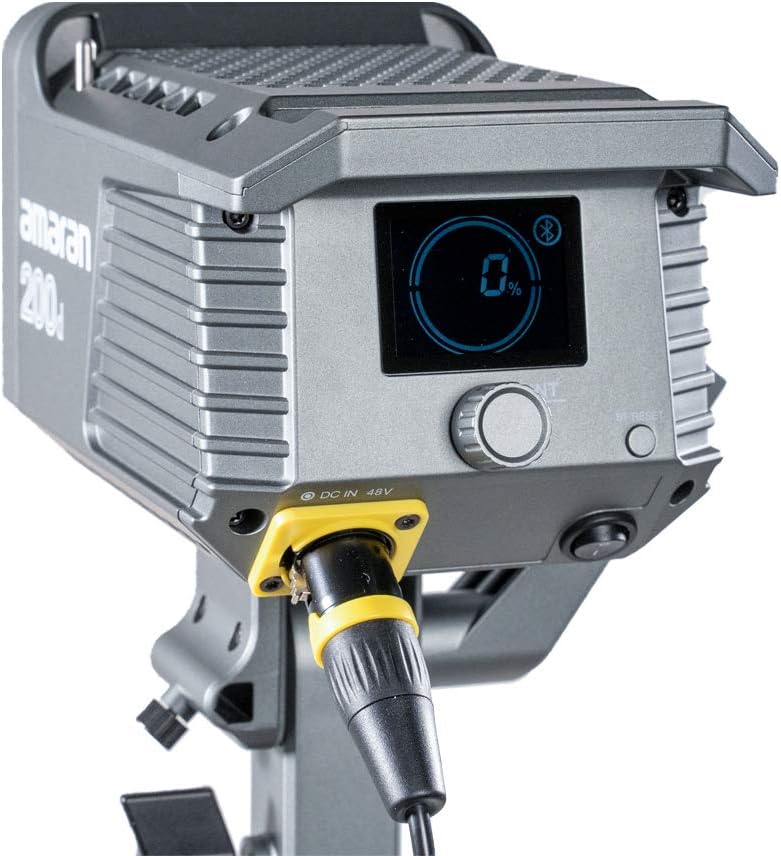
Figure 4.2: Detail of the DC 48V power input on the Amaran 200d.
5. Operativni
5.1 Uključivanje/isključivanje
Locate the power switch on the rear panel of the light head. Flip the switch to the 'ON' position to power on the device. Flip it to 'OFF' to power down.
5.2 Kontrola svjetline
The Amaran 200d features an INT adjustment knob for brightness control (0-100%).
- Rotate the INT knob clockwise to increase brightness.
- Rotate the INT knob counter-clockwise to decrease brightness.
- Press the INT knob to quickly cycle through preset brightness levels: 20%, 40%, 60%, 80%, 100%.
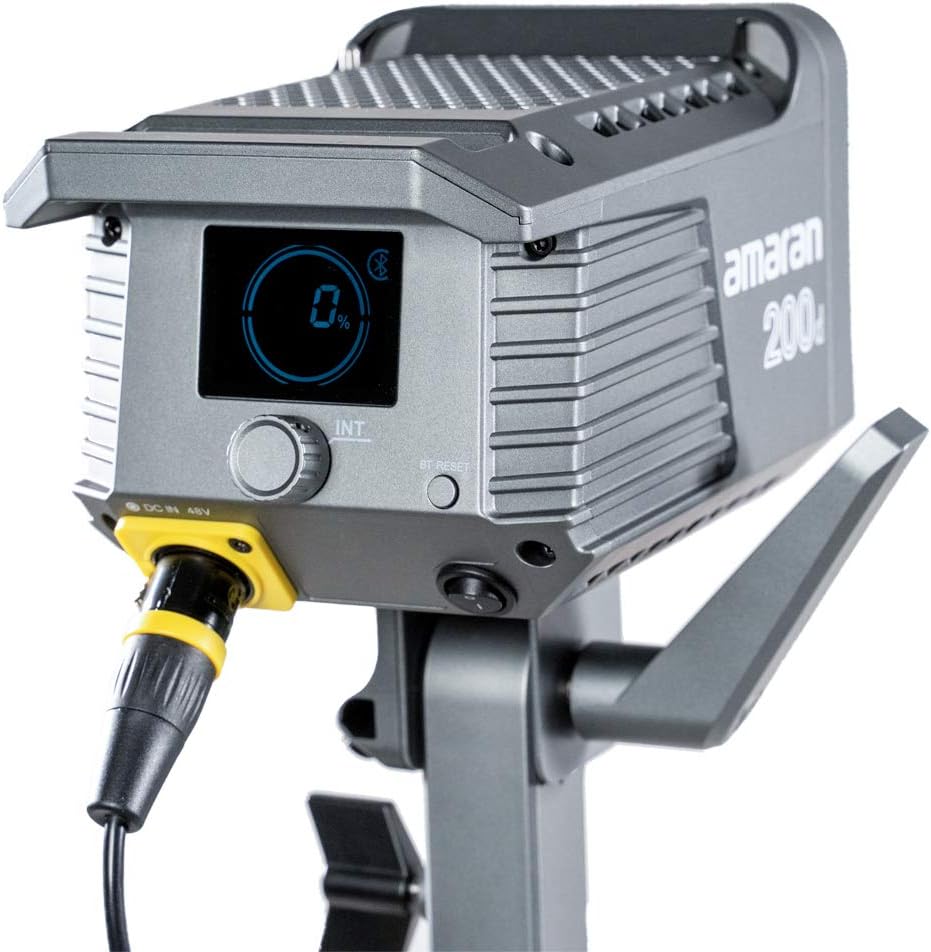
Figure 5.1: The control panel of the Amaran 200d, showing the display and adjustment knob.
5.3 Svetlosni efekti
The Amaran 200d includes 8 pre-programmed lighting effects:
- Paparazzi
- Vatromet
- Munja
- Neispravna žarulja
- TV
- Breath
- Flash
- Eksplozija
These effects can be accessed and controlled via the Sidus Link App.
5.4 Sidus Link App Control
The Amaran 200d supports 2.4G Bluetooth control via the Sidus Link App, allowing remote adjustment of brightness, lighting effects, and frequency.
- Download the Sidus Link App from your device's app store.
- Provjerite je li Bluetooth omogućen na vašem mobilnom uređaju.
- Open the Sidus Link App and follow the on-screen instructions to connect to your Amaran 200d.
- Once connected, you can control various parameters of the light remotely.

Figure 5.2: Controlling the Amaran 200d via the Sidus Link App.
6. Održavanje
6.1 Čišćenje
- Uvijek isključite napajanje prije čišćenja.
- Koristite meku, suhu krpu za brisanje površine svjetla.
- Nemojte koristiti jake hemikalije ili abrazivne materijale.
6.2 Skladištenje
- Čuvajte lampu na hladnom i suhom mjestu, zaštićeno od direktne sunčeve svjetlosti.
- If storing for extended periods, disconnect the power supply.
7. Otkrivanje problema
| Problem | Mogući uzrok | Rješenje |
|---|---|---|
| Svjetlo se ne pali. | No power supply; loose connection; faulty power supply. | Check power cable connection; ensure outlet is working; test with another power supply if available. |
| Svjetlo treperi ili je nestabilno. | Loose power connection; overheating; interference. | Secure all connections; ensure proper ventilation; move away from other electronic devices. |
| Sidus Link App cannot connect. | Bluetooth off; light not in pairing mode; app issue. | Ensure Bluetooth is on; restart light and app; try pairing again. |
8. Specifikacije
- Dimenzije proizvoda: 13 x 11.4 x 21 inča
- Težina artikla: 10.34 funte
- Broj modela: 200D
- Brand: Aputure
- Tehnologija povezivanja: Bluetooth, radio frekvencija
- Opis načina rada blica: Constant illumination, adjustable brightness, 8 built-in lighting effects
- Temperatura boje: 5600K (dnevno svjetlo)
- CRI: ≥95
- TLCI: ≥96
- Osvjetljenje: Up to 65,000 lux@1m (with Hyper-Reflector)
- Montiraj: Universal Bowens Mount
- Ulazna snaga: 48V DC
9. Garancija i podrška
Aputure products are designed for durability and performance. For specific warranty details and terms, please refer to the warranty card included with your product or visit the official Aputure website. For technical support, troubleshooting assistance, or service inquiries, please contact Aputure customer support through their official channels.
Optional protection plans are available for purchase, such as 2-Year and 3-Year Protection Plans, which can provide extended coverage beyond the standard manufacturer's warranty.
Za više informacija posjetite Aputure Store.


