1. Uvod
This manual provides detailed instructions for the installation, configuration, and maintenance of your ASRock B550M Phantom Gaming 4 Micro ATX AMD Motherboard. Please read this manual thoroughly before proceeding with installation to ensure proper setup and optimal performance.
2. Proizvod je gotovview
The ASRock B550M Phantom Gaming 4 is a high-performance Micro ATX motherboard designed for AMD Ryzen processors. It offers robust power delivery, high-speed connectivity, and support for advanced memory and storage technologies.
Ključne karakteristike:
- Supports AMD AM4 Socket Ryzen™ 3000, 3000 G-Series, 4000 G-Series, 5000 and 5000 G-Series Desktop Processors.
- 8 Power Phase Design with Digi Power for stable power delivery.
- Supports DDR4 memory up to 4733+ (OC) MHz.
- Equipped with 1 x PCIe 4.0 x16, 1 x PCIe 3.0 x16, and 1 x PCIe 3.0 x1 slots.
- Supports AMD CrossFireX™ for multi-GPU configurations.
- Graphics Output Options: HDMI, DisplayPort.
- 7.1 CH HD Audio (Realtek ALC887/897 Audio Codec).
- Storage: 4 x SATA3, 1 x Hyper M.2 (PCIe Gen4 x4), 1 x M.2 (PCIe Gen3 x2 & SATA3).
- USB Connectivity: 8 x USB 3.2 Gen1 (4 Front, 4 Rear), 6 x USB 2.0 (4 Front, 2 Rear).

Figure 2.1: ASRock B550M Phantom Gaming 4 Motherboard and retail packaging.
Video 2.1: Proizvod je završenview of the ASRock B550M Phantom Gaming 4 Motherboard.
3. Vodič za instalaciju
3.1. Instalacija CPU-a
- Pronađite AM4 CPU socket na matičnoj ploči.
- Podignite polugu za opterećenje na CPU utičnici.
- Carefully align the triangular marker on your AMD Ryzen CPU with the marker on the socket.
- Pažljivo umetnite procesor u utičnicu bez primjene sile.
- Spustite polugu za opterećenje kako biste osigurali CPU.

Slika 3.1: Od vrha prema dolje view of the motherboard, highlighting the AM4 CPU socket.
3.2. Instalacija memorije (RAM)
- Otvorite kopče na oba kraja DIMM utora.
- Poravnajte zarez na DDR4 memorijskom modulu s ključem u DIMM utoru.
- Čvrsto pritisnite oba kraja memorijskog modula dok se kopče ne uklope na svoje mjesto.
- For dual-channel configuration, refer to the motherboard manual for recommended slot pairing.
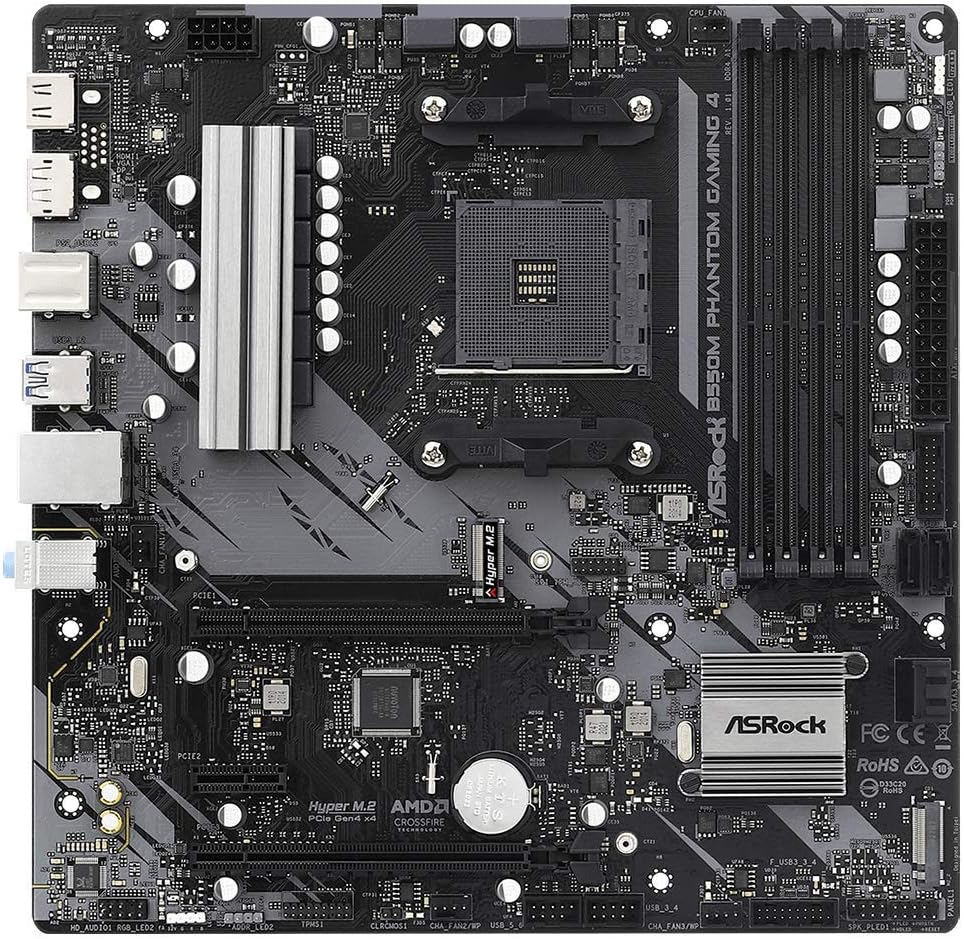
Slika 3.2: Krupni plan view of the DDR4 DIMM slots.
3.3. Instalacija uređaja za pohranu podataka
M.2 SSD instalacija:
- Locate the M.2 slots on the motherboard (Hyper M.2 and M.2).
- Uklonite vijak za odstojnik M.2.
- Umetnite M.2 SSD u utor pod uglom.
- Gently push the SSD down and secure it with the standoff screw.

Figure 3.3: M.2 slots for high-speed storage devices.
Instalacija SATA diska:
- Connect one end of the SATA data cable to a SATA3 port on the motherboard.
- Connect the other end of the SATA data cable to your SATA SSD/HDD.
- Spojite SATA kabel za napajanje iz jedinice za napajanje (PSU) na pogon.
3.4. Instalacija kartice za proširenje (PCIe)
- Locate the PCIe slots. The primary graphics card should be installed in the PCIe 4.0 x16 slot for optimal performance.
- Remove the corresponding slot cover from your PC case.
- Align your expansion card with the PCIe slot and press down firmly until it is seated correctly.
- Pričvrstite karticu vijkom na kućište računara.
3.5. Povezivanje perifernih uređaja
- Connect your monitor(s) to the graphics card or the motherboard's HDMI/DisplayPort if using an APU.
- Connect USB devices (keyboard, mouse, etc.) to the USB 3.2 Gen1 or USB 2.0 ports on the rear I/O panel.
- Connect your Ethernet cable to the LAN port for network access.
- Connect audio devices (speakers, headphones) to the appropriate audio jacks.
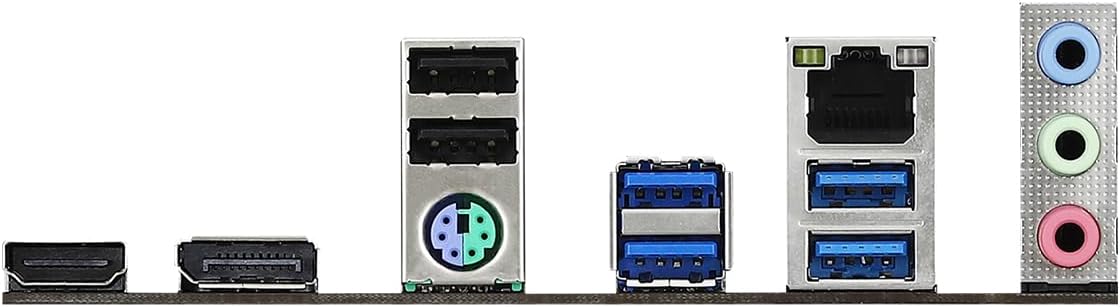
Figure 3.4: Rear I/O panel with various connectivity options.
4. Uputstvo za upotrebu
4.1. Podešavanje BIOS-a/UEFI-ja
To enter the BIOS/UEFI setup utility, power on your system and repeatedly press the Del or F2 key during the Power-On Self-Test (POST) screen. From here, you can configure various system settings, including boot order, CPU/memory frequencies, and fan controls.
4.2. Drivers and Software
After installing your operating system, it is crucial to install the latest drivers for your motherboard components. These can typically be found on the ASRock official website under the support section for your specific motherboard model. Essential drivers include chipset drivers, audio drivers, LAN drivers, and any utility software provided by ASRock.
5. Održavanje
Regular maintenance helps ensure the longevity and stable operation of your motherboard and PC system.
- Uklanjanje prašine: Periodically clean dust from the motherboard and other components using compressed air. Ensure the system is powered off and unplugged before cleaning.
- Ažuriranja BIOS-a: Provjerite ASRock website for BIOS/UEFI updates. Updates can improve compatibility, stability, and performance. Follow the provided instructions carefully when updating the BIOS.
- Ažuriranja drajvera: Keep your drivers updated to the latest versions to ensure compatibility and optimal performance with your operating system and applications.
6. Otkrivanje problema
If you encounter issues with your motherboard, consider the following basic troubleshooting steps:
- Nema napajanja: Ensure all power cables (24-pin ATX, 8-pin CPU) are securely connected to the motherboard and the power supply unit is switched on.
- Bez prikaza: Verify that your monitor is connected to the correct video output (graphics card or motherboard) and that all power cables to the graphics card are connected. Reseat the graphics card and RAM modules.
- Nestabilnost/Padovi sistema: Check for proper CPU and GPU cooling. Ensure RAM modules are correctly seated. Update drivers and BIOS.
- Komponenta nije otkrivena: Verify that the component (e.g., M.2 SSD, SATA drive, PCIe card) is correctly installed and all necessary cables are connected. Check BIOS settings to ensure the component is enabled.
- Obriši CMOS: If your system fails to boot after making BIOS changes, try clearing the CMOS. Refer to the motherboard layout diagram for the CLRCMOS jumper location or remove the CMOS battery for a few minutes.
7. Specifikacije
| Feature | Specifikacija |
|---|---|
| Brand | ASRock |
| Naziv modela | B550M PHANTOM GAMING 4 |
| CPU Socket | Socket AM4 |
| Kompatibilni procesori | AMD Ryzen 3000, 3000 G-Series, 4000 G-Series, 5000, 5000 G-Series Desktop Processors |
| Tip čipseta | AMD B550 |
| Tehnologija RAM memorije | DDR4 |
| Maksimalni kapacitet RAM-a | 128 GB |
| Brzina memorije (OC) | Do 4733+ MHz |
| PCIe Slots | 1 x PCIe 4.0 x16, 1 x PCIe 3.0 x16, 1 x PCIe 3.0 x1 |
| Interfejsi za pohranu | 4 x SATA3 6Gb/s, 1 x Hyper M.2 (PCIe Gen4 x4), 1 x M.2 (PCIe Gen3 x2 & SATA3) |
| USB 3.2 Gen1 portovi | 8 (4 Front, 4 Rear) |
| USB 2.0 portovi | 6 (4 Front, 2 Rear) |
| Grafički izlaz | HDMI, DisplayPort |
| Audio Codec | Realtek ALC887/897 Audio Codec (7.1 CH HD Audio) |
| Form Factor | Micro ATX |
| Dimenzije (DxŠxV) | 1.1 x 9.7 x 6.5 inča |
| Težina artikla | 2.2 funte |
8. Garancija i podrška
ASRock provides a limited warranty for its motherboards. For specific warranty terms, conditions, and duration, please refer to the warranty card included with your product or visit the official ASRock webstranica. Za tehničku podršku, preuzimanje upravljačkih programa i ažuriranja BIOS-a, posjetite ASRock stranicu za podršku:


