1. Uvod
This manual provides comprehensive instructions for the safe and efficient use of your Sonim XP3 XP3800 flip phone. Designed for durability and reliable communication, the XP3 XP3800 is a rugged 4G LTE device built to withstand challenging environments.
1.1. Sadržaj paketa
Molimo Vas da provjerite da li se u paketu Vašeg proizvoda nalaze svi artikli:
- Sonim XP3 XP3800 Flip Phone
- Punjiva litijum-jonska baterija
- Kabl za punjenje (USB-C)
- Zidni adapter
- Vodič za brzi početak

Slika 1.1: Prednja strana view of the Sonim XP3 XP3800 flip phone in its closed state, displaying the external screen with current time and network status.
2. Getting Started
2.1. Početno podešavanje
Before using your Sonim XP3 XP3800, ensure the battery is charged and the SIM card is properly installed. The phone is designed for use with Verizon's 4G LTE network.
2.2. Instalacija baterije i SIM kartice
- Uklonite poklopac baterije: Locate the latch or screws on the back of the phone and carefully open the battery cover.
- Umetnite SIM karticu: Locate the SIM card slot. Align your Verizon Nano-SIM card with the slot's orientation and gently push it in until it clicks into place. The Sonim XP3 XP3800 supports a single SIM card.
- Umetnite bateriju: Align the battery contacts with the phone's terminals and place the battery into its compartment.
- Zamijenite poklopac baterije: Securely close the battery cover, ensuring it is latched or screwed tightly to maintain the phone's rugged integrity.
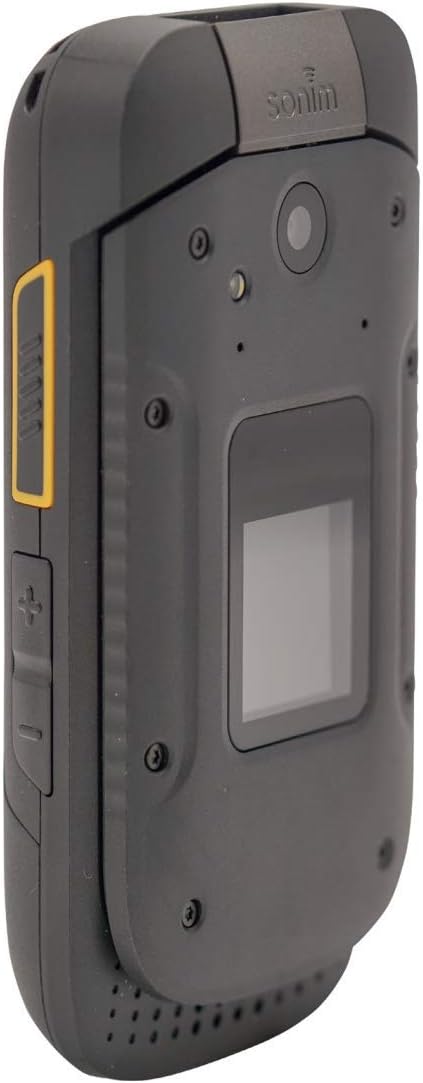
Slika 2.1: Razno views of the Sonim XP3 XP3800, illustrating its design and the location of the battery cover on the rear.
2.3. Uključivanje i isključivanje
- Za uključivanje: Press and hold the Power/End Call button (usually red) until the Sonim logo appears on the screen.
- Za isključivanje: Press and hold the Power/End Call button. Select "Power Off" from the options that appear on the screen.
3. Osnovne operacije
3.1. Upućivanje i primanje poziva
- Pozivanje:
- Open the flip phone.
- Unesite broj telefona pomoću tastature.
- Pritisnite zeleno dugme za poziv da biste započeli poziv.
- Primanje poziva:
- Kada telefon zazvoni, otvorite poklopac ili pritisnite zeleno dugme za poziv da biste odgovorili na poziv.
- Da biste završili poziv, pritisnite crveno dugme za prekid poziva.
3.2. Slanje poruka
- Idite na meni "Poruke" sa glavnog ekrana.
- Odaberite "Nova poruka" ili "Kreiraj poruku".
- Unesite broj telefona primaoca ili odaberite iz kontakata.
- Unesite svoju poruku pomoću tastature.
- Pritisnite "Pošalji".
3.3. Korištenje kamere
The Sonim XP3 XP3800 is equipped with a camera for capturing photos and videos.
- From the main menu, select "Camera".
- Kadrirajte snimak pomoću ekrana.
- Press the designated camera button or the center navigation key to take a picture.
Slika 3.1: Bočna strana view of the Sonim XP3 XP3800, highlighting the camera lens and the external display.
3.4. Phone Navigation
Navigate through menus and options using the directional keypad and the center selection button.
- Tipke za smjer: Use the Up, Down, Left, and Right keys to move through menu items.
- Centralni ključ: Press the center key to select an item or confirm an action.
- Mekani tasteri: The keys directly below the screen (left and right) perform functions indicated by the text above them, which change depending on the current screen.
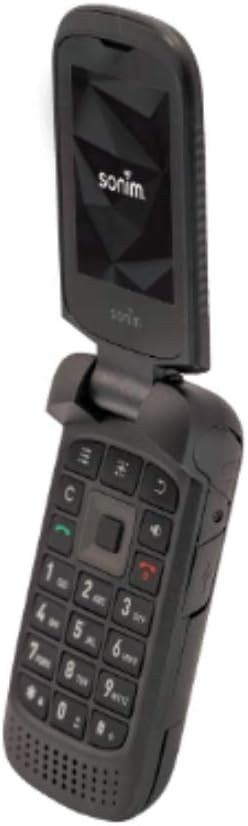
- Tasteri za jačinu zvuka: Located on the side of the phone, these adjust call volume and media playback volume.

Slika 3.2: Otvori view of the Sonim XP3 XP3800, displaying the internal screen and the full alphanumeric keypad for navigation and input.
4. Ključne karakteristike
The Sonim XP3 XP3800 is engineered with specific features to meet the demands of challenging environments:
- Military Standard Durability: Built to military specifications, making it highly resistant to drops, dust, and water.
- Robustan dizajn: Ideal for construction workers and individuals in demanding professions, offering enhanced protection against impacts.
- 4G LTE povezivost: Ensures fast and reliable communication on the Verizon network.
- Dugotrajna baterija: Designed for extended use, reducing the need for frequent recharging.
- Fizička tastatura: Large, tactile buttons for easy operation even with gloves.
5. Održavanje
Proper maintenance ensures the longevity and optimal performance of your Sonim XP3 XP3800.
- čišćenje: Koristite meku, damp cloth to wipe the phone's exterior. Avoid harsh chemicals or abrasive materials. Ensure all ports are closed before cleaning with moisture.
- Skladištenje: Telefon čuvajte na hladnom i suhom mjestu, dalje od direktne sunčeve svjetlosti i ekstremnih temperatura.
- Održavanje baterije: Avoid fully discharging the battery frequently. For long-term storage, charge the battery to about 50% and remove it from the device if possible.
- Zaštita luke: Keep the USB-C charging port and headphone jack covers securely closed when not in use to prevent dust and water ingress.
6. Otkrivanje problema
This section addresses common issues you might encounter with your Sonim XP3 XP3800.
| Problem | Mogući uzrok | Rješenje |
|---|---|---|
| Telefon se ne uključuje. | Low or no battery charge; battery not properly installed. | Punite bateriju najmanje 30 minuta. Provjerite da li je baterija pravilno postavljena. |
| Ne mogu upućivati ili primati pozive. | No network signal; SIM card not installed or faulty; account issues. | Check signal strength. Reinstall SIM card. Contact Verizon customer service. |
| Kamera ne radi. | Softverski kvar; fizičko oštećenje. | Restart the phone. If the issue persists, contact Sonim support. |
| Loš kvalitet zvuka tokom poziva. | Weak signal; speaker/microphone obstruction. | Move to an area with better signal. Clean speaker/microphone openings. |
7. Specifikacije
Detailed technical specifications for the Sonim XP3 XP3800:
| Feature | Detalj |
|---|---|
| Broj modela | XP3 XP3800 |
| Dimenzije | 2.3 x 1.1 x 4.4 inča |
| Težina artikla | 6.9 unci (6.88 unci) |
| Baterija | 1 litijum-jonska baterija (uključena) |
| Operativni sistem | Android |
| CPU model | Snapdragon |
| Rezolucija | 320 x 240 |
| Wireless Carrier | Verizon |
| Cellular Technology | 4G |
| Boja | Crna |
| Bežična mrežna tehnologija | LTE |
| Broj utora za SIM kartice | Single SIM |
| Proizvođač | Sonim |
| Datum prve dostupnosti | 15. novembra 2019 |
8. Podrška i garancija
For technical assistance, product support, or warranty inquiries, please contact Sonim customer service. Refer to the official Sonim website or the quick start guide included in your package for the most current contact information and warranty details.
Važno pravno odricanje odgovornosti: Use your phone safely and conform to any legal requirements regarding the use of cellular phones.