1. Uvod
This manual provides detailed instructions for the installation, operation, and maintenance of the SINOTIMER TM919A-2 LCD Digital Programmable Timer Switch. This device is designed for automatic control of electrical appliances based on programmed time schedules, offering daily and weekly programming options.
2. Značajke proizvoda
- Weekly 7-day programmable digital time switch.
- Multiple voltage options (5V, 12V, 24V, 110V, 220V, 85-265V). This specific model is 220V.
- Detachable battery design for backup power.
- 35mm DIN rail mounting for easy installation.
- LCD display for clear time and program viewing.
- 16 ON/OFF programs per day or week.
- Funkcija ručnog premošćivanja.
- High capacity 16A switching contact.
3. Sigurnosne informacije
WARNING: Risk of electric shock. Installation should only be performed by a qualified electrician or competent person.
- Uvjerite se da je napajanje isključeno prije instalacije ili održavanja.
- Ne prekoračujte maksimalnu nosivost od 16A.
- Potvrdite tačan voltage supply for the specific model (220V for TM919A-2).
- Držite uređaj dalje od vlage i ekstremnih temperatura.
4. Proizvod je gotovview i komponente
The SINOTIMER TM919A-2 features an LCD display, control buttons, and wiring terminals for power input and load control.

Slika 4.1: Front view of the SINOTIMER TM919A-2 Digital Timer Switch, showing the LCD display, control buttons (P, D+, H+, M+, RESET, MANUAL), and wiring terminals.

Slika 4.2: The timer switch with its transparent protective cover opened, revealing the control buttons for programming and manual operation.
Kontrolna dugmad:
- P (Program): Ulazi u način podešavanja programa.
- D+ (Dan): Adjusts day of the week or program day.
- H+ (Sat): Adjusts hour or program hour.
- M+ (Minuta): Adjusts minute or program minute.
- RESETOVATI: Vraća sve postavke na tvorničke postavke.
- PRIRUČNIK: Toggles output ON/AUTO/OFF.
5. Postavljanje i instalacija
5.1 Dijagram ožičenja
Refer to the wiring diagram on the side of the device and the illustration below for correct connection. Ensure all connections are secure.

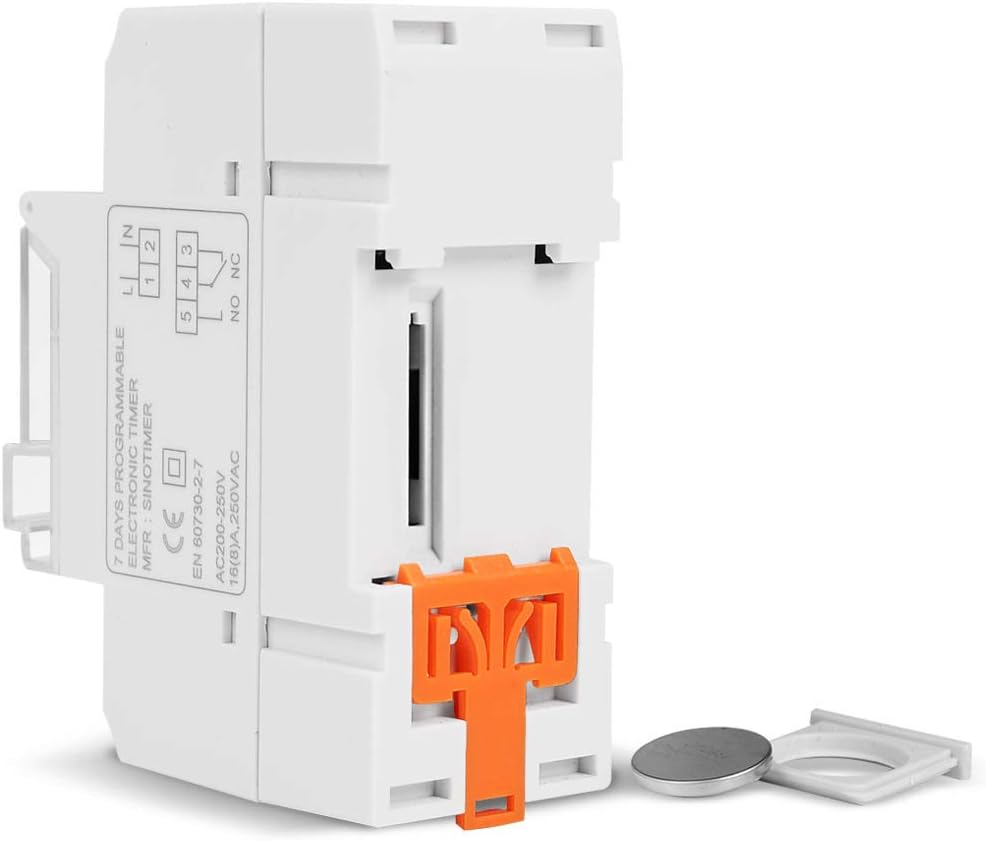
Slika 5.1: Side view of the timer switch displaying the wiring diagram. Terminals 1 and 2 are for power input (L and N). Terminals 3, 4, and 5 are for the relay output (Common, Normally Open, Normally Closed).
- Terminals 1 & 2 (L, N): Connect to the main power supply (220V AC for this model).
- Terminal 3 (NO - Normally Open): Connects to the load when the timer is ON.
- Terminal 4 (COM - Common): Connects to one side of the load and the power supply.
- Terminal 5 (NC - Normally Closed): Connects to the load when the timer is OFF (less common for typical applications).
5.2 Initial Power-up and Reset
Upon first power-up or after a long period without power, the LCD display may be blank. The internal battery provides backup for settings. If the display is unresponsive or shows garbled characters, press the RESET button using a pointed object (e.g., a pen tip). This will clear all settings and restore the timer to its default state.
5.3 Podešavanje trenutnog vremena i dana
- Pritisnite P button once. The display will show the current time setting.
- Pritisnite D+ da postavite trenutni dan u sedmici.
- Pritisnite H+ da podesite trenutni sat.
- Pritisnite M+ za postavljanje trenutne minute.
- Pritisnite P button again to exit time setting mode and return to normal operation.
6. Uputstvo za upotrebu
6.1 Programiranje ciklusa UKLJUČENO/ISKLJUČENO
Tajmer podržava do 16 programa UKLJUČENO/ISKLJUČENO. Svaki program se sastoji od vremena UKLJUČENO i vremena ISKLJUČENO.
- Pritisnite P button repeatedly until "1 ON" appears on the display. This is the first ON program.
- Pritisnite D+ da odaberete dan(e) za ovaj program. Opcije uključuju pojedinačne dane, dane u sedmici, vikende ili svih 7 dana.
- Pritisnite H+ to set the desired hour for the "ON" event.
- Pritisnite M+ to set the desired minute for the "ON" event.
- Pritisnite P again. "1 OFF" will appear. This is the first OFF program.
- Repeat steps 2-4 to set the day(s), hour, and minute for the "OFF" event.
- Nastavite pritiskati P to cycle through "2 ON", "2 OFF", up to "16 ON", "16 OFF". If you do not need all 16 programs, simply press P until the display returns to the current time.
- To save and exit programming mode, press the P button until the current time is displayed.
6.2 Ručno prebacivanje
The MANUAL Dugme vam omogućava da privremeno ili trajno poništite programirane postavke.
- Pritisnite MANUAL once: Toggles between ON/AUTO/OFF modes.
- ON: Izlaz je stalno UKLJUČEN, ignorišući programe.
- ISKLJUČENO: Izlaz je kontinuirano ISKLJUČEN, ignorišući programe.
- AUTOMATSKI: Tajmer radi u skladu s programiranim ciklusima UKLJUČIVANJA/ISKLJUČIVANJA. Ovo je standardni način rada.
7. Održavanje
7.1 Zamjena baterije
The timer includes a detachable CR2032 lithium battery to maintain time and program settings during power outages. If the display becomes dim or resets frequently, the battery may need replacement.

Slika 7.1: The timer switch shown with its battery compartment open and a CR2032 lithium battery, indicating the detachable battery design.
- Disconnect power to the timer before attempting battery replacement.
- Locate the battery compartment, typically on the side or back of the unit.
- Pažljivo uklonite staru CR2032 bateriju.
- Umetnite novu CR2032 bateriju, pazeći na ispravan polaritet (+ strana prema gore).
- Zatvorite odeljak za baterije.
- Reconnect power and reset the current time and day if necessary.
8. Otkrivanje problema
- Ekran je prazan:
- Check power supply connections (Terminals 1 & 2).
- Ensure the internal battery is charged or replaced if old.
- Pritisnite RESET dugme.
- Programi ne rade:
- Provjerite je li tajmer uključen AUTO mode (check the display for "AUTO"). Press MANUAL na ciklusne režime.
- Provjerite da li su trenutno vrijeme i dan ispravno postavljeni.
- Check that the ON/OFF programs are correctly entered and enabled for the desired days.
- Confirm wiring to the load (Terminals 3, 4, 5) is correct.
- Timer resets unexpectedly:
- The internal battery may be low or depleted. Replace the CR2032 battery.
- Ensure stable power supply to the unit.
9. Specifikacije
| Feature | Specifikacija |
|---|---|
| Model | TM919A-2 |
| Napajanje | 220V AC (as per model) |
| Potrošnja energije | 4.5 VA (MAX) |
| Temperaturni opseg | -20°C do +50°C |
| Display | LCD |
| Preklopni kontakt | 1 prekidač za prebacivanje |
| Programi | 16 UKLJUČENO/ISKLJUČENO dnevno ili sedmično |
| Histereza | 2 sekunde/dan (na 25°C) |
| Kapacitet | 16A |
| Tajmer Range | 1 minuta do 168 sati |
| Minimalni interval | 1 minuta |
| Zamračenje memorije | 60 days (with internal battery) |
| Težina artikla | 0.15 kg (5.3 unce) |
| Montaža | 35 mm DIN šina |
| Veličina ekrana | 1.2 inča |
Slika 9.1: Dimensional drawing of the SINOTIMER TM919A-2, showing measurements in centimeters for height, width, and depth.
10. Garancija i podrška
Specific warranty information for the SINOTIMER TM919A-2 is not provided in the product details. For warranty claims or technical support, please contact your retailer or the manufacturer directly. Keep your purchase receipt as proof of purchase.


