1. Uvod
The i-tec USB-C Quattro Docking Station is designed to expand the connectivity of your USB-C enabled laptop or tablet, allowing for connection of up to four external displays, multiple USB peripherals, Gigabit Ethernet, and audio devices. It also provides up to 85W Power Delivery to charge your host device. This manual provides detailed instructions for setting up, operating, and maintaining your docking station.
2. Sadržaj paketa
Molimo Vas da provjerite da li se u Vašem paketu nalaze sve dolje navedene stavke:
- i-tec USB-C Quattro Docking Station
- Adapter za napajanje
- Power Cable
- USB-C na USB-C kabl
- Vodič za brzi početak

Slika 2.1: Package Contents. The image displays the docking station, its power adapter, a power cable, and a quick setup guide.
3. Proizvod je gotovview
Familiarize yourself with the ports and indicators on your i-tec USB-C Quattro Docking Station.
3.1 Prednja ploča

Slika 3.1: Front Panel. This image shows the front of the docking station with a power button, microphone input jack, headphone output jack, one USB-C data port, and one USB 3.0 port.
- Dugme za napajanje: To power on/off the docking station.
- Priključak za mikrofon (3.5 mm): Povežite mikrofon.
- Priključak za slušalice (3.5 mm): Povežite slušalice ili zvučnike.
- USB-C port za podatke: Za povezivanje USB-C perifernih uređaja.
- USB 3.0 port: For connecting USB 3.0/2.0 peripherals.
3.2 Zadnja ploča

Slika 3.2: Rear Panel. This image displays the rear of the docking station, featuring the DC 20V power input, USB-C PD host connection, two DisplayPort outputs, two HDMI outputs, a Gigabit Ethernet (LAN) port, and four additional USB 3.0 ports.
- DC 20V Ulaz napajanja: Povežite isporučeni adapter za napajanje.
- USB-C PD Host Port: Connect to your laptop/tablet for data, video, and power delivery.
- 2x DisplayPort: Connect external monitors via DisplayPort cables.
- 2x HDMI: Connect external monitors via HDMI cables.
- GLAN (RJ-45) Port: Povežite se na žičanu mrežu.
- 4x USB 3.0 porta: Connect USB 3.0/2.0 peripherals.
4. Upute za postavljanje
Follow these steps to set up your i-tec USB-C Quattro Docking Station:
- Priključite napajanje: Connect the power adapter to the DC 20V input on the rear of the docking station, then plug the power cable into a wall outlet.
- Poveži se s host uređajem: Use the provided USB-C to USB-C cable to connect the docking station's USB-C PD Host Port to your laptop's USB-C port. Ensure your laptop's USB-C port supports DisplayPort Alternate Mode and Power Delivery for full functionality.
- Povežite eksterne ekrane: Connect your monitors to the DisplayPort and/or HDMI ports on the rear of the docking station. You can connect up to four displays simultaneously.
- Povežite periferne uređaje: Plug your USB devices (keyboard, mouse, external drives) into the available USB 3.0 or USB-C data ports. Connect an Ethernet cable to the GLAN port for wired network access. Connect headphones/speakers and a microphone to the respective audio jacks on the front panel.
- Uključeno: Press the power button on the front of the docking station. Your operating system should automatically detect the connected devices.
- Instalacija drajvera (ako je potrebno): For optimal performance or specific features, visit www.i-tec.cz/setup to download and install any required drivers for your operating system.
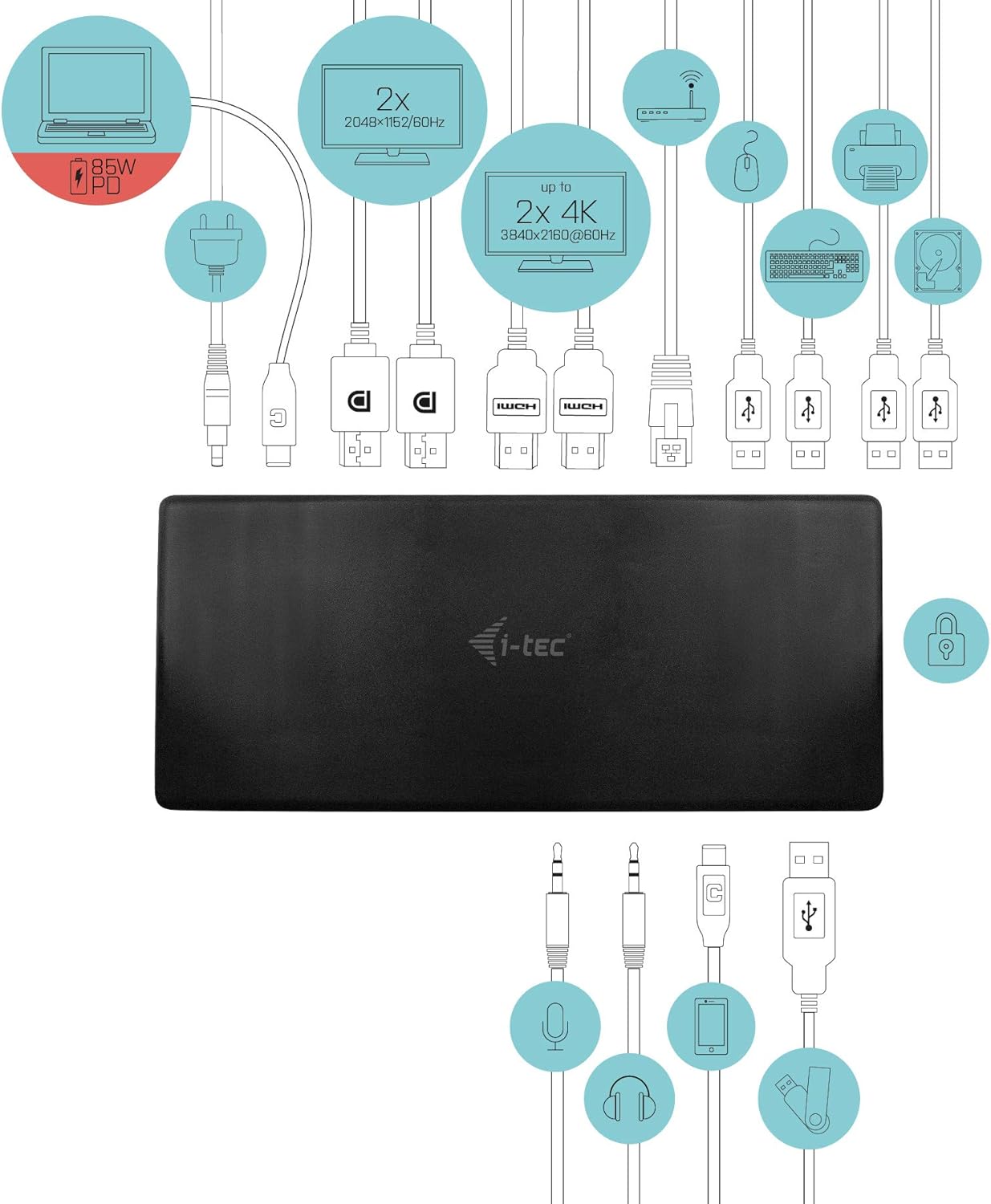
Slika 4.1: Connection Diagram. This diagram shows the various connections to the docking station, including power, host laptop, multiple monitors (DisplayPort and HDMI), Ethernet, and USB peripherals like a mouse, keyboard, and external storage.
5. Uputstvo za upotrebu
Once set up, your docking station provides enhanced functionality for your workspace.
5.1 Konfiguracija više ekrana
The docking station supports up to four external displays. You can configure these displays in various modes (extended, mirrored) through your operating system's display settings.
- Rezolucije: Supports up to 2x 2048x1152@60Hz and 2x 4K/60Hz, depending on your host device's capabilities and display connections.
- Windows: Right-click on the desktop, select 'Display settings' to arrange and configure your monitors.
- macOS: Go to 'System Preferences' > 'Displays' to adjust settings.

Slika 5.1: Four-Display Setup Example. This image illustrates a workstation with a laptop connected to the docking station, driving four external monitors simultaneously, showcasing a multi-tasking environment.
5.2 Isporuka energije
The USB-C PD Host Port provides up to 85W of power to charge your connected laptop or tablet, eliminating the need for a separate power adapter for your host device.
5.3 USB povezivanje
Utilize the 5x USB 3.0 ports and 1x USB-C data port for connecting various peripherals such as external hard drives, USB flash drives, keyboards, mice, and printers. USB 3.0 ports offer high-speed data transfer.
5.4 Gigabit Ethernet
The GLAN RJ-45 port provides a stable and high-speed wired internet connection (10/100/1000 Mbps), which is often more reliable than Wi-Fi.
5.5 Funkcionalnost zvuka
Connect your headphones, speakers, or microphone to the 3.5mm audio jacks on the front panel for integrated audio input and output.

Slika 5.2: Productivity Setup. This image shows a professional desk environment where the docking station facilitates a multi-monitor setup for enhanced productivity, displaying various applications and data across four screens.
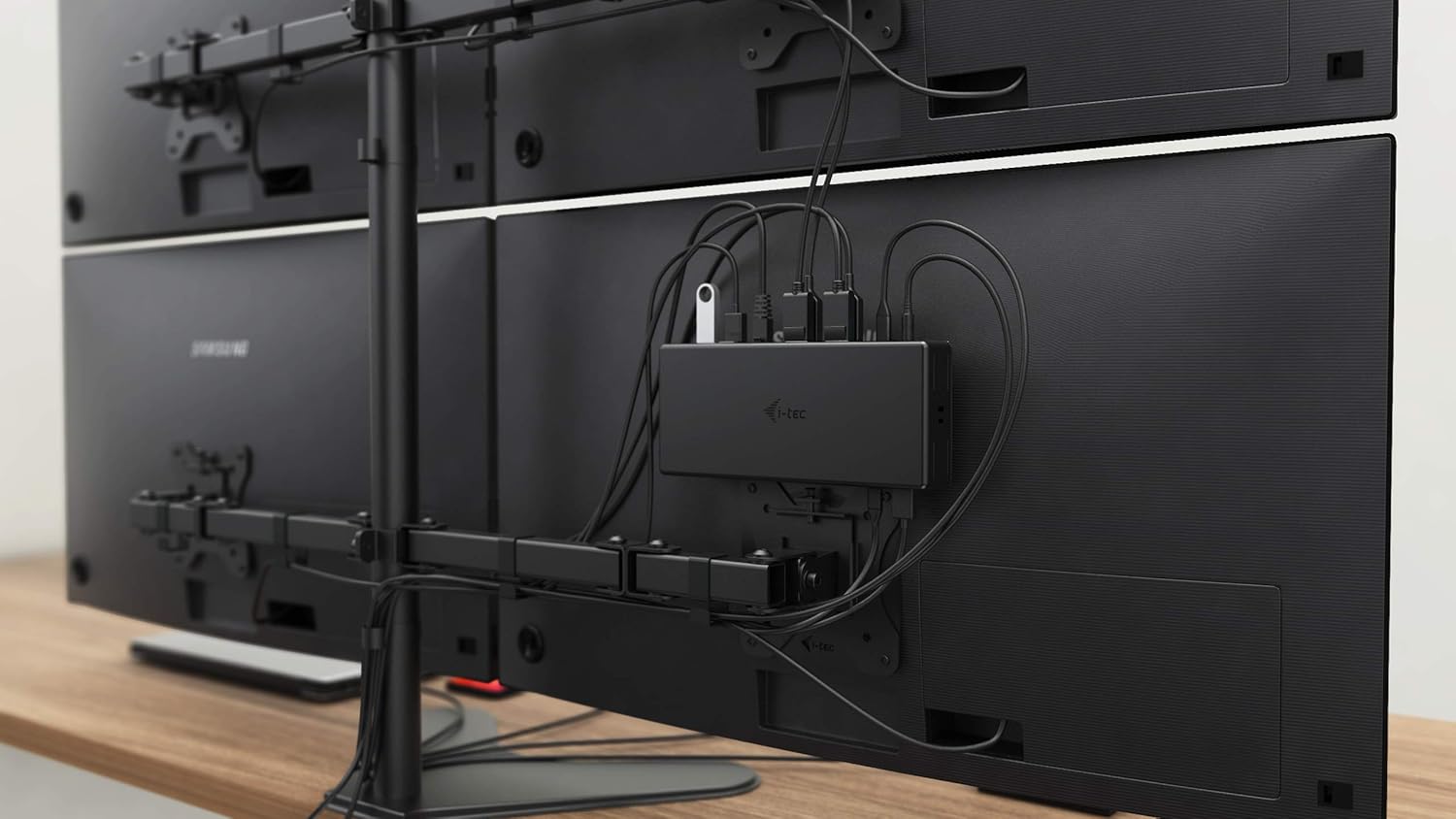
Slika 5.3: VESA Mounting. The docking station is shown mounted vertically on the back of a VESA-compatible monitor, demonstrating its space-saving installation capability and organized cable routing.

Slika 5.4: Connected Workstation. This image provides a close-up of the docking station on a desk, connected to a laptop via USB-C, and featuring various peripherals plugged into its front ports, including a USB drive and audio devices.
6. Održavanje
Da biste osigurali dugotrajnost i optimalne performanse vaše priključne stanice, slijedite ove smjernice za održavanje:
- čišćenje: Use a soft, dry cloth to clean the exterior of the docking station. Do not use liquid cleaners or aerosols.
- ventilacija: Osigurajte da je priključna stanica postavljena u dobro prozračenom prostoru kako biste spriječili pregrijavanje. Ne blokirajte ventilacijske otvore.
- Rukovanje: Avoid dropping or subjecting the docking station to strong impacts.
- Okruženje: Držite uređaj dalje od ekstremnih temperatura, vlage i direktne sunčeve svjetlosti.
- Upravljanje kablovima: Ensure cables are not excessively bent or strained to prevent damage to ports and cables.
7. Otkrivanje problema
Ako naiđete na probleme sa svojom priključnom stanicom, pogledajte sljedeće uobičajene probleme i rješenja:
7.1 Nema izlaza za prikaz
- Provjerite veze: Ensure all display cables (HDMI/DisplayPort) are securely connected to both the docking station and the monitors.
- Veza s hostom: Verify the USB-C cable from the docking station is firmly connected to your laptop's USB-C port.
- Snaga: Confirm the docking station is powered on and receiving power from the adapter.
- Kompatibilnost sa laptopom: Provjerite da li USB-C port vašeg laptopa podržava DisplayPort Alternate Mode.
- Vozači: Install the latest drivers from www.i-tec.cz/setup.
- Postavke ekrana: Adjust your operating system's display settings to detect and extend/mirror displays.
7.2 USB Devices Not Working
- Ponovo poveži: Disconnect and reconnect the USB device to a different port on the docking station.
- Snaga: Provjerite je li priključna stanica uključena.
- Veza s hostom: Verify the USB-C connection to your laptop.
- Potrošnja energije: If connecting high-power USB devices, ensure the docking station's power adapter is correctly connected and providing sufficient power.
7.3 No Network Connection (GLAN)
- Provjera kablova: Provjerite je li Ethernet kabel sigurno spojen i na priključnu stanicu i na vaš ruter/modem.
- Ruter/Modem: Provjerite da li vaš ruter/modem ispravno radi.
- Vozači: Ensure the latest network drivers are installed for the docking station.
7.4 Laptop Not Charging (Power Delivery)
- adapter za napajanje: Confirm the docking station's power adapter is correctly connected and functioning.
- USB-C kabl: Ensure the USB-C cable connecting the dock to your laptop supports Power Delivery.
- Kompatibilnost sa laptopom: Verify your laptop's USB-C port supports Power Delivery input.
8. Specifikacije
| Feature | Detalj |
|---|---|
| Broj modela | C31QUATTRODOCKPDUK |
| Brand | i-tec |
| Dimenzije proizvoda | 10 x 2 x 2.7 inča (25.4 x 5.08 x 6.86 cm) |
| Težina artikla | 10.2 unci (0.29 kg) |
| Hardversko sučelje | DisplayPort, Ethernet, HDMI, USB, USB 3.0, USB Type C |
| Kompatibilni uređaji | Laptop, Monitor, Tablet with USB-C (DisplayPort Alt Mode & Power Delivery support recommended) |
| Ukupni USB portovi | 6 (5x USB 3.0, 1x USB-C Data) |
| Ukupni HDMI portovi | 2 |
| Total DisplayPort | 2 |
| Ethernet | Gigabit Ethernet (RJ-45) |
| Audio priključci | 1x Microphone (3.5mm), 1x Headphone (3.5mm) |
| Power Delivery | Up to 85W to host device |
| Boja | Crna |
| Operativni sistemi | Windows 10, macOS, Android, Linux |
9. Informacije o garanciji
The i-tec USB-C Quattro Docking Station is covered by a manufacturer's warranty. Please refer to the warranty card included in your package or visit the official i-tec webZa detaljne uslove garancije posjetite stranicu. Sačuvajte dokaz o kupovini za slučaj reklamacije.
10. Korisnička podrška
For further assistance, technical support, or to download the latest drivers and firmware, please visit the official i-tec support webstranica:
You may also find helpful resources and FAQs on the product's dedicated setup page: www.i-tec.cz/setup


