1. Uvod
Thank you for choosing the Sinopé TH1310WF Smart Wi-Fi Thermostat. This device is designed to provide precise and efficient control over your in-floor heating system, enhancing comfort and energy savings. It integrates seamlessly with various smart home platforms, offering convenient control via mobile applications and voice commands.
This manual provides detailed instructions for the installation, operation, and maintenance of your TH1310WF thermostat. Please read it thoroughly before installation and keep it for future reference.

Figure 1: Sinopé TH1310WF Smart Wi-Fi Thermostat
The image displays the front of the Sinopé TH1310WF thermostat, a white rectangular device with a black digital display showing time, indoor temperature, and outdoor temperature. Below the screen, the Sinopé logo is visible, along with two circular buttons.
2. Sigurnosne informacije
UPOZORENJE: Risk of electric shock. This product must be installed by a qualified electrician in accordance with local and national electrical codes. Disconnect power at the circuit breaker before installation or any maintenance.
- Ensure the power supply is OFF before handling any wiring.
- Ne postavljajte termostat mokrim rukama ili dok stojite na mokrim površinama.
- Ovaj termostat je namijenjen samo za upotrebu u zatvorenom prostoru.
- Provjerite da li je volumen termostatatage i wattage ratings match your heating system's requirements (240V, 3600W max).
3. Proizvod je gotovview
3.1 Ključne karakteristike
- Nije potreban čvorište: Connects directly to your Wi-Fi network.
- In-floor Heating Compatibility: Works with heating cables and heating cable mats. Includes a 15-foot floor sensor.
- pomoćni izlaz: Features a second output for controlling an auxiliary heating system or connecting up to 10 expansion units (TR1310) for systems exceeding 15 A.
- Integracija pametnog doma: Compatible with Apple HomeKit, Amazon Alexa, Google Home, and Neviweb.
- Neviweb aplikacija: Offers advanced features such as automations, scenes, geofencing, and real-time energy reports.

Slika 2: Kompatibilnost platforme pametnog doma
This image shows the Sinopé TH1310WF thermostat alongside logos of compatible smart home platforms: Neviweb, SmartThings, Apple HomeKit, Amazon Alexa, and Google Home, highlighting its versatile integration capabilities.
3.2 Komponente
- TH1310WF Thermostat Unit
- Podni senzor od 15 metra
- Montažni vijci
4. Podešavanje
4.1 Instalacija i ožičenje
Installation of the TH1310WF thermostat involves electrical wiring and should only be performed by a qualified electrician. Ensure the power is disconnected at the main circuit breaker before beginning any wiring.
The thermostat is designed for a 240V AC power source and can handle up to 3600 watts. Connect the heating cables or mats to the LOAD terminals and the power supply to the LINE terminals. The included floor sensor should be installed within the heating mat area to accurately measure floor temperature.

Figure 3: Thermostat Wiring Terminals
This image shows the back of the Sinopé TH1310WF thermostat, highlighting the LOAD (120/240V, 15A max) and LINE (L1, L2(N)) wiring terminals. A strip gauge is also visible for proper wire preparation.

Figure 4: Thermostat Back Panel and Sensor Ports
The image displays the back panel of the Sinopé TH1310WF thermostat, showing regulatory information (FCC, IC, cETLus certification) and the auxiliary (Aux 1, Aux 2) and sensor (Sonde) connection ports.
4.2 Initial Configuration and Wi-Fi Connection
After physical installation, power on the thermostat. Follow the on-screen prompts to set the date, time, and initial operating mode. To enable smart features, connect the thermostat to your Wi-Fi network.
- Preuzmite Neviweb aplikaciju iz trgovine aplikacija na vašem pametnom telefonu (dostupna za iOS i Android).
- Create a Neviweb nalog ili se prijavite ako ga već imate.
- Follow the in-app instructions to add your new TH1310WF thermostat to your account. This typically involves putting the thermostat into pairing mode and connecting it to your home Wi-Fi network.
5. Operacija
5.1 Basic On-Device Control
The thermostat features a clear LCD display and two physical buttons for basic control. You can adjust the setpoint temperature, switch between operating modes (e.g., Manual, Program), and view current temperature readings directly on the device.
5.2 Neviweb Kontrola aplikacija
Neviweb app provides comprehensive control and advanced features for your thermostat:
- daljinski upravljač: Prilagodite postavke s bilo kojeg mjesta.
- Zakazivanje: Kreirajte prilagođene rasporede grijanja za različita doba dana i sedmice.
- automatizacije: Set up triggers and actions based on schedules or other events.
- scene: Activate personalized ambiances with a single tap.
- Geofencing: Automatically adjust heating based on your proximity to home.
- Energetski izvještaji: Monitor your energy consumption and savings in real-time.
- Multi-Location Management: Control thermostats in multiple properties from one account.

Figure 5: Neviweb App Device List
This image shows a smartphone screen displaying the Neviweb app interface, which lists various connected smart devices and their current status, allowing users to manage their smart home ecosystem.

Figure 6: Neviweb App Multi-Location Management
The image displays a smartphone screen with the Neviweb app open to the 'Locations' section, showing icons for 'Home', 'Cabin', and other properties, illustrating the ability to manage multiple locations from a single account.
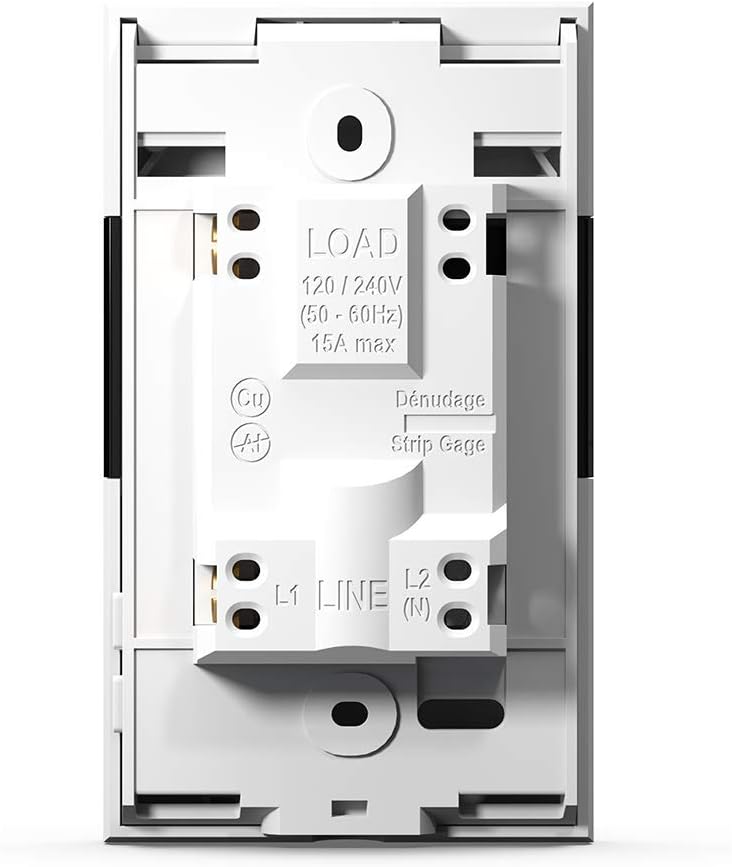
Figure 7: Neviweb App Energy Report
This image shows a smartphone displaying the Neviweb app's energy report feature, presenting a bar graph of energy consumption over time (24 hours, 30 days, 24 months) and estimated costs, allowing users to track their energy savings.
5.3 Upravljanje glasom
The TH1310WF thermostat can be controlled using voice commands through compatible smart assistants:
- Amazon Alexa: "Alexa, set the living room thermostat to 72 degrees."
- Google Home: "Hey Google, what's the temperature in the kitchen?"
- Apple HomeKit: Use Siri to control your thermostat once added to HomeKit.

Figure 8: Voice Assistant Integration
The image features an Amazon Echo Dot smart speaker on a kitchen shelf, illustrating how users can interact with their thermostat using voice commands through compatible voice assistants.
6. Održavanje
The Sinopé TH1310WF thermostat requires minimal maintenance. Keep the device clean by wiping it with a soft, dry cloth. Do not use abrasive cleaners or solvents. Ensure the vents are free from dust accumulation to maintain proper operation.
There are no user-serviceable parts inside the thermostat. Any repairs should be performed by qualified personnel.
7. Otkrivanje problema
| Problem | Mogući uzrok | Rješenje |
|---|---|---|
| Displej termostata je prazan. | Nema napajanja. | Provjerite prekidač. Osigurajte ispravne spojeve ožičenja. |
| Nije moguće povezati se na Wi-Fi. | Incorrect Wi-Fi password; Thermostat too far from router; Router issues. | Verify Wi-Fi password. Move thermostat closer to router or use a Wi-Fi extender. Restart router. |
| Sistem grijanja ne reaguje. | Thermostat in OFF mode; Wiring issue; Heating system malfunction. | Check thermostat mode. Verify wiring. Consult a qualified electrician or HVAC technician. |
| Netačno očitavanje temperature. | Floor sensor not properly installed or damaged. | Ensure floor sensor is correctly placed within the heating mat. Inspect sensor for damage. |
8. Specifikacije
| Feature | Specifikacija |
|---|---|
| Broj modela | TH1310WF |
| Voltage | 240 Volts |
| Wattage | 3600 vati |
| Current | 15A maks |
| Povezivanje | Wi-Fi |
| Tip kontrolera | Amazon Alexa, Apple HomeKit, Google Assistant, Neviweb |
| Temperaturni opseg | 41 do 97 stepeni Fahrenheita |
| Uključene komponente | Floor sensor - 15 ft |
| Dimenzije | 4.8 x 2.83 x 1.02 inča |
| Težina artikla | 13 unce |
| Materijal | Plastika |
| Display Type | LCD |
| Vrsta montaže | Zidni nosač |
9. Garancija i podrška
9.1 Informacije o garanciji
The Sinopé TH1310WF Smart Wi-Fi Thermostat is covered by a 3-godišnja garancija proizvođača od datuma kupovine. Ova garancija pokriva nedostatke u materijalu i izradi pri normalnoj upotrebi. Ne pokriva štetu nastalu nepravilnom instalacijom, nezgodom, pogrešnom upotrebom, zloupotrebom ili neovlaštenim modifikacijama.
Molimo sačuvajte svoj dokaz o kupovini za zahtjeve u vezi s garancijom.
9.2 Korisnička podrška
For technical assistance, troubleshooting, or warranty inquiries, please contact Sinopé Technologies customer support:
- Webstranica: www.sinopetech.com
- Email: support@sinopetech.com
- Telefon: Refer to the contact section on the official Sinopé webstranica za regionalne telefonske brojeve.
When contacting support, please have your product model number (TH1310WF) and purchase date available.


