1. Uvod
Hvala na kupoviniasing the Gravity Audio G12BD1 12-inch 1000W Powered Subwoofer Enclosure. This manual provides essential information for the proper installation, operation, and maintenance of your new subwoofer. To ensure optimal performance and safety, please read this manual thoroughly before attempting to install or use the product. Keep this manual for future reference.
2. Sigurnosne informacije
Pridržavajte se sljedećih sigurnosnih mjera opreza kako biste spriječili ozljede ili oštećenje proizvoda i vozila:
- električna sigurnost: Always disconnect the vehicle's negative battery terminal before beginning any electrical work. Ensure all wiring is correctly routed and secured to prevent pinching or damage. Use appropriate gauge wiring for power and ground connections.
- Instalaciono okruženje: Install the subwoofer in a dry, well-ventilated area, away from direct sunlight, heat sources, and moisture. Ensure the enclosure is securely mounted to prevent movement during vehicle operation.
- Zaštita sluha: Prolonged exposure to high sound pressure levels can cause permanent hearing damage. Operate the subwoofer at comfortable listening levels.
- Profesionalna instalacija: If you are unsure about any aspect of the installation, it is recommended to seek assistance from a qualified professional car audio installer.
3. Sadržaj paketa
Provjerite da li su sve stavke prisutne u paketu:
- 1 x Gravity Audio G12BD1 Powered Subwoofer Enclosure
4. Postavljanje i instalacija
Proper installation is crucial for the performance and longevity of your subwoofer. The G12BD1 is designed for universal fit in vehicles, typically in the trunk or a large cargo area.
4.1. Razmatranja o plasmanu
Consider the available space in your vehicle. The dimensions of the enclosure are approximately 13"D x 14"W x 14"H. Ensure there is adequate clearance for air circulation around the ampodjeljak za podizanje.
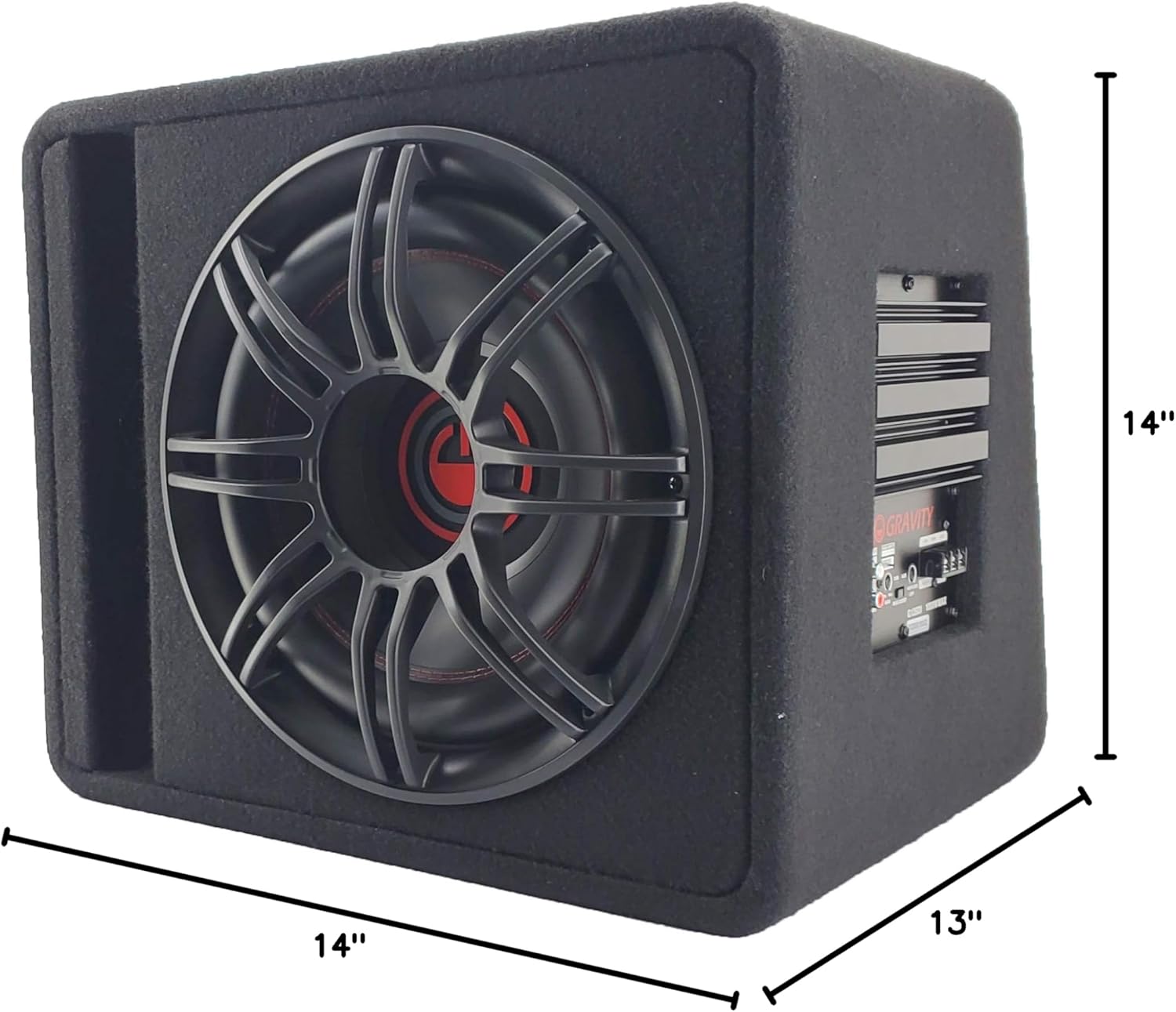
4.2. Ožičenje
The G12BD1 features an integrated amplifier, simplifying the wiring process. You will need to connect power, ground, a remote turn-on signal, and an audio input signal.

- Priključak za napajanje (+12V): Connect a heavy-gauge power cable (e.g., 8-gauge or 4-gauge, depending on total system power) directly from the vehicle's positive battery terminal to the +12V terminal on the subwoofer's amplifier. Install an in-line fuse holder (with an appropriately rated fuse) within 18 inches of the battery.
- Uzemljenje (GND): Spojite debeli kabel za uzemljenje s GND terminala na ampPričvrstite punilac na čistu, neobojenu metalnu površinu na šasiji vozila. Osigurajte čvrstu vezu niskog otpora.
- Daljinsko uključivanje (REM): Connect a remote turn-on wire from your head unit's remote output (typically a blue/white wire) to the REM terminal on the amplifier. This signal turns the ampuključivanje i isključivanje plamenika pomoću vaše glavne jedinice.
- Audio ulaz:
- RCA Low-Level Input: If your head unit has RCA pre-outs, connect RCA cables from the head unit's subwoofer or rear pre-outs to the RCA input jacks on the G12BD1 amplifier.
- High-Level Speaker Input: If your head unit does not have RCA pre-outs, use the high-level speaker inputs. Connect the speaker wires from your head unit's rear speaker outputs to the high-level input terminals on the amplifier.
After all connections are made, double-check them for polarity and security before reconnecting the vehicle's negative battery terminal.

5. Uputstvo za upotrebu
Nakon instalacije, možete podesiti postavke subwoofera za optimalne zvučne performanse.
5.1. Control Panel Adjustments
Refer to Figure 2 for the location of these controls:
- DOBITAK: This control matches the output level of your head unit to the input sensitivity of the subwoofer amplifier. Start with the gain set to minimum. Gradually increase it until you hear distortion, then back it off slightly. Do not use the gain control as a volume knob.
- BASS BOOST: This control allows you to increase the bass output at a specific frequency. Use sparingly to avoid distortion and potential damage to the subwoofer.
- LPF (niskopropusni filter): This control sets the upper frequency limit for the subwoofer. Frequencies above this setting will be filtered out. A common starting point is between 80Hz and 120Hz. Adjust to blend smoothly with your main speakers.
5.2. Početno uključivanje
After all connections are secure and settings are initially adjusted:
- Turn on your vehicle's ignition and head unit.
- The power indicator on the subwoofer ampLampica za snižavanje temperature bi trebala da se upali.
- Play some music with a good bass range.
- Carefully adjust the GAIN, BASS BOOST, and LPF controls to achieve balanced and clear bass output without distortion.
6. Održavanje
Regular maintenance ensures the longevity and performance of your subwoofer.
- čišćenje: Use a soft, dry cloth to wipe down the enclosure and amplifier. Avoid using harsh chemicals or abrasive cleaners.
- inspekcija: Periodically check all wiring connections for tightness and signs of wear or corrosion. Ensure the enclosure remains securely mounted.
- ventilacija: Osigurajte amplifier's heat sink is not obstructed to allow for proper cooling.
7. Otkrivanje problema
If you experience issues with your G12BD1 subwoofer, consult the following table before contacting support.
| Problem | Mogući uzrok | Rješenje |
|---|---|---|
| Nema struje / AmpLifier se ne uključuje |
|
|
| Nema zvuka iz subwoofera |
|
|
| Izobličen zvuk |
|
|
| Zujanje ili zujanje |
|
|
8. Specifikacije
| Feature | Specifikacija |
|---|---|
| Naziv modela | Powered Car Subwoofer |
| Vrsta zvučnika | Subwoofer, Woofer |
| Prečnik subwoofera | 12 inča |
| Impedansa | 4 Ohm |
| Maksimalna izlazna snaga zvučnika | 1000 Watts |
| Dimenzije proizvoda (D x Š x V) | 13"D x 14"Š x 14"H |
| Težina artikla | 37 funte |
| Tehnologija povezivanja | Žičani |
| Vrsta garancije | 1 godina |
9. Garancija i podrška
The Gravity Audio G12BD1 comes with a 1-year warranty. For warranty claims or technical support, please contact the retailer where the product was purchased or the manufacturer directly. Keep your proof of purchase for warranty validation.


