Uvod
Hvala na kupoviniasing the Crown 32-inch HD Ready Smart TV. This manual provides essential information for setting up, operating, maintaining, and troubleshooting your new television. Please read this manual thoroughly before using the product and retain it for future reference.
This television features HD Ready resolution, a 178-degree viewing angle, and an Android operating system for smart functionalities. It includes Dolby Audio for an enhanced sound experience.
Sadržaj paketa
Provjerite da li se u vašem paketu nalaze sve dolje navedene stavke:
- 1 LED TV jedinica
- 1 Table Stand Pair
- 1 Daljinski upravljač
- 1 Garantni list
- 1 Korisnički priručnik (ovaj dokument)
Uputstva za postavljanje
1. Raspakivanje i postavljanje
Carefully remove the TV from its packaging. Place the TV on a stable, flat surface or prepare for wall mounting. Ensure adequate ventilation around the TV.
2. Instaliranje postolja za sto
- Place the TV face down on a soft, clean cloth to prevent screen damage.
- Align the table stand pair with the corresponding holes on the bottom of the TV.
- Pričvrstite postolja pomoću priloženih vijaka. Nemojte previše zategnuti.
Note: If wall mounting, refer to the wall mount kit instructions. The TV supports VESA standard wall mounts.
3. Povezivanje napajanja
Plug the power cord into the TV's power input, then into a standard electrical outlet. Ensure the power outlet is easily accessible.
4. Povezivanje vanjskih uređaja
Televizor nudi različite mogućnosti povezivanja:
- HDMI portovi (x2): Povežite set-top box uređaje, Blu-ray plejere, igraće konzole.
- USB portovi (x2): Connect USB drives for media playback, or other USB devices.
- VGA priključak (x1): Connect a laptop or PC.
- Audio ulaz: For external audio sources.
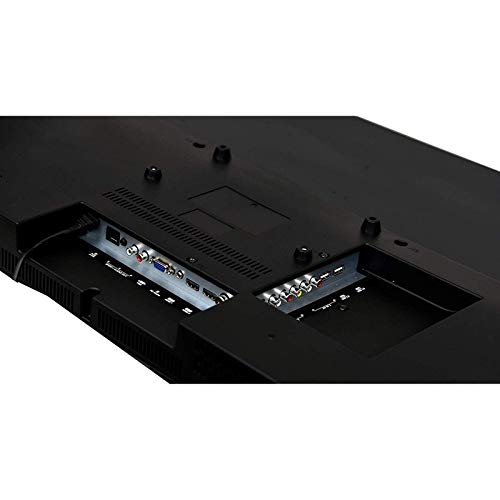
Image: Rear panel of the TV displaying HDMI, USB, and VGA ports for connecting external devices.
Uputstvo za upotrebu
1. First Time Setup and Initial Power On
- Pritisnite Snaga dugme na daljinskom upravljaču ili na televizoru.
- Follow the on-screen instructions to select your language, country, and connect to a Wi-Fi network.
- Complete the initial Android TV setup, including signing in with your Google account for full smart TV functionality.

Image: The TV displaying its smart interface with various application shortcuts.
2. Osnovne funkcije televizora
- Uključivanje/isključivanje: Koristite dugme za napajanje na daljinskom upravljaču ili televizoru.
- Kontrola jačine zvuka: Koristite VOL +/- dugmad na daljinskom.
- Odabir kanala: Koristite CH +/- buttons or number pad on the remote.
- Izvor ulaza: Pritisnite Izvor or Input button on the remote to switch between HDMI, USB, VGA, and TV inputs.
- Navigacija menijem: Koristite tipke sa strelicama i OK dugme za navigaciju kroz menije.
3. Smart TV Features (Android OS)
Your Crown Smart TV runs on the Android operating system, providing access to a wide range of applications and features:
- Pristup aplikaciji: Navigate to the home screen to access pre-installed apps like YouTube, or download new apps from the Google Play Store.
- Internet konekcija: Connect to your home Wi-Fi network for online streaming and browsing.
- Bluetooth: The TV supports Bluetooth technology for connecting compatible wireless devices.
Održavanje i njega
- Čišćenje ekrana: Nježno obrišite ekran mekom krpom koja ne ostavlja dlačice. Za tvrdokorne mrlje, lagano obrišiteampOperite krpu vodom ili specijaliziranim sredstvom za čišćenje ekrana. Ne prskajte tekućinu direktno na ekran.
- Čišćenje kabineta: Koristite meku, suhu krpu za brisanje kućišta televizora. Izbjegavajte upotrebu abrazivnih sredstava za čišćenje ili rastvarača.
- ventilacija: Provjerite da ventilacijski otvori na televizoru nisu blokirani kako biste spriječili pregrijavanje.
- Kabl za napajanje: Regularly check the power cord for any damage. If damaged, contact customer support for replacement.
- Isključivanje: Isključite televizor iz električne utičnice tokom oluje sa grmljavinom ili kada se neće koristiti duži period.
Vodič za rešavanje problema
| Problem | Mogući uzrok | Rješenje |
|---|---|---|
| Nema struje | Kabl za napajanje nije priključen; utičnica ne radi | Provjerite je li kabel za napajanje sigurno priključen; testirajte utičnicu s drugim uređajem. |
| Nema slike, ali je zvuk prisutan | Incorrect input source selected; External device not connected properly | Pritisnite Izvor button to select the correct input; Check HDMI/VGA cable connections. |
| Nema zvuka, ali je slika prisutna | Volume is muted or too low; Audio cables not connected; External audio system issue | Increase volume; Check if mute is active; Ensure audio cables are connected correctly; If using external audio, check its settings. |
| Daljinski upravljač ne radi | Baterije su prazne ili nepravilno umetnute; Prepreka između daljinskog upravljača i televizora | Replace batteries; Ensure correct polarity; Remove any obstructions; Point remote directly at the TV's IR sensor. |
| Smart TV apps not loading or slow | Poor Wi-Fi connection; App cache issues; Outdated software | Check Wi-Fi signal strength; Restart router; Clear app cache in TV settings; Check for system software updates. |
If the problem persists after trying these solutions, please contact Crown customer support.
Tehničke specifikacije
| Brand | Crown (Generic) |
| Naziv modela | 24DJ |
| Broj modela | Crown-SmartTv-32-inch |
| Veličina ekrana | 32 inča |
| Display Technology | LED |
| Rezolucija | HD Ready (1366 x 768 piksela) |
| Refresh Rate | 60 Hz |
| Viewing Angle | 178 stepeni |
| Operativni sistem | Android |
| Audio izlaz | 150 Watts |
| Podržani audio formati | MP3, WAV, MKA |
| Povezivanje | 2 HDMI, 2 USB, 1 VGA |
| Bluetooth podrška | Da |
| Dimenzije proizvoda (DxŠxV) | 7 x 55.5 x 33 centimetara |
| Težina artikla | 4 kg |
| Vrsta montaže | Zidni nosač, Stolni stalak |
| Posebne karakteristike | Flat Panel, Dolby Audio, 178-degree viewing angle, dot noise reduction, A+ grade panel, reduced motion blur, enhanced skin tone, real colors, moisture resistant and dust resistant. |
Garancija i podrška
Your Crown 32-inch HD Ready Smart TV comes with a 1 godine garancije od datuma kupovine. Molimo pogledajte priloženi garantni list za detaljne uslove i odredbe.
For technical assistance, troubleshooting beyond this manual, or warranty claims, please contact Crown customer support. Keep your purchase receipt and warranty card handy when contacting support.
Contact information for support is typically found on the warranty card or the manufacturer's official website.


