Uvod
The Lexibook CR753EN Collins Crossword Solver is an electronic device designed to assist with crossword puzzles, word games, and general word reference. It features a comprehensive database from the Collins Bradford 11th edition dictionary, phonetic spell-correction, and various word-solving tools.

Image: The Lexibook CR753EN Collins Crossword Solver, a compact electronic device with a QWERTY keyboard and a green display screen.
Setup
Instalacija baterije
The device requires one CR2032 battery (included). To install or replace the battery:
- Pronađite odeljak za baterije na poleđini uređaja.
- Koristite mali odvijač ili novčić da otvorite poklopac pretinca za baterije.
- Umetnite CR2032 bateriju s pozitivnom (+) stranom okrenutom prema gore.
- Vratite poklopac odeljka za baterije i pričvrstite ga.
Uključivanje/isključivanje
Pritisnite crveno dugme za napajanje located on the top right of the keyboard to turn the device on or off.
Uputstvo za upotrebu
The Lexibook CR753EN offers several functions to assist with word puzzles and general reference. Use the dedicated function buttons (XWORD, CLUE, ADV, SYN, SOLV) and the QWERTY keyboard for input.
Xword Function (Crossword Solver)
This function helps solve crosswords by finding words that match a given pattern.
- Pritisnite XWORD dugme.
- Enter the known letters of the word, using a question mark (?) for unknown letters. For example, to find a 5-letter word starting with 'L' and ending with 'R', enter "L???R".
- Pritisnite ENTER. The device will display a list of matching words. Use the arrow keys to scroll through the list.
Clue Function
Use this function to find words based on a clue and a pattern.
- Pritisnite CLUE dugme.
- Enter the clue (e.g., "Planet").
- Enter a pattern if known (e.g., "E?RT?").
- Pritisnite ENTER. The device will suggest words related to the clue and pattern.
Synonyms Function
Find synonyms for a given word.
- Pritisnite SYN dugme.
- Enter the word for which you need synonyms (e.g., "Learn").
- Pritisnite ENTER. A list of synonyms will be displayed.
Napredna funkcija
This function helps find words that are related to a given word or pattern, often used for word association.
- Pritisnite ADV dugme.
- Enter a word or pattern (e.g., "Game").
- Pritisnite ENTER. The device will show related words.
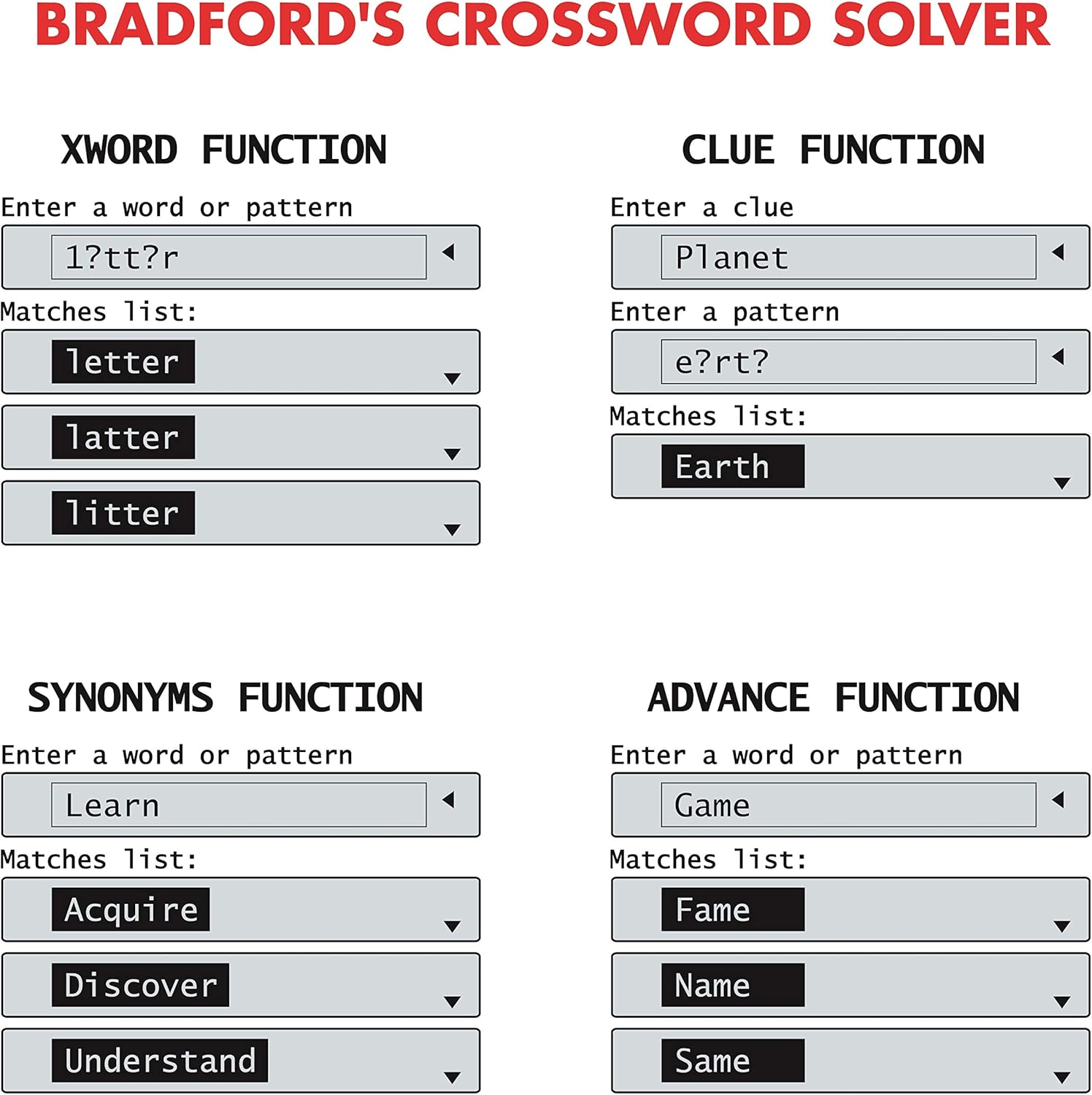
Image: Screen examples demonstrating the Xword, Clue, Synonyms, and Advance functions, showing input fields and matching word lists.
List Function (User List)
Create and manage a personalized list of words.
- Pritisnite LIST dugme.
- Follow the on-screen prompts to add, edit, or search words within your custom list.
Solver Function (Anagram & Word Builder)
This function includes tools for solving anagrams and building words.
- Pritisnite SOLV dugme.
- Odaberite bilo koje Anagram Solver or Word Builder iz menija.
- For Anagram Solver: Enter a jumbled set of letters (e.g., "snutes"). Press ENTER to see possible words (e.g., "sunset").
- For Word Builder: Enter a set of letters, and the device will suggest words that can be formed from them.
Phonetic Spell-Correction
Corrects misspelled words phonetically.
- Enter a word as it sounds (e.g., "fonetik").
- The device will suggest the correct spelling (e.g., "phonetic"). This feature is often integrated into the main word entry functions.
Igre riječima
The device includes three word games: Hangman, Word Jumble, and Anagram.
- Access the games through the main menu or a dedicated game button if available.
- Follow the on-screen instructions to play each game.

Image: Screen examples showing the Anagram Solver, Phonetic Spell-Correction, and various Word Games like Hangman and Word Jumble.
Ostale komunalne usluge
The device also includes a calculator, currency converter, and unit converter. These can typically be accessed via the main menu or dedicated buttons.
Pomoć na ekranu
Contextual help is available at any time. Look for a 'Help' or '?' icon on the screen or press a designated Help button if present.
Održavanje
Čišćenje
- Obrišite uređaj mekom, suvom krpom.
- Ne koristite tekuća sredstva za čišćenje ili abrazivne materijale.
Skladištenje
- Čuvajte uređaj na hladnom i suvom mestu dalje od direktne sunčeve svetlosti.
- Ako skladištite duži period, izvadite bateriju kako biste spriječili curenje.
Rješavanje problema
Uređaj se ne uključuje
- Provjerite je li baterija ispravno instalirana.
- Zamijenite CR2032 bateriju novom.
Incorrect Word Suggestions
- Ensure the correct function (Xword, Clue, Synonyms) is selected.
- Verify the spelling or pattern entered.
- The device uses the Collins Bradford 11th edition dictionary; some very obscure or newly coined words may not be included.
Problemi sa ekranom
- If the screen is dim or flickering, the battery may be low. Replace the battery.
- If the screen is blank, try turning the device off and on again.
Specifikacije
| Broj modela | CR753EN |
| Brand | Leksibook |
| Dimenzije (D x Š x V) | 11.8 x 7.8 x 1.4 cm |
| Težina | 160 grama |
| Izvor napajanja | 1 x CR2032 baterija |
| Materijal | Plastika |
Garancija
This Lexibook CR753EN device comes with a 2 godine garancije od datuma kupovine. Molimo sačuvajte dokaz o kupovini za bilo kakve reklamacije u vezi s garancijom. Garancija pokriva proizvodne nedostatke u normalnim uslovima upotrebe.
Podrška
For further assistance or technical support, please refer to the official Lexibook webweb-mjesto ili kontaktirajte njihovu službu za korisnike. Kontakt informacije se obično mogu pronaći na pakovanju proizvoda ili na proizvođačevim website.


