1. Proizvod je gotovview
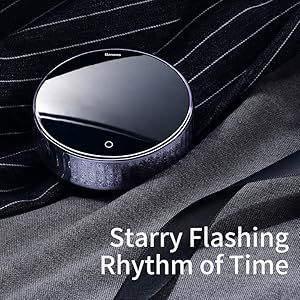
The Baseus Heyo Rotation Countdown Timer is a versatile digital timer designed for various scenarios, including kitchen cooking, study, work, and exercise. It features an intuitive rotary adjustment, a clear LCD display, and intelligent energy-saving functions.

Slika 1.1: Prednja strana view of the Baseus Heyo Rotation Countdown Timer, showcasing its sleek design and clear digital display.
2. Ključne karakteristike
- Intuitive Rotary Adjustment: Easily set time by rotating the outer ring, supporting both countdown and count-up functions.
- Clear LCD Digital Display: Large, easy-to-read numbers for minutes and seconds.
- Podesiva jačina zvuka: Three volume settings (Loud, Low, Mute) to suit different environments.
- Intelligent Energy Saving: The display dims after 5 seconds of inactivity and shuts down after another 5 seconds to conserve battery life.
- Magnetna podloga: Allows for convenient placement on metallic surfaces like refrigerators or whiteboards.
- Izdržljiv materijal: Constructed from Acrylonitrile Butadiene Styrene for longevity.

Image 2.1: Demonstrates the easy rotation mechanism for efficient timing adjustments.

Image 2.2: Illustrates the adjustable volume settings located on the back of the timer.
3. Podešavanje
3.1. Sadržaj paketa
- Baseus Heyo Rotation Countdown Timer (1 unit)
- Korisnički priručnik (ovaj dokument)
- Napomena: AAA baterije nisu uključene i moraju se kupiti zasebno.
3.2. Instalacija baterije
- Pronađite odjeljak za baterije na stražnjoj strani tajmera.
- Otvorite poklopac baterije.
- Umetnite tri (3) AAA baterije, pazeći na ispravan polaritet (+/-).
- Close the battery cover securely. The LCD display will light up, indicating successful installation.
Slika 3.1: View of the battery compartment, showing where to insert three AAA batteries.
4. Uputstvo za upotrebu
4.1. Uključivanje/isključivanje
The timer automatically powers on when batteries are installed. It enters an energy-saving mode after 5 seconds of inactivity and fully shuts down after another 5 seconds of no operation. To reactivate, simply rotate the dial or press the "O" button.
4.2. Setting the Timer (Countdown)
- Vrijeme podešavanja: Rotate the outer ring clockwise to increase the time (minutes and seconds) and counter-clockwise to decrease it. The adjustable range is 00:00 to 99:55.
- Start Countdown: Once the desired time is set, press the "O" button on the front of the timer to begin the countdown.
- Pauza/nastavak: Press the "O" button again during a countdown to pause it. Press it once more to resume.
- Resetovati: To reset the timer to 00:00, press and hold the "O" button for approximately 3 seconds.
- Alarm: When the countdown reaches 00:00, the timer will sound an alarm according to the selected volume setting.
4.3. Using as a Stopwatch (Count-up)
- Ensure the timer display is at 00:00. If not, reset it by holding the "O" button.
- Press the "O" button to start counting up from 00:00.
- Press the "O" button again to pause the count-up.
- Press and hold the "O" button to reset the stopwatch.
4.4. Podešavanje jačine zvuka
On the back of the timer, there is a switch to adjust the alarm volume. Select from three modes:
- glasno: For noisy environments or when a strong alert is needed.
- nisko: For quiet environments or subtle alerts.
- Isključi zvuk: The display will blink when the time is up, providing a silent notification. Ideal for libraries, offices, or study areas.
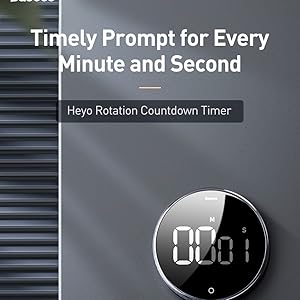
Image 4.1: The timer can be conveniently placed on magnetic surfaces for easy visibility.

Image 4.2: The timer is suitable for various settings, including professional and educational environments.
5. Održavanje
- čišćenje: Wipe the timer with a soft, dry cloth. Do not use abrasive cleaners or immerse in water.
- Zamjena baterije: Replace batteries when the display becomes dim or the timer functions erratically. Always use new AAA batteries.
- Skladištenje: Store the timer in a cool, dry place when not in use for extended periods. Remove batteries if storing for more than a month to prevent leakage.
- Izbjegavajte ekstremne uslove: Do not expose the timer to extreme temperatures, direct sunlight, or high humidity.
6. Otkrivanje problema
| Problem | Mogući uzrok | Rješenje |
|---|---|---|
| Ekran je prazan ili taman. | Slabe ili prazne baterije; nepravilna ugradnja baterija. | Zamijenite novim AAA baterijama, pazeći na ispravan polaritet. |
| Timer does not start/stop. | "O" button not pressed firmly; timer in sleep mode. | Press the "O" button firmly. Rotate the dial to wake the timer from sleep mode. |
| Alarm se ne oglašava. | Volume set to Mute; low battery. | Check the volume switch on the back and set it to Loud or Low. Replace batteries if needed. |
| Numbers are incorrect or flickering. | Faulty unit; very low battery. | Zamijenite baterije. Ako problem i dalje postoji, obratite se korisničkoj podršci. |
7. Specifikacije
- Broj modela: ACDJS-01
- Brand: Baseus
- Materijal: akrilonitril butadien stiren (ABS)
- Boja: Crna
- Dimenzije: 5 cm (Dubina) x 5 cm (Širina) x 3 cm (Visina)
- Težina artikla: 150 grama
- Vremenski raspon: 00:00 - 99:55
- Izvor napajanja: 3 x AAA baterije (nisu uključene)
- Broj postavki: 4 (referring to volume settings and timing modes)
- Zemlja porijekla: Kina
- UPC: 738633769932
8. Garancija i podrška
Baseus products are manufactured with high-quality standards. For warranty information and customer support, please refer to the warranty card included with your purchase or visit the official Baseus webMolimo sačuvajte račun za kupovinu u slučaju reklamacije.
Proizvođač: Baseus, Store2508, Dankuni, West Bengal
Uvoznik/Paker: MP International - Authorised Distributor
For technical assistance or inquiries, please contact your local distributor or the seller.


