1. Proizvod je gotovview
This manual provides comprehensive instructions for the Retro-Bit Official Sega Saturn 2.4 GHz Wireless Controller. This controller is designed for use with Sega Saturn, Sega Genesis Mini, Nintendo Switch, PlayStation 3, PC, and Mac systems, offering a wireless gaming experience with classic control.

Image description: The Retro-Bit Official Sega Saturn 2.4 GHz Wireless Controller in white, shown with its packaging, a Sega Saturn port receiver, and a USB receiver.
2. Sadržaj paketa
- 1x Retro-Bit Official Sega Saturn 2.4 GHz Wireless Controller (White)
- 1x Sega Saturn Port Receiver
- 1x USB Port Receiver
- 1x torbica za pohranu
- 1x 3.3ft Charging Cable

Image description: The Retro-Bit wireless controller neatly stored within its protective case, alongside both the Sega Saturn and USB receivers.
3. Upute za postavljanje
3.1. Punjenje kontrolera
Connect the included 3.3ft charging cable to the controller's charging port and a USB power source. The LED indicator on the controller will show charging status. A full charge provides approximately 550 mAh of battery life.
3.2. Povezivanje s uređajem
- Select the appropriate receiver: Use the Sega Saturn Port Receiver for Sega Saturn consoles or the USB Port Receiver for Sega Genesis Mini, Nintendo Switch, PlayStation 3, PC, and Mac.
- Insert the receiver: Plug the chosen receiver into the corresponding port on your gaming system or computer.
- Power on the controller: Press the HOME button on the controller to power it on. The controller will automatically attempt to pair with the receiver.
- Uparivanje (ako je potrebno): If the controller does not connect automatically, press the pairing button on the receiver and then the HOME button on the controller simultaneously until the connection is established. The LED indicator on both the controller and receiver will become solid when successfully paired.

Opis slike: Krupni plan view of the Sega Saturn port receiver, which connects the wireless controller to a Sega Saturn console.
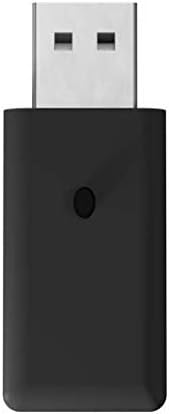
Opis slike: Krupni plan view of the USB port receiver, used to connect the wireless controller to various modern systems like PC, Mac, Switch, and PS3.
4. Upravljanje kontrolerom
4.1. Raspored i funkcije dugmadi
The controller features a classic 6-button layout with a responsive D-Pad, HOME, SELECT, and START buttons, along with shoulder buttons (L, R, Z, Y, X, A, B, C).
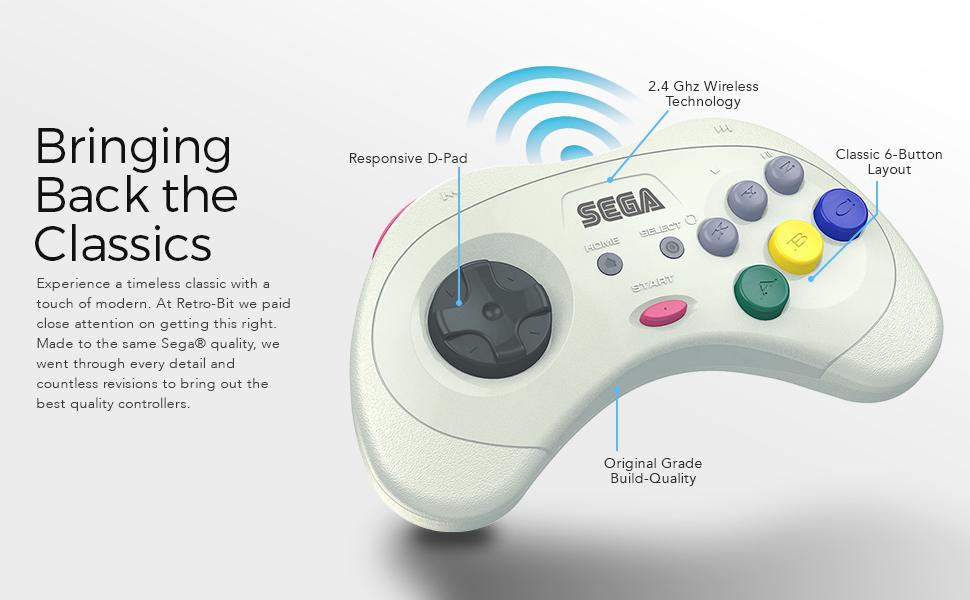
Image description: An annotated image of the Retro-Bit wireless controller highlighting its key features: Responsive D-Pad, 2.4 GHz Wireless Technology, Classic 6-Button Layout, and Original Grade Build-Quality.
4.2. Compatibility Modes
The controller automatically adapts to the connected system via the receiver.
- Sega Saturn: Full functionality for Sega Saturn games.
- Sega Genesis Mini: Compatible with the Sega Genesis Mini console.
- Nintendo Switch: Functions as a Pro Controller.
- PlayStation 3: Functions as a standard PS3 controller.
- Računar/Mac: Recognized as a standard gamepad, compatible with most games supporting XInput or DirectInput.
4.3. Sleep Mode
To conserve battery, the controller will enter sleep mode after 5 minutes of inactivity. Press any button to wake it up.
5. Održavanje
- čišćenje: Koristite meku, suhu krpu za čišćenje kontrolera. Izbjegavajte abrazivna sredstva za čišćenje ili rastvarače.
- Skladištenje: Store the controller in its included storage case when not in use to protect it from dust and damage.
- Održavanje baterije: Za optimalno trajanje baterije, izbjegavajte često potpuno pražnjenje kontrolera. Redovno ga punite.
6. Otkrivanje problema
6.1. Kontroler ne odgovara
- Uvjerite se da je kontroler napunjen.
- Verify the receiver is securely plugged into the device.
- Re-attempt the pairing process as described in the "Connecting to a Device" section.
- Check for interference from other 2.4 GHz wireless devices.
6.2. Problemi sa vezom
- Ensure you are within the 30ft gaming range.
- Try a different USB port on your PC/Mac/PS3 if using the USB receiver.
- Ensure the correct receiver is used for your system.
6.3. Dugmad ne funkcionišu ispravno
- Test the controller on a different game or system to isolate the issue.
- Pazite da se ispod dugmadi ne zaglave ostaci.
7. Tehničke specifikacije
| Feature | Detalj |
|---|---|
| Broj modela | RB-SGA-048 |
| Povezivanje | 2.4 GHz bežični |
| Kompatibilnost | Sega Saturn, Sega Genesis Mini, Switch, PS3, PC, Mac |
| Baterija | Punjiva baterija od 550 mAh |
| Kabel za punjenje | 3.3ft USB |
| bežični domet | Do 30 stopa |
| Sleep Mode | Nakon 5 minuta neaktivnosti |
| Dimenzije paketa | 7.36 x 5.83 x 2.05 inča |
| Težina artikla | 15.5 unce |
8. Garancija i podrška
For warranty information and technical support, please refer to the official Retro-Bit webweb-mjesto ili kontaktirajte njihovu korisničku službu. Sačuvajte dokaz o kupovini za slučaj reklamacije.


