1. Proizvod je gotovview
The Cecotec Conga 1090 Connected Force is a versatile 4-in-1 robot vacuum cleaner designed to sweep, vacuum, mop, and scrub your floors. It features intelligent navigation, app control, and compatibility with voice assistants for a comprehensive cleaning experience.

Image 1.1: The Conga 1090 Connected Force robot vacuum cleaner, showcasing its sleek design, accompanying smartphone application interface, and compatibility with Alexa and Google Assistant.
Ključne karakteristike:
- 4-u-1 funkcionalnost: Istovremeno mete, usisava, briše podove i riba.
- iTech Smart 2.0 navigacija: Inteligentni navigacijski sistem za efikasno čišćenje puteva.
- Kontrola aplikacije: Upravljajte načinima čišćenja, rasporedom, usisavanjem i nivoima ribanja sa svog pametnog telefona.
- Kompatibilnost glasovnog asistenta: Works with Amazon Alexa and Google Assistant for hands-free control.
- Turbo način rada na tepisima: Automatically increases suction power on carpets for deeper cleaning.
- BestFriend sistem njege: Includes a special silicone brush designed for pet hair.
- Više načina čišćenja: Auto, Edges, Manual, Room, Spiral, and Return to Home.
- Programabilno: Schedule cleaning sessions 24/7.
- Dug vijek trajanja baterije: Do 160 minuta neprekidnog čišćenja.
- Visokoefikasni filter: Captures allergens and fine dust particles.
2. Vodič za postavljanje
2.1 Raspakivanje i provjera komponenti
Pažljivo izvadite sve komponente iz ambalaže. Provjerite da li su prisutne sve dolje navedene stavke:
- Cecotec Conga 1090 Connected Force Robot Vacuum Cleaner
- Baza za punjenje i adapter za napajanje
- Multifunction Brush (bristles and silicone)
- BestFriend Care Silicone Brush
- 4 bočne četke
- Mješani rezervoar (čvrste materije i tečnosti)
- Mop and Mop Pad
- Filter visoke efikasnosti
- Uputstvo za upotrebu
2.2 Postavljanje baze za punjenje
Postavite bazu za punjenje uz zid na otvorenom prostoru, pazeći da nema prepreka unutar 1 metra (3 stope) sa strane i 2 metra (6 stopa) ispred baze. Spojite adapter za napajanje na bazu za punjenje i uključite ga u utičnicu.
2.3 Početno punjenje
Place the robot vacuum cleaner onto the charging base. Ensure the charging contacts on the robot align with those on the base. The robot will begin charging automatically. For optimal battery life, fully charge the robot before its first use (approximately 3-4 hours).
2.4 Preuzimanje aplikacije i Wi-Fi veza
- Download the official Cecotec Conga app from your smartphone's app store (Google Play Store or Apple App Store).
- Open the app and follow the on-screen instructions to create an account and add your Conga 1090 Connected Force robot.
- During the connection process, ensure your smartphone is connected to a Wi-Fi mreža od 2.4 GHz. The robot is not compatible with 5GHz networks. If you experience connection issues, verify that your router's 2.4GHz Wi-Fi channel is enabled at 20Hz (in addition to 40Hz if applicable).
- Once connected, you can control the robot and access all its features via the app.

Image 2.1: Controlling the robot vacuum cleaner using the dedicated smartphone application.
2.5 Postavljanje glasovnog asistenta (opciono)
Za integraciju s Amazon Alexom ili Google Assistantom:
- Otvorite aplikaciju Alexa ili Google Home na svom pametnom telefonu.
- Idite na odjeljak 'Vještine' ili 'Radi s Googleom'.
- Traži 'Cecotec Conga' and enable the skill/service.
- Link your Cecotec account when prompted.
- You can now use voice commands to start, stop, or send the robot back to its charging base.
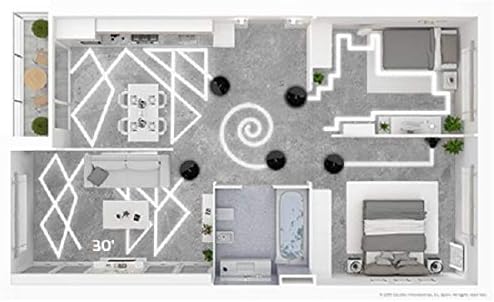
Image 2.2: The robot vacuum cleaner integrated with smart home voice assistants.
3. Uputstvo za upotrebu
3.1 Pokretanje i zaustavljanje čišćenja
- Putem dugmeta robota: Press the main power button on the robot once to start cleaning in Auto mode. Press again to pause. Hold to send it back to the charging base.
- Preko aplikacije: Open the Conga app, select your robot, and tap 'Clean' or choose a specific cleaning mode.
- Putem glasovne komande: Use your configured voice assistant (e.g., "Alexa, tell Conga to start cleaning").
3.2 Režimi čišćenja
The Conga 1090 Connected Force offers 6 cleaning modes:
- Auto: The robot intelligently cleans the entire floor area.
- ivice: Čisti uz zidove i rubove namještaja.
- Priručnik: Ručno kontrolišite kretanje robota putem aplikacije.
- soba: Čisti određenu prostoriju ili područje.
- spirala: Čisti koncentrisano područje spiralnim uzorkom.
- Povratak na početnu stranicu: Robot se vraća na svoju bazu za punjenje.

Image 3.1: Visualization of different cleaning patterns the robot can perform.
3.3 Adjusting Suction and Scrubbing Levels
Through the Conga app, you can select from three power levels (Eco, Normal, Turbo) for vacuuming and three scrubbing levels for mopping, adapting to different floor types and cleaning needs.
3.4 Zakazivanje čišćenja
Use the app to set up daily or weekly cleaning schedules. The robot will automatically start cleaning at the programmed times.
4. Održavanje
Redovno održavanje osigurava optimalne performanse i produžava vijek trajanja vašeg robotskog usisivača.
4.1 Pražnjenje spremnika za prašinu
After each cleaning cycle, or when indicated by the app, remove the dust tank and empty its contents into a waste bin. Clean any debris from the tank and filter compartment.
4.2 Četke za čišćenje
- Multifunction Brush / BestFriend Care Brush: Remove the main brush from the robot. Use the included cleaning tool to cut and remove any tangled hair or fibers.
- Bočne četke: Periodically check side brushes for wear or entanglement. Remove any debris and replace worn brushes as needed.

Image 4.1: The robot vacuum cleaner's main brush engaging with a carpeted surface.
4.3 Čišćenje filtera
Tap the high-efficiency filter gently to remove dust. Do not wash the HEPA filter with water, as this can damage it. Replace the filter every 3-6 months, depending on usage.
4.4 Cleaning the Mop and Water Tank
After mopping, remove the mop pad and wash it thoroughly. Empty any remaining water from the mixed tank and allow it to air dry before reinserting. Clean the water outlet ports on the tank to prevent blockages.
4.5 Čišćenje senzora
Wipe the robot's sensors (anti-drop sensors, obstacle detection sensors) with a clean, dry cloth to ensure accurate navigation.
5. Otkrivanje problema
If you encounter issues with your Conga 1090 Connected Force, refer to the following common solutions:
- Robot se ne puni: Ensure the charging base is plugged in and the robot's charging contacts are clean and properly aligned with the base.
- Robot se ne povezuje na Wi-Fi: Verify your Wi-Fi network is 2.4GHz. Check router settings to ensure the 2.4GHz channel is enabled at 20Hz. Restart both the robot and your router.
- Loše performanse čišćenja: Empty the dust tank, clean all brushes, and check the filter for blockages. Ensure sensors are clean.
- Robot se često zaglavljuje: Clear obstacles from the cleaning area. Ensure cables, loose rugs, or small items are removed.
- Neobični zvukovi: Check main and side brushes for tangled hair or debris. Inspect wheels for obstructions.
For persistent issues, consult the full instruction manual or contact Cecotec customer support.
6. Specifikacije
| Feature | Specifikacija |
|---|---|
| Brand | Cecotec |
| Broj modela | Conga 1090 Connected Force |
| Boja | Crna |
| Dimenzije proizvoda (D x Š x V) | 32.5 x 32.5 x 7.5 cm |
| Kapacitet spremnika za prašinu | 500 mililitara |
| Voltage | 14.4 Volts |
| Materijal | Plastika |
| Nivo buke | 64 dB |
| Kompatibilnost | Amazon Echo, Google Home, Pametni telefoni |
| Težina artikla | 4.1 kilograma |
| Filter Type | HEPA |
| Trajanje baterije | Do 160 minuta |
| Tip kontrole | Kontrola aplikacija |
7. Garancija i podrška
For warranty information, please refer to the documentation included with your product or visit the official Cecotec website. For technical support or service inquiries, please contact Cecotec customer service through their official channels.


