Uvod
This manual provides detailed instructions for the proper use and maintenance of your Casio G-Shock DW-5610SU-3 digital watch. Designed for durability and functionality, this watch features shock resistance, 200-meter water resistance, an electro-luminescent backlight, and various timekeeping functions.

Slika: Front view of the Casio G-Shock DW-5610SU-3 digital watch, showcasing its square case and digital display.
Funkcije dugmadi
Your G-Shock watch has four buttons, typically labeled as follows:
- PODEŠAVANJE (gore lijevo): Koristi se za ulazak i izlazak iz načina podešavanja i za potvrdu postavki.
- REŽIM (Dolje lijevo): Used to cycle through the watch's various modes (Timekeeping, Stopwatch, Countdown Timer, Alarm).
- SVJETLO (Gore desno): Activates the electro-luminescent backlight.
- START/STOP (Dolje desno): Used to start/stop stopwatch operations, change selections in setting modes, and activate the flash alert.

Slika: Sa strane view of the watch, highlighting the top left (ADJUST) and bottom left (MODE) buttons.

Slika: Suprotna strana view of the watch, showing the top right (LIGHT) and bottom right (START/STOP) buttons.
Podešavanje: Podešavanje vremena i datuma
- U režimu mjerenja vremena, pritisnite i držite ADJUST dugme dok gradski kod ne počne treptati, što ukazuje na ekran za podešavanje.
- Koristite START/STOP button to cycle through the settings (City Code, DST, 12/24-hour format, Seconds, Hour, Minute, Year, Month, Day).
- Koristite LIGHT button to increase a value or the START/STOP button to decrease a value (for time/date settings).
- Nakon što su sve postavke konfigurirane, pritisnite dugme ADJUST dugme za izlazak iz režima podešavanja.
Uputstvo za upotrebu
Navigacija kroz načine rada
Pritisnite MODE dugme za kretanje kroz sledeće režime:
- Timekeeping Mode (current time, date, day)
- Štoperica
- Način odbrojavanja vremena
- Alarm Mode
- Hourly Time Signal Mode
Korištenje štoperice
- Uđite u način rada štoperice pritiskom na MODE dugme.
- Pritisnite START/STOP dugme za pokretanje štoperice.
- Pritisnite START/STOP ponovo pritisnite dugme da biste ga zaustavili.
- Pritisnite ADJUST dugme za resetovanje štoperice na nulu.
- The stopwatch measures up to 23 hours, 59 minutes, 59.99 seconds.
Korištenje tajmera za odbrojavanje
- Uđite u režim odbrojavanja pritiskom na MODE dugme.
- Pritisnite i držite ADJUST dugme dok postavka sata ne počne treptati.
- Koristite LIGHT i START/STOP dugmad za podešavanje željenog vremena odbrojavanja (do 24 sati).
- Pritisnite ADJUST za potvrdu i izlazak iz načina podešavanja.
- Pritisnite START/STOP za početak odbrojavanja.
- Pritisnite START/STOP ponovo za pauziranje/nastavak.
- Kada odbrojavanje dostigne nulu, oglasit će se alarm. Pritisnite bilo koje dugme da zaustavite alarm.
Postavljanje alarma
- Uđite u alarmni režim pritiskom na MODE dugme.
- Pritisnite i držite ADJUST dugme dok postavka sata ne počne treptati.
- Koristite LIGHT i START/STOP buttons to set the alarm hour and minute.
- Pritisnite ADJUST za potvrdu i izlazak iz načina podešavanja.
- Pritisnite START/STOP button to toggle the alarm ON/OFF. An indicator will show when the alarm is active.
Electro-luminescent Backlight
Pritisnite LIGHT dugme za osvjetljavanje ekrana radi lakšeg viewing in low-light conditions. The backlight duration is typically a few seconds.
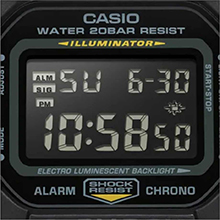
Image: Close-up of the watch display showing the electro-luminescent backlight active, illuminating the time and date.
Održavanje
Čišćenje
Obrišite sat mekom, suhom krpom. Za tvrdokornu prljavštinu koristite meku krpu.ampOperite vodom i blagim neutralnim deterdžentom, a zatim obrišite suhom krpom. Izbjegavajte upotrebu hlapljivih sredstava poput razrjeđivača ili benzina.
Otpornost na vodu
This watch is water resistant to 200 meters. It is suitable for showering, swimming, and shallow diving. Do not operate buttons while the watch is wet or submerged to prevent water ingress.

Image: The Casio G-Shock DW-5610SU-3 watch partially submerged in water, illustrating its 200-meter water resistance.
Zamjena baterije
The watch uses one CR2016 battery with an approximate life of 2 years. When the display becomes dim or functions malfunction, it may be time for a battery replacement. It is recommended to have the battery replaced by an authorized service center to ensure water resistance is maintained.
Rješavanje problema
- Ekran je prazan ili taman: Baterija je možda slaba. Zamijenite bateriju.
- Dugmad ne reagiraju: Ensure the watch is not in a locked mode (if applicable, though this model typically doesn't have a lock). If issues persist, a full reset might be needed (consult service center).
- Vrijeme je netačno: Re-set the time and date as per the "Setting Time and Date" section. If inaccuracy continues, the watch may require servicing.
- Voda unutar sata: Odmah odnesite sat u ovlašteni servisni centar. Ne pokušavajte ga sami otvoriti.
Specifikacije
| Feature | Specifikacija |
|---|---|
| Broj modela | DW-5610SU-3 |
| Materijal kućišta/okvira | Smola |
| Band Material | Smola |
| Tip stakla | Mineralno staklo |
| Otpornost na vodu | 200 metara (20 BAR) |
| Otpornost na udarce | Da |
| Pozadinsko osvetljenje | Elektroluminiscentno pozadinsko osvjetljenje s naknadnim sjajem |
| Štoperica | 1/100-second, measuring capacity 23:59'59.99" |
| Tajmer za odbrojavanje | Measuring unit 1 second, range 24 hours, auto-repeat |
| Alarm | Multi-function alarm, Hourly vremenski signal |
| Kalendar | Potpuni automatski kalendar (do 2099. godine) |
| Format vremena | 12/24-satni format |
| Preciznost | ±15 sekundi mjesečno |
| Vrsta baterije | CR2016 |
| Približno trajanje baterije | 2 godine |
| Dimenzije kućišta (V׊×D) | 48.9 × 43.8 × 13.5 mm |
| Ukupna težina | 52 g |

Image: Diagram showing the dimensions of the Casio G-Shock DW-5610SU-3 watch, with a credit card for scale, indicating a case height of 48.9 mm and width of 43.8 mm.
Garancija i podrška
Your Casio G-Shock DW-5610SU-3 watch comes with a Limited Warranty. For warranty claims, service, or technical support, please contact Casio India Co Pvt Ltd.
Manufacturer/Importer Contact:
Casio India Co Pvt Ltd
A-41, 1st Floor, MCIE, Mathura Road,
New Delhi-110044, Indija
For additional information and support, please visit the official Casio weblokaciju ili ovlašteni servisni centar.