1. Uvod
This manual provides instructions for the proper setup, operation, and maintenance of your IPD IPH-160 Monaural Wired Headset. The IPH-160 is designed for clear communication in various environments, featuring a noise-cancelling microphone and a 3.5mm jack for broad compatibility.
2. Sadržaj paketa
Molimo Vas da provjerite da li se u Vašem paketu nalaze svi artikli:
- IPD IPH-160 Monaural Headset
- Quick Disconnect (QD) to 3.5mm Jack Cable (4-pole)
- Jastučići za uši (unaprijed instalirani ili rezervni)
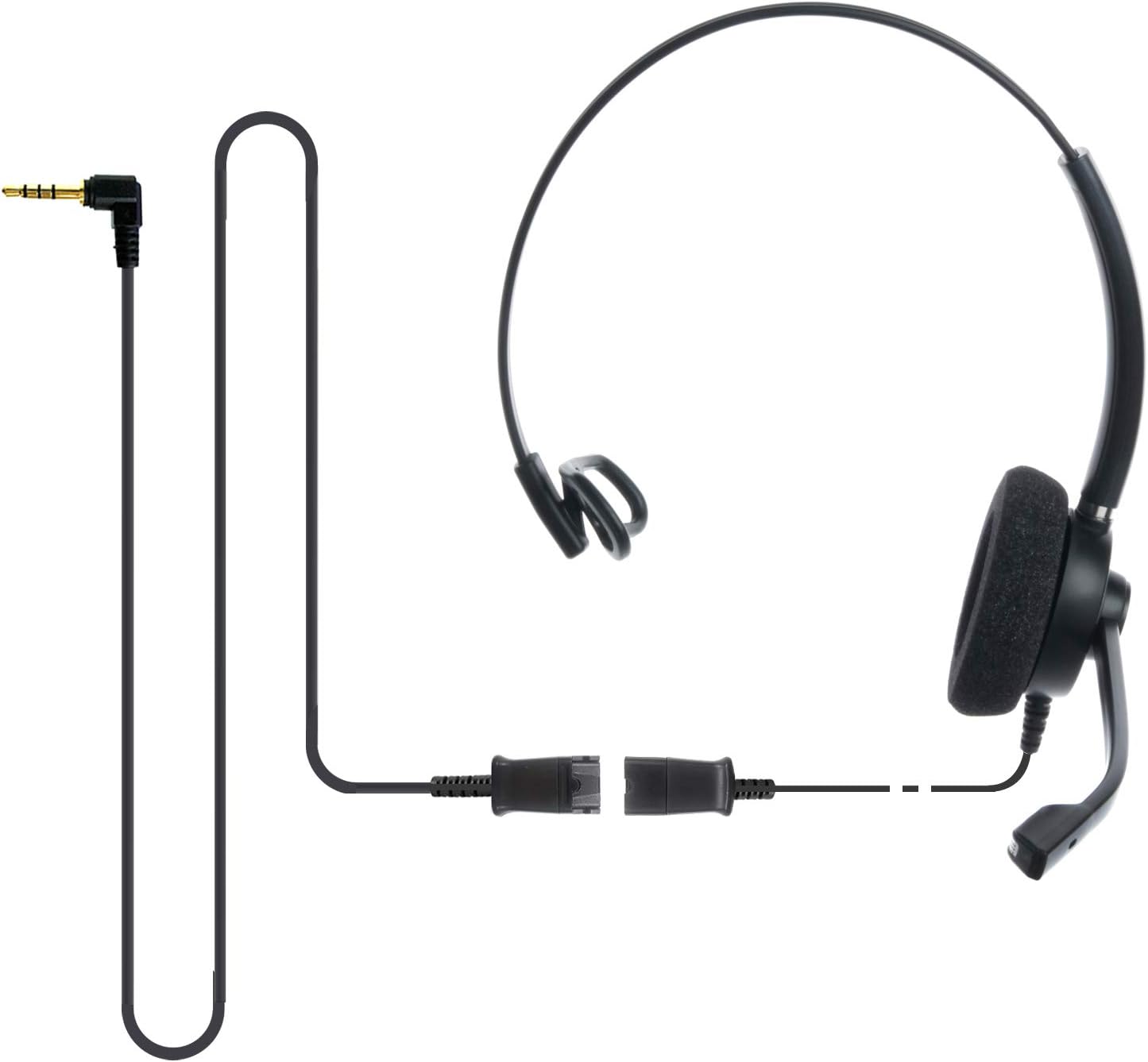
Image: The IPD IPH-160 headset with its detachable Quick Disconnect cable and 3.5mm jack connector.
3. Podešavanje
3.1 Povezivanje slušalica
- Connect the Quick Disconnect (QD) cable to the headset. Ensure a secure connection.
- Insert the 3.5mm jack of the cable into the corresponding port on your device (Android cell phone, laptop, tablet, Apple MacBook, or other smart device).

Slika: Krupni plan view of the 3.5mm jack connector, illustrating its connection to a mobile device and laptop.
3.2 Kompatibilnost uređaja
The 3.5mm jack (4 poles) is compatible with a wide range of devices including:
- Android cell phones (e.g., Samsung, Huawei, HTC, ZTE)
- Laptopovi
- Tablete
- Apple MacBooks with a single 3.5mm headset port
Napomena:
- iPhone 7/7S and later models may require an additional Lightning to 3.5mm adapter (not included).
- If your specific phone model is not listed or you encounter compatibility issues, please contact IPD support for assistance.

Image: The IPD headset shown with various connection options for desk phones, PCs/softphones, and mobile phones, highlighting the versatility of Quick Disconnect cables.
4. Upravljanje slušalicama
4.1 Nošenje i podešavanje
The IPH-160 headset is designed for all-day comfort. Adjust the headband for a secure yet comfortable fit. The microphone boom is flexible; position it approximately 1-2 inches from your mouth for optimal voice pickup.
4.2 Mikrofon za poništavanje buke
The headset features a passive noise-cancelling microphone to reduce background noise, ensuring clearer conversations. Proper microphone positioning is crucial for effective noise cancellation.

Image: A user wearing the headset, demonstrating the microphone's position and illustrating the effect of noise cancellation on audio waveforms.
4.3 Acoustic Shock Protection (ASP)
The headset incorporates an Acoustic Shock Protection (ASP) circuit on the speaker. This feature protects your hearing from sudden, unwanted loud noises by cutting sounds over 105dB and maintaining levels below 105dB.
4.4 Wideband Audio
The HD Wideband speaker delivers clear sound, enhancing the quality of your calls and audio monitoring.

Image: A close-up of the headset's ear cushion, visually representing the distinction between acoustic noise and clear sound for high-quality voice communication.
5. Održavanje
5.1 Čišćenje
To maintain hygiene and performance, regularly clean the ear cushions and other surfaces of the headset with a soft, dry cloth. Avoid using harsh chemicals or abrasive materials.
5.2 Skladištenje
When not in use, store the headset in a clean, dry place away from direct sunlight and extreme temperatures. Avoid tangling the cable to prevent damage.
6. Otkrivanje problema
6.1 Nema zvuka ili je jačina zvuka niska
- Provjerite je li 3.5 mm priključak potpuno umetnut u vaš uređaj.
- Provjerite postavke jačine zvuka na vašem uređaju.
- Verify that the headset is selected as the audio output device in your computer's sound settings.
- Confirm the Quick Disconnect (QD) cable is securely connected to the headset.
6.2 Mikrofon ne radi
- Provjerite da li je nosač mikrofona pravilno postavljen blizu vaših usta.
- Provjerite postavke mikrofona na uređaju i uvjerite se da su slušalice odabrane kao ulazni uređaj.
- Test the headset with another compatible device to rule out a device-specific issue.
6.3 Problemi kompatibilnosti
If you experience compatibility problems with your device, especially if it's not explicitly listed as compatible, please contact IPD customer support for guidance.
7. Specifikacije
| Feature | Specifikacija |
|---|---|
| Naziv modela | IPH-160-35 |
| Tehnologija povezivanja | Žičani |
| Priključak za slušalice | 3.5 mm Jack (4-pole) |
| Kontrola buke | Pasivno poništavanje buke |
| Frekvencijski odziv | 10 KHz |
| Osjetljivost | 58 dB |
| Impedansa | 150 Ohma |
| Težina artikla | 198 grama (7 unci) |
| Materijal | Plastika |
| Postavljanje uha | Preko uha |
| Posebna karakteristika | Poništavanje buke |
| Uključene komponente | Jastučići za uši |
8. Informacije o garanciji
The IPD IPH-160 Headset comes with a 3 godine garancije od datuma kupovine. Ova garancija pokriva proizvodne nedostatke pri normalnoj upotrebi. Molimo sačuvajte dokaz o kupovini za reklamacije u slučaju garancije.
9. Podrška
For technical assistance, warranty claims, or any questions regarding your IPD IPH-160 Headset, please contact IPD customer support. You can find contact information on the official IPD webweb-mjestu ili putem vašeg prodavača.
Posjetite IPD Store za više informacija i proizvoda.


