1. Uvod
Thank you for choosing the HBN Digital Programmable Timer Socket. This device is designed to automate the switching of electrical appliances, helping you save energy and enhance convenience. It features an LCD display, 8 configurable ON/OFF programs, and a random function for security. Please read this manual carefully before use to ensure proper operation and safety.
2. Sigurnosna uputstva
- This timer socket is designed for indoor use only. Do not expose it to moisture, water, or extreme temperatures.
- Ensure the connected appliance's power consumption does not exceed the timer's maximum load capacity (16A / 3680W). Overloading can cause damage or fire.
- Ne rastavljajte niti pokušavajte popraviti uređaj. Sve servisne radove prepustite kvalifikovanom osoblju.
- Čuvati van domašaja djece.
- Always insert the plug fully into the socket.
- Isključite tajmer iz zidne utičnice prije čišćenja. Čistite samo suhom, mekom krpom.
3. Proizvod je gotovview
Familiarize yourself with the components of your HBN Digital Programmable Timer Socket.

Slika 3.1: Prednja strana view of the timer socket, showing the LCD display, control buttons, and power outlet.

Slika 3.2: Natrag view of the timer socket, displaying the model number BND-50/SG3-VC and electrical ratings.
Kontrolna dugmad:

Slika 3.3: Detaljno view of the control buttons and LCD display.
- SAT: Koristi se za podešavanje trenutnog vremena i izlazak iz moda programiranja.
- PROG: Enters and cycles through the 8 ON/OFF programming settings.
- R (Random): Activates or deactivates the random switching function.
- RESETOVATI: Briše sve postavke i resetuje tajmer na fabričke postavke.
- SEDMICA: Selects the day(s) of the week for time and program settings.
- SAT: Adjusts the hour for time and program settings.
- MIN: Adjusts the minute for time and program settings.
- UKLJUČENO/AUTO/ISKLJUČENO: Manually switches the timer to ON, AUTO (programmed mode), or OFF.
LCD ekran:
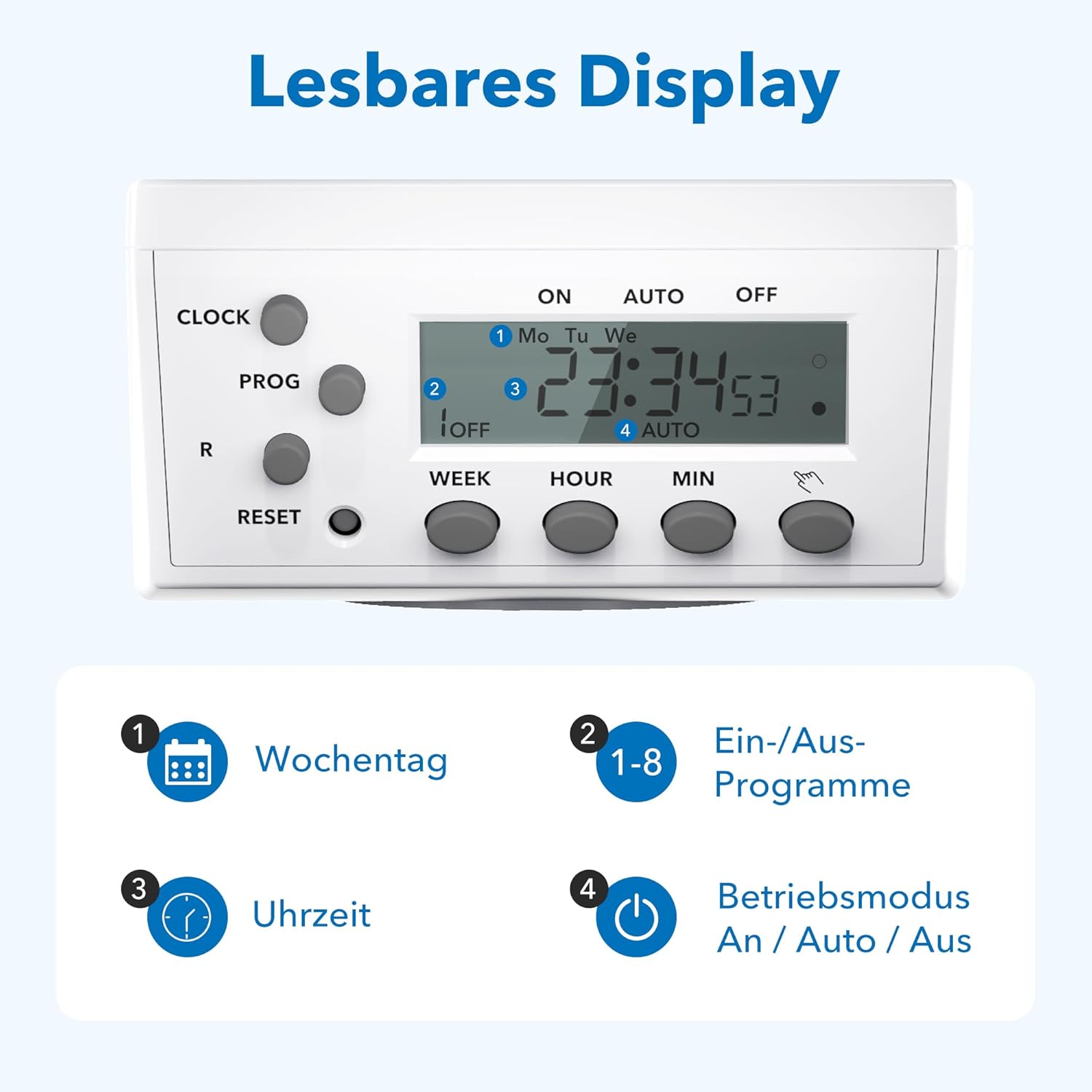
Figure 3.4: The LCD display shows current time, day, program status, and operating mode.
The LCD display provides clear information on the current time, day of the week, active program number, and the current operating mode (ON, AUTO, OFF).
4. Podešavanje
4.1 Initial Charging and Reset
- Plug the timer socket into a live wall outlet for at least 15-30 minutes to charge its internal battery. This battery retains settings during power outages.
- After charging, use a pointed object (like a pen tip) to press the RESET button. This clears all previous settings and ensures a fresh start. The display will show '0:00'.
4.2 Podešavanje trenutnog vremena
- Pritisnite i držite CLOCK dugme.
- Dok drži CLOCK, pritisnite WEEK button repeatedly to select the current day of the week (Mo, Tu, We, Th, Fr, Sa, Su).
- Dok drži CLOCK, pritisnite HOUR više puta pritisnite dugme da biste podesili trenutni sat.
- Dok drži CLOCK, pritisnite MIN više puta pritisnite dugme da biste podesili trenutne minute.
- Otpustite CLOCK dugme. Trenutno vrijeme je sada postavljeno.
5. Uputstvo za upotrebu
5.1 Programiranje vremena uključivanja/isključivanja
The timer allows for up to 8 distinct ON/OFF programs. Each program consists of an ON time and an OFF time.
- Pritisnite PROG jednom pritisnite dugme. Na ekranu će se prikazati '1 ON'.
- Pritisnite WEEK to select the desired day(s) for this program. Options include individual days, weekdays, weekends, or all days.
- Pritisnite HOUR da biste podesili željeni sat uključivanja.
- Pritisnite MIN da biste podesili željeni minut UKLJUČIVANJA.
- Pritisnite PROG ponovo. Na displeju će se prikazati '1 ISKLJUČENO'.
- Repeat steps 2-4 to set the desired OFF time for program 1.
- Pritisnite PROG again to move to '2 ON' and repeat the process for subsequent programs (up to 8).
- Nakon što podesite sve željene programe, pritisnite dugme CLOCK dugme za izlazak iz režima programiranja i povratak na prikaz trenutnog vremena.
5.2 Ručno prebacivanje (UKLJ./AUTO/ISKL.)
Pritisnite ON/AUTO/OFF dugme za ciklično prebacivanje između načina rada:
- ON: Priključeni uređaj je stalno UKLJUČEN, poništavajući sve programe.
- AUTOMATSKI: The timer operates according to the programmed ON/OFF times. This is the standard operating mode for automated control.
- ISKLJUČENO: Priključeni uređaj je stalno ISKLJUČEN, što poništava sve programe.
5.3 Slučajna funkcija
The random function provides a security feature by switching the connected appliance ON and OFF at irregular intervals (2 to 30 minutes delay) around the programmed times. This can simulate presence when you are away.
- Za aktiviranje pritisnite R button. An 'R' indicator will appear on the display.
- Da biste deaktivirali, pritisnite dugme R button again. The 'R' indicator will disappear.

Slika 5.1: Pramples of versatile applications for the timer socket.
6. Održavanje
- Ensure the timer is unplugged from the power outlet before cleaning.
- Obrišite vanjski dio mekom, suhom krpom. Ne koristite tekuća sredstva za čišćenje ili abrazivne materijale.
- Tajmer čuvajte na hladnom i suvom mestu kada ga ne koristite.
7. Otkrivanje problema
- Ekran je prazan: Ensure the timer is plugged into a live outlet. If it has been unplugged for an extended period, the internal battery may be depleted. Plug it in for 15-30 minutes to recharge.
- Uređaj se ne uključuje/isključuje kako je programirano:
- Provjerite je li tajmer uključen AUTO mode. If it's in ON or OFF mode, programs are overridden.
- Verify that the programmed ON/OFF times and days are correct.
- Ensure the current time is set accurately.
- Confirm the appliance itself is working and properly connected to the timer.
- Programs are lost after a power outage: The internal battery may not be fully charged or is at the end of its life. Ensure the timer is regularly plugged in to maintain battery charge.
- Timer is unresponsive: Pritisnite RESET button with a pointed object to clear all settings and restart the device. Then, reprogram the time and desired schedules.
8. Specifikacije

Figure 8.1: Technical data and dimensions of the timer socket.
| Specifikacija | Vrijednost |
|---|---|
| Broj modela | BND-50/SG3-VC |
| Rated Voltage | 230 V |
| Nazivna struja | 16 A |
| Maksimalno opterećenje | 3680 W |
| Minimalno vrijeme prebacivanja | 1 minuta |
| Broj programa | 8 ON/OFF Programi |
| Dimenzije proizvoda | 7.5 x 7.5 x 8 cm |
| Težina artikla | 150 grama |
| Materijal | Kunststoff (Plastika) |
| Boja | Bijelo |
| Proizvođač | Ergo I&E CO.,LTD |
9. Garancija i podrška
HBN products are manufactured to high-quality standards. For warranty information or technical support, please refer to the documentation provided with your purchase or contact your retailer. Keep your proof of purchase for warranty claims.