1. Proizvod je gotovview
The ProCase Wireless Keyboard (Model PC-08362168) is a compact and portable Bluetooth keyboard designed for multi-device compatibility. It offers a comfortable typing experience with low-profile, quiet keys and an ergonomic design, suitable for use with iOS, Android, and Windows operating systems.

Image: The ProCase Wireless Keyboard, a slim black keyboard with a standard QWERTY layout, designed for portability and multi-device use.
2. Sadržaj paketa
- ProCase Wireless Keyboard (Model PC-08362168)
- Korisnički priručnik (ovaj dokument)
Napomena: Za rad su potrebne 2x AAA baterije i nisu uključene u pakovanje.
3. Vodič za postavljanje
3.1. Instalacija baterije
- Pronađite odjeljak za baterije na stražnjoj strani tastature.
- Otvorite poklopac odeljka za baterije.
- Umetnite dvije (2) AAA baterije, pazeći na ispravan polaritet (+/-).
- Čvrsto zatvorite poklopac odeljka za baterije.

Image: Underside of the keyboard showing the ON/OFF switch, Connect button, and the battery compartment for two AAA batteries.
3.2. Uključivanje / isključivanje napajanja
Slide the ON/OFF switch, located on the back of the keyboard, to the "ON" position to power on the device. Slide it to "OFF" when not in use to conserve battery life.
3.3. Bluetooth uparivanje
- Uvjerite se da je tastatura uključena.
- Press the "Connect" button on the back of the keyboard. The Bluetooth indicator light (usually blue) on the keyboard will start blinking, indicating it is in pairing mode.
- On your device (tablet, smartphone, computer), navigate to its Bluetooth settings.
- Omogućite Bluetooth i potražite dostupne uređaje.
- Select "ProCase Keyboard" (or similar name) from the list of found devices.
- Follow any on-screen prompts to complete the pairing process. A successful connection will be indicated by the Bluetooth light on the keyboard turning solid or turning off, depending on the model.

Image: Diagram illustrating wide compatibility with Android, Windows, and iOS devices, including iPads, Android tablets, Microsoft Surface, and smartphones. It also notes that a USB drive is not included and only Bluetooth connection is supported.
4. Uputstvo za upotrebu
4.1. Osnovno kucanje
The keyboard features a standard QWERTY layout. Simply begin typing after successful pairing with your device.
4.2. Function Keys (F1-F12) and Hot Keys
The top row of keys serves dual functions: standard F-keys (F1-F12) and special hot keys for media control, volume, and other system functions. To use the F-keys (F1, F2, etc.), you must hold down the Fn key simultaneously with the desired F-key. Pressing the key without holding Fn will activate its associated hot key function.
- Fn + F1: Home
- Fn + F2: Pretraga
- Fn + F3Odaberi sve
- Fn + F4: Copy
- Fn + F5: Paste
- Fn + F6Izrezati
- Fn + F7: Prethodna numera
- Fn + F8: Pusti/pauza
- Fn + F9: Sljedeća pjesma
- Fn + F10: Mute
- Fn + F11: Stišavanje zvuka
- Fn + F12: Pojačavanje zvuka

Slika: Krupni plan view of a keyboard key, illustrating the scissor-cross mechanism for comfortable and responsive keystrokes.

Image: A person typing on the ProCase Wireless Keyboard, positioned next to a tablet, highlighting the comfortable and quiet typing experience.
5. Održavanje
5.1. Čišćenje
To clean the keyboard, gently wipe the surface with a soft, dry, lint-free cloth. For stubborn dirt, slightly dampen the cloth with water or a mild cleaning solution. Avoid excessive moisture and do not spray cleaners directly onto the keyboard.
5.2. Skladištenje
When not in use for extended periods, power off the keyboard to conserve battery life. Store it in a cool, dry place away from direct sunlight and extreme temperatures.
6. Otkrivanje problema
- Tastatura se ne povezuje:
- Provjerite je li tastatura uključena i ima li novih baterija.
- Press the "Connect" button on the back of the keyboard to enter pairing mode.
- Verify Bluetooth is enabled on your device and try re-pairing.
- Približite tastaturu svom uređaju.
- Restart both the keyboard (power off/on) and your device.
- Tipke ne reagiraju:
- Provjerite nivo baterije i zamijenite ako je potrebno.
- Provjerite je li tastatura pravilno povezana putem Bluetootha.
- Očistite sve ostatke oko tipki.
- Function (F) keys not working as expected:
- Remember that to activate F1-F12 functions, you must hold down the Fn key simultaneously. Without holding Fn, the keys will activate their assigned hot key functions (e.g., media control). This behavior cannot be changed.
- Kratko trajanje baterije:
- Ensure the keyboard is powered off when not in use.
- The keyboard features a sleep mode to conserve power during inactivity.
- Koristite visokokvalitetne AAA baterije.
7. Specifikacije
| Feature | Detalj |
|---|---|
| Broj modela | PC-08362168 |
| Dimenzije (D x Š x V) | 11.5 x 4.7 x 0.29 inča (29.2 x 11.9 x 0.74 cm) |
| Težina | 10 unce (283.5 grama) |
| Povezivanje | Bluetooth bežični |
| Izvor napajanja | 2 x AAA baterije (nisu uključene) |
| Materijal | akrilonitril butadien stiren (ABS) |
| Boja | Crna |
| Kompatibilni operativni sistemi | iOS, Android, Windows (Note: Does not support Windows 8 Mobile) |
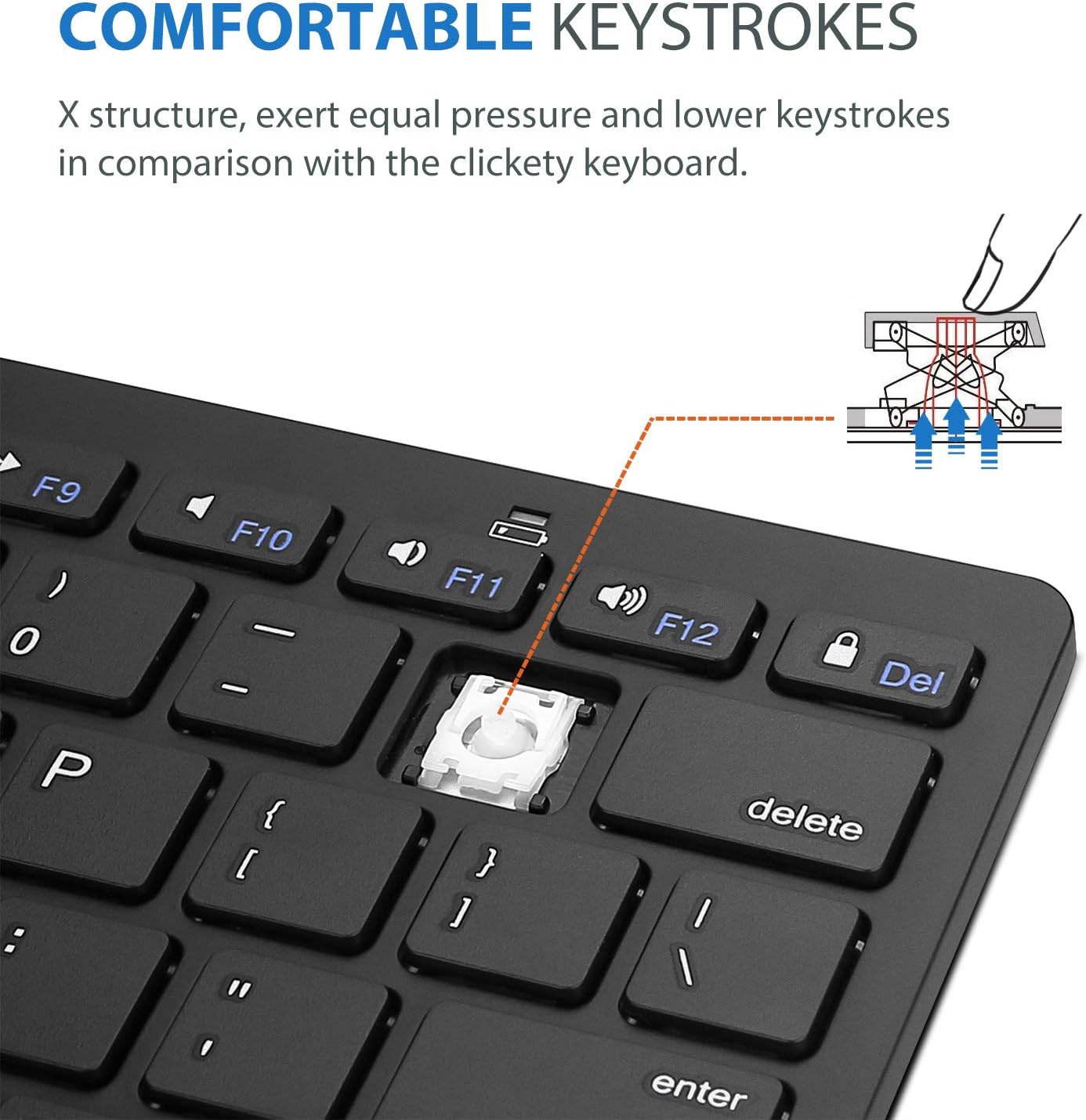
Image: Diagram showing the ultra-slim design and dimensions of the ProCase Wireless Keyboard, measuring 11.2 inches in length, 4.7 inches in width, and 0.19 inches in thickness.
8. Garancija i podrška
8.1. Informacije o garanciji
ProCase products are designed for reliability and performance. For specific warranty details regarding your ProCase Wireless Keyboard, please refer to the warranty card included with your purchase or visit the official ProCase webSačuvajte dokaz o kupovini za slučaj reklamacije.
8.2. Korisnička podrška
If you encounter any issues or have questions not covered in this manual, please contact ProCase customer support. You can find contact information on the official ProCase webweb-stranice ili putem vaše platforme za kupovinu.
Za više informacija posjetite ProCase Store on Amazon.


