Uvod
This manual provides essential information for the proper use and maintenance of NETUM 57x30mm Thermal Receipt Printer Paper Rolls. These rolls are designed for compatibility with thermal receipt printers, including the NETUM NT-1809DD model, ensuring clear and reliable printouts for various applications such as point-of-sale, receipts, and order tickets.

Image: A stack of NETUM 57x30mm thermal paper rolls, illustrating the product packaging and individual rolls.
Podešavanje i učitavanje
To ensure optimal performance, follow these steps when loading the thermal paper rolls into your compatible printer:
- Unpack the Rolls: Carefully remove the thermal paper rolls from their packaging. Inspect for any visible damage.
- Otvorite poklopac štampača: Locate and open the paper compartment cover on your thermal receipt printer. Refer to your printer's specific manual for exact instructions.
- Umetnite rolu papira: Place the thermal paper roll into the compartment. Ensure the paper feeds from the bottom of the roll and the thermal-sensitive side (usually the smoother, brighter side) is facing the thermal print head. Incorrect orientation will result in blank prints.
- Uvlačenje papira: Pull a small length of paper out past the printer's cutting edge.
- Zatvori naslovnicu: Close the printer cover securely. The printer should automatically detect the paper and be ready for printing.
Uputstvo za upotrebu
Using NETUM thermal paper rolls is straightforward once loaded correctly. The printer's thermal head will apply heat to the paper, causing a chemical reaction that darkens the surface to produce text and images.
- Kvalitet štampe: For best print quality, ensure your thermal printer's print head is clean and free from debris.
- Faktori okoline: Avoid exposing printed receipts to direct sunlight, high heat, or certain chemicals (e.g., plasticizers found in PVC wallets) for extended periods, as this can cause the print to fade prematurely.

Image: Thermal paper rolls with an example of a printed receipt, demonstrating the paper's functionality.
Održavanje i skladištenje
Proper storage and handling of thermal paper rolls are crucial for preserving their quality and ensuring print longevity.
- Uslovi skladištenja: Store unused thermal paper rolls in a cool, dry, and dark environment. Ideal storage temperature is typically below 25°C (77°F) and relative humidity between 40-60%.
- Izbjegavajte direktno svjetlo: Keep rolls away from direct sunlight or strong artificial light, as prolonged exposure can activate the thermal coating and cause premature darkening or fading.
- Izloženost hemikalijama: Avoid contact with chemicals such as alcohol, solvents, oils, and plasticizers, which can degrade the thermal coating.
- Fizičko rukovanje: Handle rolls by the edges to avoid touching the thermal surface, which can leave fingerprints or marks.
Rješavanje uobičajenih problema
If you encounter issues while using NETUM thermal paper rolls, consider the following:
- Prazni otisci:
- Ensure the paper roll is loaded with the thermal-sensitive side facing the print head.
- Check if the printer's thermal head is clean.
- Fading or Light Prints:
- Verify the paper roll has not expired or been stored in adverse conditions (e.g., high heat, direct sunlight).
- Adjust printer darkness settings if available.
- Ensure the printer's thermal head is not worn out or damaged.
- Zaglavljivanje papira:
- Ensure the paper roll is loaded correctly and not too tightly or loosely in the compartment.
- Check for any foreign objects or debris inside the printer's paper path.
- Ensure the paper roll's core is compatible with the printer's spindle.
Specifikacije
Key specifications for NETUM 57x30mm Thermal Receipt Printer Paper Rolls:
- Brand: NETUM
- Tehnologija štampe: Thermal
- Roll Dimensions: 57mm (width) x 30mm (diameter)
- Količina: 4 rolne po pakovanju
- Boja: Bijelo
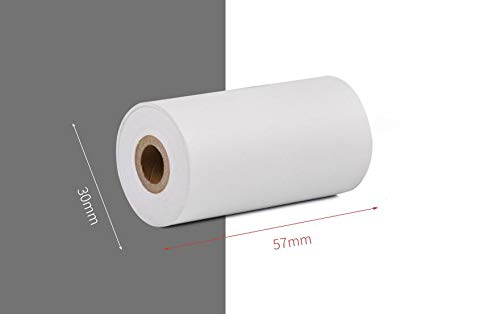
Image: A visual representation of the thermal paper roll's dimensions (57mm width, 30mm diameter).
Informacije o garanciji
No specific warranty information for these paper rolls is provided in the product details. Please refer to the NETUM official website or contact your retailer for warranty details on compatible printers and accessories.
Korisnička podrška
For technical support or inquiries regarding NETUM products, please visit the official NETUM website or contact their customer service. Contact information may also be available through your purchase platform.