1. Uvod
Thank you for choosing the VMAI 38 Inch 2.1 Sound Bar. This sound bar is designed to enhance your home entertainment experience with powerful audio, featuring dual built-in subwoofers and versatile connectivity options. Please read this manual thoroughly before use to ensure proper operation and to maximize your enjoyment of the product.
2. Sigurnosne informacije
- Ne izlažite ovaj uređaj kapanju ili prskanju tekućina.
- Ne blokirajte ventilacijske otvore. Instalirajte u skladu s uputama proizvođača.
- Ne postavljajte u blizini izvora toplote kao što su radijatori, grejni registri, peći ili drugi uređaji (uključujući ampLifiers) koji proizvode toplotu.
- Zaštitite kabel za napajanje od naleta ili stezanja, posebno na utikačima, praktičnim utičnicama i mjestu na kojem izlaze iz uređaja.
- Koristite samo dodatke/pribor koje je naveo proizvođač.
- Isključite ovaj uređaj iz struje tokom grmljavine ili kada ga ne koristite duže vreme.
3. Sadržaj paketa
Molimo Vas da provjerite da li su svi artikli uključeni u Vaš paket:
- VMAI 38 Inch Sound Bar
- Daljinsko upravljanje
- Premium 5 ft Optical cable
- 5 ft RCA cable
- Adapter za napajanje
- Wall mounting brackets and screws
- Uputstvo za upotrebu
4. Proizvod je gotovview
The VMAI Sound Bar HD-019 is engineered to deliver a powerful and clear audio experience. It features dual 25W built-in subwoofers and four speakers, providing 90W of total power for room-shaking bass and precise sound.

Figure 4.1: VMAI 38 Inch Sound Bar and included remote control.
The sound bar incorporates advanced DSP technology and Bluetooth 5.0 for stable and fast wireless transmission. It offers multiple input connections including HDMI ARC, Optical, AUX, and USB (for flash drives only).

Figure 4.2: Internal components of the VMAI Sound Bar, highlighting the 6 speakers and 90 watts of power for a superb sound experience.

Figure 4.3: Illustration of the sound bar's dual built-in subwoofers, designed to deliver deep bass.
5. Podešavanje
5.1 Opcije smještaja
The VMAI Sound Bar offers flexible placement options to suit your home theater setup:
- Položaj na radnoj površini: Position the sound bar directly in front of your TV on a flat surface, ensuring it does not obstruct the TV's remote sensor.
- Zidni nosač: For an elegant, space-saving setup, the sound bar can be mounted on the wall using the included mounting brackets and template. Ensure the wall can support the weight of the sound bar.

Figure 5.1: The sound bar's mountable design allows for both wall mounting and desktop placement.
5.2 Povezivanje vašeg zvučnog sistema
The sound bar supports various connection methods to integrate with your devices:
- HDMI ARC: Connect an HDMI cable from the sound bar's HDMI ARC port to your TV's HDMI ARC port. This allows for audio return channel functionality, simplifying control.
- optički ulaz: Use the included optical cable to connect the sound bar to your TV's optical audio output.
- AUX ulaz: Connect devices using the included RCA cable to the AUX input.
- USB ulaz: Za reprodukciju zvuka sa USB fleš diska.
- Bluetooth 5.0: Wirelessly connect your Bluetooth-enabled devices.

Figure 5.2: The sound bar supports HDMI (ARC), AUX, Optical, USB, and Bluetooth 5.0 connections.
5.3 Important Note for Optical Mode (PCM Setting)
When using the Optical input, it is crucial to adjust your TV's audio settings to PCM (Pulse Code Modulation). Failure to do so may result in no sound or distorted audio.
Steps to enable PCM (may vary by TV brand):
- Go to the 'Settings' menu on your TV.
- Navigate to 'Audio Format' or 'Sound Output' settings.
- Select 'PCM' as the digital audio output format.
- If using HDMI ARC, also check 'HDMI Audio Format' and set it to 'PCM'.
6. Uputstvo za upotrebu
6.1 Uključivanje/isključivanje
Pritisnite Power/Mode dugme na soundbaru ili daljinskom upravljaču da biste uključili ili isključili uređaj.
6.2 Odabir ulaza
Pritisnite Selection (M) dugme na zvučnoj traci ili INPUT button on the remote control to cycle through available input sources (HDMI ARC, Optical, AUX, USB, Bluetooth).
6.3 Kontrola jačine zvuka
Koristite Jačina zvuka + i Zapremina - dugmad na soundbaru ili daljinskom upravljaču za podešavanje nivoa jačine zvuka.
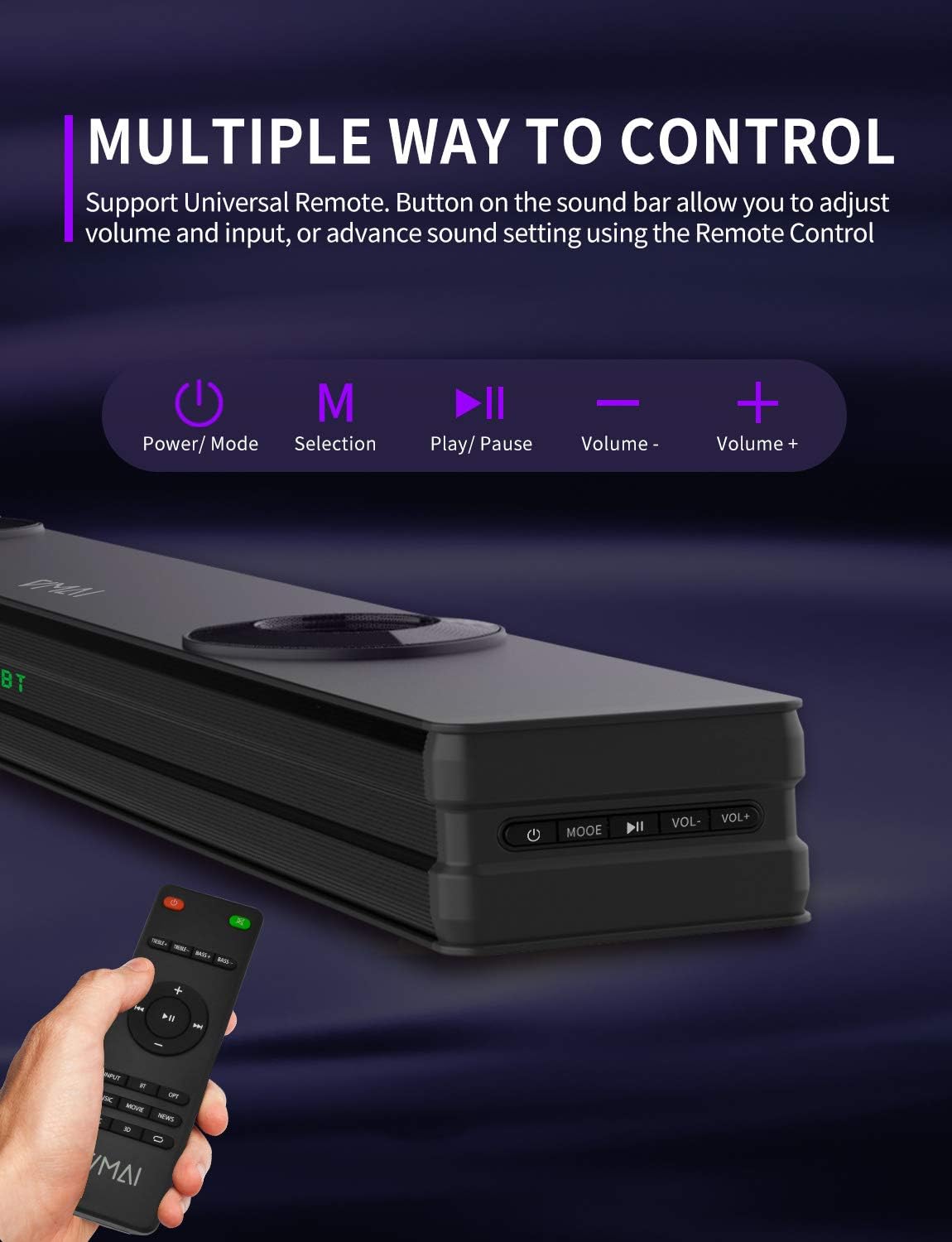
Figure 6.1: The sound bar can be controlled via its integrated buttons or the included remote control.
6.4 Equalizer Modes
The sound bar features 4 distinct sound modes to optimize your listening experience. Use the remote control to switch between them:
- Muzički način rada: Optimized for music playback, enhancing clarity and bass.
- Način rada za filmove: Provides a cinematic surround sound experience, ideal for films.
- Mod vijesti: Enhances vocal clarity for news broadcasts and dialogue-heavy content.
- 3D Surround zvuk: Creates an immersive, three-dimensional audio field.
6.5 Bluetooth uparivanje
Za uparivanje Bluetooth uređaja:
- Switch the sound bar to Bluetooth mode (indicated by 'BT' on the display).
- Omogućite Bluetooth na svom uređaju (pametnom telefonu, tabletu itd.).
- Traži 'VMAI Sound Bar' in your device's Bluetooth settings.
- Select it to pair. Once connected, the 'BT' indicator will stop flashing.
7. Održavanje
To ensure the longevity and optimal performance of your VMAI Sound Bar, follow these maintenance guidelines:
- čišćenje: Use a soft, dry cloth to clean the surface of the sound bar. Do not use liquid cleaners or aerosol sprays.
- ventilacija: Uvjerite se da otvori za ventilaciju nisu blokirani kako biste spriječili pregrijavanje.
- Skladištenje: If storing the sound bar for an extended period, unplug it from the power outlet and store it in a cool, dry place.
- Izbjegavajte vlagu: Keep the sound bar away from water and high humidity.
8. Otkrivanje problema
If you encounter issues with your VMAI Sound Bar, please refer to the following common problems and solutions:
| Problem | Mogući uzrok / rješenje |
|---|---|
| Nema zvuka sa soundbara. |
|
| Izobličen ili loš kvalitet zvuka. |
|
| Problemi sa Bluetooth vezom. |
|
| Daljinski upravljač ne radi. |
|
| Bass is weak or not noticeable. |
|
9. Specifikacije
| Feature | Specifikacija |
|---|---|
| Naziv modela | HD-019 |
| Dimenzije (D x Š x V) | 4.3"D x 38"Š x 2.5"H |
| Težina artikla | 6 funti |
| Maksimalna izlazna snaga zvučnika | 90 Watts |
| Ulazni voltage | 240 Volts |
| Vrsta zvučnika | 3D, Soundbar, Subwoofer, Surround zvuk |
| Tehnologija povezivanja | Optical, HDMI (ARC), AUX, USB, Bluetooth |
| Bluetooth verzija | 5.0 |
| Bluetooth domet | 15.24 metara (50 stopa) |
| Način audio izlaza | Stereo, Surround |
| Materijal | Metal |
| Boja | Mat crna |
10. Garancija i podrška
VMAI offers a 12-month coverage for its products. Every VMAI sound bar undergoes a strict quality test process before shipment. For any issues or inquiries, please contact VMAI customer support. We are committed to resolving all your problems within 24 hours.
VMAI aims to provide high-quality audio products that deliver fantastic audio-visual enjoyment and an authentic interactive experience.


