1. Uvod
Hvala na kupoviniasing the Lenco SPR-100BK Splash-Proof Bluetooth Speaker. This portable speaker delivers powerful sound with strong bass and features FM radio, USB, SD card playback, and integrated light effects. Designed for durability, it is splash-proof, making it suitable for various environments. This manual provides essential information for safe and optimal use of your device.
2. Važna sigurnosna uputstva
- Ne izlažite uređaj ekstremnim temperaturama, direktnoj sunčevoj svjetlosti ili visokoj vlažnosti.
- Ensure the charging port cover is securely closed when near water to maintain splash-proof integrity.
- Ne rastavljajte niti modificirajte uređaj. Za sve servisne radove obratite se kvalifikovanom osoblju.
- Koristite samo navedeni kabel za punjenje.
- Držite uređaj dalje od jakih magnetnih polja.
- Izbjegavajte ispuštanje ili izlaganje uređaja jakim udarima.
3. Proizvod je gotovview
Familiarize yourself with the components of your Lenco SPR-100BK speaker.
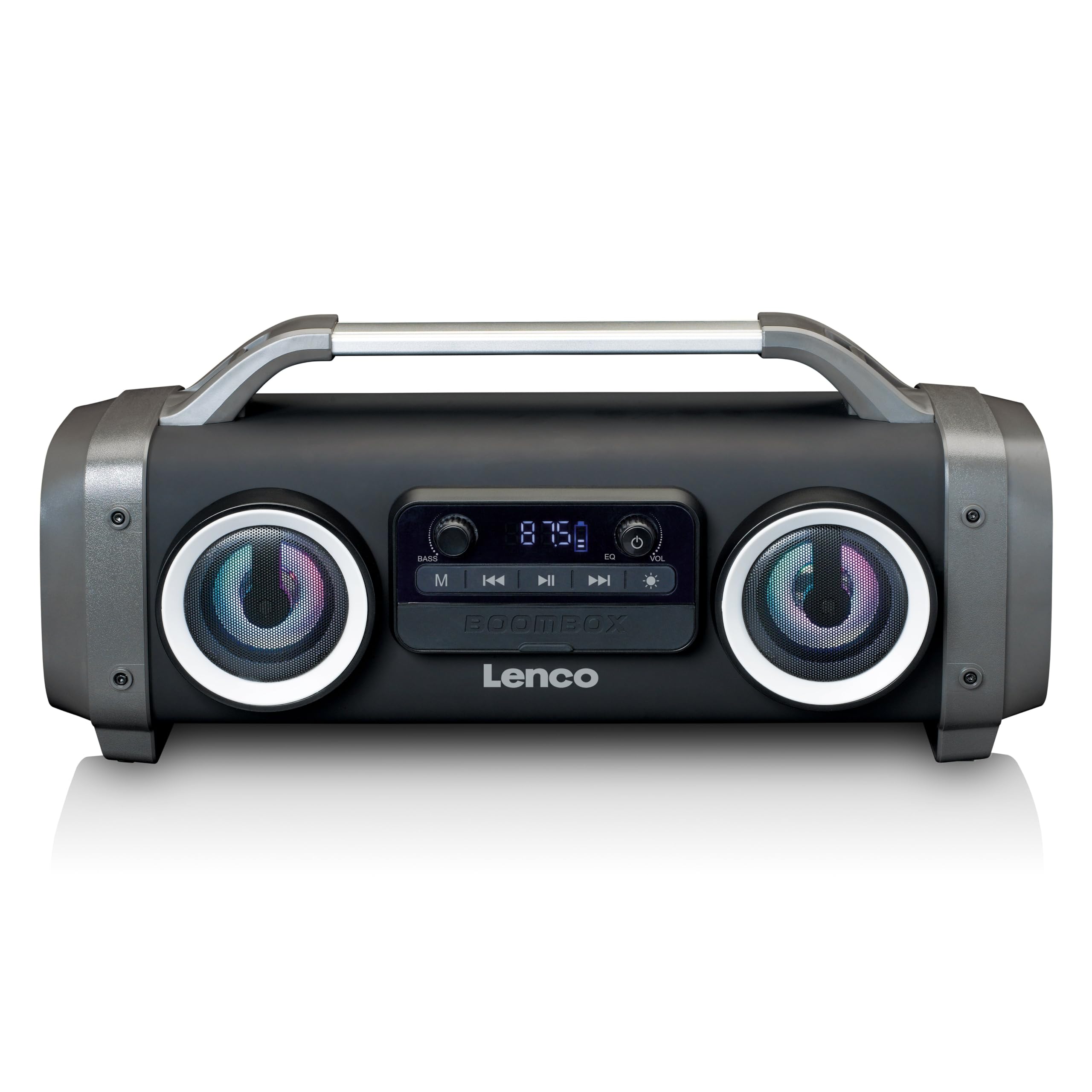
Slika 1: Prednja strana view of the Lenco SPR-100BK speaker, showing the main speaker grille, control panel, and integrated light effects.
3.1 Kontrole i portovi
- Dugme za napajanje: Uključuje ili isključuje zvučnik.
- Dugme za način rada: Prebacuje se između Bluetooth, FM radio, USB, SD i AUX načina rada.
- Dugme za reprodukciju/pauzu: Reprodukuje ili pauzira audio.
- Dugme za kontrolu jačine zvuka: Podešava glavnu jačinu zvuka.
- Bass Boost Knob: Podešava nivo basa.
- Dugme za svjetlosne efekte: Cycles through or turns off light effects.
- USB port: Za reprodukciju sa USB fleš memorije.
- Utor za SD karticu: For SD card playback.
- AUX ulaz (3.5 mm): Za povezivanje eksternih audio uređaja.
- Charging Port (Mini USB): Za punjenje interne baterije.
4. Podešavanje
4.1 Raspakivanje
Carefully remove the speaker and all accessories from the packaging. Ensure the following items are present:
- Lenco SPR-100BK Bluetooth Speaker
- USB kabl za punjenje
- 3.5 mm audio kabel (AUX kabel)
- Uputstvo za upotrebu
4.2 Punjenje baterije
- Locate the Mini USB charging port on the speaker.
- Spojite priloženi USB kabel za punjenje na priključak za punjenje zvučnika.
- Connect the other end of the USB cable to a compatible USB power adapter (5V/1A, not included) or a computer's USB port.
- Indikatorska lampica punjenja će svijetliti, obično crveno, tokom punjenja. Isključit će se ili promijeniti boju (npr. plavu) kada se uređaj potpuno napuni.
- A full charge takes approximately 4-5 hours and provides up to 15 hours of playback (without light effects).
4.3 Početno uključivanje
Pritisnite i držite Dugme za napajanje for a few seconds until the speaker powers on and you hear an audible prompt or see the display light up.
5. Operacija
5.1 Uključivanje/isključivanje napajanja
- Za uključivanje: Pritisnite i držite Dugme za napajanje.
- Za isključivanje: Pritisnite i držite Dugme za napajanje opet.
5.2 Bluetooth veza
- Uključite zvučnik. Automatski će ući u Bluetooth način uparivanja, što će biti naznačeno trepćućom LED lampicom.
- Omogućite Bluetooth na svom mobilnom uređaju (pametnom telefonu, tabletu itd.).
- Traži dostupnih Bluetooth uređaja i odaberite "SPR-100BK" sa liste.
- Nakon uparivanja, zvučnik će emitirati zvuk potvrde, a LED dioda će prestati treptati.
- Pravi bežični stereo (TWS) način rada: If you have two SPR-100BK speakers, you can pair them for stereo sound.
- Provjerite jesu li oba zvučnika uključena i u Bluetooth načinu rada.
- On one speaker (the master), press and hold the Dugme za način rada until you hear a TWS pairing prompt.
- The two speakers will automatically connect. Once connected, pair your device to the master speaker as described above.
5.3 FM radio
- Pritisnite Dugme za način rada repeatedly until you select FM Radio mode.
- Za automatsko skeniranje i spremanje stanica: Pritisnite i držite Dugme za reprodukciju/pauzu. The speaker will scan for available FM stations and save them automatically.
- To switch between saved stations: Use the Dugmad za prethodnu/sljedeću pjesmu (if available, otherwise it will cycle through automatically).
- Napomena: For better FM reception, ensure the included 3.5mm audio cable is plugged into the AUX input, as it acts as an external antenna.
5.4 Reprodukcija sa USB-a/SD kartice
- Insert a USB flash drive or an SD card (with supported audio files) u odgovarajući port/slot.
- The speaker will automatically switch to USB or SD mode and begin playback. If not, press the Dugme za način rada da odaberete pravi izvor.
- Koristite Dugme za reprodukciju/pauzu i Dugmad za prethodnu/sljedeću pjesmu za kontrolu reprodukcije.
5.5 AUX ulaz
- Connect one end of the supplied 3.5mm audio cable to the AUX input on the speaker.
- Drugi kraj priključite na priključak za slušalice ili audio izlaz vašeg vanjskog uređaja.
- Pritisnite Dugme za način rada za odabir AUX moda.
- Kontrolirajte reprodukciju i jačinu zvuka sa svog eksternog uređaja.
5.6 Svjetlosni efekti
Pritisnite Dugme za svjetlosni efekat to cycle through different light modes or to turn the lights off. The speaker features 12 color light effects.
5.7 Podešavanje zvuka
- Volumen: Rotirajte Gumb za kontrolu jačine zvuka to increase or decrease the overall sound level.
- bas: Rotirajte Bass Boost Knob to adjust the intensity of the bass.
6. Održavanje
6.1 Čišćenje
Wipe the speaker with a soft, dry cloth. Do not use abrasive cleaners, waxes, or solvents. For stubborn dirt, a slightly damp cloth can be used, ensuring all port covers are sealed.
6.2 Njega baterija
- Da biste produžili vijek trajanja baterije, potpuno napunite zvučnik prije prve upotrebe.
- Izbjegavajte često potpuno pražnjenje baterije.
- If storing the speaker for an extended period, charge it to about 50% every few months.
6.3 Skladištenje
Zvučnik čuvajte na hladnom i suhom mjestu, dalje od direktne sunčeve svjetlosti i ekstremnih temperatura.
7. Otkrivanje problema
| Problem | Mogući uzrok | Rješenje |
|---|---|---|
| Zvučnik se ne uključuje. | Baterija je prazna. | Napunite zvučnik pomoću priloženog USB kabla. |
| Nema zvuka. | Jačina zvuka je preniska; odabran je pogrešan način rada; uređaj nije povezan. | Increase volume; press Mode button to select correct source; ensure Bluetooth device is paired or AUX cable is connected. |
| Bluetooth uparivanje nije uspjelo. | Zvučnik nije u načinu uparivanja; uređaj je previše udaljen; smetnje. | Ensure speaker is in Bluetooth pairing mode (flashing LED); move device closer; turn off other Bluetooth devices. |
| Slab FM radio prijem. | No external antenna; weak signal. | Plug in the 3.5mm AUX cable to act as an antenna; try moving the speaker to a different location. |
| Reprodukcija sa USB/SD kartice ne radi. | Nepodržano file format; kartica/disk nije pravilno umetnut; oštećen files. | Osigurati files are in a supported format (e.g., MP3); reinsert the USB drive/SD card; try a different drive/card. |
8. Specifikacije
| Broj modela | SPR-100BK |
| Brand | Lenco |
| Izlazna snaga | 25 vati RMS |
| Povezivanje | Bluetooth, USB, SD Card, 3.5mm AUX Input |
| Vrsta baterije | Litijum-jonski (4400 mAh) |
| Vrijeme reprodukcije | Up to 15 hours (reduced with light effects) |
| Ulaz za punjenje | 5V/1A (Mini USB) |
| Posebne karakteristike | Splash-proof design, Integrated light effects, FM Radio, TWS function |
| Dimenzije (D x Š x V) | 60 x 60 x 85 cm |
| Težina | 2 kilograma |
Napomena: Specifikacije su podložne promjenama bez prethodne najave.
9. Garancija i podrška
9.1 Informacije o garanciji
This Lenco product is covered by a warranty for a period of 2 godine on parts from the date of purchase. This warranty covers manufacturing defects and workmanship under normal use. It does not cover damage caused by misuse, accidents, unauthorized modifications, or normal wear and tear.
9.2 Ažuriranja softvera
Software updates for this product are guaranteed until 13. aprila 2030.
9.3 Korisnička podrška
For technical assistance, warranty claims, or product inquiries, please contact Lenco customer support through their official website or the retailer where the product was purchased. Please have your model number (SPR-100BK) and proof of purchase ready.
Official Lenco Webstranica: www.lenco.com


