Uvod
Thank you for choosing the Donerton P32 Smartwatch. This manual provides essential information for setting up, operating, maintaining, and troubleshooting your device. Please read it carefully to ensure optimal performance and longevity of your smartwatch.
Šta je u kutiji
- Donerton P32 Smartwatch
- Magnetski USB kabel za punjenje
- Uputstvo za upotrebu
Vodič za postavljanje
1. Punjenje pametnog sata
Before first use, fully charge your smartwatch. Connect the magnetic charging cable to the charging contacts on the back of the watch and plug the USB end into a standard USB power adapter (not included) or a computer USB port.
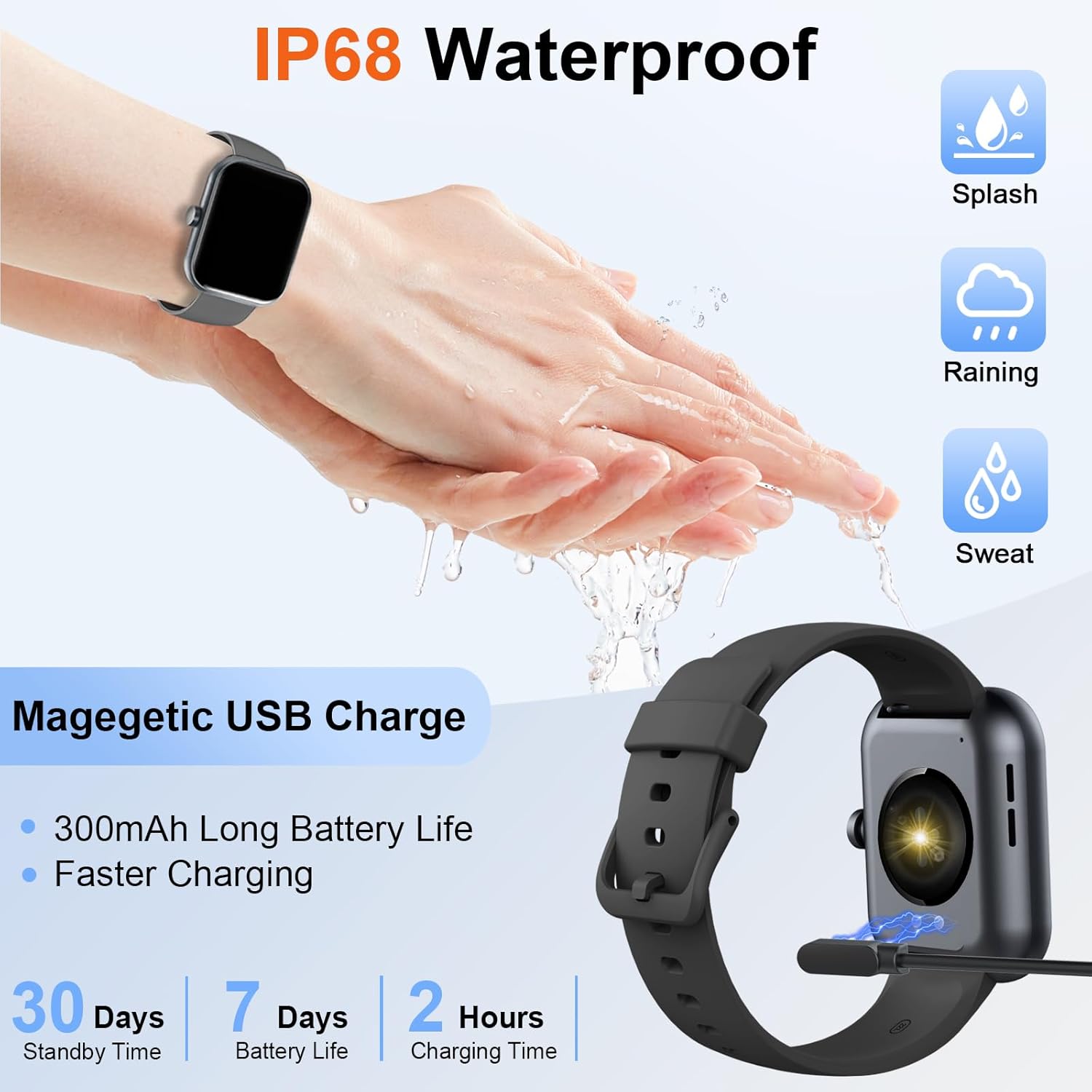
Image: The Donerton P32 Smartwatch connected to its magnetic USB charging cable, illustrating the charging process. Icons for IP68 waterproof rating and battery life are also visible.
A full charge typically takes approximately 1.5 to 2 hours. The battery indicator on the screen will show the charging status.
2. App Installation (Glory Fit)
To unlock all features and synchronize data, download the "Glory Fit" app on your smartphone. You can find it on the App Store (for iOS devices) or Google Play Store (for Android devices).
- Scan the QR code in the manual or on the watch screen (if available) to directly download the app.
- Alternatively, search for "Glory Fit" in your phone's app store.
- Install the app and grant necessary permissions for Bluetooth, notifications, and location services.
3. Uparivanje uređaja
Provjerite je li Bluetooth na vašem pametnom telefonu omogućen.
- Open the "Glory Fit" app on your smartphone.
- Navigate to the "Device" or "Mine" section within the app.
- Tap "Add Device" or "Bind Device" and select your Donerton P32 Smartwatch from the list of available Bluetooth devices. The watch name usually appears as "P32" or similar.
- Potvrdite zahtjev za uparivanje i na telefonu i na pametnom satu.
- Nakon uparivanja, sat će sinhronizovati vrijeme i podatke sa vašim telefonom.
Uputstvo za upotrebu
Osnovna navigacija
- Ekran na dodir: Prevucite prstom lijevo/desno, gore/dolje za navigaciju kroz menije i funkcije. Dodirnite za odabir.
- Bočno dugme: Press to wake up the screen, return to the previous screen, or go to the main watch face.
- Osjećaj za zapešće: The screen will illuminate automatically when you raise your wrist.

Image: The Donerton P32 Smartwatch showcasing its main features through a series of icons, including alarm, sedentary reminder, stopwatch, calorie tracking, step counting, multiple sports modes, find phone function, and a full touch screen interface.
Ključne karakteristike
- Activity Tracking (Pedometer, Distance, Calories): The integrated high-performance motion sensor accurately records your steps, distance covered, and calories burned throughout the day. View detailed statistics in the Glory Fit app.
- Monitor otkucaja srca: The smartwatch continuously tracks your heart rate in real-time. This data helps you monitor your cardiovascular health and optimize workout intensity.
- Praćenje spavanja: Automatically monitors your sleep duration and quality, distinguishing between light, deep, and REM sleep stages. Access comprehensive sleep analysis in the Glory Fit app to understand your sleep patterns.
- 24 sportskih načina rada: Select from a variety of sports modes to track specific activities. The watch records relevant data for each mode, such as duration, calories, and heart rate.

Image: A man running outdoors, wearing the Donerton P32 Smartwatch. The image highlights the '100+ Sport Modes Fitness Tracker' feature, displaying activity tracking metrics such as steps, distance, and calories on the watch face and a smartphone screen.
- Obavještenja o poruci: Receive alerts for incoming calls, SMS messages, and notifications from social media apps (Facebook, Messenger, Twitter, WhatsApp, Instagram) directly on your wrist.
- Bluetooth Call and Answer: Make and receive calls directly from your smartwatch when connected to your phone via Bluetooth.

Image: A man interacting with the Donerton P32 Smartwatch to manage a Bluetooth call. The watch screen displays options for dialing, an incoming call, call history, and contacts, demonstrating its call management capabilities.
- Vremenska prognoza: After setting your location in the app, view current and upcoming weather conditions directly on your smartwatch.
- Alarm: Set alarms through the Glory Fit app to wake you up or remind you of important events.
- Kontrola muzike: Kontrolirajte reprodukciju muzike na svom pametnom telefonu (reprodukcija, pauza, preskakanje pjesama) direktno sa svog sata.
- Sedentarni podsjetnik: The watch can remind you to move if you've been inactive for too long, promoting a healthier lifestyle.
- Štoperica i tajmer: Utilize built-in stopwatch and timer functions for various activities.
- Pronađite telefon: If your phone is misplaced, use this feature on your watch to make your phone ring (if within Bluetooth range).
- Kontrola kamere: Remotely control your smartphone's camera by shaking your wrist while the camera function is active in the app.

Image: The Donerton P32 Smartwatch interface showing a selection of its multifunctional capabilities, including weather forecasts, alarm clock settings, camera remote control, timer, flashlight, and the 'Find Phone' feature.
Održavanje
Vodootpornost (IP68)
The Donerton P32 Smartwatch is IP68 waterproof, meaning it is resistant to daily moisture such as hand washing, bathing, and swimming. It is not necessary to remove it frequently for these activities.
Važna napomena: Do not use the smartwatch for diving or in hot water environments like hot springs or saunas, as extreme temperatures and high-pressure water can compromise the seal and cause damage.
Čišćenje
- Redovno brišite ekran i remen sata mekom, suhom krpom.
- Za tvrdokornu prljavštinu koristite blagi damp krpom, a zatim dobro osušite.
- Izbjegavajte upotrebu jakih hemikalija ili abrazivnih materijala, koji mogu oštetiti završnu obradu.
Battery Care
- Izbjegavajte često potpuno pražnjenje baterije.
- Charge the watch when the battery level is low.
- Čuvajte sat na hladnom i suhom mjestu ako ga ne koristite duži period.
Rješavanje problema
| Problem | Moguće rješenje |
|---|---|
| Sat se ne uključuje | Provjerite je li sat potpuno napunjen. Spojite ga na punjač na najmanje 10 minuta. |
| Nije moguće upariti s telefonom | 1. Provjerite je li Bluetooth omogućen na vašem telefonu. 2. Make sure the watch is within Bluetooth range. 3. Ponovo pokrenite i sat i telefon. 4. Obrišite Bluetooth keš memoriju na telefonu (ako je primjenjivo). 5. Ensure the "Glory Fit" app has necessary permissions. |
| Obavještenja nisu primljena | 1. Check if the watch is successfully paired with the app. 2. Ensure notification permissions are granted to the "Glory Fit" app on your phone. 3. Verify that app notifications are enabled within the "Glory Fit" app settings. 4. Provjerite da li postavke obavještenja na vašem telefonu dozvoljavaju aplikaciji prikazivanje upozorenja. |
| Netačni zdravstveni podaci | 1. Ensure the watch is worn snugly on your wrist, about one finger's width from the wrist bone. 2. Keep the sensor clean and free from sweat or dirt. 3. Note that smartwatches are not medical devices and data is for reference only. |
| Kratko trajanje baterije | 1. Smanjite svjetlinu ekrana. 2. Ograničite česta buđenja ekrana. 3. Turn off unnecessary features if not in use. 4. Provjerite da li je sat potpuno napunjen. |
Specifikacije
| Feature | Detalj |
|---|---|
| Brand | Donerton |
| Broj modela | P32 |
| Veličina ekrana | 1.69 inches TFT-LCD |
| Operativni sistem | Proprietary (Compatible with Android, iOS) |
| Povezivanje | Bluetooth 5.0 |
| Kompatibilni uređaji | Smartphones with iOS 9.0+ / Android 5.0+ |
| Vrsta baterije | Litijum-polimer |
| Trajanje baterije (tipična upotreba) | Do 7 dana |
| Vrijeme pripravnosti | Do 30 dana |
| Vrijeme punjenja | Otprilike 1.5 - 2 sata |
| Otpornost na vodu | IP68 |
| Naziv aplikacije | glory fit |
Garancija i podrška
For warranty information and customer support, please refer to the documentation provided with your purchase or contact Donerton customer service directly. Details are typically available on the official Donerton webweb-mjestu ili putem vašeg prodavača.


