1. Uvod
The ANCEL FX1000 is a professional vehicle diagnostic tool designed to read and clear trouble codes, view live data, and perform various special functions for a single-car manufacturer. It supports full OBD service modes and is compatible with vehicles manufactured from 1996 onwards. This manual provides detailed instructions for setting up and operating your device.
2. Značajke proizvoda
- Full OBDII Service Modes: Supports 8 OBDII service modes for comprehensive diagnostics.
- Multi-System Diagnostics: Capable of diagnosing all major vehicle systems including Engine, Transmission, SRS (Supplemental Restraint System), SAS (Steering Angle Sensor), TPMS (Tire Pressure Monitoring System), ABS (Anti-lock Braking System), and more.
- Posebne funkcije: Includes advanced functions such as DPF (Diesel Particulate Filter) Regeneration, Battery Replacement, ABS Bleeding, Oil Service Reset, EPB (Electronic Parking Brake) Reset, and Throttle Position Adaption.
- Podrška za više jezika: Supports 7 languages: English, French, Spanish, German, Russian, Polish, and Portuguese.
- Manufacturer-Specific Tool: Designed for a single-car manufacturer, allowing in-depth diagnostics for a specific brand's vehicle series.
- Lifetime Free Online Updates: Osigurava da vaš uređaj uvijek ima najnoviji softver i pokrivenost vozila.
3. Sadržaj paketa
Your ANCEL FX1000 package should include the following items:
- ANCEL FX1000 Diagnostic Tool
- OBDII priključni kabel
- Micro USB Cable (for PC connection and updates)
- Preuzmite vodič
- Hard Shell torbica
4. Izgled uređaja
Familiarize yourself with the buttons and ports on your ANCEL FX1000 device for optimal operation.

Image: ANCEL FX1000 device showing LCD display, Return button, Scroll Left/Right/Up/Down buttons, Fn button, and Ok button. Dimensions are also indicated.
- LCD ekran: Prikazuje dijagnostičke informacije i opcije menija.
- Dugme za povratak: Vraća se na prethodni ekran ili meni.
- Scroll Buttons (Up/Down/Left/Right): Used to navigate through menus and select options.
- Fn dugme: Function button, may have context-specific uses.
- Dugme OK: Potvrđuje odabire ili ulazi u podmenije.
- OBDII konektor: Connects the device to the vehicle's OBDII port.
- USB port: For connecting to a computer for software updates.
5. Podešavanje i povezivanje
Follow these steps to connect your ANCEL FX1000 to your vehicle:
- Pronađite OBDII priključak vašeg vozila. Obično se nalazi ispod instrumentne ploče na strani vozača.
- Ensure the vehicle's ignition is ON, but the engine is NOT running. For push-button start vehicles, press the start button until all dashboard lights illuminate without starting the engine.
- Plug the OBDII connector from the ANCEL FX1000 into your vehicle's OBDII port. The device will power on automatically.
- Once powered on, the device is ready for use.
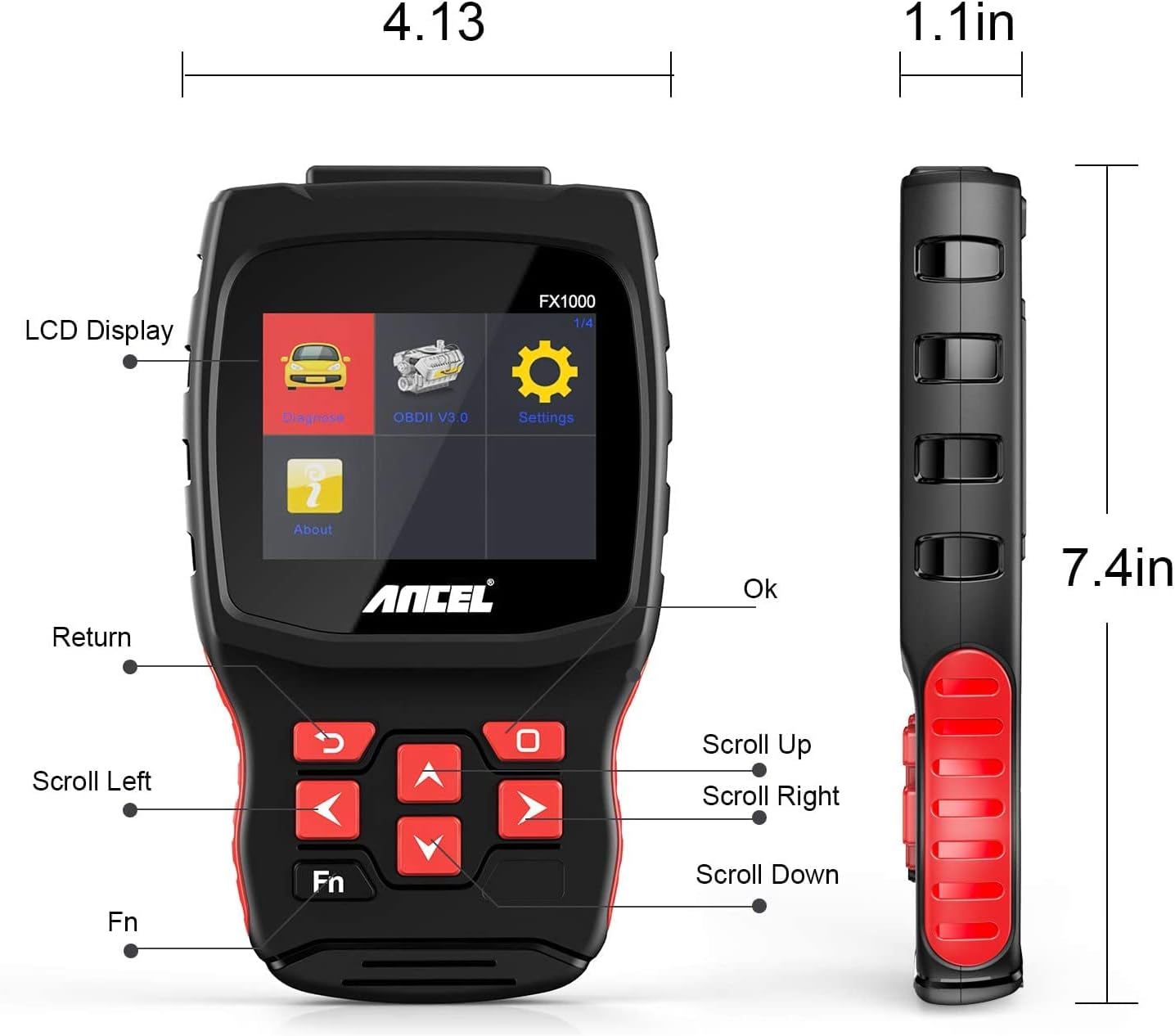
Image: A hand holding the ANCEL FX1000 connected to a vehicle's OBDII port, with the car's dashboard visible.
6. Navigacija i postavke
The ANCEL FX1000 features a user-friendly interface. Use the arrow buttons to navigate and the OK button to select.
- Dijagnoza: Access vehicle-specific diagnostic functions.
- OBDII V3.0: Access general OBDII functions for all compatible vehicles.
- Postavke: Konfigurišite postavke uređaja.
- O: View device information such as serial number, firmware version, and software version.
Opcije menija postavki:
- Jezik: Promijenite jezik prikaza.
- jedinica: Prebacivanje između Celzijusa i Farenhajta za očitavanje temperature.
- Zvučni signal: Enable or disable audible feedback.
- Zapis: View recorded diagnostic data.
- Test dugmeta: Test the functionality of the device buttons.
- LCD Test: Test the LCD display.
7. Dijagnostika sistema
The ANCEL FX1000 allows you to perform in-depth diagnostics on various vehicle systems. After selecting 'Diagnose' and your vehicle's manufacturer (e.g., Toyota), you can choose specific systems.
Image: Visual representation of systems diagnosed by FX1000, including Engine, ABS, TPMS, Transmission, Oil Service, Airbag, Battery, Audio, and Headlight Activate.
Dijagnostičke funkcije:
- Read Trouble Code: Retrieves current, pending, and history Diagnostic Trouble Codes (DTCs).
- Clear Trouble Code: Erases DTCs from the vehicle's computer.
- Čitanje prijenosa podataka: Prikazuje parametre podataka u realnom vremenu sa senzora vozila.
- Aktivni test: Allows bidirectional control to test specific components.
- Posebna funkcija: Accesses advanced maintenance and service functions.
8. Posebne funkcije
The ANCEL FX1000 offers several special functions for vehicle maintenance:

Image: Visual representation of special functions including Oil Service Reset, ABS Bleeding, TPMS Reset, and EPB Reset.
- Resetovanje servisa ulja: Resetuje lampicu za servis ulja nakon zamjene ulja.
- Krvarenje iz ABS-a: Obavlja funkcije odzračivanja za ABS sistem.
- Resetovanje EPB-a: Resets the Electronic Parking Brake system.
- Throttle Position Adaption: Adapts the throttle position sensor.
- Regeneracija DPF-a: Pokreće proces regeneracije filtera dizelskih čestica.
- Zamjena baterije: Registers new battery replacements.
9. OBDII Functions (General)
The 'OBDII V3.0' menu provides general diagnostic functions compatible with all OBDII-compliant vehicles (1996 and newer).
- Read Current Trouble Code: Displays active DTCs.
- Clear Trouble Code: Erases all stored DTCs.
- Read Current Data: View podaci senzora uživo.
- Read Pending Trouble Code: Displays DTCs that have not yet fully matured.
- Read Freeze Frame Data: Shows a snapshot of vehicle conditions when a DTC was set.
- Readiness Tests: Provjerava status monitora povezanih s emisijama.
Readiness Test:
The Readiness Test is crucial for emissions inspections. It indicates whether various emission control systems have completed their self-tests. Look for 'Complete' or 'Supported' status for all monitors. If a monitor shows 'Not Complete' or 'Not Supported', it may indicate an issue or that the drive cycle has not been completed.
10. Clearing Trouble Codes
To clear trouble codes, navigate to the 'Clear Trouble Code' option within the relevant diagnostic menu. The device will prompt you to confirm. After clearing, it is recommended to cycle the vehicle's ignition off and on to ensure all related warning lights are reset.
Note: The ANCEL FX1000 can only read and clear SRS error codes; it does NOT support SRS reset functions.
11. Ažuriranje softvera
To ensure your ANCEL FX1000 has the latest vehicle coverage and features, regular software updates are recommended. The device offers lifetime free online updates.
- Connect the device to your computer using the provided Micro USB cable.
- Follow the instructions in the 'Download Guide' included in your package to install the update software on your computer.
- Register your device using the serial number and your email address.
- Select the specific car manufacturer software you need for your device.
- Perform the update as prompted by the software.

Image: ANCEL FX1000 connected via USB cable to a laptop, illustrating the update process.
12. Otkrivanje problema
If you encounter issues while using your ANCEL FX1000, refer to the following common scenarios:
-
Povezani dokumenti - FX1000

ANCEL VD500 Korisnički priručnik: Vodič za OBD2 dijagnostički alat
Sveobuhvatno korisničko uputstvo za dijagnostički skener ANCEL VD500 OBD2. Saznajte više o sigurnosnim mjerama opreza, karakteristikama, radu, specifikacijama i garanciji za vaš automobilski dijagnostički alat.
ANCEL VOD700 Korisnički priručnik - Volvo višesistemski skener
Sveobuhvatni korisnički priručnik za višesistemski skener ANCEL VOD700, koji pruža detaljne upute za Volvo vozila, uključujući dijagnostiku, posebne funkcije, podešavanje alata i ažuriranja.
ANCEL DS160, DS100, DS200 Korisnički priručnik - Automobilski dijagnostički alati
Korisnički priručnik za ANCEL DS160, DS100 i DS200 automobilske dijagnostičke alate. Obuhvata karakteristike, parametre, upotrebu, funkcije, često postavljana pitanja i garanciju za ove OBD2 skenere.
ANCEL BD300 OBD2 skener - uputstvo za upotrebu
Sveobuhvatno korisničko uputstvo za ANCEL BD300 OBD2 skener. Saznajte kako preuzeti ANCEL aplikaciju, povezati se putem Bluetootha, izvršiti dijagnostiku vozila, ažurirati softver i koristiti posebne funkcije poput EPB-a, CBS-a, ABS-a i resetiranja zračnih jastuka. Podržava potpunu dijagnostiku sistema za BMW i druga vozila.
ANCEL FD500 Korisnički priručnik: Sveobuhvatni vodič za dijagnostiku automobila
Otkrijte ANCEL FD500, sveobuhvatni multisistemski OBD2 skener u sivoj boji, dizajniran za vozila Ford, Lincoln i Mercury. Ovaj korisnički priručnik pruža detaljne upute o njegovim karakteristikama, sigurnosnim mjerama opreza i dijagnostičkim funkcijama, uključujući motor, ABS, SRS, mjenjač, 4WD sisteme, EPB, resetiranje ulja i registraciju akumulatora.
ANCEL BD300 korisnički priručnik i vodič za brzi početak
Sveobuhvatno korisničko uputstvo za ANCEL BD300 Bluetooth OBD2 dijagnostički alat, koje pokriva podešavanje, rad i funkcije za BMW/Mini vozila. Uključuje upute za povezivanje aplikacije, dijagnostiku sistema i resetiranje servisa.