Uvod
This manual provides essential information for the safe and efficient operation of your Dual MCR 4 Portable DAB+/FM Radio. This device offers both digital DAB+ and analog FM radio reception, ensuring a wide range of listening options. Its color TFT display enhances usability by showing station names and additional information. With intuitive controls, auxiliary input, and headphone jack, the MCR 4 is designed for versatile and enjoyable audio experiences.
Sigurnosne informacije
- Prije korištenja uređaja pažljivo pročitajte sva uputstva.
- Držite uređaj dalje od vode, vlage i visokih temperatura.
- Ne pokušavajte rastavljati ili modificirati uređaj. Za sve servisne radove obratite se kvalifikovanom osoblju.
- Use only the provided power adapter or recommended battery types.
- Osigurajte odgovarajuću ventilaciju oko uređaja tokom rada.
- Odgovorno odložite baterije u skladu s lokalnim propisima.
Sadržaj paketa
Molimo Vas da provjerite da li se u paketu nalaze svi artikli:
- Dual MCR 4 Main Unit
- Adapter za napajanje
- Uputstvo za upotrebu
Product Overview
The Dual MCR 4 features a compact design with intuitive controls for easy access to its functions. Key components include:
- TFT ekran u boji: Prikazuje informacije o stanici, vrijeme i opcije menija.
- Okretno dugme: For tuning, volume control, and menu navigation.
- Dugmad za memoriju: To save and recall your favorite radio stations.
- Teleskopska antena: Za optimalan prijem radio signala.
- Auxiliary Input (AUX-IN): Located at the back, for connecting external audio devices.
- Priključak za slušalice: Located at the back, for private listening.
- Mechanical On/Off Switch: Located at the back, for direct power control.
- Passive Membrane: Located at the back, contributing to exceptional sound quality.
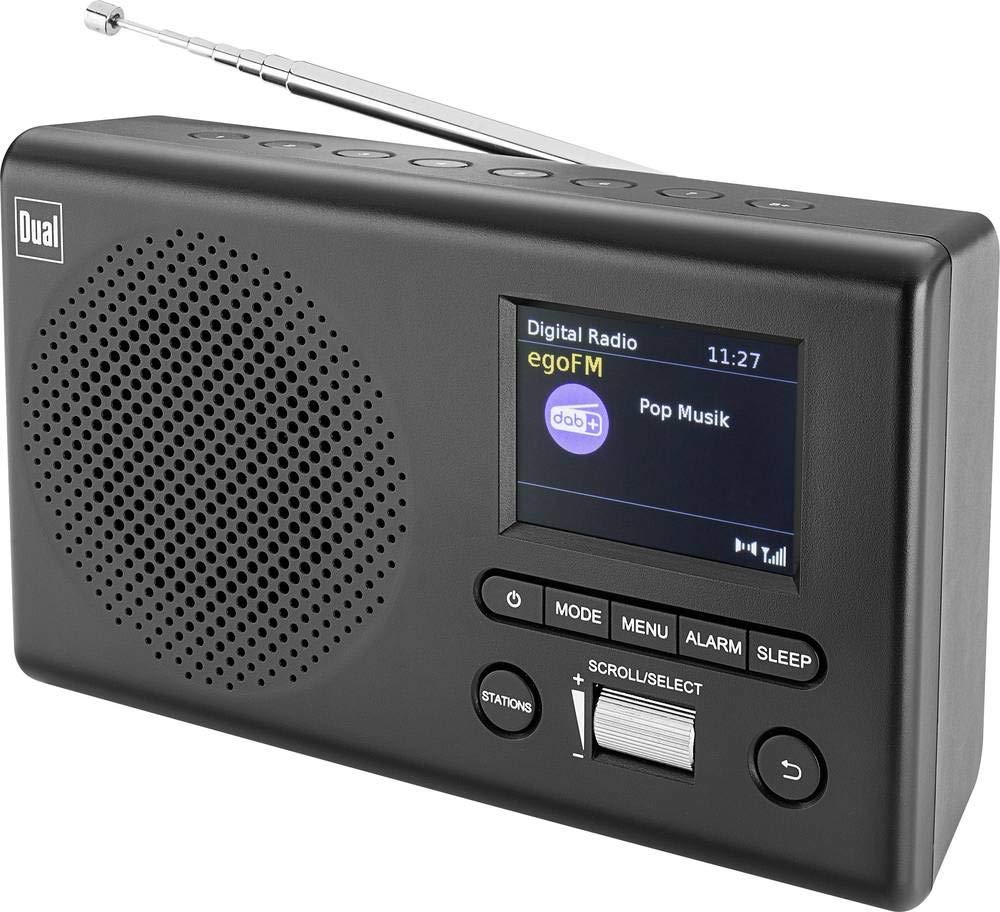
Slika: Front view of the Dual MCR 4 Portable DAB+/FM Radio, showing the color TFT display, rotary knob, and control buttons. The radio has a black and silver finish.
Setup
1. Napajanje uređaja
The Dual MCR 4 can be powered by either the included AC power adapter or batteries, offering portability.
- Korištenje AC adaptera: Connect the power adapter to the DC IN port on the back of the radio and plug the other end into a standard wall outlet.
- Korištenje baterija: Open the battery compartment on the bottom/back of the radio and insert the required batteries (type and quantity usually specified inside the compartment or in the full manual). Ensure correct polarity.
2. Podešavanje antene
Extend the telescopic antenna fully for optimal reception of both DAB+ and FM radio signals. Adjust its position for the best signal quality.
3. Initial Power On and Station Scan
After connecting power, switch on the radio using the mechanical ON/OFF switch at the back. The radio will typically perform an automatic station scan upon first use, searching for available digital (DAB+) and analog (FM) radio stations. This process may take a few moments.
Uputstvo za upotrebu
1. Osnovni rad
- Uključivanje/isključivanje: Use the mechanical switch at the back. For standby, a dedicated button on the front might be available (refer to physical unit).
- Kontrola jačine zvuka: Rotate the main rotary knob to adjust the listening volume.
2. DAB+ radio način rada
- Selecting DAB+ Mode: Press the MODE button (if available) or navigate through the menu using the rotary knob until DAB+ mode is selected.
- Odabir stanice: After an automatic scan, use the rotary knob to scroll through the list of available DAB+ stations. Press the knob to confirm your selection.
- Čuvanje unaprijed postavljenih postavki: Tune to your desired station. Press and hold a memory button (e.g., 1-5) until the display confirms the station is saved.
- Podsjećajući na unaprijed zadane postavke: Briefly press the corresponding memory button to recall a saved station.
- Prikaz informacija: The color TFT display will show station name, program information (DLS), and potentially station logos or slideshows.
3. Režim FM radija
- Selecting FM Mode: Press the MODE button or navigate through the menu until FM mode is selected.
- Ručno podešavanje: Rotate the tuning knob to manually adjust the frequency.
- Automatsko skeniranje: Press and hold the tuning knob or a dedicated scan button to automatically search for the next available FM station.
- Čuvanje unaprijed postavljenih postavki: Tune to your desired FM station. Press and hold a memory button until the display confirms the station is saved.
- Podsjećajući na unaprijed zadane postavke: Briefly press the corresponding memory button to recall a saved station.
4. Auxiliary Input (AUX-IN)
Connect an external audio device (e.g., smartphone, MP3 player) to the AUX-IN port on the back of the radio using a 3.5mm audio cable. Select AUX mode on the radio to play audio from the connected device.
5. Korištenje slušalica
For private listening, plug standard 3.5mm headphones into the headphone jack located on the back of the unit. The internal speaker will automatically mute.
Održavanje
- čišćenje: Obrišite radio mekom, suhom krpom. Ne koristite abrazivna sredstva za čišćenje ili rastvarače.
- Skladištenje: If storing for an extended period, remove batteries and store the unit in a cool, dry place.
- Održavanje antene: Pažljivo rukujte teleskopskom antenom kako biste spriječili oštećenja.
Rješavanje problema
| Problem | Moguće rješenje |
|---|---|
| Nema struje |
|
| Loš radio prijem |
|
| Nema zvuka iz zvučnika |
|
Specifikacije
| Brand | Dual |
| Broj modela | 76074 |
| Boja | Crna, srebrna |
| Tehnologija podešavanja | DAB+, FM |
| Tehnologija povezivanja | Auxiliary (AUX-IN) |
| Posebne karakteristike | Portable, Color TFT Display |
| Kompatibilni uređaji | Headphones, External Audio Devices (via AUX-IN) |
| Izvor napajanja | Mains (AC Adapter), Battery Powered |
| Uključene komponente | Main Unit, Power Adapter, User Manual |
| Preporučena upotreba | Muzika |
Garancija i podrška
For warranty information and technical support, please refer to the specific warranty card included with your product or contact Dual customer service. The included user manual provides detailed instructions and contact information.


