Uvod
The Hyperkin Armor3 NuWave Controller is designed to provide accurate and fluid motion control for your Nintendo Wii U and Wii consoles. Featuring built-in Nu+ technology, this controller enhances your gaming experience by offering a wider range of motion in compatible titles. This manual provides essential information on setting up, operating, maintaining, and troubleshooting your NuWave Controller.
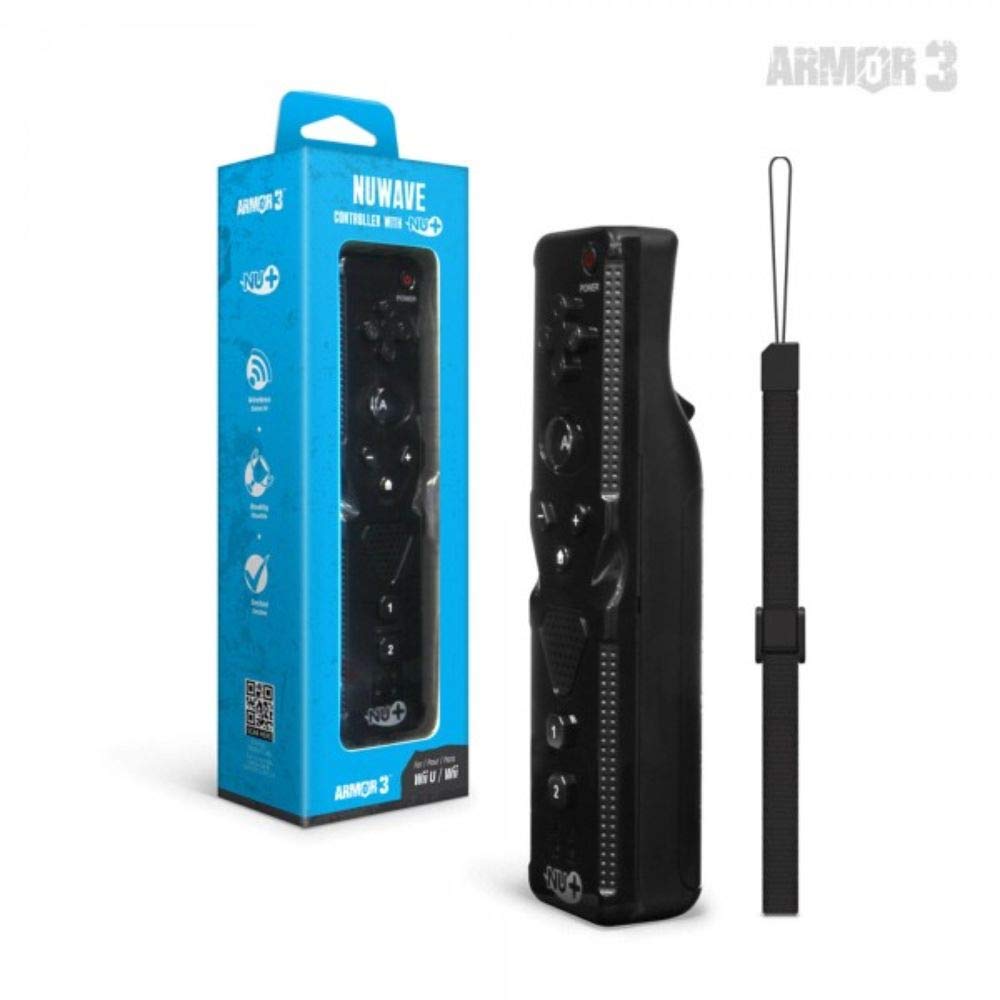
Slika 1: Hyperkin Armor3 NuWave Controller and its packaging. The controller is black with a wrist strap, and the packaging highlights its Nu+ technology and compatibility with Wii U and Wii.
Product Overview
The Armor3 NuWave Controller is a motion-sensing controller compatible with both Wii U and Wii systems. It integrates advanced Nu+ technology for enhanced motion detection and precision in supported games.
Ključne karakteristike:
- Kompatibilnost: Fully compatible with Nintendo Wii U and Nintendo Wii consoles.
- Nu+ Technology: Built-in technology for a wider range of motion and improved accuracy in compatible titles.
- Ergonomski dizajn: Designed for comfortable grip and extended gameplay sessions.
- Izvor napajanja: Potrebne su 2 AA baterije (nisu uključene).
Setup
1. Instalacija baterije
- Pronađite odjeljak za baterije na stražnjoj strani kontrolera.
- Pomaknite poklopac baterije prema dolje da biste ga otvorili.
- Umetnite dvije (2) AA baterije, pazeći na ispravan polaritet (+/-) kao što je naznačeno unutar odjeljka.
- Vratite poklopac baterije tako što ćete ga pomaknuti prema gore dok ne klikne na svoje mjesto.
2. Povezivanje s vašom konzolom
To connect the NuWave Controller to your Wii U or Wii console, follow these steps:
- Ensure your console is powered on.
- On your Wii U or Wii console, press the SYNC button (usually located near the SD card slot or battery compartment).
- On the NuWave Controller, open the battery cover and locate the small red SYNC button inside the battery compartment.
- Press and release the SYNC button on the controller.
- The player indicator lights on the bottom of the controller will flash. Once a single light remains lit, the controller is successfully connected.
- If connection fails, repeat steps 2-5. Ensure the controller is within range of the console.
Uputstvo za upotrebu
Osnovne kontrole:
- Upravljačka tipkovnica (D-Pad): Used for menu navigation and character movement.
- Dugme A: Primary action button, often used for selection or interaction.
- B Button (Trigger): Located on the underside, typically used for grabbing or firing.
- 1 & 2 Buttons: Auxiliary action buttons, functions vary by game.
- Dugme za početnu stranicu: Returns to the console's Home Menu.
- Plus (+) & Minus (-) Buttons: Often used for zooming, adjusting settings, or specific in-game actions.
- Dugme za napajanje: Uključuje/isključuje kontroler.
Motion Sensing with Nu+ Technology:
The built-in Nu+ technology provides enhanced motion tracking. For games that support it, you will experience more precise and responsive movements. Hold the controller firmly and ensure clear line of sight to the sensor bar for optimal performance.
- kalibracija: Some games may require initial calibration. Follow on-screen prompts.
- Remen za zapešće: Always use the included wrist strap to prevent accidental drops during active gameplay.
Održavanje
čišćenje:
- Obrišite kontroler mekom, suhom krpom.
- Za tvrdokornu prljavštinu, lagano dampNamočite krpu vodom. Ne koristite jake hemikalije ili abrazivna sredstva za čišćenje.
- Ensure no liquid enters the controller's openings.
Skladištenje:
- Kontroler čuvajte na hladnom i suhom mjestu, dalje od direktne sunčeve svjetlosti i ekstremnih temperatura.
- Ako skladištite duže vrijeme, izvadite baterije kako biste spriječili curenje.
Održavanje baterije:
- Always use new, high-quality AA batteries.
- Nemojte miješati stare i nove baterije ili različite vrste baterija.
- Istrošene baterije odlažite odgovorno u skladu sa lokalnim propisima.
Rješavanje problema
| Problem | Mogući uzrok | Rješenje |
|---|---|---|
| Kontroler se ne uključuje. | Prazne ili nepravilno umetnute baterije. | Zamijenite baterije novim AA baterijama, pazeći na ispravan polaritet. |
| Controller does not sync with console. | Incorrect syncing procedure; out of range; console interference. | Ensure console is on. Repeat syncing steps (press SYNC on console, then on controller). Move closer to console. Check for other wireless device interference. |
| Dugmad ne reaguju ili reaguju sa zakašnjenjem. | Low battery; connection issue; physical obstruction. | Replace batteries. Re-sync the controller. Ensure buttons are not stuck. |
| Motion control is inaccurate. | Sensor bar obstruction; improper calibration; environmental factors. | Ensure clear line of sight to the sensor bar. Re-calibrate in-game if prompted. Avoid strong light sources directly facing the sensor bar. |
Specifikacije
- Model: M07399-bk
- Brand: Hyperkin
- Kompatibilnost: Nintendo Wii U, Nintendo Wii
- Izvor napajanja: 2 x AA baterije (nisu uključene)
- Dimenzije: 2.8 x 1.8 x 8 inča (približno)
- Težina: 3.88 unce (približno, bez baterija)
- tehnologija: Built-in Nu+ motion technology
- Boja: Crna
Garancija i podrška
For specific warranty information and terms, please refer to the documentation included with your purchase or visit the official Hyperkin website. Hyperkin provides customer support for their products.
Online podrška: Visit the official Hyperkin webstranica za najčešća pitanja, vodiče za rješavanje problema i kontakt informacije. www.hyperkin.com
Kontakt: Refer to the Hyperkin website for the most current customer service contact methods (phone, email, etc.).


