1. Uvod
Thank you for choosing the FLEXISPOT EN2 Electric Height Adjustable Standing Desk. This manual provides essential information for the safe and efficient assembly, operation, and maintenance of your new desk. Please read these instructions carefully before use and retain them for future reference.
2. Sigurnosne informacije
- This desk is designed to support a maximum weight of 176 lbs (79.8 kg). Exceeding this limit may result in damage or injury.
- During assembly, an electric drill may be required, which is not included in the package.
- The product will be delivered in two separate packages and may be shipped separately.
- The 5-year and 2-year warranties cover different components of the desk. Refer to the Warranty section for details.
- The height adjustment motor operates quietly, under 50 dB, at a speed of 0.6 inches (1.5 cm) per second.
- Each desk leg has undergone testing, enduring 20,000 lift cycles.
- To ensure proper assembly and stability, please follow the assembly instructions carefully.
3. Sadržaj paketa
Before beginning assembly, ensure all components are present and undamaged. The package includes:
- Whole-piece desktop (48 x 30 inches)
- Desk frame (legs and crossbar)
- 6-button digital controller with 4 memory presets
- Removable desktop power outlet (3 AC outlets, 2 USB charging ports)
- Cable management device
- Assembly hardware and tools (Allen wrench included, Phillips head screwdriver required but not included)
- Uputstvo za upotrebu
Note: The desktop and desk frame may arrive in separate packages.

Image: All components of the FLEXISPOT EN2 desk laid out for assembly, including the desktop, frame parts, and hardware.
4. Podešavanje
4.1 Montaža
Follow the detailed instructions provided in the included assembly guide. Ensure all screws are tightened securely. An electric drill may be helpful for certain steps, but is not supplied.
4.2 Initial Placement & Leveling
Place the assembled desk in your desired location. The feet are adjustable to ensure the desk is level on uneven surfaces.

Image: Close-up of the adjustable feet on the desk's base, allowing for leveling on various floor types.
4.3 Priključak za napajanje
Connect the desk's power cable to a suitable wall outlet. The removable desktop power outlet can be clipped to the back or side of your desk for convenient access.
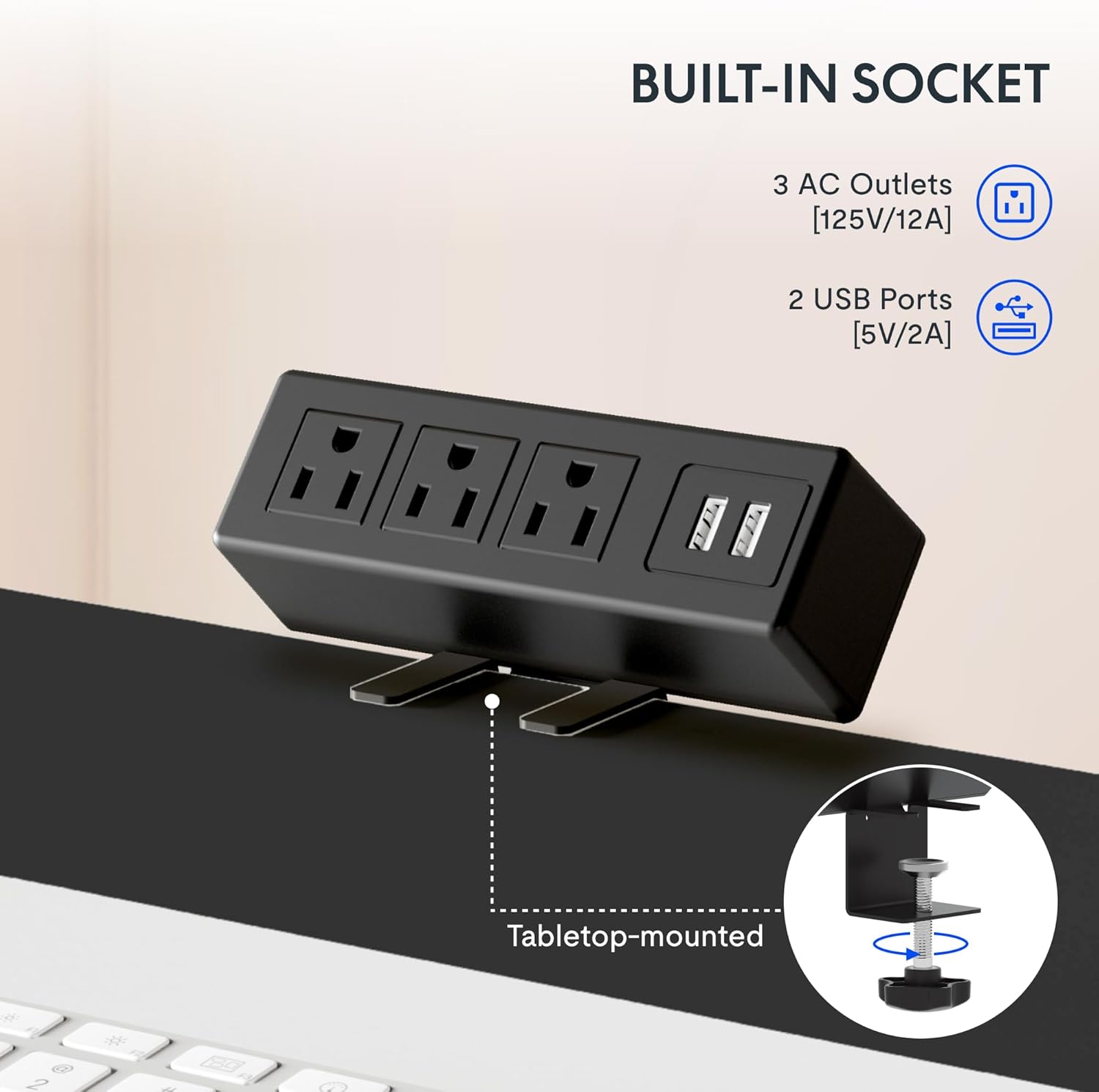
Image: The removable desktop power outlet, featuring three AC outlets and two USB ports, shown clamped to the desk edge.
4.4 Upravljanje kablovima
Utilize the included cable management device to organize and tidy up your workspace. This helps prevent cable clutter and ensures a clean aesthetic.

Image: A cable management tray installed beneath the desk, designed to hold and organize power cords and other cables.
4.5 Opcioni pribor
The desk includes hooks that can be installed on the sides for hanging headphones or other items.

Image: A black hook attached to the side of the desk, suitable for hanging headphones or other accessories.
4.6 Video instalacije
For a visual guide on frame installation, please refer to the official FLEXISPOT installation video:
Video: Official FLEXISPOT Standing Desk Frame Installation Guide. This video demonstrates the step-by-step process of assembling the desk frame.
5. Uputstvo za upotrebu
5.1 Podešavanje visine
The desk features a 6-button digital controller for smooth and quiet height adjustments. Use the up (▲) and down (▼) arrow buttons to manually adjust the desk height.

Image: Close-up of the 6-button digital controller, showing the LED display, up/down arrows, and four programmable height setting buttons.
5.2 Predefinisane postavke memorije
The controller includes four programmable memory presets (1, 2, 3, 4). To save a desired height:
- Adjust the desk to your preferred height using the up/down arrows.
- Press the 'M' button (often indicated by a person icon or 'M').
- Immediately press one of the number buttons (1, 2, 3, or 4) to save the current height to that preset.
To recall a saved height, simply press the corresponding number button. The desk will automatically move to the programmed position.
5.3 Desktop Power Outlet
The integrated power outlet provides convenient access to power for your devices. It includes 3 standard AC outlets (125V/12A) and 2 USB charging ports (5V/2A).

Slika: Detaljna view of the desktop power outlet, highlighting the three AC sockets and two USB charging ports.
6. Održavanje
Da biste osigurali dugotrajnost i optimalne performanse vašeg FLEXISPOT EN2 stola, slijedite ove smjernice za održavanje:
- čišćenje: Obrišite radnu površinu i okvir mekom krpomamp krpom. Izbjegavajte jake hemikalije ili abrazivna sredstva za čišćenje koja bi mogla oštetiti završnu obradu.
- inspekcija: Povremeno provjeravajte sve vijke i spojeve kako biste bili sigurni da su čvrsto zategnuti. Po potrebi ih ponovo zategnite.
- Upravljanje kablovima: Regularly inspect cables for any signs of wear or damage. Ensure cables are neatly managed to prevent snagging during height adjustments.
- Ograničenje težine: Ne prekoračujte maksimalnu nosivost od 79.8 kg (176 lbs).
7. Otkrivanje problema
If you encounter any issues with your FLEXISPOT EN2 desk, please refer to the troubleshooting section in the comprehensive manual (if available) or contact customer support. Common issues may include:
- Desk not adjusting height.
- Error codes on the digital display.
- Neuobičajeni zvukovi tokom rada.
Note: A slight 0-1 inch tolerance in desktop size is normal due to manual measurement.
8. Specifikacije
| Feature | Detalj |
|---|---|
| Brand | FLEXISPOT |
| Broj modela | EN2 |
| Dimenzije radne površine | 48"W x 30"D (121.9 cm x 76.2 cm) |
| Materijal za radnu površinu | Engineered Wood (FSC-Certified) |
| Materijal okvira | legirani čelik |
| Boja | Crni vrh + crni okvir |
| Raspon podešavanja visine | 28.1" do 45.7" (71.4 cm do 116.1 cm) |
| Mehanizam za podizanje | Električni |
| Maksimalni kapacitet težine | 176 lbs (79.8 kg) |
| Nivo buke | Manje od 50 dB |
| Tip kontrole | 6-button digital controller with 4 memory presets |
| Utičnica | 3 AC (125V/12A), 2 USB (5V/2A) |
| Obavezna montaža | Da |
9. Garancija i podrška
9.1 Informacije o garanciji
FLEXISPOT provides the following warranty coverage for the EN2 Standing Desk:
- 5-godišnja garancija: Covers frames, motors, and other mechanical devices.
- 2-godišnja garancija: Covers controllers, switches, and electronics.
Molimo sačuvajte svoj dokaz o kupovini za zahtjeve u vezi s garancijom.
9.2 Korisnička podrška
For any questions, technical assistance, or warranty claims, please contact FLEXISPOT customer support. Refer to your product packaging or the official FLEXISPOT webstranicu za najnovije kontakt informacije.


