1. Uvod
1.1 Proizvod završenview
The AIDA PTZ-X12-IP is a Full HD IP Broadcast PTZ Camera designed for broadcast and conference applications. It features advanced IP streaming technology supporting H.264 and H.265 (HEVC) codecs. Integrated RS232 and VISCA over IP control ensure compatibility with most IP-based controllers, streamlining workflows and simplifying cable management. The camera offers multiple video output formats including 3G-SDI, HDMI, USB 3.0, and online video outputs like RTSP/RTMP.
1.2 Ključne karakteristike
- Full HD Progressive Scan sensor for sharp, vivid color in various lighting conditions.
- Advanced digital image processor providing detailed images with comprehensive feature access.
- Motion-compensated temporal noise reduction filter for effective noise reduction without motion blur.
- Versatile connectivity: 3G/HD-SDI, HDMI, RJ-45, USB 3.0, and USB 2.0 for seamless video performance.
- Powerful 12X Optical Zoom capability.
2. Sigurnosne informacije
Please read this manual carefully before operating the device. Retain it for future reference. Observe all warnings and instructions marked on the product.
- Izvor napajanja: Use only the power adapter supplied with the unit. Ensure the power voltage je unutar specificiranog raspona.
- Instalacija: Install the camera on a stable surface or mount it securely according to installation guidelines. Avoid placing it in direct sunlight, near heat sources, or in areas with high humidity or dust.
- čišćenje: Isključite napajanje prije čišćenja. Koristite meku, suhu krpu. Ne koristite tekuća ili aerosolna sredstva za čišćenje.
- servisiranje: Ne pokušavajte sami servisirati ovaj proizvod. Sve servise prepustite kvalificiranom servisnom osoblju.
- Voda i vlaga: Da biste smanjili rizik od požara ili strujnog udara, nemojte izlagati ovaj uređaj kiši ili vlazi.
3. Sadržaj paketa
Provjerite da li su sve stavke prisutne u paketu:
- AIDA PTZ-X12-IP Camera Unit
- Adapter za napajanje
- Remote Control (if included with specific model variant)
- Nosač za montažu (ako je uključen)
- Korisnički priručnik (ovaj dokument)
4. Proizvod je gotovview
4.1 Kamera Views

Slika 4.1: Prednja strana view of the AIDA PTZ-X12-IP camera, highlighting its compact design and the prominent lens.
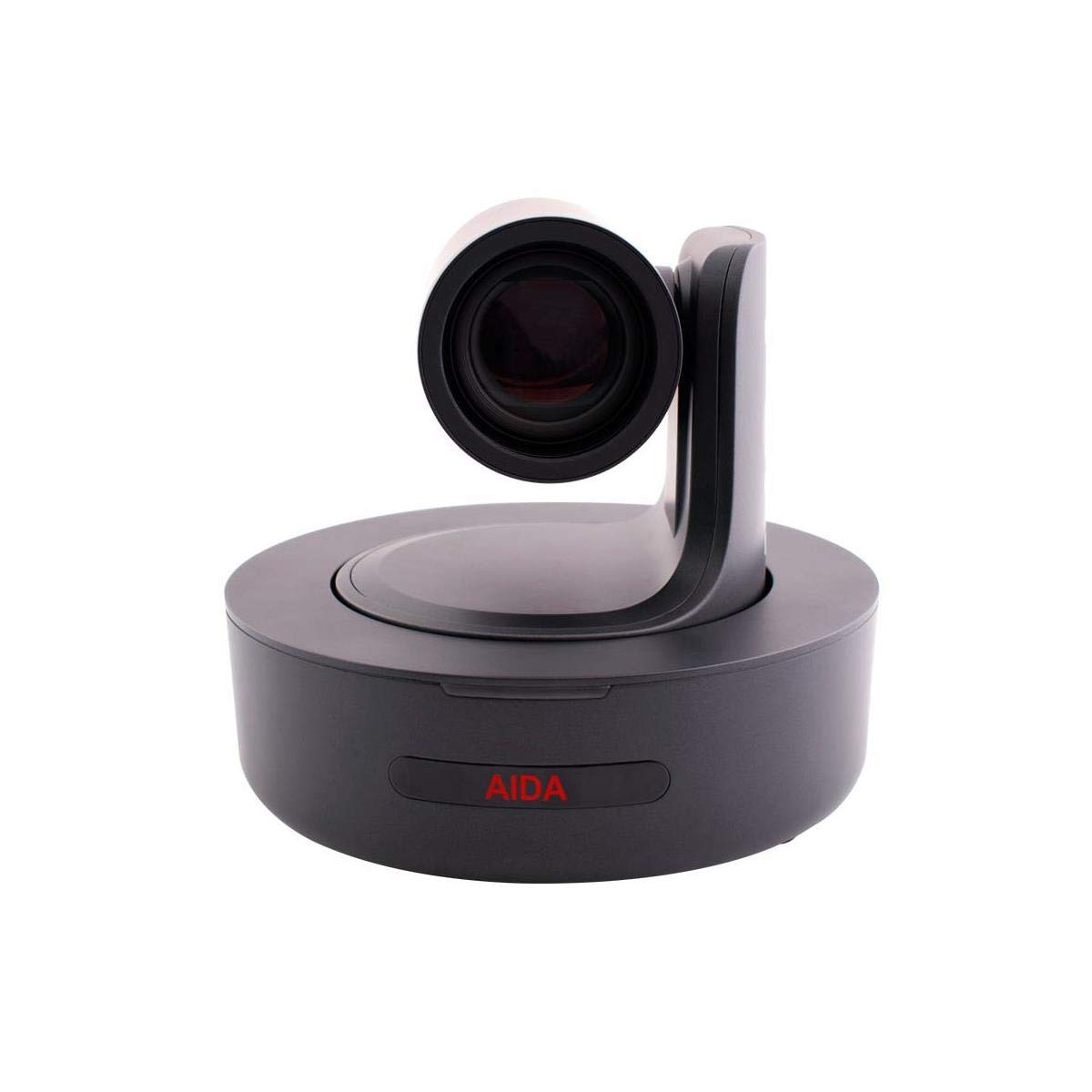
Slika 4.2: Direktno ispred view of the AIDA PTZ-X12-IP camera, emphasizing the lens and the camera's rotational base.

Slika 4.3: Pozadi view of the AIDA PTZ-X12-IP camera, detailing the various connectivity ports.
4.2 Portovi i konektori
Refer to Figure 4.3 for the location of the following ports:
- IN-RS232-OUT: RS232 serial control ports for daisy-chaining and external control.
- USB 3.0: High-speed USB connection for video output and control.
- LAN: RJ-45 Ethernet port for IP streaming, control (VISCA over IP), and power (PoE, if supported by model).
- DC12V: Power input for the included 12V DC power adapter.
- (Note: 3G-SDI and HDMI ports are typically located on the rear panel, though not explicitly labeled in Figure 4.3, they are standard for this model.)
5. Podešavanje
5.1 Instalacija
- plasman: Position the camera on a flat, stable surface or mount it using a compatible bracket (sold separately or included). Ensure adequate ventilation around the unit.
- Priključak za napajanje: Connect the supplied 12V DC power adapter to the DC12V port on the camera and then plug it into a power outlet.
- Početno uključivanje: The camera will perform a self-test and the lens will move to its home position.
5.2 Veze
Connect the camera to your video system using one or more of the following methods:
- 3G-SDI izlaz: Connect a 3G-SDI cable from the camera's 3G-SDI OUT port to a compatible SDI input device (e.g., switcher, recorder).
- HDMI izlaz: Connect an HDMI cable from the camera's HDMI OUT port to an HDMI display or capture device.
- USB 3.0 izlaz: Connect a USB 3.0 cable from the camera's USB 3.0 port to a computer for direct video capture and control.
- Ethernet (LAN) veza: Connect an Ethernet cable from the camera's LAN port to a network switch or router for IP streaming and control.
- RS232 kontrola: For serial control, connect an RS232 cable to the IN-RS232-OUT ports and to your control device.
6. Operativni
6.1 Osnovni rad
The PTZ-X12-IP camera can be controlled via its included remote control (if applicable), a dedicated PTZ controller, or via IP commands.
- Pan/Tilt: Use the joystick or directional buttons on your controller to move the camera horizontally (pan) and vertically (tilt).
- zumiranje: Use the zoom controls to adjust the 12x optical zoom. Zoom in (Tele) to magnify the image, zoom out (Wide) to broaden the field of view.
- Fokus: The camera typically features auto-focus. Manual focus adjustment may be available through the control interface.
- Unaprijed postavljene postavke: Store and recall specific camera positions (pan, tilt, zoom, focus) as presets for quick scene changes.
6.2 IP Control and Streaming
For advanced control and streaming capabilities, connect the camera to your network via the LAN port.
- IP adresa: The camera will obtain an IP address via DHCP by default. You can find its IP address using a network scanner or by accessing the camera's web interfejs.
- Web Interfejs: Pristupite postavkama kamere i uživo view by entering its IP address into a web browser. This interface allows for detailed configuration of video settings, network parameters, and PTZ control.
- VISCA preko IP-a: The camera supports VISCA over IP for integration with professional PTZ controllers and software. Refer to the camera's network settings for port information.
- RTSP/RTMP Streaming: Configure streaming protocols (RTSP/RTMP) through the web interface to stream video to compatible platforms or servers.
7. Održavanje
7.1 Čišćenje
- Objektiv: Use a soft, lint-free cloth specifically designed for optical lenses. If necessary, use a small amount of lens cleaning solution. Avoid touching the lens with bare fingers.
- Tijelo kamere: Obrišite kućište fotoaparata mekom, suhom krpom. Za tvrdokornu prljavštinu, laganoamp Može se koristiti krpa, ali pazite da vlaga ne uđe u kameru.
- konektori: Keep connectors free of dust and debris. Use compressed air if needed.
7.2 Skladištenje
When not in use for extended periods, store the camera in a cool, dry place, away from direct sunlight and extreme temperatures. Use the original packaging or a protective case to prevent dust accumulation and physical damage.
8. Otkrivanje problema
Ako naiđete na probleme, pogledajte sljedeću tabelu za uobičajene probleme i rješenja.
| Problem | Mogući uzrok | Rješenje |
|---|---|---|
| Nema struje | Adapter za napajanje nije priključen ili je neispravan. | Check power connections. Ensure the power outlet is functional. Try a different power adapter if available. |
| Nema video izlaza | Neispravan priključak kabla; na ekranu je odabran pogrešan ulaz; kamera nije uključena. | Verify all video cables are securely connected. Select the correct input source on your display/switcher. Ensure camera is powered on. |
| PTZ control not working | Control cable disconnected; incorrect control protocol/settings; IP address conflict. | Check RS232 or Ethernet cable connections. Verify control protocol (e.g., VISCA) and camera ID settings. Check for IP address conflicts on the network. |
| Slika je mutna | Lens is dirty; focus is incorrect; lighting conditions are poor. | Clean the lens. Adjust focus manually if auto-focus is not performing correctly. Improve lighting in the environment. |
| IP stream not accessible | Network cable disconnected; incorrect IP settings; firewall blocking access. | Ensure Ethernet cable is connected. Verify camera's IP address and network settings. Check firewall rules on your computer/network. |
Ako problem i dalje postoji nakon isprobavanja ovih rješenja, obratite se korisničkoj podršci.
9. Specifikacije
Technical specifications for the AIDA PTZ-X12-IP camera:
| Feature | Detalj |
|---|---|
| Naziv modela | PTZ-X12-IP |
| Dimenzije proizvoda | 11.8 x 11 x 10.9 inča |
| Težina | 7.8 funti |
| Optički zum | 12x |
| Tehnologija povezivanja | Wired (3G-SDI, HDMI, USB 3.0, RJ-45) |
| Video izlazni formati | 3G-SDI, HDMI, USB 3.0, RTSP/RTMP (IP) |
| Upravljačka sučelja | RS232, VISCA over IP |
| IP Streaming Codecs | H.264, H.265 (HEVC) |
| Preporučena upotreba | Indoor, Outdoor (with appropriate protection) |
| Proizvođač | AIDA Imaging |
10. Garancija i podrška
10.1 Informacije o garanciji
AIDA products are designed and manufactured to the highest quality standards. This product is covered by a limited warranty against defects in materials and workmanship. Specific warranty terms and duration may vary by region and retailer. Please retain your proof of purchase for warranty claims.
10.2 Korisnička podrška
For technical assistance, troubleshooting, or warranty inquiries, please contact AIDA customer support. You can find contact information and additional resources on the official AIDA webweb-mjestu ili putem vašeg prodavača proizvoda.
Posjetite AIDA Store za više informacija.


