1. Uvod
The Dragonwar G22 Lancer is a high-performance optical gaming mouse designed for precision and customization. It features an ergonomic design, 7 programmable buttons, and a 7000 DPI optical sensor, providing gamers with enhanced control and accuracy. This manual provides detailed instructions for setting up, operating, and maintaining your Dragonwar G22 Lancer gaming mouse.

Figure 1.1: Dragonwar G22 Lancer Gaming Mouse
2. Ključne karakteristike
- Ergonomski dizajn: Engineered for comfort during extended gaming sessions.
- 7 Kontrolna dugmad: Optimize your gameplay with customizable button assignments.
- 7000 DPI Precision Mode: High-resolution optical sensor for accurate tracking and movement.
- Sistem podesivih težina: Customize the mouse's weight for personalized feel and control.
- Žičano povezivanje: Reliable and responsive connection with a nearly two-meter cable.
- RGB rasvjeta: Customizable lighting effects for aesthetic appeal.
3. Sadržaj paketa
- Dragonwar G22 Lancer Gaming Mouse
- Adjustable Weight Set (pre-installed or separate)
- Korisnički priručnik (ovaj dokument)
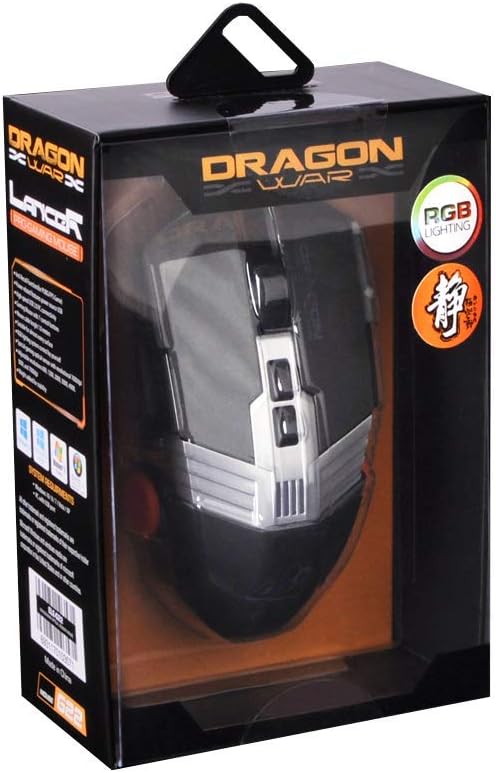
Slika 3.1: Vrh view of the Dragonwar G22 Lancer Gaming Mouse
4. Podešavanje
- Povežite miša: Plug the USB connector of the Dragonwar G22 Lancer mouse into an available USB port on your computer. The mouse is plug-and-play compatible with most operating systems (Windows XP, Linux).
- Instalacija drajvera (opciono): While the mouse functions as a standard HID device, for full customization of buttons, DPI settings, and RGB lighting, it is recommended to download and install the official Dragonwar software from the manufacturer's webstranica. Pratite upute na ekranu tokom instalacije.
- Početni test: Once connected, move the mouse to ensure the cursor responds on your screen. The RGB lighting should illuminate.
5. Uputstvo za upotrebu
5.1 Funkcije dugmadi
The Dragonwar G22 Lancer features 7 control buttons. Their default functions are as follows, but can be customized via the Dragonwar software:
- Lijevi klik: Primarna akcija.
- Desni klik: Sekundarni radni/kontekstni meni.
- Scroll Wheel (Click): Middle click, often used for opening links in new tabs or specific game functions.
- Scroll Wheel (Up/Down): Scrolling content.
- DPI Cycle Button (behind scroll wheel): Ciklično mijenja unaprijed postavljene nivoe DPI-ja.
- Bočni tasteri (Naprijed/Nazad): Obično se koristi za navigaciju u web preglednicima ili dodijeljeni radnjama u igri.

Figure 5.1: Detail of Scroll Wheel and Side Buttons
5.2 DPI podešavanje
The mouse supports up to 7000 DPI. Use the dedicated DPI cycle button located behind the scroll wheel to switch between different sensitivity levels. Each press will cycle to the next preset DPI, allowing you to quickly adjust cursor speed for different tasks or game scenarios.
5.3 RGB osvjetljenje
The Dragonwar G22 Lancer features customizable RGB lighting. Lighting modes and colors can be configured through the Dragonwar software, allowing you to personalize the mouse's appearance to match your setup or mood.
6. Customization: Adjustable Weight System
The Lancer mouse includes an adjustable weight system to fine-tune its feel and balance. This allows you to add or remove small weights to achieve your preferred mouse weight for optimal control and comfort.
- Locate Weight Compartment: The weight compartment is typically located on the underside of the mouse. Refer to Figure 6.1 for its approximate location.
- Otvoreni odjeljak: Gently open the cover of the weight compartment.
- Add/Remove Weights: Insert or remove the small metal weights as desired. Experiment with different configurations to find the balance that suits your grip and play style.
- Zatvori odjeljak: Securely close the weight compartment cover after making adjustments.

Figure 6.1: Adjustable Weight System Components
7. Održavanje
- čišćenje: Koristite meku, suhu krpu za brisanje površine miša. Za tvrdokornu prljavštinu, lagano obrišiteampIsperite krpu vodom. Izbjegavajte upotrebu jakih hemikalija ili abrazivnih materijala.
- Održavanje senzora: Optički senzor na donjoj strani miša održavajte čistim i bez prašine ili ostataka kako biste osigurali precizno praćenje.
- Upravljanje kablovima: Avoid sharp bends or excessive pulling on the mouse cable to prevent damage.
8. Otkrivanje problema
- Miš ne reaguje:
- Provjerite je li USB kabel sigurno priključen u ispravan USB priključak.
- Pokušajte sa drugim USB portom na računaru.
- Ponovo pokrenite računar. - Kretanje kursora je nepravilno:
- Clean the optical sensor on the underside of the mouse.
- Ensure you are using the mouse on a suitable surface (e.g., a mouse pad, not highly reflective surfaces).
- Check DPI settings; a very high DPI might feel erratic if you are not used to it. - Dugmad ne rade:
- Ensure the Dragonwar software is installed correctly if you have customized button functions.
- Try resetting the mouse to factory defaults via the software, if available. - RGB rasvjeta ne radi:
- Check the lighting settings within the Dragonwar software.
9. Specifikacije
| Feature | Specifikacija |
|---|---|
| Brand | Dragonwar |
| Serija modela | G22 LANCER |
| Broj modela stavke | 6931170103571 |
| Tehnologija detekcije pokreta | Optički |
| DPI | Do 7000 DPI |
| Broj dugmadi | 7 |
| Tehnologija povezivanja | Žičani |
| Dužina kabla | Pribl. 2 metara |
| Kompatibilnost operativnog sistema | Linux, Windows XP (i novije verzije) |
| Boja | Crna |
| Dimenzije proizvoda (D x Š x V) | 19.4 x 7.7 x 36 cm |
| Težina artikla | 248 g |
10. Garancija i podrška
For warranty information and technical support, please refer to the official Dragonwar webweb-mjesto ili kontaktirajte njihovu korisničku službu. Sačuvajte račun kao dokaz o kupovini za reklamacije u slučaju garancije.
Online podrška: Visit the official Dragonwar webstranica za često postavljana pitanja, preuzimanje upravljačkih programa i kontakt informacije.
