1. Uvod
The Maxell Bass 13 Wireless Headphones (Model B13-WHPS) are designed to provide a versatile audio experience. These headphones feature 40mm drivers for clear sound, an integrated microphone for communication, and comfortable ear pads for extended listening. They offer both wireless Bluetooth connectivity and a traditional 3.5mm wired option.
2. Šta se nalazi u kutiji
- Maxell Bass 13 Wireless Headphones
- USB kabl za punjenje
- 3.5mm Audio Cable (if applicable, not explicitly listed but common for hybrid headphones)
- Uputstvo za upotrebu
3. Proizvod je gotovview
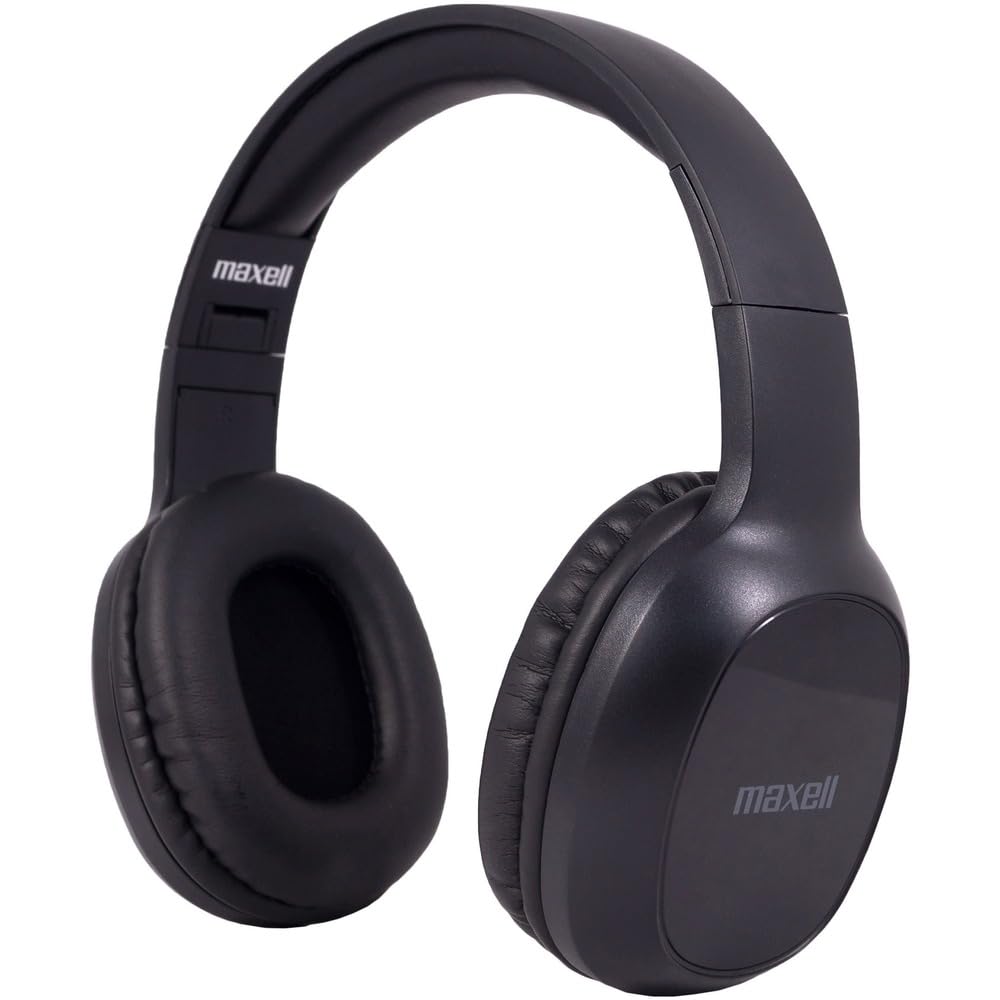
Figure 1: Maxell Bass 13 Wireless Headphones

Figure 2: Earcup Controls (Power, Volume, Play/Pause)
Ključne karakteristike:
- 40mm dinamički drajveri: Deliver clear and powerful audio performance.
- Integrisani mikrofon: Omogućava pozivanje bez upotrebe ruku.
- Noise-Isolating Earpads: Provide comfort and help reduce external distractions.
- Bluetooth 5.0 povezivanje: Za stabilnu bežičnu vezu.
- 3.5 mm audio priključak: Allows for wired connection to compatible devices.
- Podesiva traka za glavu: Osigurava udobno pristajanje za različite veličine glave.
- Trajanje baterije do 8 sati: For extended listening and talk time.
4. Podešavanje
4.1 Punjenje slušalica

Figure 3: Connecting the USB Charging Cable
- Locate the charging port on the headphone earcup.
- Connect the small end of the provided USB charging cable to the headphone's charging port.
- Spojite veći kraj USB kabla na USB izvor napajanja (npr. USB priključak računara, USB adapter za zid).
- The LED indicator on the headphones will illuminate to show charging status. It will typically turn off or change color when fully charged.
- A full charge provides up to 8 hours of continuous talk/play time.
4.2 Bluetooth uparivanje
- Provjerite jesu li slušalice potpuno napunjene.
- Press and hold the Power button on the headphone earcup until the LED indicator flashes blue and red, indicating pairing mode.
- Na vašem uređaju (pametnom telefonu, tabletu, računaru) idite na postavke Bluetootha.
- Traži available devices. Select "Maxell Bass 13" from the list.
- Nakon uparivanja, LED indikator će obično pokazivati stalno plavo svjetlo ili će sporo treptati plavo.
- Ako se od vas zatraži šifra, unesite "0000".
4.3 Žičana veza (3.5 mm audio priključak)

Figure 4: Connecting the 3.5mm Audio Cable
For devices without Bluetooth or when battery is low, you can use the 3.5mm audio cable:
- Uključite jedan kraj 3.5 mm audio kabla u audio ulazni priključak na slušalicama.
- Drugi kraj priključite na 3.5 mm audio izlaz na vašem uređaju.
- The headphones will operate in passive mode, and Bluetooth functionality will be disabled.
5. Uputstvo za upotrebu
5.1 Uključivanje/isključivanje napajanja
- Uključeno: Pritisnite i držite dugme za napajanje otprilike 3 sekunde dok se LED indikator ne upali.
- Iskljuciti: Pritisnite i držite dugme za napajanje otprilike 3-5 sekundi dok se LED indikator ne ugasi.
5.2 Kontrola jačine zvuka
- Povećajte jačinu zvuka: Pritisnite dugme za pojačavanje zvuka (+).
- Smanji jačinu zvuka: Pritisnite dugme za smanjenje jačine zvuka (-).
5.3 Reprodukcija muzike
- Pusti/pauza: Press the Multi-function button (often the Power button or a dedicated Play/Pause button) once.
- Sljedeća pjesma: Press and hold the Volume Up (+) button (or double-press, refer to specific product button layout).
- Prethodni zapis: Press and hold the Volume Down (-) button (or double-press, refer to specific product button layout).
5.4 Upravljanje pozivima
- Odgovori/Završi poziv: Pritisnite višenamjenski taster jednom.
- odbiti poziv: Pritisnite i držite višenamjenski gumb otprilike 2 sekunde.
- Ponovno biranje zadnjeg broja: Dvaput pritisnite višenamensko dugme.
6. Održavanje
6.1 Čišćenje
- Obrišite slušalice mekom, suhom krpom koja ne ostavlja dlačice.
- Ne koristite abrazivna sredstva za čišćenje, rastvarače ili aerosolne sprejeve.
- Izbjegavajte ulazak vlage u bilo kakve otvore.
6.2 Skladištenje

Figure 5: Headphones Folded for Storage
- Slušalice čuvajte na hladnom i suhom mjestu, dalje od ekstremnih temperatura.
- When not in use for extended periods, ensure the headphones are fully charged before storage to preserve battery health.
- The headphones feature a foldable design for compact storage and portability.
6.3 Njega baterija
- Izbjegavajte često potpuno pražnjenje baterije.
- Charge the headphones regularly, even if not used often.
- Ne izlažite bateriju prekomjernoj toploti ili direktnoj sunčevoj svjetlosti.
7. Otkrivanje problema
| Problem | Mogući uzrok | Rješenje |
|---|---|---|
| Slušalice se ne uključuju | Niska baterija | U potpunosti napunite slušalice. |
| Nije moguće uparivanje putem Bluetootha | Slušalice nisu u načinu rada za uparivanje; Bluetooth uređaja isključen; Previše daleko od uređaja | Ensure headphones are in pairing mode (flashing blue/red). Turn on device Bluetooth. Move headphones closer to device. |
| Nema zvuka | Volume too low; Incorrect audio source; Headphones not connected | Increase headphone and device volume. Check if headphones are properly paired/connected. Verify audio output settings on your device. |
| Loš kvalitet poziva | Weak Bluetooth signal; Microphone obstructed | Približite se uređaju. Provjerite da mikrofon nije prekriven. |
8. Specifikacije
| Feature | Detalj |
|---|---|
| Broj modela | B13-WHPS |
| Brand | Maxell |
| Tehnologija povezivanja | Bluetooth 5.0 |
| Veličina audio drajvera | 40 mm |
| Trajanje baterije | Up to 8 Hours (continuous talk/play time) |
| Priključak za slušalice | 3.5 mm Jack |
| Funkcije kontrole buke | Sound Isolation, Noise Cancelling |
| Impedansa | 32 Ohma |
| Osjetljivost | 100 dB |
| Frekvencijski odziv | 20 Hz |
| Postavljanje uha | On Ear |
| Form Factor | Preko uha |
| Dimenzije proizvoda | 7.25 x 3 x 9 inča |
| Težina artikla | 8.4 unce |
| Materijal | Electronic Components, Foam, Plastic, Wire |
| Kompatibilni uređaji | Tablets, Laptops, Desktops, Portable Devices with 3.5mm Audio Jack |
9. Zvanični video proizvoda
Video 1: Maxell Bass 13 Bluetooth Headphones Overview. This video provides a visual demonstration of the headphones' features and design.
10. Garancija i podrška
Maxell products are designed for reliability and performance. For specific warranty information, please refer to the warranty card included with your purchase or visit the official Maxell website. For technical support or customer service inquiries, please contact Maxell customer support through their official channels.


