1. Uvod
Thank you for choosing the Kaidi KD-750 Bluetooth Headphones. This manual provides essential information for the proper setup, operation, and maintenance of your device. Please read it thoroughly before use to ensure optimal performance and longevity of your headphones.
2. Sadržaj paketa
Provjerite da li se sve stavke nalaze u vašem paketu:
- 1 x Kaidi KD-750 Bluetooth Headphones
- 1 x USB kabl za punjenje
- 1 x Reinforced 3.5mm Audio Cable with Microphone (P2 Cable)
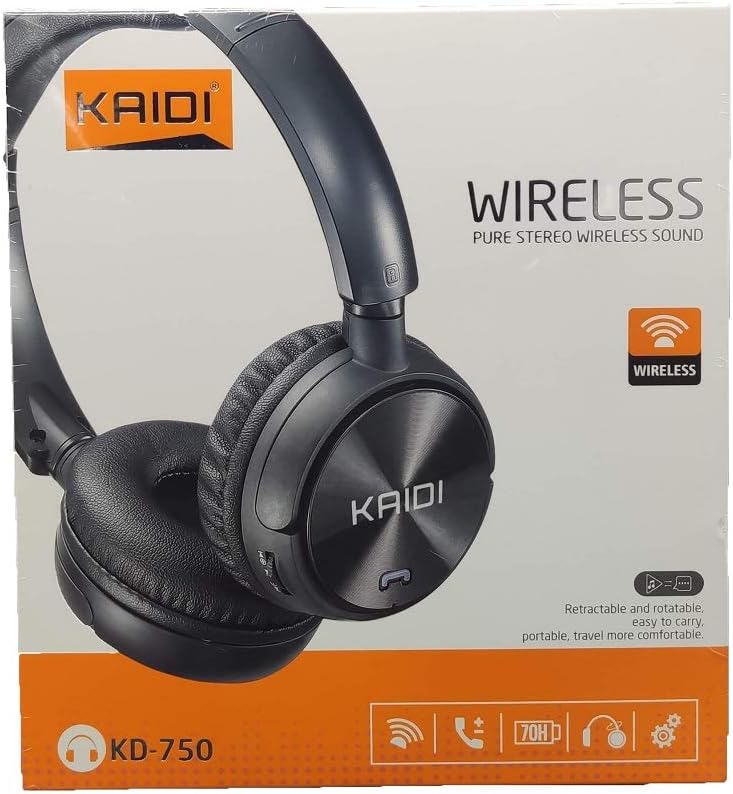
Slika: Front view of the Kaidi KD-750 retail packaging, showing the headphones and branding.
3. Proizvod je gotovview
Familiarize yourself with the various parts and controls of your Kaidi KD-750 headphones.

Slika: Front view of the Kaidi KD-750 Bluetooth Headphones, showcasing the earcups with Kaidi logo and the adjustable headband.
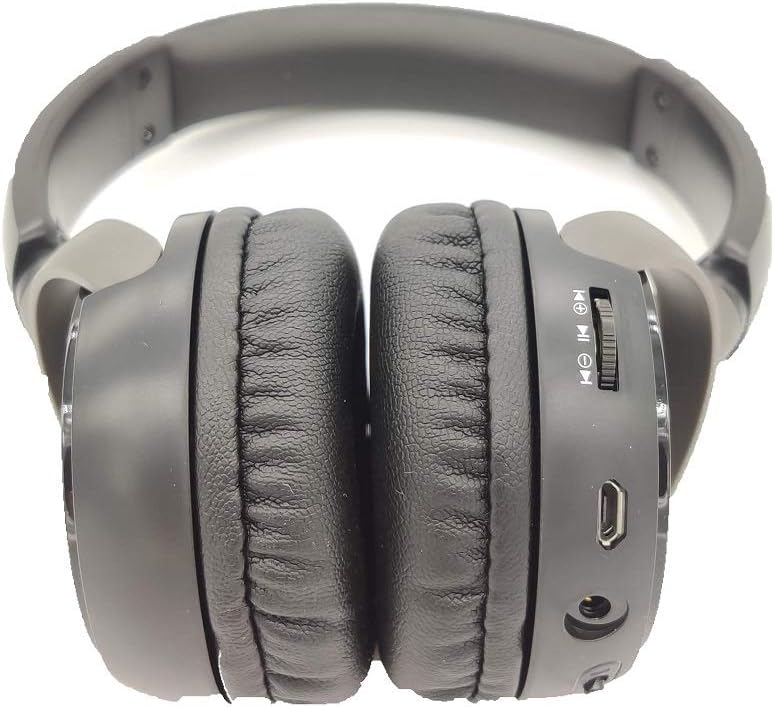
Slika: Sa strane view of the Kaidi KD-750 Bluetooth Headphones, highlighting the control buttons, charging port, and audio jack on the earcup.

Image: Back of the Kaidi KD-750 retail box, featuring a diagram of the headphone controls and key product features.
3.1. Kontrole i portovi
- Dugme za napajanje / Višenamjensko dugme: Uključivanje/Isključivanje, Reprodukcija/Pauza, Odgovaranje/Završetak poziva.
- Dugme za pojačavanje zvuka / sljedeću pjesmu: Kratki pritisak za pojačavanje zvuka, dugi pritisak za sljedeću pjesmu.
- Dugme za smanjivanje jačine zvuka / prethodnu pjesmu: Kratki pritisak za smanjenje jačine zvuka, dugi pritisak za prethodnu pjesmu.
- Dugme za način rada (M): Switch between Bluetooth, FM Radio, and SD Card modes.
- Micro USB priključak za punjenje: Za punjenje slušalica.
- 3.5 mm AUX ulaz: Za žičanu vezu pomoću priloženog audio kabla.
- Utor za mikro SD karticu: Za reprodukciju muzike direktno sa Micro SD kartice.
- mikrofon: Za hands-free pozive.
4. Podešavanje
4.1. Punjenje slušalica
Prije prve upotrebe, potpuno napunite slušalice.
- Connect the Micro USB end of the charging cable to the charging port on the headphones.
- Spojite USB-A kraj kabela za punjenje na USB adapter za napajanje (nije uključen) ili USB priključak računara.
- The LED indicator will illuminate (usually red) during charging.
- Once fully charged (approximately 2 hours), the LED indicator will change color or turn off (refer to specific LED behavior in the specifications).
Napomena: Trajanje baterije je oko 5 sata sa punim punjenjem.
4.2. Bluetooth uparivanje
Uparite slušalice s uređajem koji podržava Bluetooth.
- Uvjerite se da su slušalice isključene.
- Pritisnite i držite dugme za napajanje otprilike 3-5 sekundi dok LED indikator ne počne naizmjenično treperiti plavo i crveno, što označava režim uparivanja.
- Na svom uređaju (pametnom telefonu, tabletu, računaru) omogućite Bluetooth i potražite dostupne uređaje.
- Select "KD-750" from the list of found devices.
- Nakon uparivanja, LED indikator će obično polako treperiti plavo ili ostati stalno plavo.
- If a password is required, enter "0000".
Efektivni domet Bluetooth veze je približno 10 metara (33 stope).
5. Uputstvo za upotrebu
5.1. Uključivanje/isključivanje
- Uključeno: Press and hold the Power Button for 2-3 seconds until the LED indicator lights up.
- Iskljuciti: Press and hold the Power Button for 3-4 seconds until the LED indicator turns off.
5.2. Music Playback (Bluetooth Mode)
- Pusti/pauza: Kratko pritisnite dugme za napajanje.
- Sljedeća pjesma: Dugo pritisnite dugme za pojačavanje jačine zvuka.
- Prethodni zapis: Dugo pritisnite dugme za smanjivanje jačine zvuka.
- Povećavanje glasnoće: Kratko pritisnite dugme za pojačavanje jačine zvuka.
- Smanjivanje jačine zvuka: Kratko pritisnite dugme za smanjenje jačine zvuka.
5.3. Telefonski pozivi
- Odgovori na poziv: Short press the Power Button when an incoming call rings.
- Završi poziv: Kratko pritisnite dugme za napajanje tokom poziva.
- odbiti poziv: Long press the Power Button when an incoming call rings.
- Ponovno biranje zadnjeg broja: Double-press the Power Button.
5.4. Mode Switching (FM Radio / SD Card / AUX)
Pritisnite Dugme Mode (M). to cycle through available modes: Bluetooth, FM Radio, and SD Card playback.
5.4.1. Režim FM radija
- Switch to FM mode using the Mode (M) Button.
- Long press the Power Button to automatically scan and save available FM stations.
- Short press the Volume Up/Down buttons to adjust volume.
- Long press the Volume Up/Down buttons to switch between saved stations.
5.4.2. Reprodukcija s Micro SD kartice
- Insert a Micro SD card (with MP3 files) into the SD card slot.
- Switch to SD Card mode using the Mode (M) Button. The headphones will automatically begin playing music from the card.
- Use the Play/Pause, Volume Up/Down, and Next/Previous Track controls as in Bluetooth mode.

Slika: Krupni plan view of the Micro SD card slot on the Kaidi KD-750 headphones.
5.4.3. AUX Wired Mode
- Connect one end of the included 3.5mm audio cable to the AUX input on the headphones.
- Drugi kraj priključite na 3.5 mm audio izlaz vašeg uređaja.
- Slušalice će se automatski prebaciti u AUX način rada.
- In AUX mode, controls on the headphones (volume, track control) may not function; use your connected device for control.
6. Održavanje i njega
- Čistite slušalice mekom, suhom krpom. Ne koristite abrazivna sredstva za čišćenje ili rastvarače.
- Izbjegavajte izlaganje slušalica ekstremnim temperaturama, vlazi ili direktnoj sunčevoj svjetlosti.
- Ne uranjajte slušalice u vodu ili bilo koju drugu tečnost.
- Čuvajte slušalice na hladnom i suvom mestu kada se ne koriste.
- Redovno punite slušalice, čak i ako se ne koriste duži period, kako biste održali stanje baterije.
7. Otkrivanje problema
7.1. Headphones do not power on.
Rješenje: The battery may be depleted. Connect the headphones to a power source using the USB charging cable and allow them to charge for at least 30 minutes before attempting to power on again.
7.2. Cannot pair with a Bluetooth device.
- Rješenje 1: Ensure the headphones are in pairing mode (LED flashing blue and red alternately).
- Rješenje 2: Provjerite je li Bluetooth omogućen na vašem uređaju i nalazi li se u krugu od 10 metara od slušalica.
- Rješenje 3: Isključite Bluetooth na uređaju, zatim ga ponovo uključite i pokušajte ponovo pretražiti.
- Rješenje 4: If previously paired, try "forgetting" or "unpairing" the headphones from your device's Bluetooth list and then re-pairing.
7.3. No sound or low volume.
- Rješenje 1: Provjerite nivoe jačine zvuka i na slušalicama i na povezanom uređaju.
- Rješenje 2: Provjerite jesu li slušalice pravilno povezane putem Bluetootha ili 3.5 mm AUX kabela.
- Rješenje 3: If using AUX mode, ensure the cable is fully inserted into both the headphones and the audio source.
7.4. FM radio reception is poor.
Rješenje: Move to an open area away from obstructions or electronic interference. The 3.5mm audio cable can sometimes act as an antenna; try connecting it even if not using AUX mode for improved reception.
8. Specifikacije
| Bluetooth verzija: | v4.2 |
| Podržani protokoli: | AVRCP1.3, A2DP1.0, HFP1.5, HSP1.0 |
| Efektivni raspon: | 10 metara (33 stopa) |
| Radna frekvencija: | 2.402 GHz - 2.480 GHz |
| Vrsta baterije: | Built-in 3.7V 300mAh Rechargeable Lithium Battery |
| Charging Voltage: | DC 4.2V - 5.5V |
| Vrijeme punjenja: | Približno 2 sata |
| Trajanje baterije: | Approximately 5 hours (playback) |
| Impedansa zvučnika: | 32 Ohma |
| Kontrola buke: | Pasivno poništavanje buke |
| Tehnologija povezivanja: | Bluetooth, 3.5 mm priključak |
| Kompatibilni uređaji: | Any device supporting Bluetooth connectivity |
| Težina proizvoda: | 190 g |
| Boja: | Crna |
9. Garancija i podrška
The Kaidi KD-750 Bluetooth Headphones come with a standard manufacturer's warranty against defects in materials and workmanship. Please refer to the warranty card included with your purchase for specific terms and conditions, including the warranty period.
For technical support, troubleshooting assistance, or warranty claims, please contact your retailer or the official Kaidi customer service. Contact information can typically be found on the product packaging or the official Kaidi website.
Molimo sačuvajte dokaz o kupovini u svrhu garancije.


