1. Proizvod je gotovview
The Ciglow TES200 is a versatile digital integration tester designed for efficient and accurate testing of integrated circuits. It is primarily used to test 74 serija i 40 serija integrated digital components, capable of testing over 200 different integrations.
This device offers fine workmanship and stable, powerful performance for long-term use. Its simple operation allows users to quickly determine the functionality of integrated logic gates, identifying faulty components with ease. The selection of integration tests is performed through intuitive key operations.

Figure 1.1: The TES200 IC Tester and its accompanying display module.
Video 1.1: Overview of the Ciglow IC Tester's functionality and components.
2. Sadržaj paketa
Prilikom otvaranja paketa, molimo Vas da provjerite da li su sve komponente prisutne i neoštećene:
- 1 x TES200 IC Tester Unit
- 1 x LCD Display Module

Figure 2.1: The TES200 IC Tester and its separate LCD display module.
3. Ključne karakteristike
- Digital Integration Test: Specifically designed for 74 series and 40 series integrated digital circuits.
- Opsežna kompatibilnost: Capable of testing more than 200 different integrated circuits.
- Rad prilagođen korisniku: Simple key operations for selecting and performing tests.
- Fault Identification: The test logic can determine if integrated logic gates are faulty.
- Prijenosni dizajn: Easy to carry and install, offering strong and stable performance.
- Izdržljiva konstrukcija: Fine workmanship built to strict quality standards for long-term reliability.
4. Podešavanje
Before operating the TES200 IC Tester, follow these steps to ensure proper setup:
- Connect the Display: Carefully connect the LCD display module to the main TES200 tester unit. Ensure the pins are correctly aligned and seated firmly.
- Priključak za napajanje: Connect a 7-12 VDC power supply to the designated power input port on the TES200 unit.
- Uključeno: Locirajte SW1 Napajanje switch on the side of the unit. Slide the switch to the ON position to power on the device. The display should illuminate.

Slika 4.1: Pozadi view of the TES200 main board, showing connection points.
5. Uputstvo za upotrebu
The TES200 features a straightforward interface for testing integrated circuits.
5.1 Opisi ključeva
- UPUTE: Press this button to select the integration type. You can switch between 74 serija i 40 serija ICs.
- GORE: Use this button to select the previous integration model within the chosen series.
- DOLJE: Use this button to select the next integration model within the chosen series.
- Test: After selecting the desired integration model, press this button to initiate the test.
5.2 Postupak testiranja
- Insert IC: Carefully insert the integrated circuit into the ZIF (Zero Insertion Force) socket on the TES200. Napomena: Ensure the IC is aligned correctly, with pin 1 facing the designated indicator on the socket. Align the IC down when installing for testing.
- Select Series: Pritisnite MODE button to toggle between 74 series and 40 series testing modes, matching the type of IC you are testing.
- Odaberite model: Koristite UP i DOLJE buttons to navigate through the available IC models until the correct model number for your IC is displayed.
- Pokreni test: Once the correct model is selected, press the Test button. The TES200 will perform the test and display the result on the LCD screen, indicating whether the IC is DOBRO or if there are issues.

Figure 5.1: The LCD display indicating a successful test with 'IC IS GOOD'.
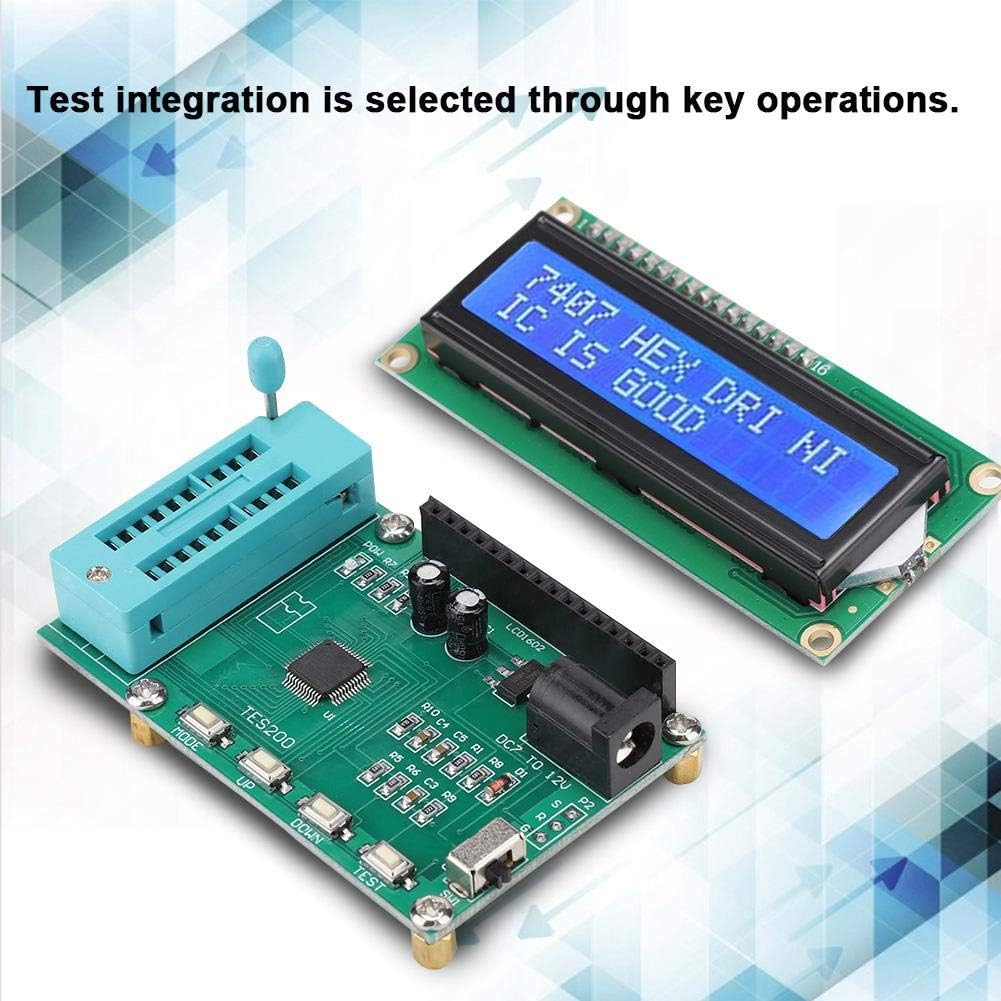
Figure 5.2: The TES200 unit and display during an active test operation.
6. Održavanje
To ensure the longevity and optimal performance of your TES200 IC Tester, follow these maintenance guidelines:
- čišćenje: Use a soft, dry cloth to clean the exterior of the device. Avoid using abrasive cleaners or solvents, which can damage the plastic and electronic components.
- Skladištenje: Store the tester in a cool, dry place away from direct sunlight, excessive heat, and moisture. When not in use, it is recommended to store it in its original packaging or a protective case.
- Pažljivo rukujte: The ZIF socket and display are sensitive components. Avoid applying excessive force when inserting or removing ICs, and protect the display from impacts.
- Isključite kada nije u upotrebi: Always turn off the device using the SW1 Power switch when it is not in active use to conserve power and prevent unnecessary wear.
7. Otkrivanje problema
If you encounter issues with your TES200 IC Tester, refer to the following common problems and solutions:
- Uređaj se ne uključuje:
- Ensure the power supply is correctly connected and providing 7-12 VDC.
- Check that the SW1 Power switch is in the ON pozicija.
- Provjerite da li je adapter za napajanje funkcionalan.
- Display is Blank or Shows Garbled Characters:
- Ensure the LCD display module is securely connected to the main tester unit.
- Power cycle the device (turn off, then turn on again).
- Incorrect Test Results or IC Always Shows 'BAD':
- Verify that the IC is inserted correctly into the ZIF socket, with proper alignment.
- Ensure you have selected the correct IC series (74 or 40) using the MODE dugme.
- Confirm that the exact IC model number is selected using the UP/DOLJE buttons before pressing Test.
- Clean the pins of the IC before insertion to ensure good contact.
- Test a known good IC of the same type to confirm the tester's functionality.
- Dugmad ne reaguju:
- Uključite uređaj.
- Pazite da se oko dugmadi ne nakupe ostaci.
Ako problem i dalje postoji nakon isprobavanja ovih rješenja, obratite se korisničkoj podršci za daljnju pomoć.
8. Specifikacije
| Parametar | Vrijednost |
|---|---|
| Working Voltage | 7~12 VDC |
| Working Current | <30 mA |
| Radna temperatura | -40℃ ~ 65℃ |
| Temperatura skladištenja | -40℃ ~ 65℃ |
| Brand | Ciglow |
| Broj modela | Ciglowyrmu16w2kc |
| Izvor napajanja | Corded Electric |
| Stil | Digital |
| Težina artikla | 0.06 kilograma (2.11 unci) |
| Minimalna radna voltage | 7 volti (DC) |
| Gornja temperatura | 65 stepeni Celzijusa |
| UPC | 748904525631 |
| ASIN | B07X561WJF |
| Datum prve dostupnosti | 29. avgusta 2019 |
9. Garancija i podrška
For warranty information, technical support, or any inquiries regarding your Ciglow TES200 IC Tester, please refer to the contact information provided with your purchase or visit the official Ciglow webSačuvajte račun kao dokaz o kupovini za reklamacije u slučaju reklamacije.