1. Uvod
The Supermicro SYS-1019C-FHTN8 is a 1U rackmount server designed for demanding applications such as network security, uCPE network appliances, and virtualization. It supports Intel Xeon E-2100 Series Processors and features a front I/O design, accommodating two hot-swappable 2.5-inch drives and an additional two internal 2.5-inch drives. This server is equipped with eight Gigabit Ethernet LAN ports and a dedicated IPMI port for comprehensive remote management.
2. Postavljanje i instalacija
2.1 Raspakivanje i pregled
Carefully remove the server from its packaging. Inspect the server for any signs of damage that may have occurred during shipping. Retain all packaging materials for future use or return if necessary.
2.2 Montaža u stalak
The SYS-1019C-FHTN8 is a 1U rackmount server. Install the server into a standard 19-inch server rack using appropriate rack rails (sold separately or included). Ensure proper ventilation and cable management within the rack.
2.3 Instalacija komponenti
Before powering on the server, ensure all necessary components are installed. Refer to the following for guidance:
2.3.1 Instalacija pogona
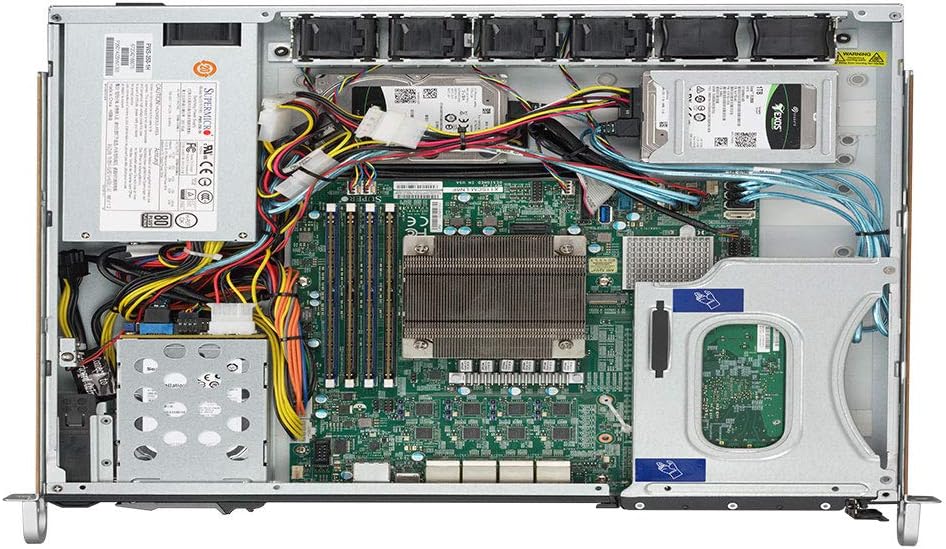
The server supports two hot-swappable 2.5-inch drives accessible from the front panel and two additional internal 2.5-inch drives. For hot-swappable drives, slide the drive into the bay until it clicks into place. For internal drives, secure them within the chassis using the provided mounting hardware.

Slika 1: Prednja strana view of the SYS-1019C-FHTN8 server, highlighting the two hot-swappable 2.5-inch drive bays.
2.3.2 Instalacija memorije
The server features four DDR4 DIMM slots, supporting up to 128GB ECC UDIMM. Align the memory module with the slot key and press firmly until the retaining clips snap into place on both sides.
2.3.3 Instalacija M.2
The server includes two M.2 22110 slots. Install M.2 storage devices by inserting them into the slot and securing them with the provided screw.
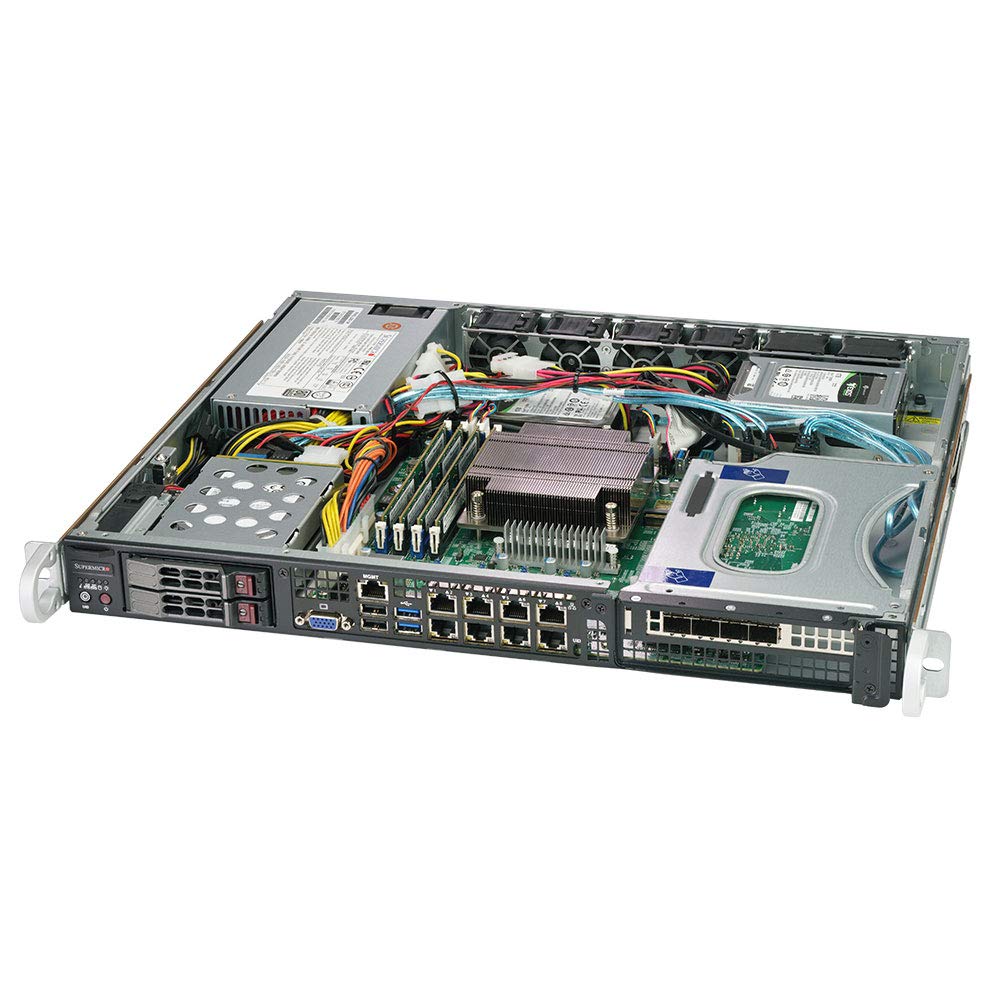
Slika 2: Interni view of the SYS-1019C-FHTN8 server, showing the motherboard layout, DIMM slots, and internal drive mounting points.
2.4 Povezivanje perifernih uređaja
Connect the power cable to the server's power supply unit and a suitable power source. Connect network cables to the desired Gigabit Ethernet LAN ports. If local access is required, connect a display, keyboard, and mouse to the appropriate ports.
Slika 3: Pozadi view of the SYS-1019C-FHTN8 server, illustrating the eight Intel i210-AT GbE LAN ports, USB ports, VGA port, and the dedicated IPMI port.
2.5 Početno uključivanje
Press the power button on the front panel. Observe the system's boot process. Access the BIOS/UEFI setup utility by pressing the designated key (usually DEL or F2) during startup to configure boot options or other system settings.
3. Uputstvo za upotrebu
3.1 Instalacija operativnog sistema
Install your preferred operating system (e.g., Windows Server, Linux distribution, VMware ESXi) using a bootable USB drive, optical drive (if connected), or network installation via PXE boot.
3.2 Konfiguracija mreže
Configure the eight Intel i210-AT GbE LAN ports according to your network requirements. This may involve setting static IP addresses, configuring VLANs, or bonding interfaces for redundancy and increased throughput.
3.3 Remote Management (IPMI)
The dedicated IPMI port allows for out-of-band management of the server. Connect the IPMI port to your management network. Access the IPMI web interfejs preko a web browser using the assigned IP address to monitor system health, manage power, and perform remote KVM functions.
4. Održavanje
4.1 Redovno čišćenje
Periodically clean the server's exterior and internal components to prevent dust buildup, which can impede airflow and lead to overheating. Use compressed air to clear dust from fans and heatsinks. Ensure the server is powered off and disconnected from the power source before cleaning.
4.2 Ažuriranja firmvera
Regularly check the Supermicro website for updated BIOS, IPMI, and driver firmware. Keeping firmware up-to-date ensures optimal performance, stability, and security. Follow the manufacturer's instructions carefully when performing firmware updates.
4.3 Zamjena komponenti
When replacing components such as drives, memory, or fans, ensure the server is powered off and properly grounded. Refer to the specific component's installation guide for detailed instructions. For hot-swappable drives, follow the operating system's procedure for safe removal and insertion.
4.4 Razmatranja životne sredine
Operate the server within its specified environmental limits (temperature, humidity). Ensure adequate airflow around and through the server to prevent thermal issues. Avoid placing the server in direct sunlight or near heat sources.
5. Otkrivanje problema
5.1 Nema napajanja
- Verify the power cable is securely connected to both the server and the power outlet.
- Check the power supply unit (PSU) status LEDs.
- Testirajte utičnicu s drugim uređajem.
5.2 No Boot/Display
- Provjerite je li monitor povezan i uključen.
- Check memory modules are properly seated.
- Listen for POST (Power-On Self-Test) beep codes, which can indicate specific hardware issues.
- If using IPMI, check the remote console for boot messages.
5.3 Problemi s mrežnom vezom
- Verify network cables are securely connected to the correct LAN ports.
- Check network adapter status LEDs on the server and the switch.
- Confirm network configuration (IP address, subnet mask, gateway) in the operating system.
- Ping other devices on the network to isolate the issue.
5.4 IPMI Access Problems
- Ensure the dedicated IPMI port is connected to the network.
- Verify the IPMI IP address and network settings are correctly configured.
- Check for firewall rules that might be blocking access to the IPMI port.
6. Specifikacije
| Feature | Specifikacija |
|---|---|
| Podrška procesora | Intel Xeon E-2100 Series Processor, LGA 1151 |
| Čipset | Intel C246 |
| Memorija | 4 x DDR4 DIMM slots; Up to 128GB ECC UDIMM |
| Drive Bays | 2 x Hot-swap 2.5" Drive Bays (front), 2 x Internal 2.5" Drive Bays |
| M.2 slotovi | 2 x M.2 22110 slots |
| LAN portovi | 8 x Intel i210-AT GbE LAN Ports |
| Luka za upravljanje | 1 x Dedicated IPMI LAN Port |
| USB portovi | 2 x USB 2.0 Ports (rear) |
| Form Factor | 1U Rackmount |
| Dimenzije (V x Š x D) | 43 x 437 x 381 mm (1.7" x 17.2" x 15.0") |
| Težina | Otprilike 25 funti |
| Hardverska platforma | PC |
| Materijal | Metal |
7. Garancija i podrška
7.1 Garancija proizvođača
This Supermicro server is covered by a manufacturer's warranty. Please refer to the warranty documentation provided with your purchase or visit the official Supermicro webstranicu za detaljne uslove i odredbe u vezi sa garancijskim pokrićem, trajanjem i procedurama servisiranja.
7.2 Tehnička podrška
For technical assistance, troubleshooting beyond this manual, or warranty claims, please contact Supermicro technical support. Have your server's model number (SYS-1019C-FHTN8) and serial number ready when contacting support to expedite service.
- Supermicro podrška Webstranica: www.supermicro.com/support
- Kontakt informacije: Obratite se podršci webstranica za regionalne kontaktne brojeve i adrese e-pošte.


