1. Uvod
This manual provides detailed instructions for the setup, operation, and maintenance of your Natec TURBOT Wireless Keyboard with Touchpad (model NKL-0968). This device is designed to enhance your experience with Smart TVs, cellphones, and other compatible devices, offering convenient wireless control via 2.4 GHz technology.
Molimo vas da pažljivo pročitate ovaj priručnik prije upotrebe proizvoda kako biste osigurali pravilnu funkcionalnost i spriječili oštećenja.
2. Sadržaj paketa
Provjerite da li su sve stavke prisutne u paketu:
- Natec TURBOT Wireless Keyboard with Touchpad
- USB 2.4 GHz Receiver
- Korisnički priručnik (ovaj dokument)
- (Note: 2 AAA batteries are required and may not be included)
3. Vodič za postavljanje
3.1. Instalacija baterije
The Natec TURBOT keyboard requires two (2) AAA batteries for operation. Locate the battery compartment on the underside of the keyboard. Open the cover, insert the batteries according to the polarity markings (+/-), and close the cover securely.
3.2. Povezivanje USB prijemnika
The USB 2.4 GHz receiver is typically stored in a dedicated compartment on the keyboard itself for safekeeping. Carefully remove the receiver from its storage slot.

Figure 1: USB receiver stored in the keyboard compartment.
Insert the USB receiver into an available USB port on your Smart TV, computer, or other compatible device. The device should automatically detect and install the necessary drivers.
3.3. Uključivanje tastature
Locate the power switch on the side of the keyboard. Slide the switch to the "ON" position. The keyboard should now be ready for use.
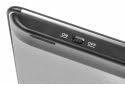
Figure 2: Power switch on the keyboard.
4. Uputstvo za upotrebu
4.1. Funkcije tastature

Figure 3: Natec TURBOT Wireless Keyboard Layout.
The keyboard features a standard QWERTY layout for typing. It also includes dedicated function keys (F1-F12) which may have secondary multimedia functions (e.g., volume control, media playback). These secondary functions are often accessed by holding down the Fn key and pressing the corresponding function key.
- Caps Lock: Toggles uppercase/lowercase letters.
- Shift: Used for uppercase letters and secondary symbols.
- Ctrl / Alt / Win: Standard modifier keys for various shortcuts depending on the operating system.
- Pozadinsko osvetljenje: The keyboard features a backlight for improved visibility in low-light conditions. Refer to your device's operating system or the keyboard's specific function key combinations (often involving the Fn key) to activate or adjust the backlight.
4.2. Funkcije dodirne table
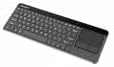
Figure 4: Integrated Touchpad.
The integrated touchpad allows for mouse-like navigation. It supports various gestures:
- Dodir jednim prstom: Functions as a left-click.
- Tap sa dva prsta: Functions as a right-click.
- Svitak s dva prsta: Drag two fingers up or down to scroll through content.
- Fizička dugmad: Below the touchpad, there are two physical buttons. The left button acts as a left-click, and the right button acts as a right-click.
Touchpad sensitivity and other settings may be adjustable through your connected device's operating system settings.
5. Održavanje
- Čišćenje: Use a soft, dry cloth to clean the keyboard and touchpad. For stubborn dirt, a slightly damp cloth with mild cleaning solution can be used, ensuring no liquid enters the device.
- Zamjena baterije: Replace batteries when the keyboard's performance degrades or it stops responding. Always use fresh AAA batteries.
- Skladištenje: When not in use for extended periods, turn off the keyboard to conserve battery life. Store the USB receiver in its designated compartment to prevent loss.
- Izbjegavajte ekstremne uslove: Do not expose the keyboard to extreme temperatures, direct sunlight, or high humidity.
6. Otkrivanje problema
6.1. Tastatura ne reaguje
- Uvjerite se da je tastatura uključena.
- Provjerite jesu li baterije pravilno instalirane i dovoljno napunjene. Zamijenite ih ako je potrebno.
- Provjerite je li USB prijemnik sigurno priključen u ispravan USB priključak na vašem uređaju.
- Pokušajte priključiti USB prijemnik u drugi USB priključak.
- Restart your connected device (Smart TV, computer, etc.).
6.2. Touchpad Not Working
- Provjerite je li tastatura uključena i povezana.
- Clean the touchpad surface to remove any dirt or obstructions.
- Check your device's settings for any touchpad-related configurations.
6.3. Povremena veza
- Ensure there are no large metallic objects or other 2.4 GHz wireless devices causing interference between the keyboard and the USB receiver.
- Približite tastaturu USB prijemniku.
7. Specifikacije
| Brand | Natec |
| Broj modela | NKL-0968 |
| Tehnologija povezivanja | 2.4 GHz bežični |
| Kompatibilni uređaji | Smart TV, Cellphone |
| Kompatibilnost operativnog sistema | Android 10.0 (and compatible systems) |
| Posebne karakteristike | Integrated Touchpad, Backlit Keys |
| Opis tastature | Multimedija |
| Boja | Crna/srebrna |
| Materijal | akrilonitril butadien stiren (ABS) |
| Izvor napajanja | 2 x AAA baterije |
8. Garancija i podrška
For warranty information, technical support, or further assistance, please refer to the official Natec webweb-mjesto ili kontaktirajte njihovu službu za korisnike. Sačuvajte račun za kupovinu u slučaju reklamacije.
Natec does not provide specific information regarding spare parts availability or software updates beyond the initial purchase.


