1. Uvod
The NEDIS VEXT3470AT HDMI Audio Extractor allows you to separate audio signals from an HDMI source and output them to an audio system, while simultaneously passing the video signal to a display. This device is designed to integrate modern HDMI sources with audio systems that may not have HDMI inputs, providing both digital (Toslink) and analog (L/R stereo) audio outputs.
It supports 3D video and amplifies the digital video signal for reliable transmission.
2. Sigurnosne informacije
- Prije upotrebe pažljivo pročitajte ove upute.
- Držite uređaj dalje od vode, vlage i ekstremnih temperatura.
- Ne pokušavajte sami otvarati ili popravljati uređaj. Za sve servisne radove obratite se kvalifikovanom osoblju.
- Koristite samo priloženi adapter za napajanje. Korištenje neispravnog adaptera može oštetiti uređaj i poništiti garanciju.
- Osigurajte odgovarajuću ventilaciju oko uređaja kako biste spriječili pregrijavanje.
- Isključite adapter za napajanje tokom oluje sa grmljavinom ili kada se ne koristi duži period.
3. Sadržaj paketa
Molimo Vas da provjerite sadržaj paketa kako biste bili sigurni da su svi artikli prisutni i u dobrom stanju:
- NEDIS VEXT3470AT HDMI Audio Extractor
- Adapter za napajanje
- Korisnički priručnik (ovaj dokument)
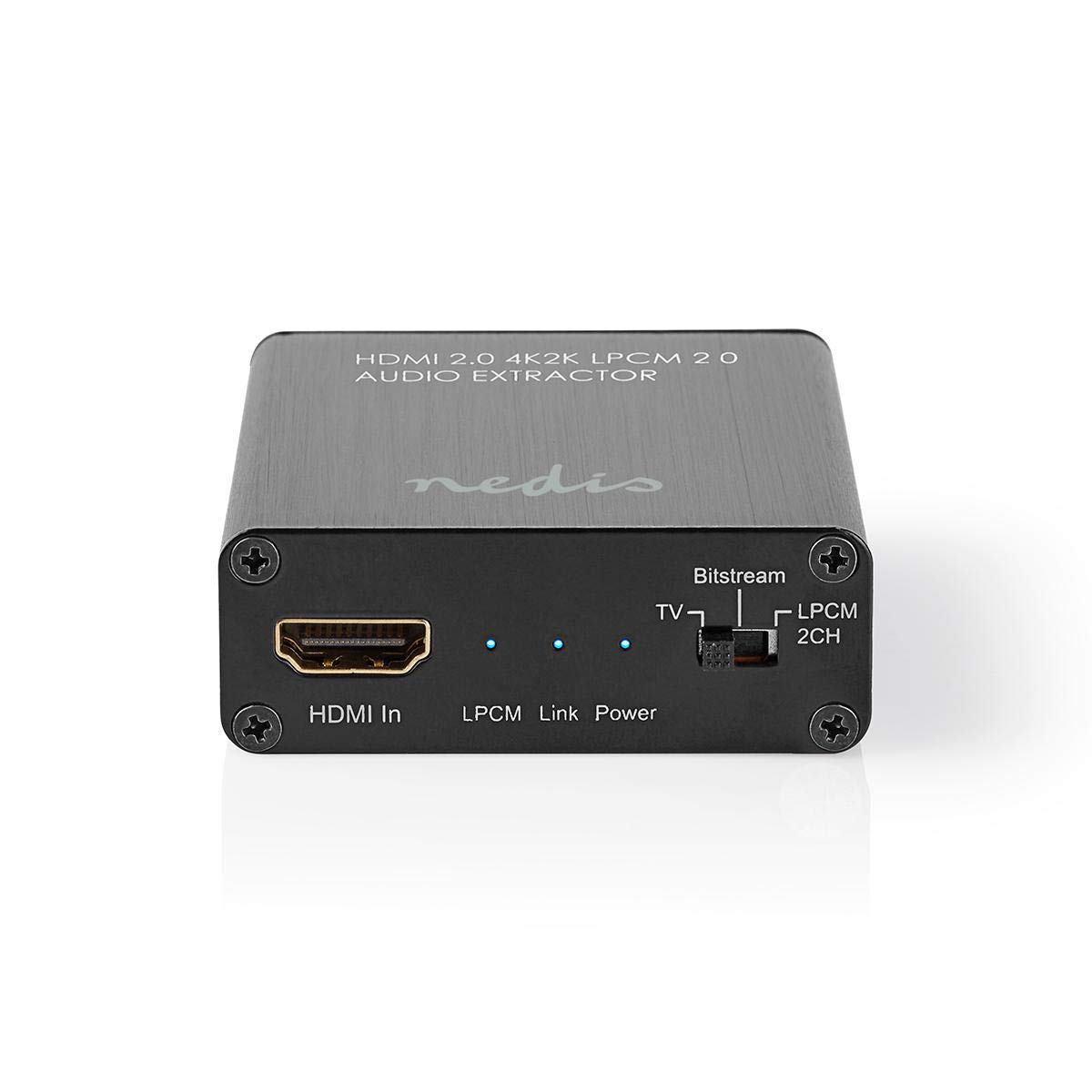
Image: The NEDIS VEXT3470AT HDMI Audio Extractor unit shown alongside its power adapter.
4. Proizvod je gotovview
Familiarize yourself with the ports and indicators on the HDMI Audio Extractor:
4.1 Input Side
Image: Close-up of the input side of the audio extractor, showing the HDMI In port, LPCM, Link, and Power indicator LEDs, and the Audio Mode Switch.
- HDMI ulaz: Connect your HDMI source device (e.g., DVD/Blu-ray player, game console).
- LPCM LED: Indicates when LPCM audio format is detected.
- Link LED: Indicates an active HDMI connection.
- LED za napajanje: Svijetli kada je uređaj uključen.
- Audio Mode Switch:
- Bitstream: For multi-channel audio formats like Dolby Digital or DTS.
- TV: Passes audio directly from the HDMI source to the TV.
- LPCM 2CH: For 2-channel stereo audio output via L/R analog and Toslink.
4.2 Output Side

Image: Close-up of the output side of the audio extractor, showing the 5V/DC power input, Optical (Toslink) audio output, HDMI Out port, and L/R analog audio outputs.
- 5V/DC: Ulazni priključak za napajanje. Ovdje priključite priloženi adapter za napajanje.
- optički: Digital audio output (Toslink). Connect to an audio receiver or soundbar.
- HDMI izlaz: Povežite se sa svojim TV-om ili ekranom.
- L/R: Analog stereo audio output. Connect to an amplifier or stereo system using RCA cables.
5. Upute za postavljanje
Follow these steps to connect your HDMI Audio Extractor:
- Uređaji za isključivanje: Ensure all devices (HDMI source, TV, audio system) are powered off before making connections.
- Povežite HDMI izvor: Connect an HDMI cable from your source device (e.g., Blu-ray player) to the HDMI ulaz port on the audio extractor.
- Poveži ekran: Spojite drugi HDMI kabel iz HDMI izlaz port on the audio extractor to your TV or display.
- Povežite audio sistem:
- For digital audio, connect an optical Toslink cable from the Optički port on the extractor to your audio receiver or soundbar.
- For analog stereo audio, connect RCA cables from the L/R ports on the extractor to your stereo amplifier ili aktivni zvučnici.
- Priključite napajanje: Uključite priloženi adapter za napajanje u 5V/DC port on the extractor, then plug the adapter into a power outlet. The Power LED should illuminate.
- Uređaji za uključenje: Power on your TV/display, audio system, and then your HDMI source device.
6. Uputstvo za upotrebu
Once connected, operate the device as follows:
- Odaberite Audio način rada: Koristite Prekidač za audio način rada on the input side to select the desired audio output format:
- Bitstream: For multi-channel audio (e.g., Dolby Digital, DTS) to be passed through the Optical output. Your audio receiver must support these formats.
- TV: Passes the audio directly to the TV via HDMI. Audio extraction via Optical/L/R may be limited or unavailable in this mode, depending on the source and TV capabilities.
- LPCM 2CH: Converts multi-channel audio to 2-channel LPCM for output via Optical and L/R analog ports. This is suitable for stereo systems or when your receiver does not support Bitstream formats.
- Potvrdite indikatore:
- The LED za napajanje trebao bi biti uključen.
- The Link LED should be on when an active HDMI signal is detected from the source.
- The LPCM LED will illuminate if the audio signal is in LPCM format.
- Adjust Audio System: Ensure your audio receiver or soundbar is set to the correct input (Optical or Analog L/R) and volume.
7. Održavanje
To ensure the longevity and optimal performance of your HDMI Audio Extractor:
- čišćenje: Za čišćenje uređaja koristite meku, suhu krpu. Ne koristite tekuća sredstva za čišćenje ili aerosole.
- Skladištenje: Čuvajte uređaj na hladnom i suvom mestu kada se ne koristi.
- Rukovanje: Izbjegavajte ispuštanje ili izlaganje uređaja jakim udarima.
8. Otkrivanje problema
Ako naiđete na probleme, pogledajte sljedeći vodič za rješavanje problema:
| Problem | Mogući uzrok / rješenje |
|---|---|
| Nema video izlaza |
|
| Nema audio izlaza |
|
| LED za napajanje je isključen |
|
| Intermittent Audio/Video |
|
9. Specifikacije
Key technical specifications for the NEDIS VEXT3470AT HDMI Audio Extractor:
- Broj modela: VEXT3470AT
- Brand: NEDIS
- Unos: 1x HDMI
- Izlaz: 1x HDMI, 1x Optical (Toslink), 1x L/R Stereo (RCA)
- HDMI verzija: Compatible with HDMI 2.0 (implied by 4K2K support in product name)
- Video rezolucija: Up to 4K (4K2K)
- 3D podrška: Da
- Audio formati: LPCM 2.0, Bitstream (Dolby Digital, DTS pass-through)
- Napajanje: 5V DC (preko priloženog adaptera)
- Dimenzije (D x Š x V): Približno 7.7 x 6.4 x 2.3 cm
- Težina: 240 grama
- Boja: Anthracite (Black)
- Zemlja porijekla: Kina
10. Garancija i podrška
NEDIS products are manufactured to high quality standards. In the unlikely event of a defect during the warranty period, please contact your retailer for support. The warranty period is subject to local consumer laws and regulations.
For technical assistance or further inquiries, please refer to the support information provided by your retailer or visit the official NEDIS website.


