1. Uvod
Thank you for choosing the Kungfuking Surge Protector Power Strip with USB Ports. This device is designed to provide convenient power access and surge protection for your electronic devices. It features two AC outlets and two USB ports, along with a 6.56 ft extension cord and a flat plug for versatile placement. This manual provides essential information for safe installation, operation, and maintenance of your power strip.

Figure 1: Kungfuking Surge Protector Power Strip (Model: Kungfuking 2AC+2USB)
2. Važna sigurnosna uputstva
Molimo pročitajte i razumite sva sigurnosna uputstva prije upotrebe ovog proizvoda. Nepoštivanje ovih uputstava može dovesti do strujnog udara, požara ili ozbiljnih povreda.
- NEMOJTE exceed the electrical ratings of 120V, 12A, 60Hz, and 2.1A for USB ports.
- NEMOJTE use in wet environments or near water.
- NEMOJTE disassemble or modify the device.
- NEMOJTE use with aquariums or other water-related products.
- NEMOJTE priključite u drugu pomičnu slavinu.
- NEMOJTE use if the cord or plug is damaged.
- Čuvati van domašaja djece.
- Uverite se da je utikač do kraja utaknut u zidnu utičnicu.
- Ovaj proizvod je samo za unutrašnju upotrebu.
3. Značajke proizvoda
The Kungfuking Surge Protector Power Strip is designed for convenience and safety, offering multiple power options in a compact form factor.
- 2 AC utičnice: Provides standard power for electronic devices.
- 2 USB-A porta: Delivers 5V/2.1A for charging smartphones, tablets, and other USB-powered devices.
- 6.56 FT Extension Cord: Offers flexibility in placement, reaching distant outlets.
- Dizajn ravnog utikača: Minimizes obstruction and allows furniture to be placed closer to the wall.
- Zaštita od prenapona: Štiti povezane uređaje od strujnih udara i skokova.
- Izdržljiva konstrukcija: Built with fireproof ABS+PC materials for enhanced safety.
- Montažni dizajn: Can be easily mounted on or under desks, walls, or other surfaces.

Slika 2: Ključne karakteristike i specifikacije

Figure 3: All-in-One Charging Station in use
4. Postavljanje i instalacija
The power strip can be installed in various locations to suit your needs. Mounting screws are included for secure installation.
4.1 Opcije montaže
The power strip offers flexible mounting options:
- Under Desk/Table: Mount horizontally or vertically under a desk or table to keep surfaces clear.
- Zidni nosač: Secure to a wall for convenient access, such as near a TV or bedside.
- Side of Cabinets/Headboards: Install vertically on the side of furniture for discreet power access.

Figure 4: Installation Options and Dimensions
4.2 Koraci instalacije
- Odaberite lokaciju: Select a flat, stable surface for mounting, ensuring it is within reach of a wall outlet and your devices.
- Označite rupe za vijke: Place the power strip in the desired position and mark the locations for the mounting screws using a pencil.
- Drill Pilot Holes (Optional): For wood surfaces, you may pre-drill small pilot holes to prevent wood splitting.
- Secure the Power Strip: Use the provided screws to firmly attach the power strip to the surface. Ensure it is securely fastened before use.
- Povežite se na napajanje: Plug the power strip's flat plug into a standard 120V wall outlet. The flat plug design allows for placement behind furniture.
4.3 dokample Installations
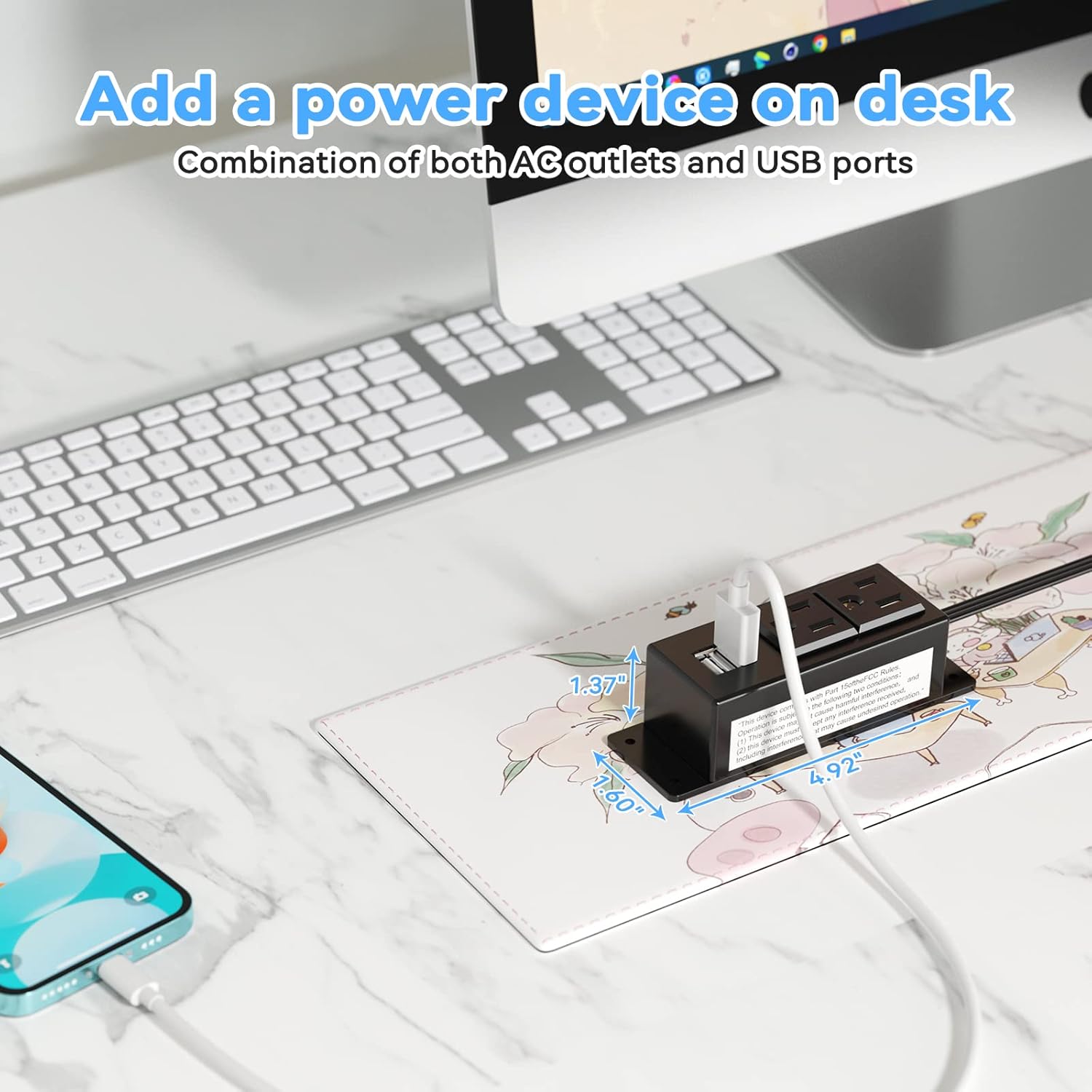
Figure 5: Desk Surface Installation

Figure 6: Under-Desk Installation

Figure 7: Wall-Mounted for TV

Figure 8: Nightstand Installation

Figure 9: Kitchen Cabinet Installation

Figure 10: Flat Plug for Space-Saving Placement
5. Uputstvo za upotrebu
Using your Kungfuking Surge Protector Power Strip is straightforward:
- Uključite u zidnu utičnicu: Ensure the power strip's flat plug is securely connected to a grounded 120V AC wall outlet.
- Spojite AC uređaje: Insert the power cords of your electronic devices into the two AC outlets.
- Povežite USB uređaje: Plug your USB charging cables into the two USB-A ports to charge compatible devices.
- Uključeno: The power strip is designed for continuous operation once plugged in. There is no on/off switch.
- Upotreba monitora: Avoid overloading the power strip by ensuring the total power consumption of connected devices does not exceed the rated capacity (12A, 120V).
6. Otkrivanje problema
Ako naiđete na probleme s produžnim kablom, pogledajte sljedeće uobičajene probleme i rješenja:
| Problem | Mogući uzrok | Rješenje |
|---|---|---|
| Nema napajanja iz AC utičnica ili USB portova. |
|
|
| USB devices not charging. |
|
|
| Power strip feels hot. |
|
|
7. Specifikacije
| Feature | Detalj |
|---|---|
| Model | Kungfuking 2AC+2USB |
| AC utičnice | 2 |
| USB portovi | 2 (USB-A) |
| Ulazni voltage | 120V AC |
| AC Current Rating | 12A |
| Frekvencija | 60Hz |
| USB izlaz | 5V / 2.1A (Total) |
| Dužina kabla | 6.56 stopa (2 metra) |
| Plug Type | Flat Plug |
| Materijal | Vatrootporni ABS+PC |
| Dimenzije (približno) | 4.92 x 3.74 x 1.37 inča (D x Š x V) |
| Težina (približno) | 10.5 unce |
| Posebne karakteristike | Surge Protection, Mountable Design |
8. Održavanje
Proper maintenance ensures the longevity and safe operation of your power strip:
- čišćenje: Prije čišćenja isključite produžni kabel iz zidne utičnice. Za brisanje vanjske strane koristite suhu, meku krpu. Ne koristite tekuća sredstva za čišćenje ili sprejeve.
- inspekcija: Periodically inspect the power cord, plug, and housing for any signs of damage, such as cuts, fraying, or cracks. If damage is found, discontinue use immediately.
- Skladištenje: Kada se produžni kabel ne koristi duži period, čuvajte ga na hladnom i suhom mjestu, dalje od direktne sunčeve svjetlosti i vlage.
9. Garancija i podrška
Kungfuking products are designed for reliability and performance. For warranty information, technical support, or any questions regarding your product, please refer to the contact information provided at the point of purchase or visit the official Kungfuking website.
Molimo sačuvajte svoj dokaz o kupovini za zahtjeve u vezi s garancijom.


