1. Uvod
The AOPUTTRIVER AP-570C is a 4000-count auto-ranging digital clamp meter designed for precise electrical measurements. It offers a wide range of functions including AC/DC current, AC/DC voltage, resistance, capacitance, frequency, duty cycle, temperature, diode test, and continuity. This manual provides essential information for safe and effective operation of your device.
2. Sigurnosne informacije
Uvijek se pridržavajte sigurnosnih mjera opreza prilikom korištenja električne opreme za testiranje. Nepoštivanje ovih mjera može dovesti do strujnog udara, ozljede ili oštećenja mjerača ili opreme koja se testira.
- Prije upotrebe provjerite je li mjerač u dobrom radnom stanju.
- Ne primjenjivati voltage or current exceeding the maximum rated values.
- Koristite odgovarajuću ličnu zaštitnu opremu (LZO) kao što su izolirane rukavice i zaštitne naočale.
- Verify the function switch is in the correct position for the measurement being performed.
- Avoid touching exposed conductors or circuit components during measurements.
- Do not operate the meter in wet environments or in the presence of explosive gases or dust.
- Odmah zamijenite baterije kada se pojavi indikator slabe baterije kako biste osigurali tačna očitavanja.
- The AP-570C Clamp Meter meets IEC1010 Double Insulation, Pollution Degree 2, and Overvoltage Category III standards.
3. Komponente proizvoda
The AOPUTTRIVER AP-570C package includes the following items:
- AOPUTTRIVER AP-570C Clamp Meter
- Test kablovi (2)
- Temperaturna sonda
- 9V (6F22) Battery
- Uputstvo za upotrebu
- Torba za pohranu
- Mali odvijač

Image: AOPUTTRIVER AP-570C Digital Clamp Meter with test leads, temperature probe, battery, and storage bag.
4. Product Diagram and Key Functions
Familiarize yourself with the main parts and controls of the AP-570C clamp metar:

Image: Labeled diagram of the AP-570C showing the clamp, rotary switch, LCD display, D.HOLD/Back Light key, SELECT key, MAX/MIN key, REL key, Hz/DUTY key, COM Input Jack, and T+VΩHz Input Jack.
- Clamp: Koristi se za beskontaktno mjerenje AC/DC struje.
- Okretni prekidač: Odabire željenu funkciju mjerenja.
- LCD ekran: Prikazuje očitanja mjerenja i indikatore.
- D.HOLD/Back Light Key: Freezes the current reading on the display and activates/deactivates the backlight.
- Tipka SELECT: Toggles between different measurement modes within a single rotary switch position (e.g., AC/DC voltage, dioda/kontinuitet).
- MAX/MIN Key: Zapisuje maksimalne i minimalne vrijednosti tokom mjerenja.
- REL Key: Activates relative measurement mode.
- Hz/DUTY Key: Odabira mjerenje frekvencije ili radnog ciklusa.
- Input Jacks (COM, T+VΩHz): Spojite mjerne kablove za volumentage, resistance, capacitance, diode, continuity, and temperature measurements.
5. Podešavanje
5.1. Instalacija baterije
The AP-570C requires one 9V (6F22) battery. To install or replace the battery:
- Provjerite je li mjerač ISKLJUČEN.
- Use the provided small screwdriver to open the battery compartment cover on the back of the meter.
- Insert the 9V battery, observing the correct polarity (+/-).
- Vratite poklopac odeljka za baterije i pričvrstite ga vijkom.
5.2. Povezivanje ispitnih vodova
Za većinu mjerenja (volumentage, resistance, capacitance, diode, continuity, temperature), connect the test leads:
- Umetnite crni mjerni kabel u ulazni priključak "COM" (zajednički).
- Insert the red test lead into the "T+VΩHz" input jack.
- For temperature measurements, connect the temperature probe to the same input jacks, ensuring correct polarity if applicable.
6. Uputstvo za upotrebu
6.1. Mjerenje AC/DC struje (Clamp)
Klamp function allows for non-contact current measurement. This is ideal for safely measuring current in live circuits.
- Turn the rotary switch to the desired current range (e.g., 400A or 1000A).
- Press the SELECT button to toggle between AC and DC current measurement if necessary.
- Otvorite clamp čeljusti pritiskom na okidač.
- Unutar cl-a zatvorite jedan provodnik (ne snop žica).amp čeljusti. Provjerite jesu li čeljusti potpuno zatvorene.
- Očitajte trenutnu vrijednost na LCD zaslonu.

Image: The AP-570C clamp meter measuring current on an electrical cable.
Video: Demonstration on how to measure DC current using a clamp metar.
6.2. AC/DC Voltage Measurement
Za mjerenje voltage, use the test leads connected to the appropriate input jacks.
- Turn the rotary switch to the "V~" (AC Voltage) ili "V-" (DC Voltage) position. The meter may auto-range.
- Spojite mjerne kabele paralelno s krugom ili komponentom koju želite izmjeriti.
- Pročitajte voltage vrijednost na LCD zaslonu.

Image: The AP-570C clamp meter with test leads connected to an electrical outlet for voltage mjerenje.
6.3. Resistance, Capacitance, Diode, and Continuity Measurement
These functions are accessed via the rotary switch and SELECT button.
- Turn the rotary switch to the "Ω" (Resistance), "CAP" (Capacitance), or "Diode/Continuity" position.
- Use the SELECT button to switch between Diode Test and Continuity Test if on the combined setting.
- Spojite mjerne kablove preko komponente koju treba mjeriti.
- Read the value on the LCD display. For continuity, a buzzer will sound if continuity is detected.
Video: Demonstration on how to measure capacitance using a clamp metar.
6.4. Mjerenje temperature
The AP-570C can measure temperature using the included temperature probe.
- Turn the rotary switch to the "°C" (Temperature) position.
- Connect the temperature probe to the "COM" and "T+VΩHz" input jacks.
- Place the tip of the temperature probe on or in the object whose temperature you wish to measure.
- Read the temperature value on the LCD display. The range is -20°C to 1000°C.
6.5. Backlight and Data Hold
- Pozadinsko osvjetljenje: Press the "D.HOLD/Back Light" button briefly to turn the LCD backlight on or off, improving visibility in low-light conditions.
- Zadržavanje podataka: Press and hold the "D.HOLD/Back Light" button to freeze the current reading on the display. Press again to release.

Slika: Krupni plan view of the AP-570C's bright LCD display and protective case.
6.6. Non-Contact Voltage (NCV) Detekcija
NCV funkcija omogućava brzo otkrivanje AC voltažetage bez direktnog kontakta.
- Turn the rotary switch to the "NCV" position.
- Move the top part of the meter (near the clamp jaws) close to the conductor or outlet.
- Mjerač će pokazivati prisustvo AC voltažetage putem zvučnog signala i/ili vizualnog indikatora.
7. Specifikacije
Key technical specifications for the AOPUTTRIVER AP-570C:
- Prikaz: 4000 Counts
- DC struja: 200A~1000A
- AC struja: 400A~1000A (0.1A resolution for 0.1~400A)
- DC Voltage: 400mV~1000V
- AC Voltage: 4V~750V
- Otpor: 400Ω, 4KΩ, 40KΩ, 400KΩ, 4MΩ, 40MΩ
- Kapacitet: 5.12nF~100µF
- Učestalost: Da
- Radni ciklus: Da
- Diodni test: Da
- Zvučnik kontinuiteta: Da
- Raspon temperature: -20°C do 1000°C
- Jaw Caliber: 45 mm (1.77 in)
- Sigurnosna ocjena: IEC1010 Double Insulation, Pollution Degree 2, Overvoltage Kategorija III
- Izvor napajanja: 1 x 9V baterija (uključena)
- Dimenzije proizvoda: 22.35 x 9.65 x 3.81 cm
- Težina artikla: 444.52 g (0.98 funti)
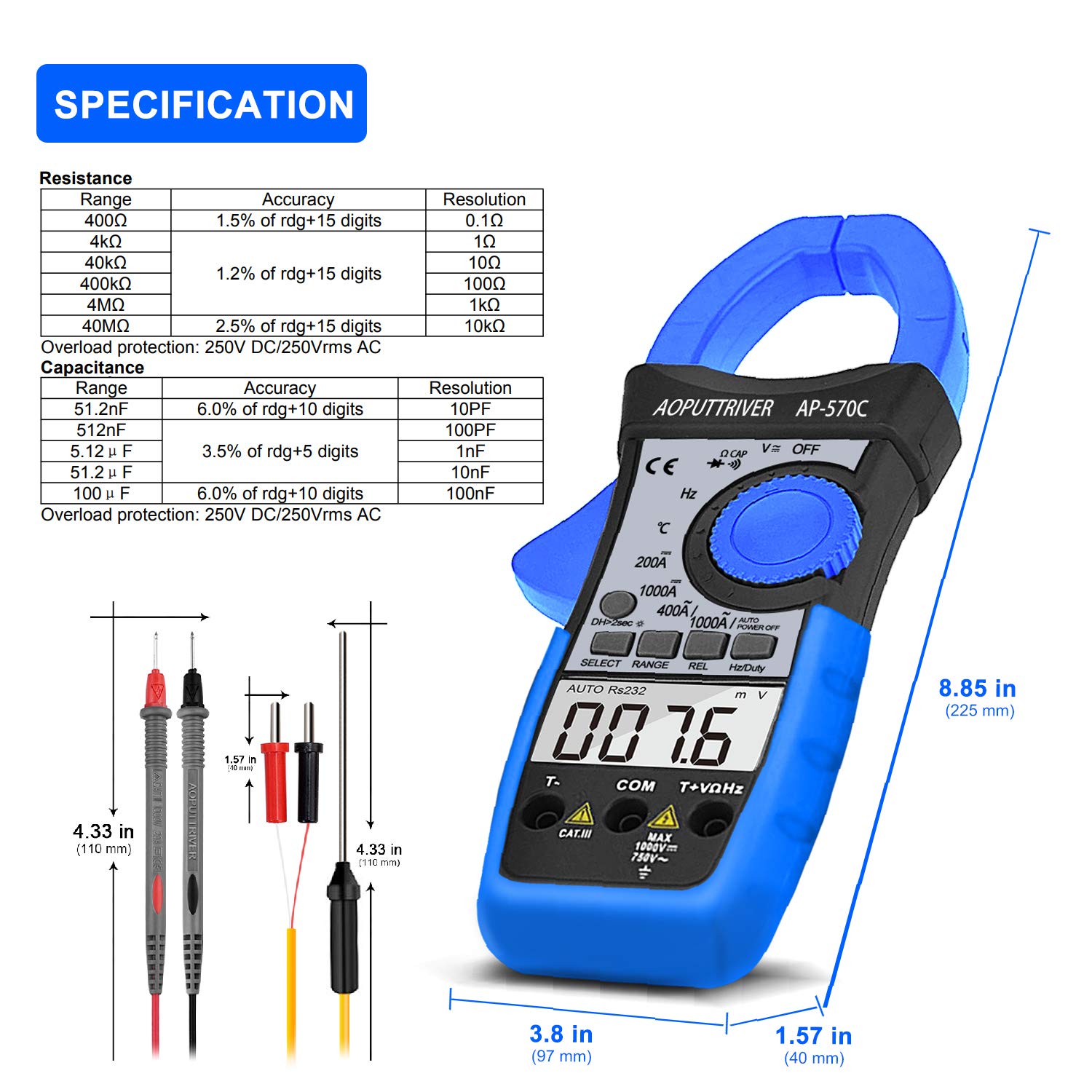
Image: Detailed specifications table for Resistance and Capacitance, along with physical dimensions of the meter and test leads.
8. Održavanje
8.1. Čišćenje
To maintain the accuracy and longevity of your meter:
- Obrišite kućište oglasomamp krpa i blagi deterdžent. Ne koristite abrazive ili otapala.
- Keep the input terminals and clamp jaws clean and free of debris.
8.2. Zamjena baterije
When the low battery indicator appears on the LCD, replace the 9V battery as described in the "Setup" section. Prompt replacement ensures continued accuracy.
8.3. Skladištenje
When not in use, store the meter in its protective storage bag in a dry, cool place, away from direct sunlight and extreme temperatures.
9. Otkrivanje problema
If you encounter issues with your AP-570C, consider the following common solutions:
- Nema prikaza/Slab prikaz: Provjerite napunjenost baterije i uvjerite se da je pravilno instalirana. Zamijenite ako je potrebno.
- "OL" na ekranu: Indicates an over-range condition. The measured value exceeds the selected range. Switch to a higher range or verify the circuit.
- Netačna očitavanja:
- Provjerite da li su mjerni kablovi potpuno umetnuti i da li ostvaruju dobar kontakt.
- Provjerite je li rotacijski prekidač postavljen na ispravnu funkciju i raspon.
- Za mjerenja struje, osigurajte da se samo jedan provodnik nalazi unutar clamp čeljusti.
- Provjerite ima li vanjskih elektromagnetskih smetnji.
- Zvučnik kontinuiteta ne radi: Ensure the meter is in continuity mode and test leads are making proper contact. If the issue persists, the meter may require service.
10. Garancija i podrška
The AOPUTTRIVER AP-570C comes with a 2 godine garancije and lifetime technical support. For any questions or assistance with your product, please contact AOPUTTRIVER customer support.
You can visit the official AOPUTTRIVER store for more information: AOPUTTRIVER Store


