
1. Uvod
This user manual provides detailed instructions for the installation, configuration, and operation of your Jennov 5.0MP PTZ Outdoor WiFi Security Camera. Please read this manual thoroughly before using the product to ensure proper functionality and safety. Keep this manual for future reference.
Karakteristike proizvoda Gotovoview:
- 5.0 Megapixel Resolution: Delivers clear and detailed video footage.
- 5X optički zum: Allows for detailed magnification of distant objects without loss of clarity.
- Pan/Tilt/Zoom (PTZ) Functionality: Offers a 355° horizontal rotation and 100° vertical tilt for comprehensive area coverage.
- Dvosmjerni zvuk: Ugrađeni mikrofon i zvučnik omogućavaju komunikaciju u realnom vremenu.
- Poboljšani noćni vid: Equipped with infrared LEDs for clear monitoring up to 65ft in low-light conditions.
- Detekcija pokreta i upozorenja: Configurable motion detection zones and sensitivity with push notifications and email alerts.
- IP66 ocjena otpornosti na vremenske uvjete: Izdržljiv metalni casing designed to withstand various outdoor weather conditions.
- Uključena SD kartica od 64 GB: Provides local storage for continuous 24/7 recording.
- Daljinski pristup: Monitor and control the camera from your smartphone, tablet, or PC.
2. Sadržaj paketa
Provjerite da li se u vašem paketu nalaze sve dolje navedene stavke. Ako neke stavke nedostaju ili su oštećene, obratite se korisničkoj podršci.
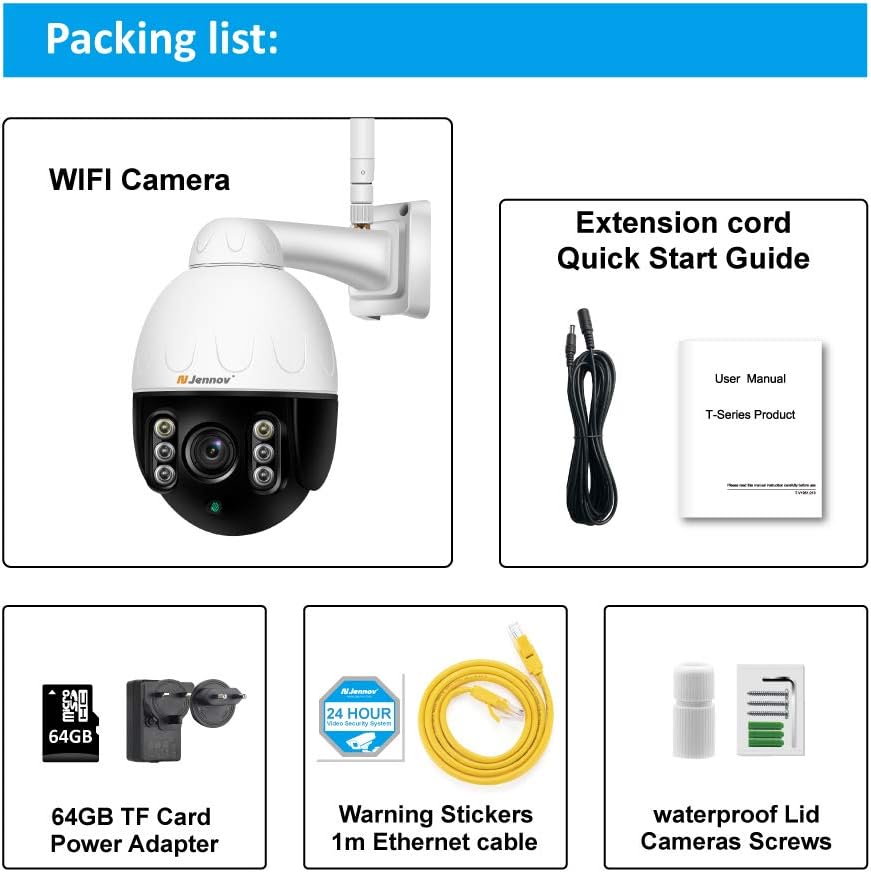
Image: Visual representation of the Jennov PTZ Camera and its included accessories.
- Jennov 5.0MP PTZ WiFi Camera (1 unit)
- 12V1A Power Adapter (1 unit)
- 3.3ft Ethernet Cable (1 unit)
- Mounting Screws (set)
- Waterproof Cap for Ethernet connection (1 unit)
- Warning Label (1 unit)
- 64GB Micro SD kartica (unaprijed instalirana)
- Kratki vodič / Korisnički priručnik
3. Upute za postavljanje
3.1 Fizička instalacija
- Odaberite lokaciju: Select a suitable outdoor location for mounting the camera. Ensure it has a clear line of sight to the area you wish to monitor and is within range of your 2.4GHz Wi-Fi network. The camera is designed for wall or ceiling mounting.
- Montirajte kameru: Use the provided mounting screws to securely attach the camera bracket to the chosen surface. Ensure the camera is positioned correctly for optimal viewing kut.
- Priključite napajanje: Connect the 12V1A power adapter to the camera's power input and plug it into a power outlet.
- Ethernet veza (opciono): For a more stable connection, you can use the provided Ethernet cable to connect the camera directly to your router. Use the waterproof cap to protect the Ethernet port if installed outdoors.
3.2 Instalacija aplikacije i početno podešavanje
- Preuzmite aplikaciju: Traži the recommended camera application (e.g., 'HiCam' or similar as per quick start guide) on your smartphone's app store (iOS or Android) and install it.
- Registrirajte račun: Otvorite aplikaciju i slijedite upute na ekranu da biste registrirali novi korisnički račun.
- Dodaj kameru: Power on the camera. In the app, select 'Add Device' or '+' icon. Follow the prompts to connect the camera to your home 2.4GHz Wi-Fi network. Ensure your phone is also connected to the 2.4GHz network during setup.
- Konfigurirajte postavke: Once connected, you can rename the camera, set a password, and adjust initial video settings.
4. Uputstvo za upotrebu
4.1 Uživo View i PTZ kontrola
Access the live video feed through the mobile app or PC client.

Image: A smartphone screen displaying the camera's live feed with pan and tilt controls, indicating 355° horizontal and 100° vertical rotation.
- Pan/Tilt: Use the directional controls within the app to rotate the camera horizontally (355°) and vertically (100°) to adjust the viewing kut.
- optički zum: Utilize the zoom controls (often a pinch-to-zoom gesture or dedicated buttons) to activate the 5X optical zoom for closer inspection of details.
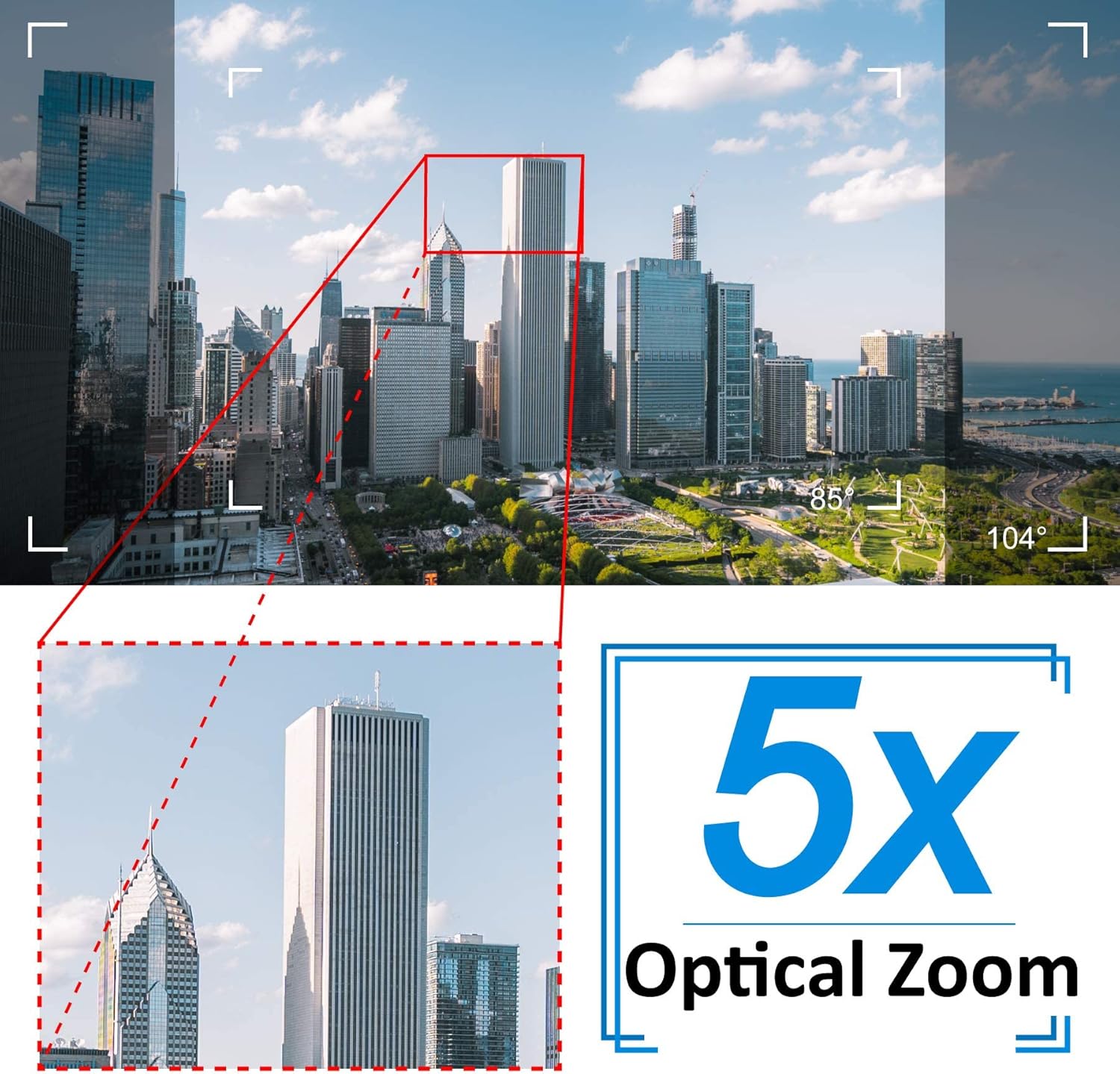
Image: A cityscape view demonstrating the 5X optical zoom feature, highlighting the ability to magnify distant objects clearly.
4.2 Dvosmjerni audio
Kamera podržava dvosmjernu audio komunikaciju.

Image: A person interacting with the camera's two-way audio feature via a smartphone, showing speech bubbles for communication.
- slušaj: Tap the speaker icon in the app to hear audio from the camera's location.
- govori: Press and hold the microphone icon to speak through the camera's speaker. Release to stop speaking.
4.3 Noćni vid
Kamera se automatski prebacuje u režim noćnog snimanja u uslovima slabog osvetljenja.

Image: A comparison showing a daytime view of a house and its clear night vision equivalent captured by the 5MP 1920P camera.
- The integrated IR-Cut filter and infrared LEDs provide clear black-and-white video up to 65ft (20 meters) in complete darkness.
4.4 Detekcija pokreta i upozorenja
Konfigurišite postavke detekcije pokreta da biste primali upozorenja o sumnjivim aktivnostima.

Image: A visual representation of the camera's human detection, email alert, and app notification features, with highlighted detection zones.
- Postavi zonu detekcije: In the app settings, define specific areas within the camera's view za detekciju pokreta.
- Podesite osjetljivost: Modify the motion detection sensitivity to minimize false alarms.
- Configure Alerts: Enable push notifications to your smartphone and/or email alerts with snapshots when motion is detected.
4.5 Snimanje i pohranjivanje
The camera comes with a pre-installed 64GB SD card for local storage.
- Kontinuirano snimanje: The camera supports 24/7 continuous recording to the SD card.
- Snimanje u petlji: When the SD card is full, new recordings will automatically overwrite the oldest footage.
- Reprodukcija: Pristup snimljen footagputem funkcije reprodukcije u aplikaciji.
5. Održavanje
Redovno održavanje osigurava optimalne performanse i dugotrajnost vaše sigurnosne kamere.

Image: The Jennov PTZ camera shown outdoors in various weather conditions (rain, snow, sun, wind), emphasizing its IP66 weatherproof rating.
- čišćenje: Povremeno čistite objektiv kamere mekom,amp cloth to remove dust, dirt, or water spots that may affect image quality. Do not use harsh chemicals.
- Provjerite veze: Regularly inspect power and Ethernet cable connections for any signs of wear or damage. Ensure waterproof caps are securely in place.
- Ažuriranja firmvera: Check the app regularly for available firmware updates. Keeping the camera's firmware updated can improve performance and security.
- Zaštita životne sredine: While the camera is IP66 weatherproof, extreme conditions (e.g., direct lightning strikes, prolonged submersion) should be avoided.
6. Otkrivanje problema
Ako naiđete na probleme s kamerom, pogledajte sljedeće uobičajene probleme i rješenja.
| Problem | Mogući uzrok | Rješenje |
|---|---|---|
| Kamera se ne povezuje na Wi-Fi. | Incorrect Wi-Fi password; Camera too far from router; Only supports 2.4GHz Wi-Fi. | Verify password. Move camera closer to router. Ensure your router is broadcasting a 2.4GHz network and your phone is connected to it during setup. |
| No image or black screen in live view. | Power issue; Network disconnection; Camera malfunction. | Check power connection. Verify Wi-Fi/Ethernet connection. Restart camera and router. |
| Night vision is unclear. | Dirty lens; Obstruction; Insufficient IR illumination. | Clean the camera lens. Ensure no objects are blocking the IR LEDs. |
| Motion detection alerts are too frequent or not triggered. | Sensitivity too high/low; Detection zone not configured correctly. | Adjust motion detection sensitivity in the app. Redefine the detection zone to focus on critical areas. |
| Dvosmjerni audio ne radi. | Microphone/speaker muted; App permissions; Network latency. | Check mute settings in the app. Ensure the app has microphone permissions on your phone. Verify stable network connection. |
7. Specifikacije
Detailed technical specifications for the Jennov 5.0MP PTZ Outdoor WiFi Security Camera.
| Feature | Specifikacija |
|---|---|
| Broj modela | JE-P22HT55-5X-FAS-64-UK |
| Efektivna video rezolucija | 5 MP (1920p) |
| Optički zum | 5X (2.7-13.5mm autofocus lens) |
| Kut pomicanja / nagiba | Horizontalno: 355°, Vertikalno: 100° |
| Bežična tehnologija | Wi-Fi (samo 2.4 GHz) |
| Noćni vid | Up to 65ft (20 meters) with Infrared LED |
| Weatherproof Rating | IP66 |
| Skladištenje | 64GB Micro SD kartica (unaprijed instalirana) |
| Napajanje | 12V1A DC (24 Watts) |
| Materijal | Metal Casing |
| Dimenzije (D x Š x V) | 21.5 x 19.5 x 11.5 cm |
| Težina | 1.2 kilograma |
| Kompatibilni uređaji | Android/iOS Smartphones, Tablets, PCs |
| Vrsta instalacije | Zidni nosač, plafonski nosač |
8. Garancija i podrška
For warranty information and technical support, please refer to the official Jennov website or contact their customer service directly. Details regarding warranty periods and support channels are typically provided with your purchase documentation or on the manufacturer's product page.
Molimo sačuvajte dokaz o kupovini za bilo kakve reklamacije u vezi s garancijom.


