1. Uvod
The AIYIMA DAC-A2 is a versatile Digital-to-Analog Converter (DAC) and headphone amplifier designed to enhance your audio experience. It features multiple digital input options and provides both RCA line-out and a 3.5mm headphone output, along with adjustable bass and treble controls for personalized sound. This manual provides detailed instructions for setup, operation, and maintenance of your DAC-A2.

Figure 1: AIYIMA DAC-A2 Headphone Ampdiferencijal DAC
2. Ključne karakteristike
- Integrated DAC and Headphone Amplifier: Built-in Hi-Fi headphone amplifier chip capable of driving 16ohm to 200ohm headphones.
- Advanced Chipset: Utilizes SA9023+CS8416+97220+NE5532 for optimal audio performance.
- Multiple Digital Inputs: Supports PC-USB, Optical, and Coaxial S/PDIF inputs, compatible with most home audio systems, PCs, and Macs.
- Versatile Outputs: Features RCA line-out for connecting to powered speakers or external amplifiers, and a 3.5mm headphone output.
- High-Resolution Audio: PC-USB input supports up to 24Bit/96KHz; Optical/Coaxial inputs support up to 24Bit/192kHz.
- Tone Controls: Independent bass and treble controls to customize your audio output.
- Compact and Portable: DC 5V power input allows for a portable and professional desktop audio device.

Figure 2: Internal Chipset and Features Overview
3. Sadržaj paketa
Molimo Vas da provjerite paket za sljedeće stavke:
- AIYIMA DAC-A2 Unit
- USB kabl (tip A do tip B)
- Optical Cable (Toslink)
- DC 5V Power Cable (USB-C for power)
- Uputstvo za upotrebu
4. Kontrole i interfejsi

Slika 3: Izgled prednje i zadnje ploče
4.1 Prednja ploča
- Prekidač ulaza: Toggle between USB, Optical (OPT), and Coaxial (COA) inputs.
- 3.5 mm izlaz za slušalice: Ovdje spojite slušalice.
- Bass Control Knob: Adjust the low-frequency response.
- Treble Control Knob: Adjust the high-frequency response.
- Dugme za kontrolu jačine zvuka: Adjust the overall output volume. This knob also acts as the power switch (push to turn on/off) and has a power indicator light.
4.2 Zadnja ploča
- DC 5V Ulaz napajanja: Connect the provided DC 5V power cable.
- RCA audio izlaz (L/R): Connect to powered speakers or an external amplifier.
- Koaksijalni ulaz (COA): Connect a coaxial digital audio source.
- Optički ulaz (OPT): Connect an optical digital audio source.
- PC-USB ulaz: Connect to your computer for USB audio.
5. Podešavanje i veze
Follow these steps to connect your AIYIMA DAC-A2 to your audio system:
- Priključak za napajanje: Connect the provided DC 5V power cable to the "DC 5V" input on the rear panel of the DAC-A2. Connect the other end to a suitable 5V power source (e.g., a USB wall adapter, not included). Ensure the power indicator light on the front panel illuminates when the volume knob is pressed to turn on.
- Ulazni izvor veze: Odaberite jednu od sljedećih metoda unosa:
- PC-USB: Connect the provided USB cable from your computer's USB port to the "PC-USB" input on the DAC-A2.
- optički: Spojite optički kabel iz audio izvora (npr. TV-a, igraće konzole) na "OPTICAL" ulaz.
- Koaksijalni: Connect a coaxial cable from your audio source to the "COAXIAL" input.
- Izlazna veza: Odaberite jednu od sljedećih metoda izlaza:
- RCA izlaz: Connect RCA cables from the "AUDIO OUT" (L/R) ports on the DAC-A2 to your powered speakers or an external ampunos korisnika koji želi da ga sačuva.
- 3.5 mm izlaz za slušalice: Plug your headphones into the 3.5mm jack on the front panel. Note: The headphone output takes priority. If headphones are connected, sound will be routed to them and not the RCA outputs.
- Odaberite unos: Use the input switch on the front panel to select the desired audio source (USB, OPT, or COA).
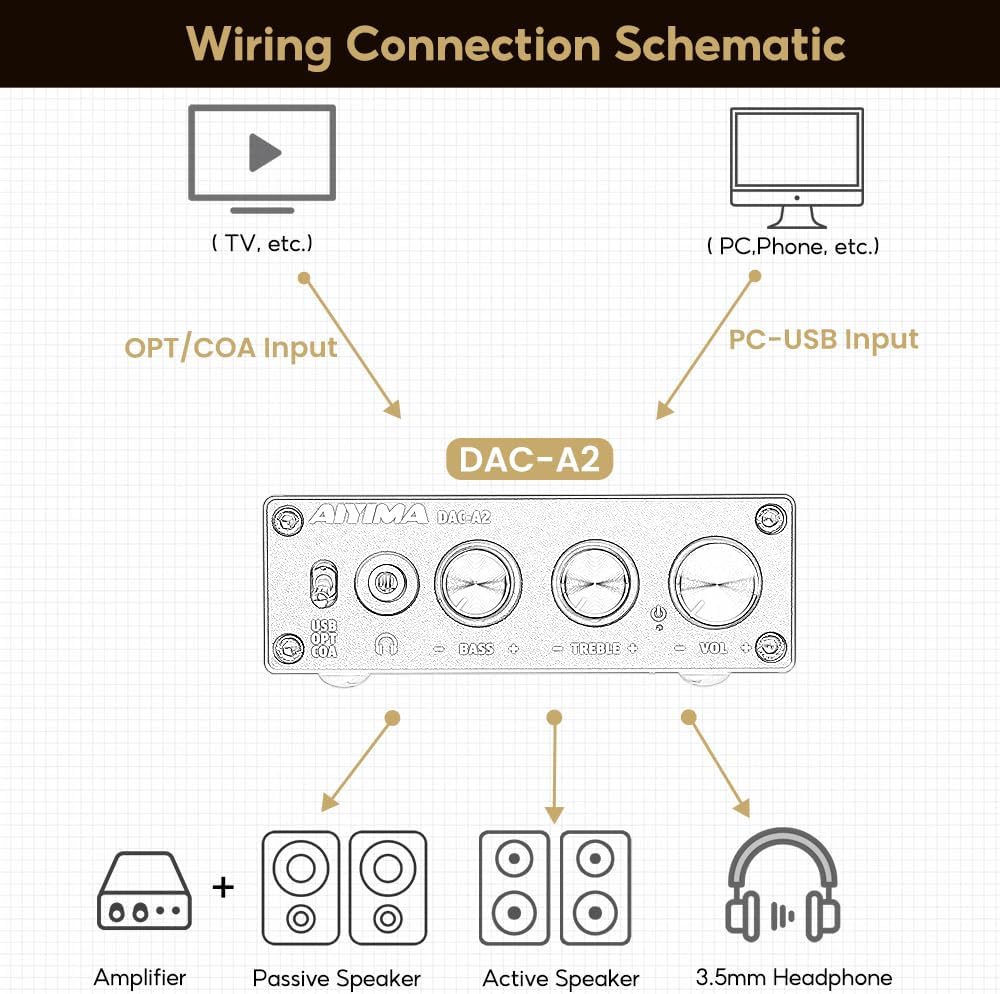
Slika 4: Dijagram povezivanja
Video 1: Demonstrates connecting the AIYIMA DAC-A2 to a laptop and an amplifier, showing the audio output to speakers and headphones. It illustrates switching between PC-USB input and adjusting volume, bass, and treble controls.
6. Uputstvo za upotrebu
- Uključivanje/isključivanje: Press the Volume Control Knob to turn the unit on or off. The power indicator light will illuminate when on.
- Odabir ulaza: Use the Input Switch (USB/OPT/COA) on the front panel to select your active audio source.
- Podešavanje jačine zvuka: Rotate the Volume Control Knob clockwise to increase volume and counter-clockwise to decrease it.
- Podešavanje basa: Rotate the Bass Control Knob to increase or decrease the bass frequencies according to your preference.
- Podešavanje visokih tonova: Rotate the Treble Control Knob to increase or decrease the treble frequencies according to your preference.

Figure 5: Adjustable Bass and Treble Controls
Video 2: Shows the AIYIMA DAC-A2 in a desktop setup, demonstrating the connection of headphones and the adjustment of volume, bass, and treble controls for an enhanced audio experience.
7. Specifikacije

Slika 6: Dimenzije proizvoda
| Feature | Specifikacija |
|---|---|
| Brand | AIYIMA |
| Broj modela | DAC-A2 |
| Čipset | SA9023+CS8416+97220+NE5532 |
| PC-USB ulaz Sampling Rate | 24Bit/96KHz |
| Optički/koaksijalni ulaz Sampling Rate | 24Bit/192kHz |
| Raspon impedanse slušalica | 16ohm to 200ohm |
| Maximum Supply Voltage | 5 Volts |
| Minimalna ponuda Voltage | 5 volti (DC) |
| Interface Type | Coaxial, USB, Optical |
| Broj kanala | 1 |
| Dimenzije proizvoda (D x Š) | 3.86"L x 2.89"W (approx. 98mm x 73mm) |
| Težina artikla | 14.8 unci (otprilike 420 g) |
8. Otkrivanje problema
If you encounter issues with your DAC-A2, please refer to the following common problems and solutions:
- Nema izlaza zvuka:
- Ensure the DAC-A2 is powered on and the power indicator is lit.
- Verify that the correct input source (USB, OPT, COA) is selected using the front panel switch.
- Check all cable connections (input and output) are secure.
- If using headphones, ensure they are fully plugged into the 3.5mm jack. Remember the headphone output has priority over RCA.
- Adjust the volume knob on the DAC-A2 and ensure your connected speakers/amplifier also have their volume turned up.
- For PC-USB input, check your computer's sound settings to ensure the DAC-A2 is selected as the default playback device.
- Izobličen ili loš kvalitet zvuka:
- Uvjerite se da su svi kablovi pravilno povezani i da nisu oštećeni.
- Provjerite audio izvor da li ima problema s kvalitetom.
- Adjust the Bass and Treble controls to see if they are set to extreme levels causing distortion.
- Ensure the power supply is stable and providing sufficient 5V power. An unstable power supply can cause noise.
- Isprekidan zvuk:
- Provjerite ima li labavih kablovskih veza.
- Ensure the power supply is consistent.
- If using PC-USB, try a different USB port on your computer or a different USB cable.
9. Održavanje
- čišćenje: Za čišćenje vanjske strane uređaja koristite meku, suhu krpu. Ne koristite tekuća sredstva za čišćenje ili otapala.
- Skladištenje: Uređaj čuvajte na hladnom i suhom mjestu, dalje od direktne sunčeve svjetlosti i ekstremnih temperatura.
- Rukovanje: Izbjegavajte ispuštanje ili izlaganje uređaja jakim udarcima.
- ventilacija: Osigurajte odgovarajuću ventilaciju oko uređaja kako biste spriječili pregrijavanje.
10. Garancija i podrška
AIYIMA products are designed for reliability and performance. For warranty information, technical support, or service inquiries, please refer to the contact information provided with your purchase or visit the official AIYIMA webMolimo sačuvajte dokaz o kupovini za potrebe reklamacije.
11. Važne informacije o sigurnosti
- Do not expose this unit to rain, moisture, or extreme temperatures.
- Ne otvarajte casing. Unutra nema dijelova koje korisnik može sam servisirati. Za sve servisne radove obratite se kvalifikovanom osoblju.
- Koristite samo navedeno napajanje (DC 5V).
- Izbjegavajte postavljanje jedinice u blizini izvora topline ili na direktnu sunčevu svjetlost.
- Čuvati van domašaja djece.


