1. Proizvod je gotovview
The FEELWORLD F6 Plus V2 is a 6-inch field monitor designed for DSLR cameras, featuring a 3D LUT touch screen with a 1920x1080 IPS display. It supports 4K HDMI input and output, and includes a tilt arm for flexible mounting. This manual provides instructions for setup, operation, and maintenance of your F6 Plus V2 monitor.

Image 1.1: FEELWORLD F6 Plus V2 6-inch field monitor.
2. Sadržaj paketa
Provjerite da li se u vašem paketu nalaze sve dolje navedene stavke:
- FEELWORLD F6 Plus V2 Monitor
- Micro HDMI kabel
- Senka sunca
- Nagnuti ruku
- Operativni priručnik

Image 2.1: Included accessories with the FEELWORLD F6 Plus V2 monitor.
3. Vodič za postavljanje
3.1 Fizički overview
Familiarize yourself with the ports and controls of the F6 Plus V2 monitor.
- Gornja strana: Power/Touch button, 3/4-inch screw mount, Menu rocker wheel.
- Lijeva strana: HDMI In, HDMI Out (4K pass-through up to 24Hz), DC Out 8V.
- Bottom Side: SD Card slot (for 3D LUT upload and firmware upgrade), DC In 12V, 1/4-inch screw mount, Headphone monitor jack.
- Zadnja strana: Standard F970 battery slot.

Slika 3.1: Vrh view of the monitor with power/touch button and menu wheel.

Slika 3.2: Bočna strana view of the monitor displaying various input/output ports.
3.2 Napajanje monitora
The F6 Plus V2 can be powered via the F970 battery slot on the back or through the DC In 12V port. Ensure the battery is charged or the power adapter is connected before use.
3.3 Montiranje monitora
The monitor can be mounted using the included tilt arm via the hot shoe mount or 1/4"-20 thread. This allows for flexible positioning, such as on top of your camera or on a gimbal.
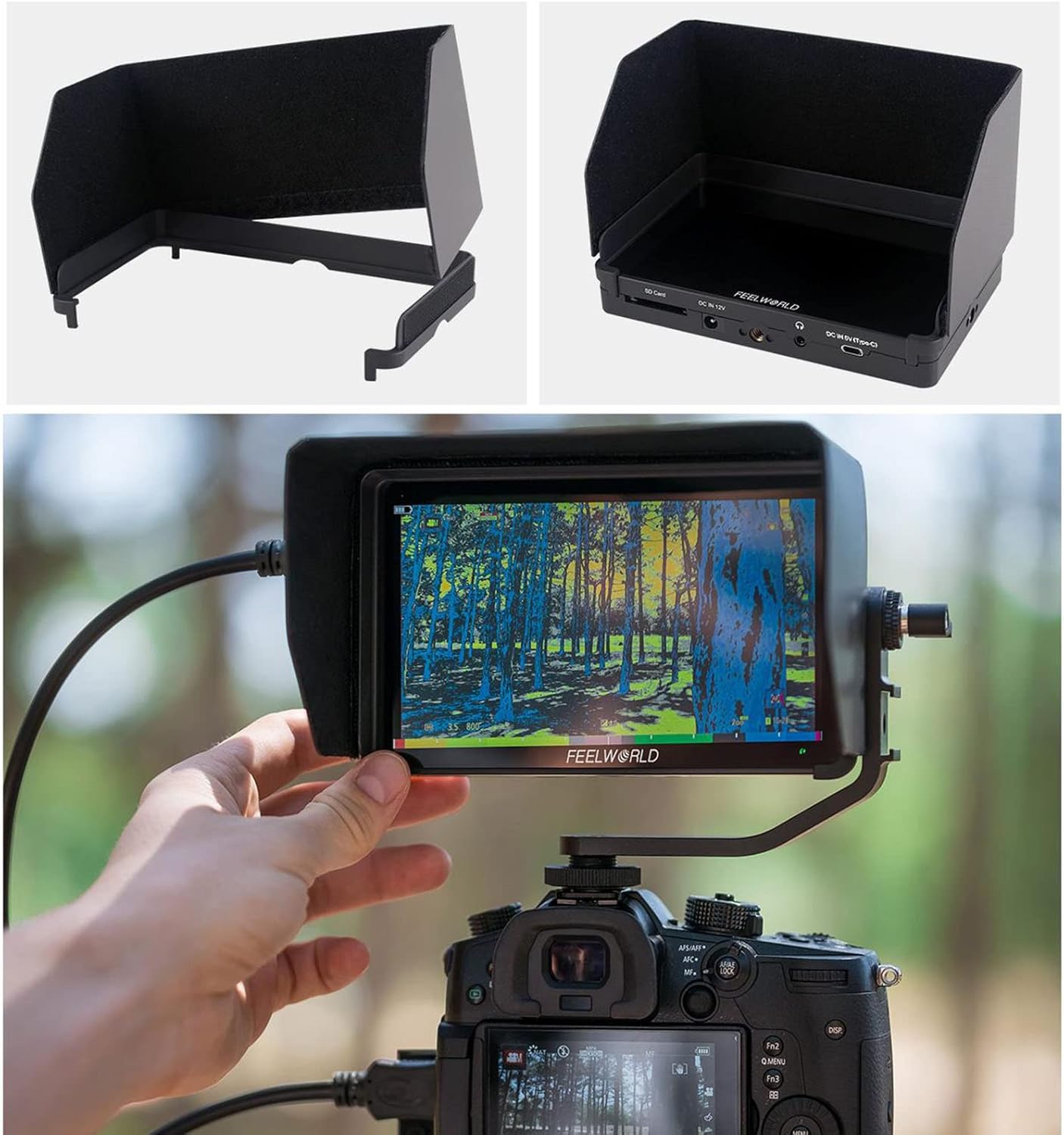
Image 3.3: Monitor mounted on a camera with the tilt arm and sunshade.
4. Uputstvo za upotrebu
4.1 Osnovni rad
Press the Power/Touch button to turn the monitor on or off. The touch screen allows for intuitive control of all parameters.
4.2 Navigacija izbornikom
Tap twice on the screen to enter the menu system. The menu rocker wheel can also be used to navigate and select options. The menu is organized into several categories:
- Postavke slike: Adjust display parameters.
- Postavke funkcija: Access monitoring tools.
- Postavke sistema: Configure general monitor options.
4.3 Monitoring Tools and Features
The F6 Plus V2 includes a variety of professional monitoring tools to assist with your video production:
- Waveform Monitoring: Choose from RGB Parade, Y Parade, vectorscope, histogram, and audio phase/level displays for broadcast-accurate signal monitoring.
- Pomoć pri fokusiranju (Peaking): Highlights in-focus areas to aid in sharp focusing.
- Lažna boja: Displays exposure levels using color overlays.
- histogram: Graphical representation of tonal distribution.
- Audio mjerač: Monitors audio input levels.
- jednobojno: Displays the image in black and white.
- Sigurnosni marker: Provides frame guides for various aspect ratios (e.g., 4:3, 16:9, 2.35:1).
- Centralni marker: Prikazuje križić u sredini ekrana.
- Anamorfni način rada: Uklanja anamorfni footage (1.33x, 2.0x).
- Flip Image: Okreće sliku horizontalno ili vertikalno.
- zumiranje: Magnifies a portion of the screen for detailed inspection.
- zamrznuti: Holds the current frame on the screen.
- Piksel po piksel: Prikazuje sliku u njenoj izvornoj rezoluciji bez skaliranja.
- Screenshot & Video Overlay: Capture screenshots and compare them with real-time video using semi-transparent overlay. (Requires SD card)

Image 4.1: Waveform monitoring and other analysis tools on the F6 Plus V2.
Image 4.2: Screenshot and video overlay function for composition comparison.
4.4 3D LUT Color Calibration
The monitor supports 3D LUT (Look Up Table) import via SD card, allowing you to preview your desired color grades in real-time. It comes with pre-loaded LUTs for various log profiles like S-Log2/3, V-Log, and Log-C.
- To import custom LUTs, save your .cube LUT files onto an SD card.
- Umetnite SD karticu u utor za SD karticu na monitoru.
- Navigate to the LUT Import section in the menu and select "Initialize" to load the LUTs.
- Once imported, you can select your desired LUT from the list for live preview.

Image 4.3: Real-time 3D LUT preview for color calibration.
4.5 Podešavanja prikaza
You can adjust various display parameters to suit your viewing preferences and shooting environment:
- Color Temperature (e.g., 6500K)
- Pozadinsko osvetljenje
- Osvetljenost
- Kontrast
- Saturation
- Hue
- Oštrina
5. Održavanje
To ensure the longevity and optimal performance of your FEELWORLD F6 Plus V2 monitor, follow these maintenance guidelines:
- čišćenje: Use a soft, dry cloth to clean the monitor screen and body. For stubborn smudges, a slightly damp cloth with a mild, non-abrasive cleaner can be used, ensuring no liquid enters the ports.
- Skladištenje: Store the monitor in a cool, dry place away from direct sunlight and extreme temperatures. Use the provided sunshade or a protective case when not in use to prevent scratches and dust accumulation.
- Održavanje baterije: If using rechargeable batteries, follow the manufacturer's instructions for charging and storage. Remove batteries if the monitor will not be used for an extended period.
- Ažuriranja firmvera: Periodically check the FEELWORLD official website for firmware updates to ensure your monitor has the latest features and bug fixes. Follow the provided instructions for safe updating via the SD card slot.
6. Otkrivanje problema
If you encounter issues with your FEELWORLD F6 Plus V2 monitor, refer to the following common troubleshooting steps:
- Nema napajanja: Ensure the battery is fully charged or the power adapter is securely connected. Check the power button operation.
- Nema signala: Verify that the HDMI cable is correctly connected to both the camera and the monitor. Check the camera's HDMI output settings. Ensure the correct input source is selected on the monitor.
- Izobličenje slike/netačne boje: Check the HDMI cable for damage. Reset display settings to default in the monitor menu. Ensure no incorrect LUTs are applied.
- Ekran na dodir ne reagira: Try restarting the monitor. Ensure the touch function is enabled via the Power/Touch button.
- Neuspjeh ažuriranja firmvera: Ensure the SD card is properly formatted and the firmware file is correctly placed. Follow the update instructions precisely.
For persistent issues, contact FEELWORLD customer support or refer to the official websajt za dalju pomoć.
7. Specifikacije
| Feature | Specifikacija |
|---|---|
| Broj modela | F6 PLUS V2 |
| Veličina ekrana | 6 inča |
| Rezolucija | FHD 1080p (1920x1080) |
| Display Type | IPS ekran osetljiv na dodir |
| Aspect Ratio | 16:9 |
| Kontrast Ratio | 1000:1 |
| Osvetljenost | 500 nita |
| HDMI ulaz/izlaz | 4K HDMI ulaz i izlaz petlje |
| LUT podrška | 3D LUT Cube Import (up to 50) via SD Card |
| Power Input | DC In 12V, 5V Type-C, F970/LP-E6 Battery Plate |
| Izlazna snaga | DC Out 8V |
| Težina artikla | 2.2 funte |
| Dimenzije paketa | 7.5 x 5.1 x 3.4 inča |
8. Zvanični video proizvoda
Video 8.1: FEELWORLD F6 Plus 4K DSLR Camera Field Monitor Overview by INSTACINE. This video demonstrates the monitor's features, physical layout, and menu options, including touch screen functionality and LUT loading. Note: This video is for the FEELWORLD F6 Plus model, and some features or specifications may vary slightly for the F6 Plus V2.
9. Garancija i podrška
For warranty information, technical support, or service inquiries, please refer to the official FEELWORLD webweb-mjesto ili direktno kontaktirajte njihovu korisničku službu. Sačuvajte račun kao dokaz o kupovini za reklamacije u slučaju garancije.


