Uvod
This manual provides detailed instructions for the proper setup, operation, and maintenance of your ALINCO DX-10 10-Meter Multi-Mode Emitter. Please read this manual thoroughly before using the device to ensure optimal performance and safety. Retain this manual for future reference.
Sadržaj paketa
Provjerite da li se u vašem paketu nalaze sve dolje navedene stavke:
- CB Radio
- Mikrofon
- Držač mikrofona
- Mounting Support for CB Radio
- Kabl za napajanje

Image: The ALINCO DX-10 radio, microphone, and its packaging box, illustrating the items included in the product package.
Karakteristike proizvoda
The ALINCO DX-10 is a versatile 10-meter multi-mode emitter designed for reliable communication. Key features include:
- Multi-mode Operation: Supports LSB, USB, AM, FM, and CW modes.
- Frekvencijski raspon: 28,000-29,700 MHz (Programmable).
- Kanali: 40 programmable channels per band.
- Izlazna snaga: 1-12 W (FM/AM/CW) and 0-25 W (USB/LSB) adjustable.
- Frequency Jumps: 10Hz, 100Hz, 1kHz, and 10kHz.
- Prikaz: Large backlit display with 7 selectable colors.
- Funkcije: Dual Watch, Scan, RF Gain, Mic Gain, NB (Noise Blanker), ANL (Automatic Noise Limiter), Roger Beep, Clarifier, Squelch (SQ), RF PWR, SWR meter, S-meter, TOT (Time Out Timer), Echo function, and emergency channel (9/19) button.
- Povezivanje: 6-pin microphone connector, additional external speaker jack (3.5 mm), CW connection.

Image: Front panel of the ALINCO DX-10, highlighting the multi-color display, channel selector, mode switch, and various control knobs and buttons.
Uputstva za postavljanje
- Priključak za napajanje: Connect the supplied power cord to the 13.8 VDC power source, ensuring correct polarity. The radio requires 13.8 VDC +/-15%.
- Priključak antene: Connect a suitable 10-meter antenna to the antenna connector on the rear panel of the radio. Ensure the antenna is properly tuned for the 10-meter band to prevent damage to the transceiver.
- Povezivanje mikrofona: Plug the 6-pin microphone connector into the microphone jack on the front panel.
- Montaža: Use the provided mounting support to securely install the CB radio in your desired location (e.g., vehicle or base station).
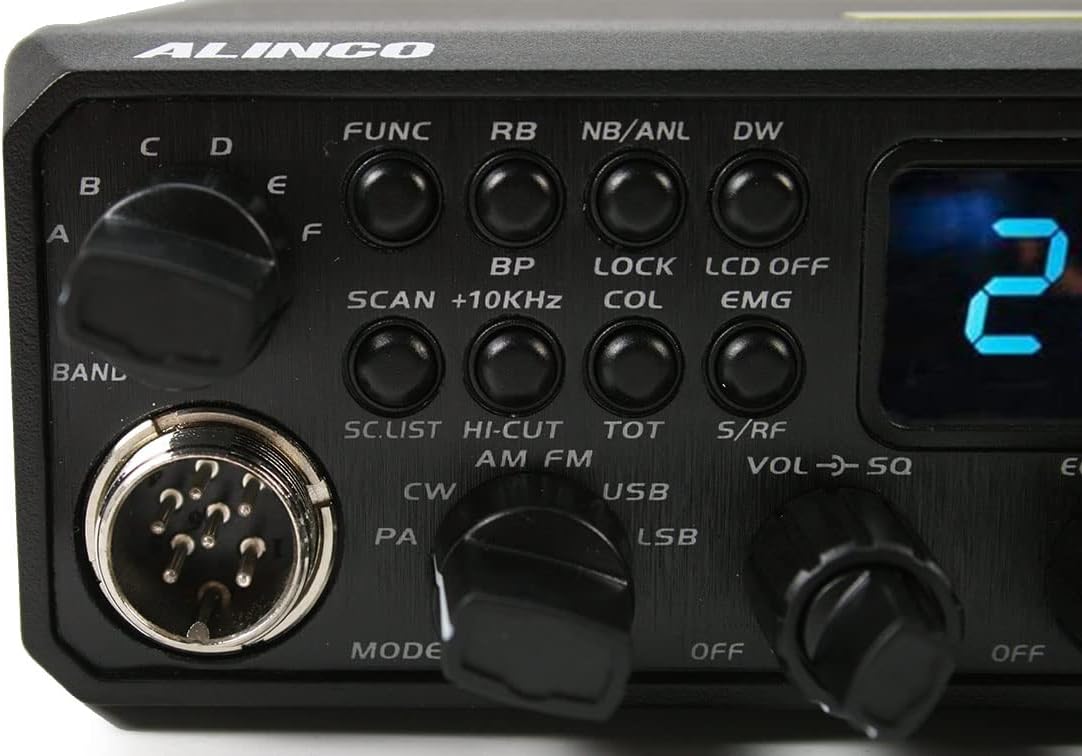
Image: Rear panel of the ALINCO DX-10, displaying the antenna connector, power input, and other rear panel connections.
Uputstvo za upotrebu
Basic Operation
- Uključivanje/isključivanje: Turn the VOL/SQ knob clockwise to power on the unit. Turn counter-clockwise until it clicks to power off.
- Podešavanje jačine zvuka: Rotate the outer ring of the VOL/SQ knob to adjust the audio output volume.
- Podešavanje prigušenja: Rotate the inner knob of VOL/SQ to adjust the squelch level. Adjust until background noise disappears, but signals are still received clearly.
- Odabir kanala: Use the CHANNEL knob on the right side of the front panel to select your desired operating channel.
- Odabir načina rada: Use the MODE switch (AM/FM/USB/LSB/CW/PA) to select the desired modulation mode.
- Frequency Adjustment (Clarifier): Use the CLARIFIER knob for fine-tuning the receive frequency, especially in SSB modes (USB/LSB), to ensure clear audio.
Napredne funkcije
- Dugme FUNC: Press the FUNC button to access secondary functions indicated above the primary buttons.
- Dvostruko praćenje (DW): Activates monitoring of two channels simultaneously.
- skeniranje: Initiates scanning through active channels.
- Noise Blanker (NB) / Automatic Noise Limiter (ANL): Press NB/ANL to reduce impulse noise.
- Roger Beep (RB): Activates an audible tone at the end of your transmission.
- Funkcija odjeka: Engages the echo effect for transmissions.
- RF pojačanje: Adjusts the sensitivity of the receiver.
- Pojačanje mikrofona: Podešava osjetljivost ulaza mikrofona.
- Emergency Channel (EMG): Quickly switches to emergency channels 9 or 19.
- Display Color (COL): Changes the backlight color of the display.

Slika: Detaljna view of the ALINCO DX-10 control panel, showing the mode selector, function buttons, and various adjustment knobs for fine-tuning operation.
Održavanje
Proper maintenance ensures the longevity and optimal performance of your ALINCO DX-10.
- čišćenje: Use a soft, dry cloth to clean the exterior of the radio. Do not use abrasive cleaners, solvents, or harsh chemicals.
- ventilacija: Ensure the ventilation fins on the side and rear of the unit are clear of obstructions to prevent overheating during operation.
- Napajanje: Always use a stable 13.8 VDC power supply within the specified tolerance. Unstable power can damage the unit.
- antena: Regularly inspect your antenna and coaxial cable for any signs of damage or corrosion. Ensure all connections are secure.
Rješavanje problema
If you encounter issues with your ALINCO DX-10, refer to the following common problems and solutions:
- Nema napajanja: Check the power cord connection and the power supply voltage. Ensure the power switch (VOL/SQ knob) is turned on.
- Nema zvuka: Adjust the volume knob. Check squelch setting; if set too high, it may block weak signals. Ensure the microphone is properly connected.
- Poor Transmission/Reception: Verify antenna connection and ensure the antenna is properly tuned for the operating frequency. Check the selected mode (AM/FM/SSB). Adjust RF Gain and Mic Gain.
- Iskrivljeni zvuk: Adjust Clarifier for SSB modes. Check Mic Gain setting. Ensure the microphone is not damaged.
For persistent issues not resolved by these steps, contact ALINCO customer support or a qualified service technician.
Specifikacije
| Feature | Specifikacija |
|---|---|
| Frekvencijski opseg | 28,000-29,700 MHz (Programmable) |
| Modulacijski modovi | AM, FM, LSB, USB, CW |
| Kanali | 40 programmable channels per band |
| Napajanje | 13.8 VDC +/-15% |
| Transmission Power (FM/AM/CW) | 1-12 W adjustable |
| Transmission Power (USB/LSB) | 0-25 W adjustable |
| Apsorbovana struja | 6A maks |
| Audio Power Speaker | 3 W |
| Tip mikrofona | 6 pinova |
| Dimenzije (Š x V x D) | 238 x 173 x 51 mm (9.37 x 6.81 x 2.01 inča) |
| Težina | 1687 g (3.72 lbs) |
| Impedansa | 50 oma |

Slika: Od vrha prema dolje view of the ALINCO DX-10 radio with its physical dimensions (length, width, height) indicated in centimeters.
Garancija i podrška
For warranty information and technical support, please refer to the official ALINCO website or contact your authorized ALINCO dealer. Keep your purchase receipt as proof of purchase.
Online resursi: For additional information, firmware updates, and frequently asked questions, visit the official ALINCO support page.


