1. Uvod
Thank you for choosing the Diyeeni USB Wired Mini Speaker. This manual provides essential information for the proper setup, operation, and maintenance of your speaker. Please read it thoroughly before use to ensure optimal performance and longevity of the product.
2. Sigurnosne informacije
- Ne izlažite zvučnik vodi ili prekomjernoj vlazi.
- Izbjegavajte ispuštanje ili izlaganje zvučnika jakim udarcima.
- Ne pokušavajte sami rastavljati ili popravljati zvučnik. Za sve servisne radove obratite se kvalifikovanom osoblju.
- Držite zvučnik dalje od izvora toplote i direktne sunčeve svjetlosti.
- Osigurajte odgovarajuću ventilaciju oko zvučnika tokom upotrebe.
3. Sadržaj paketa
Provjerite da li su sve stavke prisutne u paketu:
- 1 x Diyeeni USB Wired Mini Speaker
- 1 x Integrated USB Power & Audio Cable (attached to speaker)
4. Proizvod je gotovview
The Diyeeni USB Wired Mini Speaker is designed for use with desktop and notebook computers, offering a compact and portable audio solution. It features dual speakers for clear sound output and an integrated USB cable for both power and audio transmission.

Slika 1: Prednja strana view of the Diyeeni USB Wired Mini Speaker, highlighting its compact design.

Image 2: Diagram illustrating the internal dual speaker components of the Diyeeni USB Wired Mini Speaker.

Image 3: A hand holding the Diyeeni USB Wired Mini Speaker, demonstrating its portable and compact size.
5. Podešavanje
Follow these steps to connect your Diyeeni USB Wired Mini Speaker to your computer:
- Povežite USB kabl: Locate an available USB port on your desktop or notebook computer. Insert the integrated USB cable from the speaker into the USB port. This single cable provides both power to the speaker and transmits audio signals.
- Automatska instalacija drajvera: Your computer should automatically detect the new audio device and install the necessary drivers. This process may take a few moments.
- Select as Audio Output: Once installed, you may need to manually select the Diyeeni USB Wired Mini Speaker as your default audio output device in your computer's sound settings.
- Windows: Right-click the speaker icon in the taskbar, select 'Sound settings' or 'Playback devices', and choose the USB speaker from the list.
- macOS: Go to 'System Preferences' > 'Sound' > 'Output' and select the USB speaker.
- plasman: Place the speaker on a stable, flat surface near your computer for optimal sound projection.
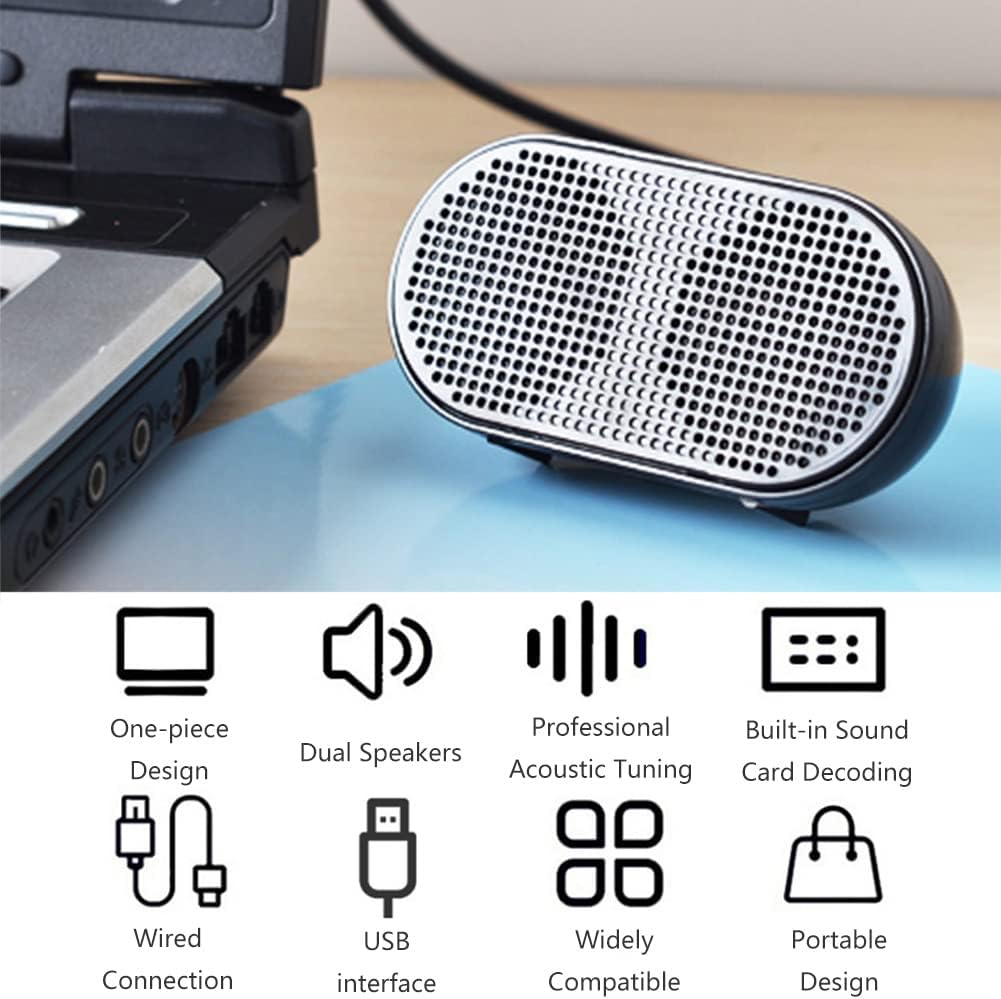
Image 4: The Diyeeni USB Wired Mini Speaker connected to a laptop via its integrated USB cable, ready for use.

Image 5: The Diyeeni USB Wired Mini Speaker positioned next to a desktop monitor, illustrating its compact size and simple USB connection.
6. Operacija
Once connected and selected as the audio output device, the Diyeeni USB Wired Mini Speaker operates automatically with your computer's audio. There are no physical controls on the speaker itself.
- Kontrola jačine zvuka: Adjust the volume directly from your computer's operating system or the media player application you are using.
- Uključivanje/isključivanje: The speaker powers on automatically when connected to a powered USB port and powers off when disconnected or when the computer is shut down.
- Kompatibilnost: The speaker is compatible with various devices, including desktop computers, notebook computers, and other devices that support USB audio output.

Image 6: A collage demonstrating the wide application of the Diyeeni USB Wired Mini Speaker with various devices such as laptops and desktop computers.
7. Održavanje
To ensure the longevity and proper functioning of your speaker, follow these maintenance guidelines:
- čišćenje: Za brisanje vanjske strane zvučnika koristite meku, suhu krpu. Nemojte koristiti tekuća sredstva za čišćenje ili abrazivne materijale.
- Skladištenje: When not in use, store the speaker in a cool, dry place away from direct sunlight and extreme temperatures.
- Održavanje kablova: Avoid bending or twisting the integrated USB cable excessively to prevent internal damage.
8. Otkrivanje problema
If you encounter issues with your Diyeeni USB Wired Mini Speaker, refer to the following common problems and solutions:
- Nema zvuka:
- Provjerite je li USB kabel sigurno priključen u ispravan USB priključak na vašem računaru.
- Check your computer's volume settings and ensure it is not muted or set too low.
- Verify that the Diyeeni USB Wired Mini Speaker is selected as the default audio output device in your computer's sound settings (refer to Section 5, Step 3).
- Try connecting the speaker to a different USB port or another computer to rule out a port or computer-specific issue.
- izobličeni zvuk:
- Reduce the volume on your computer. High volume levels can sometimes cause distortion.
- Provjerite audio izvor (npr. muziku file, video) is of good quality.
- Speaker Not Recognized by Computer:
- Odspojite i ponovo povežite USB kabl.
- Ponovo pokrenite računar.
- Check your computer's Device Manager (Windows) or System Information (macOS) to see if the USB audio device is listed without errors.
9. Specifikacije
| Feature | Detalj |
|---|---|
| Vrsta proizvoda | Mini Wire Speaker |
| Vrsta zvučnika | Multimedija |
| Konfiguracija zvučnika | Dual Speakers (2.0 Channel) |
| Veličina zvučnika | 6 centimetara |
| Maksimalna izlazna snaga zvučnika | 1.5 Watts (each) |
| Tehnologija povezivanja | USB (Integrated Power Supply & Audio Cable) |
| Kompatibilni uređaji | Stoni računar, Laptop |
| Izvor napajanja | Električni uređaj s kablom (putem USB-a) |
| Težina artikla | 3.17 unci (0.09 kilograma) |
| Dimenzije proizvoda | 3.35 x 1.18 x 1.65 inča |
| UPC | 754959887068 |
10. Garancija i podrška
For warranty information or technical support, please refer to the documentation provided at the time of purchase or contact Diyeeni customer service through their official channels. Keep your purchase receipt as proof of purchase.


