1. Uvod
This manual provides detailed instructions for the installation, programming, and operation of your Orbit 2-Outlet Programmable Hose Faucet Timer, Model 24621. This device is designed to automate your watering schedule, ensuring efficient irrigation for your garden or lawn. Please read these instructions carefully before use to ensure proper function and longevity of the product.
2. Proizvod je gotovview
The Orbit 2-Outlet Programmable Hose Faucet Timer features a large digital display and intuitive controls for easy programming. It allows for independent programming of two watering zones from a single faucet.

Slika 2.1: Front view of the Orbit 2-Outlet Programmable Hose Faucet Timer, displaying the digital screen and control dial.
Ključne karakteristike:
- Dual Outlets: Control two separate watering zones independently.
- Lako programiranje: Simple interface with a large, easy-to-read digital display.
- Fleksibilno zakazivanje: Program watering intervals from every hour up to every 7th day.
- Podesivo trajanje: Set watering times from 1 to 360 minutes.
- Kašnjenje kiše: Pause your watering schedule for 1 to 7 days.
- Ručni rad: Instant faucet use without interrupting programmed schedules.
- Napaja se na baterije: Operates on batteries for convenience.
3. Instalacija
3.1. Instalacija baterije
- Pronađite odjeljak za baterije na stražnjoj strani tajmera.
- Skinite poklopac baterije.
- Umetnite dvije nove AA alkalne baterije, pazeći na ispravan polaritet (+/-).
- Vratite poklopac baterije na sigurno.
3.2. Attaching the Timer to the Faucet
- Provjerite je li slavina zatvorena.
- Thread the timer's inlet collar onto your outdoor hose faucet. Hand-tighten only; do not use tools.
- Connect your garden hoses to the two outlets at the bottom of the timer. Hand-tighten only.
- Slowly turn on the faucet completely.

Slika 3.1: The timer connected to a water faucet with two hoses attached, ready for use in a garden setting.
4. Programske instrukcije
The timer features a large dial and buttons for easy navigation through programming steps. Use the STATION button to select which outlet (1 or 2) you are programming.
4.1. Postavite sat
- Okrenite točkić na SET CLOCK.
- Koristite < i > dugmad za podešavanje trenutnog vremena.
- Pritisnite OK dugme za potvrdu.
4.2. Set Start Time
- Okrenite točkić na VRIJEME POČETKA.
- Koristite < i > dugmad za podešavanje željenog vremena početka zalivanja.
- Pritisnite OK za potvrdu.
4.3. Set Watering Duration (How Long)
- Okrenite točkić na KOLIKO DUGO.
- Koristite < i > buttons to set the watering duration (from 1 to 360 minutes).
- Pritisnite OK za potvrdu.
4.4. Set Watering Frequency (How Often)
- Okrenite točkić na KOLIKO ČESTO.
- Koristite < i > buttons to set the watering frequency (from every hour up to every 7th day).
- Pritisnite OK za potvrdu.
4.5. Ručni rad
To water manually without affecting your programmed schedule:
- Okrenite točkić na AUTO/MANUALNO.
- Pritisnite MANUAL dugme.
- Koristite < i > buttons to set the desired manual watering duration.
- Pritisnite OK da započnete ručno zalijevanje.
- To stop manual watering, press the MANUAL button again or turn the dial to OFF.
4.6. Funkcija odlaganja kiše
To temporarily pause your watering schedule due to rain or other reasons:
- Okrenite točkić na AUTO/MANUALNO.
- Pritisnite i držite RAIN DELAY button (often integrated with AUTO/MANUAL or a dedicated button).
- Koristite < i > buttons to select the delay duration (1 to 7 days).
- Pritisnite OK to activate the rain delay. The timer will resume its programmed schedule after the delay period.
5. Održavanje
5.1. Zamjena baterije
It is recommended to replace the batteries annually, or when the low battery indicator appears on the display, to ensure continuous operation. Refer to section 3.1 for battery installation steps.
5.2. Zimsko skladištenje
Before the first frost, remove the timer from the faucet. Drain any water from the timer and store it indoors in a dry, protected location. Freezing temperatures can damage the internal components of the timer.
6. Otkrivanje problema
| Problem | Mogući uzrok | Rješenje |
|---|---|---|
| Tajmer se ne uključuje ili je ekran prazan. | Prazne ili nepravilno instalirane baterije. | Zamijenite baterije novim AA alkalnim baterijama, pazeći na ispravan polaritet. |
| Water does not flow at scheduled time. | Faucet is off; rain delay is active; incorrect programming; low water pressure. | Ensure faucet is fully open. Check if rain delay is active. Verify programming settings (start time, duration, frequency). Check water pressure. |
| Tajmer se ne isključuje. | Internal valve malfunction; low battery. | Replace batteries. If problem persists, the unit may require replacement. |
| Water leaks from faucet connection. | Loose connection; worn washer. | Ensure connection is hand-tight. Check and replace the rubber washer inside the timer's inlet if it is worn or missing. |
| Timer resets or loses program. | Low batteries; power interruption. | Replace batteries. Reprogram the timer. |
7. Specifikacije
- Model: 24621
- Brand: Orbita
- Materijal: Plastika
- Boja: Grey
- Dimenzije proizvoda: 3"D x 2"Š x 4"H
- Težina artikla: 1.2 funti
- Izvor napajanja: 2 x AA alkalne baterije (nisu uključene)
- Broj postavki: 3 (Start Time, How Long, How Often)
- Trajanje zalijevanja: 1 do 360 minuta
- Učestalost zalijevanja: Every hour up to every 7th day
- Opcije odlaganja zbog kiše: 1 do 7 dana
- UPC: 046878246218
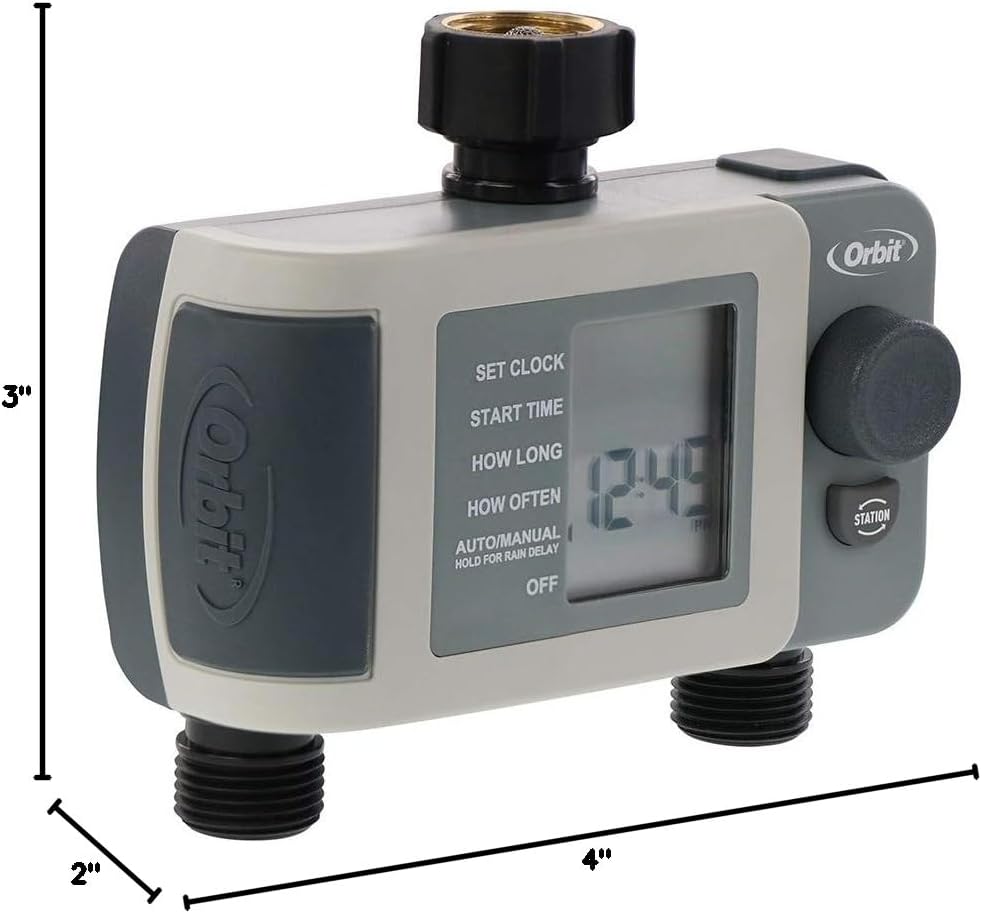
Slika 7.1: Diagram showing the approximate dimensions of the timer: 3 inches deep, 2 inches wide, and 4 inches high.
8. Garancija i podrška
Orbit products are designed for durability and performance. For specific warranty information or technical support, please refer to the official Orbit webweb-mjesto ili direktno kontaktirajte njihovu korisničku službu. Sačuvajte račun za kupovinu u slučaju reklamacije.


