1. Uvod
This user manual provides detailed instructions for the safe and efficient operation of your Veidoo 10-inch Android Tablet PC. Please read this manual thoroughly before using the device and retain it for future reference. This tablet is designed for various uses, including communication, entertainment, and productivity.

This image shows the Veidoo 10-inch Android Tablet PC. The front of the tablet displays the home screen with the current time, date, and various application icons such as Camera, Gallery, Settings, and Music. The rear of the tablet, visible behind the front, is black with a subtle textured design and features the rear camera module.
2. Sigurnosne informacije
- Ne izlažite uređaj ekstremnim temperaturama, direktnoj sunčevoj svjetlosti ili visokoj vlažnosti.
- Izbjegavajte ispuštanje ili izlaganje uređaja jakim udarima.
- Koristite samo punjače i dodatke koje je odobrio proizvođač.
- Ne pokušavajte sami rastavljati ili popravljati uređaj. Obratite se kvalifikovanom servisnom osoblju.
- Držite uređaj podalje od djece i kućnih ljubimaca.
- Uređaj i njegovu bateriju odložite odgovorno u skladu s lokalnim propisima.
3. Proizvod je gotovview
3.1 Fizičke karakteristike
Familiarize yourself with the various ports and buttons on your Veidoo Tablet PC:

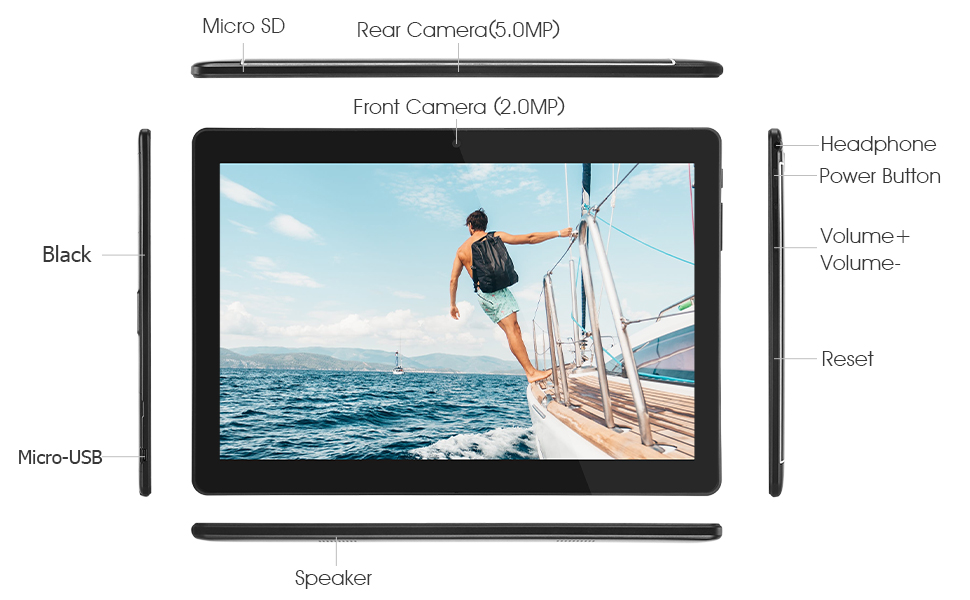
This diagram illustrates the various physical components and ports of the Veidoo 10-inch Android Tablet PC. It clearly labels the Micro SD card slot, the 5.0MP rear camera, the 2.0MP front camera, the headphone jack, the power button, the volume up and down buttons, the reset pinhole, the Micro-USB charging port, and the speaker.
- Micro SD utor: Za proširivu pohranu.
- Zadnja kamera (5.0MP): Za snimanje fotografija i videa.
- Prednja kamera (2.0MP): Za video pozive i selfije.
- Priključak za slušalice: Priključite slušalice od 3.5 mm.
- Dugme za napajanje: Pritisnite i držite za uključivanje/isključivanje, kratki pritisak za spavanje/buđenje.
- Dugmad za jačinu zvuka: Podesite jačinu zvuka.
- Poništi Pinhole: Use a thin object to reset the device if unresponsive.
- Micro-USB port: Za punjenje i prijenos podataka.
- govornik: Audio izlaz.
3.2 Sadržaj paketa
Provjerite da li se u kutiji vašeg proizvoda nalaze svi artikli:

This image displays the items typically found inside the Veidoo 10-inch Android Tablet PC product box. It includes the tablet itself, a black protective case, a power adapter (wall charger), a USB charging and data cable, a service warranty card, and a leaflet containing frequently asked questions and support information.
- Veidoo 10-inch Android Tablet PC
- Adapter za napajanje
- USB kabel
- Protective Case (optional, may vary by package)
- Korisnički priručnik (ovaj dokument)
- Servisna garancija
- FAQ Leaflet
4. Podešavanje
4.1 Punjenje baterije
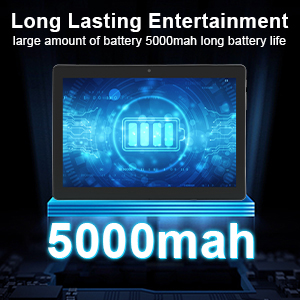
Before first use, fully charge the tablet. Connect the USB cable to the tablet's Micro-USB port and the other end to the power adapter. Plug the adapter into a wall outlet. The charging indicator will show the charging status. A full charge typically takes 3-4 hours.

This image focuses on the Veidoo 10-inch Android Tablet PC's battery capacity, prominently displaying a battery icon and '5000mAh'. This signifies the tablet's 5000mAh battery, designed to provide extended usage time for entertainment and productivity.
4.2 Uključivanje/isključivanje
- Za uključivanje: Press and hold the Power button until the Veidoo logo appears on the screen.
- Za isključivanje: Pritisnite i držite dugme za napajanje dok se ne pojavi meni. Odaberite "Isključivanje" i potvrdite.
- Spavanje/Buđenje: Kratko pritisnite dugme za napajanje da biste tablet stavili u stanje mirovanja ili ga probudili.
4.3 Inserting SIM and Micro SD Cards
The tablet supports dual SIM cards for 3G phone calls and a Micro SD card for expandable storage.
- Locate the SIM/SD card slot on the side of the tablet.
- Carefully open the slot cover.
- Insert the SIM card(s) and/or Micro SD card into the designated slots with the gold contacts facing down. Ensure they are correctly seated.
- Čvrsto zatvorite poklopac utora.
This image demonstrates the storage capabilities of the Veidoo 10-inch Android Tablet PC, showing multiple applications and content open. It highlights the device's 16GB internal storage (ROM) and its ability to expand storage up to 32GB via a Micro SD card, allowing for ampprostora za aplikacije, fotografije i videozapise.
4.4 Početno podešavanje
Prilikom prvog uključivanja, tablet će vas voditi kroz proces početnog podešavanja:
- Odaberite željeni jezik.
- Povežite se na Wi-Fi mrežu.
- Prijavite se sa svojim Google računom ili kreirajte novi. Ovo je neophodno za preuzimanje aplikacija iz Google Play trgovine.
- Postavite zaključavanje ekrana (PIN, uzorak, lozinka).
- Review i prihvatite uslove i odredbe.
5. Upravljanje tabletom
5.1 Osnovna navigacija
- Dodirnite: Odaberite stavku ili otvorite aplikaciju.
- Dodirnite i držite: Pristupite kontekstnim menijima ili premjestite ikone.
- Prevucite: Skrolajte kroz ekrane ili liste.
- Zumiranje štipanjem: Uvećavanje ili smanjivanje slika i web stranice.
5.2 Povezivanje (Wi-Fi i Bluetooth)
- Wi-Fi: Idi na Postavke > Mreža i internet > Wi-Fi. Turn Wi-Fi on, select your network, and enter the password.
- Bluetooth: Idi na Postavke > Povezani uređaji > Bluetooth. Turn Bluetooth on, scan for devices, and pair with your desired accessory.
5.3 Making Phone Calls (3G)
With a valid SIM card inserted, you can make and receive 3G phone calls:

This image shows a group of four individuals participating in a video call using the Veidoo 10-inch Android Tablet PC. This illustrates the tablet's capability for video conferencing and its 3G phone call functionality, allowing users to connect with others remotely.
- Otvorite Telefon app.
- Dial the number using the keypad or select a contact.
- Dodirnite dugme za poziv da započnete poziv.
5.4 Korištenje kamera
The tablet is equipped with a front and rear camera for photos and videos.
- Otvorite Kamera app.
- Prebacujte se između prednje i zadnje kamere pomoću ikone kamere.
- Dodirnite dugme okidača da biste snimili fotografiju ili pokrenuli/zaustavili snimanje videa.
5.5 Upravljanje pohranom
Možeš view and manage your tablet's internal and external storage:
- Idi na Postavke > Pohrana.
- Here you can see storage usage and free up space by deleting unnecessary files or uninstalling apps.
5.6 Installing and Uninstalling Apps
This image features the Veidoo 10-inch Android Tablet PC showcasing its Android 10 operating system with a multitude of application icons. This highlights that the device is GMS (Google Mobile Services) certified, ensuring access to Google Play Store and other Google services.
- Instaliraj: Otvorite Google Play prodavnica app, search for your desired app, and tap Instaliraj.
- Deinstaliraj: Idi na Postavke > Aplikacije i obavještenja > Prikaži sve aplikacije. Select the app you wish to uninstall and tap Deinstaliraj.
6. Održavanje
- čišćenje: Za čišćenje ekrana i kućišta koristite meku krpu koja ne ostavlja dlačice. Izbjegavajte abrazivna sredstva za čišćenje ili rastvarače.
- Ažuriranja softvera: Redovno provjeravajte ažuriranja sistema u Postavke > Sistem > Ažuriranje sistema kako bi se osigurale optimalne performanse i sigurnost.
- Održavanje baterije: To prolong battery life, avoid fully discharging the battery frequently. Store the tablet in a cool, dry place when not in use for extended periods.
- Sigurnosna kopija podataka: Regularly back up important data to a cloud service or external storage device to prevent data loss.
7. Otkrivanje problema
| Problem | Moguće rješenje |
|---|---|
| Tablet se ne uključuje | Ensure the battery is charged. Connect the charger and wait a few minutes before attempting to power on. If unresponsive, try pressing the reset pinhole. |
| Ekran ne reagira | Restart the tablet by holding the Power button. If that doesn't work, use the reset pinhole. Ensure the screen is clean and dry. |
| Nije moguće povezati se na Wi-Fi | Check if Wi-Fi is enabled in settings. Ensure the Wi-Fi password is correct. Restart your router and the tablet. |
| Aplikacije se ruše ili zamrzavaju | Zatvorite i ponovo otvorite aplikaciju. Obrišite keš memoriju aplikacije u Postavke> Aplikacije i obavijesti. Update the app or uninstall and reinstall it. Ensure sufficient storage space. |
| Loše trajanje baterije | Reduce screen brightness. Close unused apps running in the background. Turn off Wi-Fi, Bluetooth, and GPS when not in use. Limit background data usage. |
8. Specifikacije
Key technical specifications for the Veidoo 10-inch Android Tablet PC (Model T10):

This image provides a visual summary of the Veidoo Tablet PC's key specifications. It highlights features such as 1GB RAM, a 2MP front and 5MP rear camera setup, a 10.1-inch IPS HD display with 1280x800 resolution, 16GB of internal storage, Android 10 operating system, Wi-Fi connectivity, a Quad-Core CPU, and dual SIM card support.
| Feature | Detalj |
|---|---|
| Naziv modela | Touch (T10) |
| Veličina ekrana u stojećem položaju | 10.1 inča |
| Rezolucija ekrana | 800 x 1280 (IPS) |
| RAM | 1 GB (DDR3 SDRAM) |
| Veličina tvrdog diska / fleš memorije | 16 GB (proširivo do 32 GB putem Micro SD kartice) |
| Bežični tip | 802.11b, 802.11b/g (Wi-Fi), Bluetooth |
| Prosječno trajanje baterije | 6 Hours (5000mAh Lithium Polymer) |
| Hardverska platforma | Android |
| Operativni sistem | Android 6.0 Marshmallow (GMS Certified) |
| Težina artikla | 2.86 funte |
| Dimenzije proizvoda | 9.49 x 6.69 x 0.37 inča |
| Pozadi Webcam Resolution | 5 MP |
| Front Webcam Resolution | 2 MP |
| Broj procesora | 4 (Quad-Core) |
| Izvor napajanja | Napaja se baterijama, električnim kablom |
9. Garancija i podrška
Your Veidoo Tablet PC comes with a service warranty. Please refer to the included Service Warranty Card for specific terms and conditions, including warranty period and coverage details.
For technical support, troubleshooting assistance, or warranty claims, please contact Veidoo customer service. Contact information can typically be found on the warranty card or the official Veidoo website. When contacting support, please have your model number (T10) and purchase information ready.
You can also visit the official Veidoo store on Amazon for more information and support resources: Veidoo trgovina


