1. Uvod
This manual provides detailed instructions for the setup, operation, and maintenance of your Ipega PG-9076 Wireless Game Controller. Please read this manual carefully before use to ensure proper functionality and to maximize your gaming experience. This controller is designed for compatibility with Android, iOS, and Windows devices.
2. Proizvod je gotovview
The Ipega PG-9076 controller features a design similar to an Xbox controller, incorporating standard gaming buttons along with additional multimedia controls. It includes a retractable phone holder for mobile gaming.
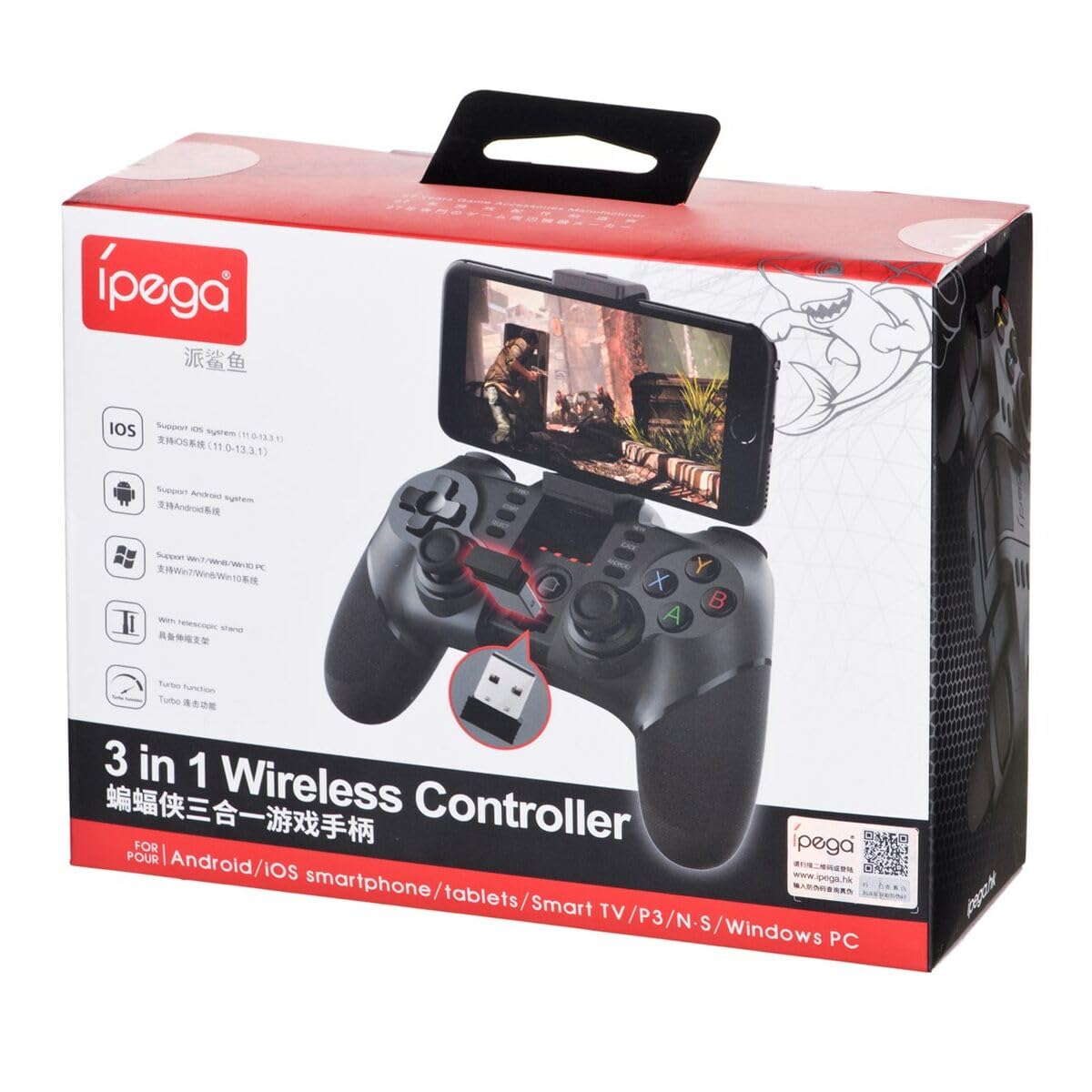
Figure 2.1: Ipega PG-9076 controller with a smartphone mounted, showcasing its mobile gaming capability.

Slika 2.2: Prednja strana view of the controller, highlighting the dual analog sticks, D-pad, action buttons (A, B, X, Y), and mode selection buttons (SELECT, START, ANDROID, IOS, TURBO, CLEAR).

Slika 2.3: Pozadi view of the controller, displaying the product label with model number, input specifications, and a QR code for additional information or support.
Ključne karakteristike:
- Bluetooth 3.0 connectivity for wireless operation.
- Integrated multimedia buttons (volume, play/pause, track control).
- Retractable phone holder, accommodating devices up to 9 cm wide.
- Compatible with Android (3.2+), iOS (4.3+), and Windows.
- Built-in 380 mAh rechargeable battery.
3. Podešavanje i povezivanje
Before first use, ensure the controller is fully charged. Refer to Section 5 for charging instructions.
3.1. Uparivanje s Android uređajima
- Ensure your Android device's Bluetooth is enabled.
- Na kontroleru pritisnite i držite ANDROID button simultaneously with the HOME button until the indicator light flashes rapidly.
- On your Android device, search for Bluetooth devices and select "PG-9076" to pair.
- Nakon uparivanja, indikatorska lampica na kontroleru će ostati stalno upaljena.
3.2. Pairing with iOS Devices
- Provjerite je li Bluetooth na vašem iOS uređaju omogućen.
- Na kontroleru pritisnite i držite IOS button simultaneously with the HOME button until the indicator light flashes rapidly.
- On your iOS device, search for Bluetooth devices and select "PG-9076" to pair.
- Nakon uparivanja, indikatorska lampica na kontroleru će ostati stalno upaljena.
3.3. Povezivanje sa Windows računarom
The controller can be connected to a Windows PC via Bluetooth or USB cable.
3.3.1. Bluetooth Connection (PC)
- Provjerite da li je na vašem računaru omogućen Bluetooth.
- Na kontroleru pritisnite i držite START button simultaneously with the HOME button until the indicator light flashes rapidly.
- On your PC, go to Bluetooth settings, search for devices, and select "PG-9076" to pair.
- Nakon uparivanja, indikatorska lampica na kontroleru će ostati stalno upaljena.
3.3.2. USB Cable Connection (PC)
- Connect the controller to your PC using the provided USB cable.
- Računar bi trebao automatski prepoznati i instalirati potrebne upravljačke programe.
- Configuration within the operating system and individual games may be required for optimal performance.

Figure 3.1: The USB dongle (if included with your model) can be inserted into the controller for wireless connection to devices that do not have built-in Bluetooth, such as some PCs or Smart TVs.

Figure 3.2: The included USB cable is used for charging the controller and can also be used for a wired connection to a PC.
4. Načini rada
The PG-9076 supports various gaming modes depending on the connected device and game type.
4.1. Android Gaming
- Supports most games with 'Arcade Mode' (often indicated by a controller symbol).
- Compatible with various simulator games.
- Ensure your Android OS is version 3.2 or newer.
4.2. iOS Gaming
- Compatible with games that support 'iCade' mode.
- Ensure your iOS is version 4.3 or newer.
4.3. Windows PC Gaming
- Can be used via Bluetooth or USB cable.
- System and in-game configuration may be necessary for full compatibility and optimal control mapping.
4.4. Multimedijalne funkcije
The controller includes dedicated multimedia buttons for:
- Volume control (up/down)
- Pusti/Pauza
- Fast forward/Rewind
5. Punjenje i baterija
The controller is equipped with a rechargeable internal battery.
5.1. Upute za punjenje
- Connect the provided USB cable to the micro-USB port on the controller.
- Connect the other end of the USB cable to a USB power source (e.g., PC, USB wall adapter).
- Indikatorska lampica punjenja će svijetliti tokom punjenja i ugasiti se kada se uređaj potpuno napuni.
5.2. Specifikacije baterije
- Kapacitet baterije: 380 mAh
- Charging Time: Approximately 2 to 5 hours (may vary based on charger output).
- Operating Autonomy: Up to 12 hours of continuous gameplay.
- Standby Time: Up to 30 days when fully charged.
6. Održavanje
Da biste osigurali dugotrajnost i optimalne performanse vašeg kontrolera, slijedite ove smjernice za održavanje:
- Držite kontroler suhim i dalje od vlage.
- Izbjegavajte izlaganje kontrolera ekstremnim temperaturama.
- Čistite kontroler mekom, suhom krpom. Ne koristite jake hemikalije ili abrazivna sredstva za čišćenje.
- Kontroler čuvajte na sigurnom mjestu kada ga ne koristite kako biste spriječili fizička oštećenja.
7. Otkrivanje problema
If you encounter issues with your Ipega PG-9076 controller, refer to the following common problems and solutions:
7.1. Controller Does Not Turn On
- Ensure the battery is charged. Connect the controller to a power source and allow it to charge for at least 30 minutes.
- Press and hold the HOME button for a few seconds to attempt to power on.
7.2. Nije moguće uparivanje putem Bluetootha
- Make sure the controller is in the correct pairing mode for your device (Android, iOS, or PC).
- Provjerite je li Bluetooth omogućen na vašem uređaju i je li vidljiv.
- Move the controller closer to your device (within 8 meters).
- Isključite i uključite Bluetooth na uređaju, a zatim pokušajte ponovo upariti uređaj.
- Clear any previous pairings of the controller from your device's Bluetooth list.
7.3. Buttons or Joysticks Not Responding Correctly
- Ensure the controller is fully charged. Low battery can affect performance.
- Ponovo pokrenite kontroler i svoj uređaj.
- For PC, check in-game settings and system controller configurations.
- Some games, especially those designed for touchscreens, may not fully support external controllers.
8. Specifikacije
| Feature | Specifikacija |
|---|---|
| Model | PG-9076 |
| Brand | Ipega |
| Tehnologija povezivanja | Bluetooth 3.0 |
| Operativna udaljenost | Up to 8 meters (barrier-free) |
| Power Input | DC 5V 500 mAh |
| Operating Voltage | DC 3.7V |
| Radna struja | 30 mAh |
| Kapacitet baterije | 380 mAh |
| Vrijeme punjenja | 2-5 sata |
| Battery Autonomy (Gameplay) | Do 12 sati |
| Vrijeme pripravnosti | Do 30 dana |
| Uređaj Clamp Širina | Do 9 cm |
| Dimenzije proizvoda | 19.1 x 7.5 x 7.4 cm |
| Težina proizvoda | 304 g |
| Kompatibilne platforme | Android, iOS, Windows |
9. Garancija i podrška
For warranty information, please refer to the terms provided by your retailer at the time of purchase. Extended warranty options may be available from third-party providers.
For technical support or further inquiries, you may scan the QR code located on the back of your controller or visit the official Ipega support channels. The QR code on the product label links to http://weixin.qq.com/r/uUUHHyPERX46rWd89xCr.


