Uvod
This manual provides instructions for the safe and effective use of your T&G TG504 Portable Bluetooth Speaker. Please read it thoroughly before use and retain it for future reference. This speaker is designed for portable audio playback with wireless Bluetooth connectivity and water resistance.
Product Overview
The T&G TG504 is a cylindrical, portable Bluetooth speaker featuring a robust design and a built-in microphone for hands-free calling. It offers high-definition sound with bass boost and multiple connectivity options.
Ključne karakteristike:
- Portable and Cylindrical Design
- Water Resistant Construction
- Built-in Microphone for Calls
- Bluetooth bežična veza
- AUX and USB Port for versatile playback
- Bass Boost and High Definition Sound
- Battery Powered for on-the-go use
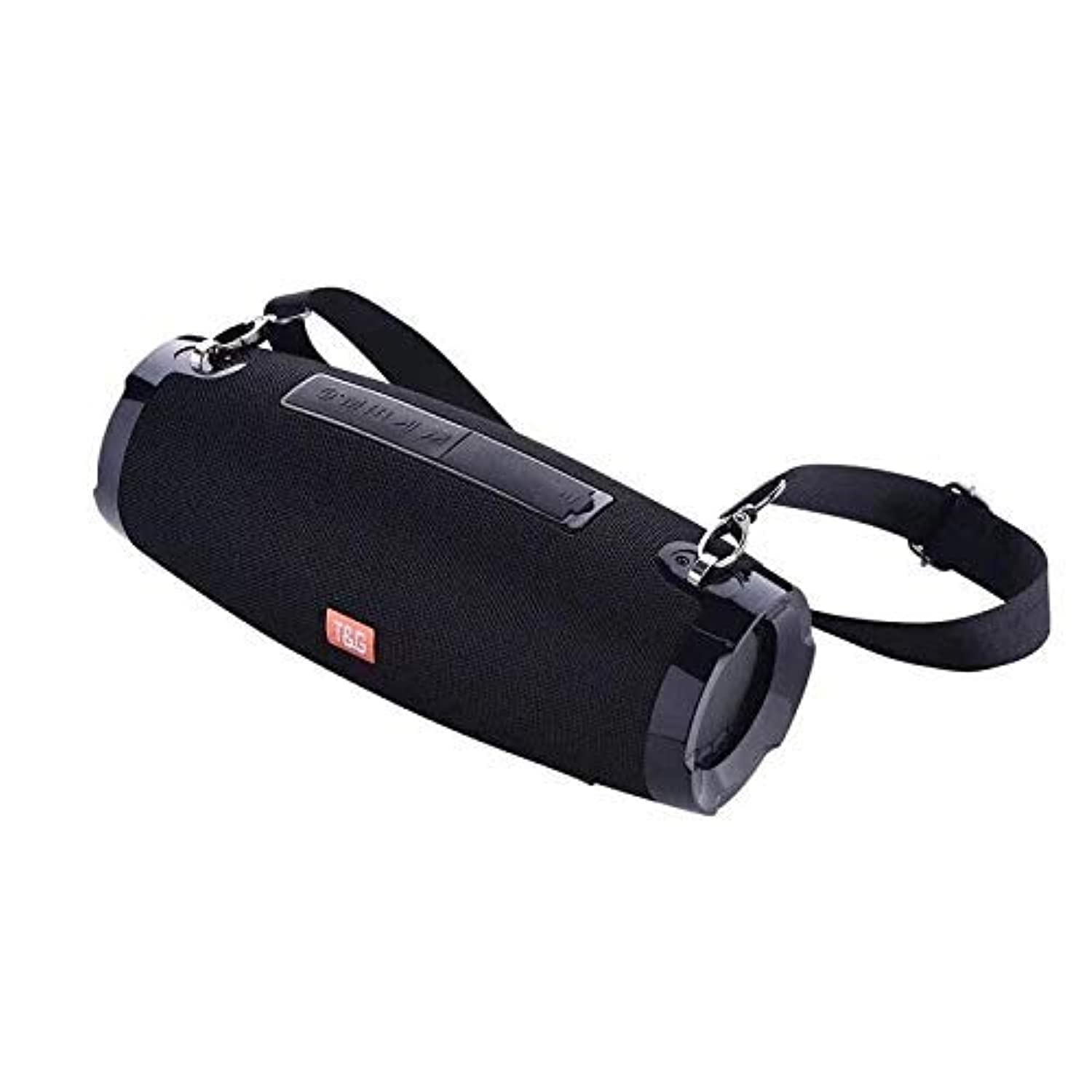
This image shows the T&G TG504 Portable Bluetooth Speaker. It features a black cylindrical design with a mesh grille covering the speaker. The T&G brand logo is visible in orange on the front. The speaker has attachment points on the sides, suggesting portability.
Sadržaj paketa
- T&G TG504 Prijenosni Bluetooth zvučnik
- AUX kabel
- USB kabl za punjenje
- Uputstvo za upotrebu
Kontrole i indikatori
Familiarize yourself with the speaker's controls and ports for optimal operation.
- Dugme za napajanje: Pritisnite i držite da biste uključili ili isključili zvučnik.
- Dugme za reprodukciju/pauzu: Pritisnite za reprodukciju ili pauziranje zvuka.
- Jačina zvuka (+): Pritisnite za povećanje jačine zvuka. Držite za prelazak na sljedeću pjesmu.
- Stišavanje (-): Pritisnite za smanjenje jačine zvuka. Držite za prelazak na prethodnu pjesmu.
- Dugme za način rada (M): Pritisnite za prebacivanje između Bluetooth, AUX i USB načina rada.
- Dugme za poziv: Press to answer or end a phone call. Hold to reject a call.
- AUX priključak: Za žično povezivanje s audio uređajima.
- USB port: For playing music from a USB drive or charging other devices (if supported).
- Port za punjenje: Za spajanje USB kabla za punjenje.
- LED indikator: Prikazuje status napajanja, status punjenja i status Bluetooth uparivanja.
Setup
1. Punjenje zvučnika
- Spojite manji kraj USB kabela za punjenje na priključak za punjenje zvučnika.
- Povežite veći kraj USB kabla za punjenje na USB adapter za napajanje (nije uključen) ili USB priključak računara.
- LED indikator će prikazivati status punjenja (npr. crven tokom punjenja, isključen kada je potpuno napunjen).
- Prije prve upotrebe, ostavite otprilike 3-4 sata da se baterija potpuno napuni.
2. Uključivanje / isključivanje napajanja
- To power on, press and hold the Power button until the LED indicator lights up and you hear an audible prompt.
- To power off, press and hold the Power button again until the LED indicator turns off and you hear an audible prompt.
3. Bluetooth uparivanje
- Ensure the speaker is powered on and in Bluetooth pairing mode (LED indicator will typically flash blue). If not, press the Mode button to switch to Bluetooth mode.
- Na svom mobilnom uređaju (pametnom telefonu, tabletu, laptopu) omogućite Bluetooth.
- Traži available Bluetooth devices. The speaker will appear as "TG504" or similar.
- Select "TG504" to connect. Once paired, the LED indicator will turn solid blue, and you will hear a confirmation sound.
- Zvučnik će se automatski ponovo povezati sa posljednjim uparenim uređajem kada se uključi, ako je uređaj u dometu i ako je Bluetooth omogućen.
4. Povezivanje putem AUX-a
- Connect one end of the provided AUX cable to the speaker's AUX port.
- Connect the other end of the AUX cable to the headphone jack of your audio device.
- Zvučnik će se automatski prebaciti u AUX način rada ili ćete možda morati pritisnuti dugme Mode da biste odabrali AUX.
Uputstvo za upotrebu
Puštanje muzike
- Bluetooth način rada: Once paired, start playing music on your connected device. Audio will stream through the speaker.
- AUX način rada: Start playing music on your connected audio device.
- USB način rada: Umetnite USB fleš disk sa MP3 files into the USB port. The speaker will automatically detect and play music. Press the Mode button to switch to USB mode if needed.
- Use the Play/Pause button on the speaker or your device to control playback.
Podešavanje jačine zvuka
- Press the Volume Up (+) button to increase the volume.
- Press the Volume Down (-) button to decrease the volume.
- Volume can also be adjusted from your connected device.
Handling Calls (Bluetooth Mode)
- Odgovori na poziv: When a call comes in, press the Call button once to answer.
- Završi poziv: During a call, press the Call button once to end the call.
- odbiti poziv: When a call comes in, press and hold the Call button to reject it.
- Ponovno biranje zadnjeg broja: In standby mode, double-press the Call button to redial the last number.
Voice Control
The speaker supports voice control. Depending on your connected device, you may be able to activate your device's voice assistant (e.g., Siri, Google Assistant) by pressing and holding the Play/Pause button (or a dedicated voice button if available) for a few seconds.
Održavanje
Čišćenje
- Obrišite zvučnik mekom, suhom krpom.
- Ne koristite abrazivna sredstva za čišćenje, alkohol ili hemijske rastvarače.
Skladištenje
- Čuvajte zvučnik na hladnom i suhom mjestu, dalje od direktne sunčeve svjetlosti i ekstremnih temperatura.
- Ako skladištite bateriju duži period, periodično je punite kako biste produžili njen vijek trajanja.
Vodootporna njega
- Prije izlaganja zvučnika vodi, provjerite jesu li svi poklopci priključaka sigurno zatvoreni.
- Do not submerge the speaker in water. Water resistance protects against splashes and light rain, not full immersion.
- After exposure to water, wipe the speaker dry before charging or opening port covers.
Rješavanje problema
Ako naiđete na probleme sa zvučnikom, pogledajte sljedeću tabelu za uobičajene probleme i rješenja.
| Problem | Mogući uzrok | Rješenje |
|---|---|---|
| Zvučnik se ne uključuje | Slaba baterija; Dugme za napajanje nije pravilno pritisnuto | Napunite zvučnik; Pritisnite i držite dugme za napajanje 3-5 sekundi. |
| Nije moguće uparivanje putem Bluetootha | Zvučnik nije u načinu uparivanja; Bluetooth uređaja isključen; Zvučnik je previše udaljen od uređaja | Ensure speaker LED is flashing blue; Turn on Bluetooth on your device; Move speaker closer to device (within 10 meters). |
| Nema zvuka | Volume too low; Incorrect mode selected; Device not playing audio | Increase speaker and device volume; Press Mode button to select correct input; Ensure audio is playing on your device. |
| Izobličenje zvuka | Previsoka jačina zvuka; Slaba baterija; Smetnje | Smanjite jačinu zvuka; Napunite zvučnik; Udaljite se od drugih bežičnih uređaja. |
| Mikrofon ne radi | Not in call mode; Microphone blocked | Ensure you are on a call; Check for obstructions around the microphone. |
Specifikacije
| Naziv modela | TG504 |
| Brand | T&G |
| Boja | Crna |
| Oblik | Cilindrične |
| Težina artikla | 735 grams (approx. 1 kg / 2.2 pounds) |
| Maksimalna izlazna snaga zvučnika | 10 vati |
| Tehnologija povezivanja | Bluetooth, Pomoćni (AUX) |
| Bežična komunikacijska tehnologija | Bluetooth |
| Otporan na vodu | Da |
| Izvor napajanja | Battery Powered |
| Kontrolni metod | Glas |
| Način audio izlaza | Surround |
| Vrsta montaže | Tabletop |
| Kompatibilni uređaji | Tablet, Laptop, Smartphone |
| Posebne karakteristike | Bass Boost, High Definition Sound, Water Resistant, USB Port |
| Uključene komponente | AUX kabel |
Sigurnosne informacije
- Ne izlažite zvučnik ekstremnim temperaturama, direktnoj sunčevoj svjetlosti ili visokoj vlažnosti.
- Izbjegavajte ispuštanje ili izlaganje zvučnika jakim udarcima.
- Čuvajte zvučnik dalje od djece i kućnih ljubimaca.
- Ne pokušavajte sami rastavljati, popravljati ili modificirati zvučnik. To će poništiti garanciju i može uzrokovati oštećenje ili ozljedu.
- Koristite samo navedeni kabel za punjenje i kompatibilni adapter za napajanje.
- Do not use the speaker near water sources if port covers are not securely closed.
- Dugotrajno slušanje pri visokim nivoima glasnoće može uzrokovati oštećenje sluha.
Garancija i podrška
Specific warranty details are not provided in the product information. For warranty claims or technical support, please refer to the retailer or manufacturer's official website where you purchased the product. Keep your proof of purchase for any warranty-related inquiries.