1. Uvod
This manual provides detailed instructions for the installation, operation, and maintenance of the MCZ Control Panel RED HYDRO, model 41451200600. This control panel is designed for use with various MCZ and RED pellet stoves, ensuring efficient and reliable performance. Please read this manual thoroughly before attempting any installation or operation to ensure safe and correct usage.
The control panel allows users to manage stove functions such as power, temperature settings, programming, and monitoring operational status. Proper understanding of its features will optimize your stove's performance and longevity.
2. Sigurnosne informacije
Always adhere to the following safety guidelines to prevent injury, damage to the product, or property damage:
- Isključite napajanje: Always ensure the main power supply to the stove is disconnected before performing any installation, maintenance, or wiring procedures on the control panel.
- Kvalificirano osoblje: Installation and complex maintenance should only be performed by qualified and authorized technical personnel.
- Pročitajte priručnik: Read and understand all instructions in this manual before operating the control panel.
- Originalni dijelovi: Use only original MCZ spare parts and accessories. Use of non-original parts may void the warranty and compromise safety.
- Uslovi okoline: Do not expose the control panel to extreme temperatures, humidity, or direct water contact.
3. Sadržaj paketa
Prilikom raspakivanja provjerite da li su svi artikli prisutni i neoštećeni:
- MCZ Control Panel RED HYDRO (Model 41451200600)
- Vijci za montažu (količina može varirati)
- Korisnički priručnik (ovaj dokument)
Ako bilo koji artikl nedostaje ili je oštećen, odmah se obratite svom dobavljaču.
4. Postavljanje i instalacija
This section outlines the general steps for installing the control panel. Refer to your specific stove's manual for detailed wiring diagrams and mounting instructions.
4.1 Montaža kontrolne table
- Odaberite lokaciju: Choose a suitable location on the stove or an adjacent surface, ensuring it is easily accessible and protected from excessive heat or moisture.
- Pripremite otvaranje: If replacing an existing panel, ensure the opening matches the dimensions of the new MCZ 41451200600 panel. If installing new, carefully cut an opening according to the provided template (if applicable, or measure the panel dimensions).
- Sigurnosna ploča: Insert the control panel into the opening and secure it using the provided mounting screws. Do not overtighten.
4.2 Ožičenje
UPOZORENJE: Ensure the main power supply to the stove is disconnected before making any electrical connections.
- Identifikujte konektore: Locate the appropriate wiring harness from your stove that connects to the control panel. The panel typically has clearly labeled ports for power, sensors, and communication.
- Spojite žice: Carefully connect the wiring harness to the corresponding ports on the back of the control panel. Ensure all connections are secure and correctly oriented. Refer to the wiring diagram in your stove's specific manual.
- Potvrdite veze: Double-check all connections before restoring power. Incorrect wiring can cause damage to the control panel or the stove.
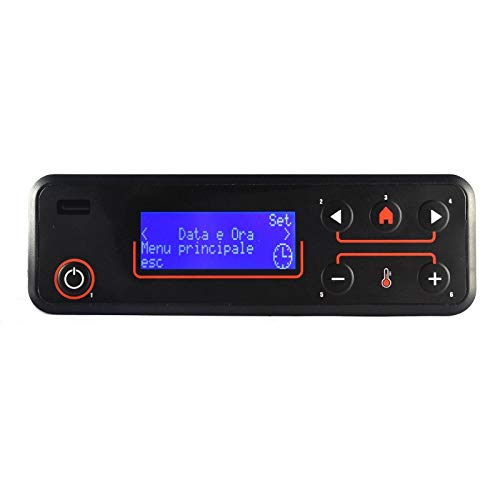
Slika 1: Prednja strana view of the MCZ Control Panel RED HYDRO, model 41451200600. This image shows the display screen and control buttons, illustrating the user interface for managing stove operations.
5. Uputstvo za upotrebu
This section describes the basic functions and operation of the MCZ Control Panel. The exact menu structure and available options may vary slightly depending on the specific MCZ or RED stove model it is connected to.
5.1 Compatible Stove Models
This control panel is compatible with a wide range of MCZ and RED pellet stoves, including but not limited to:
- RED365 Althea MULTIAIR, Camelia Air Ceramic, Camelia Air Metal, Compact 14 (2015), Compact 18 (2012, 2015), Compact 24 (ver.2012), Compact 35, Compact 45, Compact Slim 15, Compact Slim 15 High Efficiency
- Dalia AIR (2014), Dalia AIR 6 S1, Dalia OYSTER AIR (2015), Edera MULTIAIR (2014), Erica Flora
- Gardenia AIR (2014), Gardenia HYDRO High Efficiency, Gardenia HYDRO (ver. 2012)
- Loto HYDRO 16, Loto HYDRO 23, Loto HYDRO 23/S, Loto MULTIAIR, Lotus
- Malva HYDRO 12, Malva MULTIAIR, Malva MULTIAIR 10 UP! S1
- Margherita AIR (2014), Margherita HYDRO High Efficiency, Margherita HYDRO (ver. 2012)
- Minta AIR 8 S1, Orchidea AIR (2014), Orchidea HYDRO High Efficiency, Orchidea HYDRO (ver. 2012), Orchidea MULTIAIR (2014)
- Primula AIR (2014), Primula HYDRO High Efficiency, Primula HYDRO (ver. 2012), Primula MULTIAIR (2014), Tulip
5.2 Osnovne funkcije
- Uključivanje/isključivanje: Press and hold the power button (usually marked with a circle and a vertical line) to turn the stove on or off. The display will show the current status.
- Navigacija menijem: Use the arrow buttons (up/down or left/right) to navigate through the menu options. The 'OK' or 'Enter' button confirms selections, and the 'Esc' or 'Back' button returns to the previous screen.
- Podešavanje temperature: In the main screen or temperature setting menu, use the up/down arrows to increase or decrease the desired room temperature.
- Fan Speed/Power Level: Some models allow adjustment of fan speed or heating power level directly from the control panel. Navigate to the relevant menu and adjust as needed.
- Programiranje: Access the 'Program' or 'Timer' menu to set daily or weekly operating schedules for your stove. Follow the on-screen prompts to set start/stop times and desired temperatures.
6. Održavanje
The MCZ Control Panel requires minimal maintenance. Regular cleaning and occasional checks will ensure its longevity and proper function.
6.1 Čišćenje kontrolne table
- Isključite napajanje: Always disconnect the main power supply to the stove before cleaning.
- Obrišite površinu: Koristite meku, suvu ili blago damp cloth to gently wipe the display and buttons.
- Izbjegavajte hemikalije: Do not use abrasive cleaners, solvents, or harsh chemicals, as these can damage the display or plastic components.
6.2 Redovne provjere
- Vizuelni pregled: Periodically check the panel for any signs of physical damage, loose connections, or unusual wear.
- Test funkcionalnosti: Ensure all buttons respond correctly and the display is clear and legible.
7. Otkrivanje problema
This section provides solutions to common issues you might encounter with your MCZ Control Panel. For more complex problems, consult a qualified technician.
| Problem | Mogući uzrok | Rješenje |
|---|---|---|
| Panel se ne uključuje. | No power supply to the stove; Loose wiring connection; Faulty panel. | Check main power supply to the stove. Verify all wiring connections are secure. If problem persists, contact technical support. |
| Ekran je prazan ili nečitljiv. | Power issue; Display damage; Extreme temperature. | Check power. Ensure panel is not exposed to extreme heat or cold. If damaged, replacement may be necessary. |
| Dugmad ne reagiraju. | Software glitch; Physical damage; Dirt/debris under buttons. | Try restarting the stove (power cycle). Clean around buttons. If physical damage, contact support. |
| Stove not responding to panel commands. | Communication error; Incorrect settings; Stove fault. | Verify wiring connections between panel and stove. Check stove's own error codes. Consult stove manual. |
8. Specifikacije
| Feature | Detalj |
|---|---|
| Model | MCZ Control Panel RED HYDRO |
| Broj dijela | 41451200600 |
| Kompatibilnost | Various MCZ and RED pellet stove models (refer to section 5.1) |
| Display Type | LCD (specifics may vary by production batch) |
| Radna temperatura | Tipično od 0°C do 50°C (od 32°F do 122°F) |
| Napajanje | Provided by the connected stove (specific voltage details in stove manual) |
9. Garancija i podrška
MCZ products are manufactured to high-quality standards and are covered by a limited warranty against manufacturing defects. The specific terms and duration of the warranty may vary by region and purchase date. Please retain your proof of purchase for warranty claims.
For technical assistance, warranty service, or to purchase original spare parts, please contact your authorized MCZ dealer or visit the official MCZ website. When contacting support, please have your product model number (41451200600) and the serial number of your stove readily available.
MCZ Official Webstranica: www.mcz.it


