1. Uvod
This manual provides instructions for the APEXEL HD5V2 5-in-1 Phone Camera Lens Kit. This kit includes a variety of lenses designed to enhance mobile photography, offering different perspectives and capabilities for your smartphone camera. The kit features a 10X Macro Lens, 2X Telephoto Lens, 110° Wide Angle Lens, 170° Super Wide Angle Lens, and a 195° Fisheye Lens.
2. Sadržaj paketa
Provjerite da li se u vašem paketu nalaze sve dolje navedene stavke:
- 1x 195° Fisheye Lens
- 1x 110° Wide Angle Lens
- 1x 2X Telephoto Lens
- 1x 10X Macro Lens
- 1x 170° Super Wide Angle Lens
- 1x Portable Bag
- 1x Apexel Innovative Metal Clip
- 5x Silikonska futrola
- 1x krpa za čišćenje
- 1x Korisnički priručnik (ovaj dokument)

3. Postavljanje i instalacija
The APEXEL lens kit is designed for easy attachment to most smartphones. Follow these steps to install a lens:
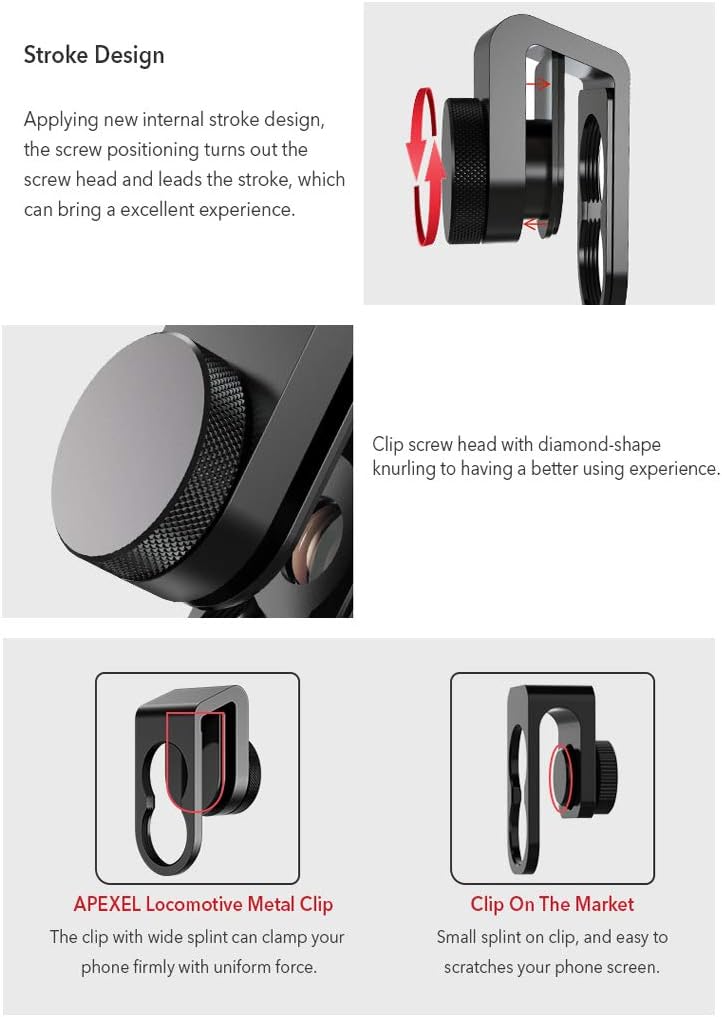
- Pričvrstite klip: Secure the Apexel Innovative Metal Clip onto your smartphone, ensuring the clip's aperture aligns with your phone's main camera lens. The clip features a soft anti-skid pad to prevent scratches.
- Screw in the Lens: Carefully screw the desired lens into the threaded opening of the metal clip. Ensure it is securely fastened but do not overtighten.
- Poravnanje: Open your phone's camera application and adjust the clip and lens position until the lens is perfectly centered over your phone's camera, and the image on your screen is clear without dark edges (vignetting).
Napomene o kompatibilnosti:
- The lens clip is compatible with most single and dual-lens phones, including iPhone 11/11 Pro/11 Pro Max, iPhone 12/12 Pro/12 Pro Max, iPhone 13/13 Pro/13 Pro Max, Samsung, iPad, and Android smartphones.
- Važno: The lens clip is not applicable to iPhone 14, 15, or 16 series.
- If your phone's protective case is thin (less than 11mm total thickness), you may use the clip directly. For thicker cases or phones exceeding 11mm in thickness, the clip may not work effectively, and the case might need to be removed.
Video 3.1: An official APEXEL video demonstrating the setup and use of the 5-in-1 lens kit, including how to attach the clip and various lens types to a smartphone.
4. Uputstvo za upotrebu
Each lens in the kit offers a unique photographic effect. Experiment with different lenses to achieve desired results.
4.1. 10X Macro Lens
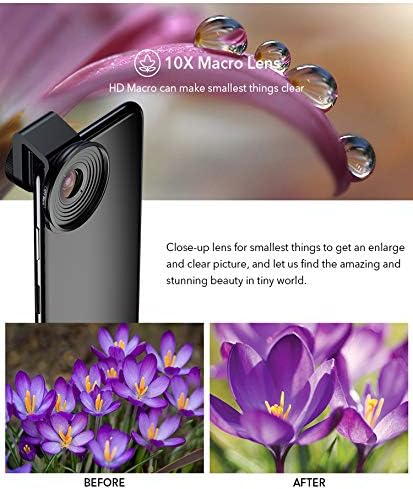
The 10X Macro Lens is designed for extreme close-up photography, allowing you to capture intricate details of small subjects. To use, position the lens very close to your subject, typically between 0.39 to 1.18 inches (1-3 cm) away, to achieve sharp focus and magnify fine details.
4.2. 2X Telephoto Lens
The 2X Telephoto Lens brings subjects closer without digital zoom, which can degrade image quality. It is ideal for portraits, wildlife, or distant objects. When used on a single-lens phone, it provides 2x optical zoom. On a dual-lens phone, if attached to the telephoto camera, it can achieve up to 4x magnification. This lens also helps create a natural background blur, enhancing the subject.

4.3. 110° Wide Angle Lens
The 110° Wide Angle Lens expands your field of view, allowing you to capture more of the scene without distortion or dark edges. This is suitable for landscapes, group photos, or architectural shots where you want to include more context in your frame.
4.4. 170° Super Wide Angle Lens
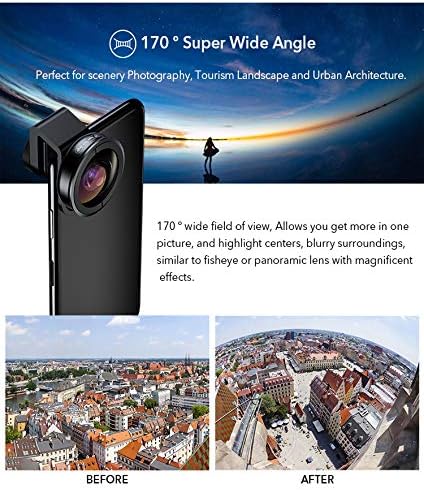
The 170° Super Wide Angle Lens provides an even broader perspective than the 110° lens, delivering a flat image without dark edges. It's excellent for capturing vast scenery, urban architecture, or large groups, offering a panoramic-like effect without the extreme distortion of a fisheye lens.
4.5. 195° Fisheye Lens
The 195° Fisheye Lens creates a dramatic, rounded, and distorted image, characteristic of fisheye photography. This lens is used for creative effects, capturing a unique perspective for landscapes, action shots, or playful portraits. It produces a circular image with a wide, spherical field of view.

5. Održavanje i njega
- čišćenje: Use the provided cleaning cloth to gently wipe the lens surfaces. Avoid using abrasive materials or harsh chemicals, which can damage the lens coatings.
- Skladištenje: Always store the lenses in their individual silicone cases and then in the portable zipper bag when not in use. This protects them from dust, scratches, and minor impacts. The silicone cases offer fall resistance and buffering.
- Rukovanje: Handle lenses by their metal barrels, avoiding touching the glass elements directly to prevent fingerprints and smudges.
Video 5.1: An official APEXEL video demonstrating the protective features of the silicone cases and portable bag for the lens kit, highlighting their role in preventing damage from drops and environmental factors.
6. Otkrivanje problema
| Problem | Mogući uzrok | Rješenje |
|---|---|---|
| Dark edges (vignetting) or blurry image | Lens not perfectly aligned with phone camera. | Adjust the clip and lens position until the lens is centered over your phone's camera. Ensure the lens is screwed in completely. |
| Clip does not fit or is unstable | Phone case is too thick, or phone exceeds 11mm thickness. Incompatibility with newer iPhone models. | Remove your phone case if it is thick. Verify your phone's thickness. Note that the clip is not compatible with iPhone 14, 15, or 16 series. |
| Macro lens images are blurry | Subject is too far from the macro lens. | Move the macro lens closer to the subject (0.39-1.18 inches / 1-3 cm is the optimal range). |
| Lenses appear dirty or smudged | Dust, fingerprints, or smudges on the lens surface. | Gently clean the lens using the provided cleaning cloth. Avoid touching the glass directly. |
7. Specifikacije
- Broj modela: HD5V2
- Dimenzije proizvoda: 8.66 x 2.75 x 2.75 inča
- Težina artikla: 12.6 unce
- Lens Types Included: 10X Macro, 2X Telephoto, 110° Wide Angle, 170° Super Wide Angle, 195° Fisheye
- Opis žižne daljine: 20 millimeters (general)
- Kompatibilni nosači: Universal clip for most iPhone models (up to 13 series), Samsung Galaxy and Note, Google Pixel, Huawei, and other Android smartphones.
- Materijal: Professional cinema quality glass, aerospace metal (lenses), aluminum alloy (clip).
8. Garancija i podrška
APEXEL provides a 12-mjesečna garancija for this product. Additionally, a 60-dnevna garancija povrata novca is offered. For any questions, technical assistance, or warranty claims, please contact APEXEL customer service at service@apexellens.com. Please have your purchase details and model number (HD5V2) ready when contacting support.


