Važna sigurnosna uputstva
Please read this manual carefully before using the appliance and keep it for future reference. Incorrect use may result in electric shock, fire, or serious injury.
- Osigurajte napajanje voltage odgovara naljepnici s karakteristikama na uređaju.
- Ne uranjajte uređaj, kabel za napajanje ili utikač u vodu ili druge tekućine.
- Unplug the appliance from the power outlet when not in use, before filling water, or before cleaning.
- Nemojte koristiti uređaj s oštećenim kablom ili utikačem, ili nakon što uređaj pokvari ili je na bilo koji način oštećen.
- Držite uređaj van domašaja djece.
- Nemojte blokirati ulaze ili izlaze zraka.
- Postavite uređaj na stabilnu, ravnu površinu.
- Only use clean water in the water tank.
Product Overview
Ključne karakteristike
- 3-u-1 funkcionalnost: Air Cooler, Humidifier, and Purifier.
- Kapacitet rezervoara za vodu: 4 litara.
- Brzine ventilatora: 3 podesivih brzina.
- Oscilacija: Oscillating ventilation grille for wide air distribution.
- Tajmer: 7-satni programabilni tajmer.
- Kontrola: Operable via control panel and remote control.
- mobilnost: Equipped with 4 wheels for easy movement.
Komponente proizvoda
Familiarize yourself with the main parts of your LIVOO Mobile Air Cooler.

slika: Front view of the LIVOO Mobile Air Cooler, displaying the air outlet grille and the transparent water level indicator at the bottom.

slika: Side view of the LIVOO Mobile Air Cooler, highlighting its compact design and the four castor wheels for portability.
Setup
Raspakivanje
- Pažljivo izvadite hladnjak zraka iz ambalaže.
- Uklonite sav materijal za pakovanje i provjerite da li nedostaju ili su oštećeni bilo koji dijelovi.
- Držite materijale za pakovanje dalje od djece.
Punjenje rezervoara za vodu
- Uvjerite se da je uređaj isključen iz električne utičnice.
- Locate the water tank. For this model, the tank is typically accessed from the rear or bottom.
- Fill the tank with clean, cool water. Do not exceed the maximum fill line indicated on the tank. The capacity is 4 liters.
- For enhanced cooling, you may add ice packs (not included) to the water tank if a dedicated compartment is available.
- Čvrsto zatvorite poklopac rezervoara za vodu.
Pozicioniranje jedinice
Place the air cooler on a firm, level surface. Ensure there is adequate space around the unit (at least 20 cm) for proper air circulation. The integrated wheels allow for easy repositioning.
Operacija
Once the unit is set up and the water tank is filled, plug the power cord into a suitable electrical outlet.
Kontrolna tabla završenaview
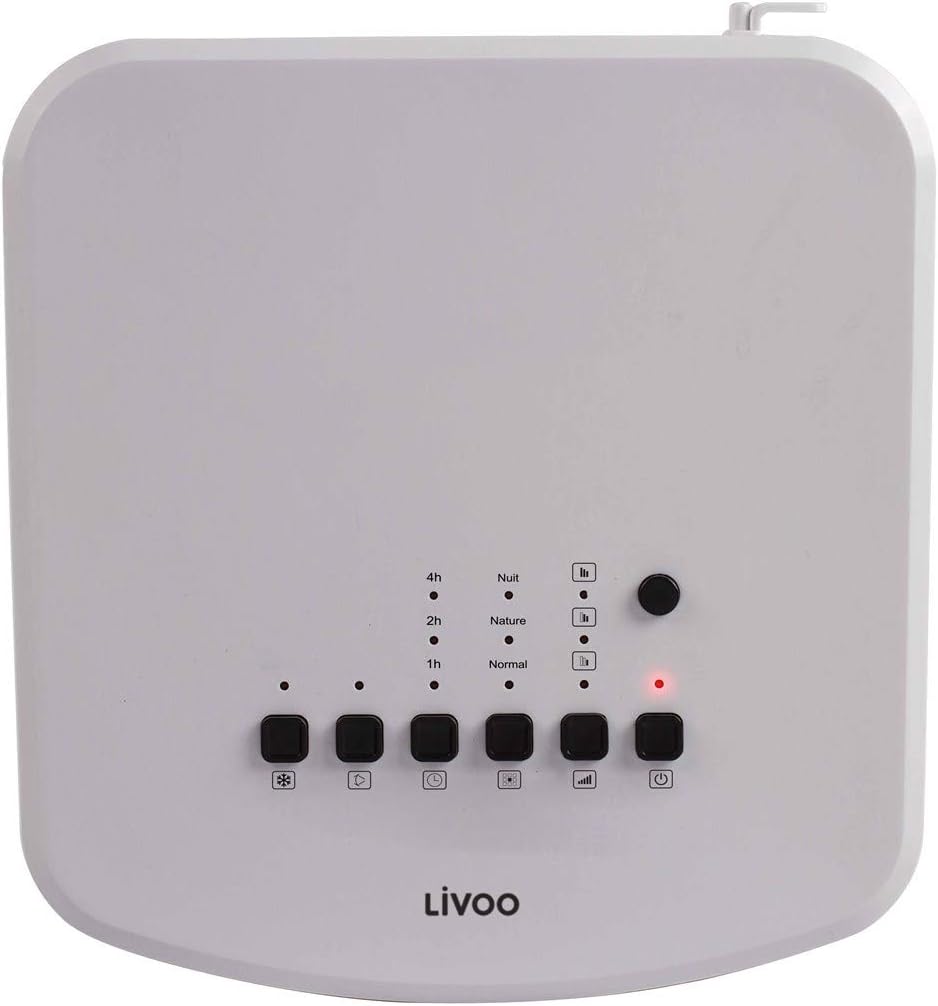
slika: Top-mounted control panel of the air cooler, featuring buttons for power, mode, speed, oscillation, and cooling function, along with indicator lights for timer and mode settings.
- Dugme za napajanje (⏻): Uključuje ili isključuje jedinicu.
- Dugme za režim (□□□): Prebacuje se između načina rada Normalni, Prirodni i Noćni.
- Dugme za brzinu (|||): Podešava brzinu ventilatora (niska, srednja, visoka).
- Dugme za oscilaciju (⟳): Activates or deactivates the oscillating grille.
- Cooling/Humidifier Button (❄): Engages the cooling and humidifying function.
- Dugme tajmera (L): Sets the operating timer (1h, 2h, 4h, up to 7 hours).
Daljinski upravljač gotovview

slika: The remote control for the air cooler, featuring buttons for power, mode, speed, oscillation, cooling, and timer functions, mirroring the main control panel.
The remote control provides the same functionality as the control panel for convenient operation from a distance. Ensure batteries are correctly inserted.
Funkcije
- Zračni hladnjak: Uses water evaporation to cool the air. Activate by pressing the 'Cooling' button.
- Ovlaživač: Adds moisture to the air, beneficial in dry environments. This function is integrated with the cooling feature.
- Purifier: Filters dust and other particles from the air as it passes through the unit. This function operates whenever the fan is on.
Postavke brzine
Press the 'Speed' button to cycle through Low, Medium, and High fan speeds to adjust airflow intensity.
Oscilirajuća funkcija
Press the 'Oscillation' button to activate the automatic swing of the vertical louvers, distributing cool air over a wider area. Press again to stop oscillation.
Funkcija tajmera
Press the 'Timer' button repeatedly to set the desired operating time (1, 2, 4 hours, or combinations up to 7 hours). The unit will automatically turn off after the set time.
Načini rada
- Normalni način rada: Konstantan protok zraka odabranom brzinom.
- Način rada u prirodi: Simulira prirodni povjetarac promjenom brzine ventilatora.
- Noćni način rada: Operates at a lower, quieter speed for undisturbed sleep.
Održavanje
Redovno održavanje osigurava optimalne performanse i produžava vijek trajanja vašeg hladnjaka zraka. Uvijek isključite uređaj iz struje prije čišćenja.
Čišćenje jedinice
- Obrišite vanjske površine mekom krpom, damp tkanina. Nemojte koristiti abrazivna sredstva za čišćenje ili rastvarače.
- Očistite rešetke za ulaz i izlaz zraka mekom četkom ili usisivačem kako biste uklonili nakupljenu prašinu.
Čišćenje spremnika za vodu
To prevent mold and mildew growth, clean the water tank regularly, especially if the unit is used frequently.
- Ispustite preostalu vodu iz rezervoara.
- Remove the water tank (if detachable) and wash it with mild soap and water. Rinse thoroughly.
- For stubborn deposits, use a solution of white vinegar and water, let it sit for 30 minutes, then scrub and rinse.
- Ostavite rezervoar da se potpuno osuši na zraku prije ponovnog sastavljanja.
Čišćenje filtera
The air cooler includes a filter for air purification. This filter should be cleaned periodically.
- Pronađite filter za vazduh, obično se nalazi na zadnjoj strani uređaja.
- Pažljivo uklonite filter.
- Rinse the filter under running water to remove dust and debris. For deeper cleaning, use a soft brush.
- Allow the filter to air dry completely before placing it back into the unit. Do not use the unit with a wet filter.
Skladištenje
Prilikom skladištenja uređaja tokom dužeg perioda:
- Provjerite da li je rezervoar za vodu prazan i čist.
- Clean the entire unit as described above.
- Uređaj čuvajte na hladnom i suhom mjestu, dalje od direktne sunčeve svjetlosti i ekstremnih temperatura.
Rješavanje problema
If you encounter issues with your air cooler, refer to the following common problems and solutions:
| Problem | Mogući uzrok | Rješenje |
|---|---|---|
| Jedinica se ne uključuje | Nema napajanja Dugme za napajanje nije pritisnuto | Check if the power cord is securely plugged in. Check the power outlet. Pritisnite dugme za napajanje (⏻) na kontrolnoj ploči ili daljinskom upravljaču. |
| Nema efekta hlađenja | Rezervoar za vodu prazan Funkcija hlađenja nije aktivirana Sobna temperatura je previsoka | Napunite rezervoar za vodu. Press the Cooling/Humidifier button (❄). Evaporative coolers are most effective in dry climates. For very hot and humid conditions, cooling effect may be limited. |
| Slab protok vazduha | Brzina ventilatora je preniska Ulazi/izlazi za zrak blokirani Filter prljav | Increase fan speed using the Speed button (|||). Ensure nothing is obstructing the grilles. Očistite filter za zrak prema uputama za održavanje. |
| Neprijatan miris | Stagnant vode u rezervoaru Prljav filter | Drain and clean the water tank thoroughly. Use fresh water. Očistite filter za vazduh. |
| Daljinski upravljač ne radi | Baterije su prazne ili nepravilno umetnute Prepreka između daljinskog upravljača i uređaja | Zamijenite baterije i provjerite ispravan polaritet. Uklonite sve predmete koji blokiraju put signala. |
Specifikacije
Technical details for the LIVOO Mobile Air Cooler DOM389.
| Feature | Detalj |
|---|---|
| Brand | Livoo |
| Broj modela | DOM389 |
| Boja | Crno-bijelo |
| Dimenzije proizvoda (D x Š x V) | 26 x 24 x 57 cm |
| Težina artikla | 5.3 kilograma |
| Kapacitet (rezervoar za vodu) | 4 litara |
| Nivo buke | 65 decibela |
| Tip kontrole | Remote Control, Control Panel |
| Posebna karakteristika | Air Cooler, Humidifier, Purifier |
| Vrsta montaže | Podni nosač |
| Materijal | Metalne (i plastične komponente) |

slika: Dimensional diagram of the air cooler, indicating a height of 57cm, width of 24cm, and depth of 26cm.
Garancija i podrška
This product is covered by a manufacturer's warranty. For specific warranty terms and conditions, please refer to the warranty card included with your purchase or contact your retailer.
For technical support, spare parts, or service inquiries, please contact the Livoo customer service department or your local distributor. Contact information can typically be found on the Livoo official webweb-mjesto ili vašu dokumentaciju o kupovini.


