1. Uvod
Hvala na kupoviniasing the Promate Silox True Wireless Stereo Speaker. This manual provides detailed instructions for setting up, operating, and maintaining your speaker. Please read this manual thoroughly before use to ensure optimal performance and safety.

Image 1.1: Promate Silox True Wireless Stereo Speaker. This image displays the cylindrical blue speaker from a front-side angle, highlighting its mesh fabric exterior and rubberized ends.
2. Sigurnosne informacije
- Ne izlažite zvučnik ekstremnim temperaturama ili direktnoj sunčevoj svjetlosti.
- Izbjegavajte ispuštanje ili izlaganje zvučnika jakim udarcima.
- Držite zvučnik dalje od vode i tekućina, uprkos njegovoj IPX6 ocjeni, kako biste spriječili oštećenje unutrašnjih komponenti.
- Do not attempt to disassemble or repair the speaker yourself. Contact authorized service personnel.
- Koristite samo priloženi kabel za punjenje i adapter.
- Čuvati van domašaja djece.
3. Sadržaj paketa
Molimo Vas da provjerite paket za sljedeće stavke:
- Promate Silox True Wireless Stereo Speaker
- Kabel za punjenje (USB)
- Pomoćni audio kabel
- Uputstvo za upotrebu

Image 3.1: Promate Silox Speaker Packaging. This image shows the retail box of the Promate Silox speaker, illustrating the speaker itself and icons representing its key features like Bluetooth, TWS, IPX6 water resistance, and multiple connectivity options.
4. Proizvod je gotovview
4.1 Kontrole i indikatori

Image 4.1: Promate Silox Speaker Controls. This image shows the top panel of the speaker with clearly labeled buttons for power, play/pause, volume up/next track, volume down/previous track, mode, and EQ.
- Dugme za napajanje: Pritisnite i držite za uključivanje/isključivanje.
- Dugme za reprodukciju/pauzu: Pritisnite za reprodukciju ili pauziranje muzike.
- Dugme za pojačavanje zvuka / sljedeću pjesmu: Pritisnite za povećanje jačine zvuka. Držite za prelazak na sljedeću pjesmu.
- Dugme za smanjivanje jačine zvuka / prethodnu pjesmu: Pritisnite za smanjenje jačine zvuka. Držite za prelazak na prethodnu pjesmu.
- Dugme za režim (M): Press to switch between Bluetooth, FM Radio, Micro SD, USB, and AUX modes.
- EQ taster: Pritisnite za cikličko prebacivanje između unaprijed postavljenih postavki ekvilajzera.
- Dugme za poziv: Press to answer/end calls. Hold to reject calls.
- LED indikator: Prikazuje status napajanja, status punjenja i status Bluetooth uparivanja.
4.2 portova

Image 4.2: Promate Silox Speaker Connectivity Ports. This image highlights the various input ports on the speaker, including Bluetooth, 3.5mm Audio Jack (AUX), Micro SD Card Slot, and USB Slot, all protected under a rubber flap.
- Micro USB priključak za punjenje: Za punjenje zvučnika.
- AUX ulaz (3.5 mm): Za povezivanje eksternih audio uređaja putem audio kabla.
- Utor za mikro SD karticu: Za reprodukciju muzike direktno sa Micro SD kartice.
- USB port: Za reprodukciju muzike direktno sa USB fleš diska.
5. Podešavanje
5.1 Punjenje zvučnika
- Connect the Micro USB end of the charging cable to the speaker's charging port.
- Spojite USB-A kraj na USB adapter za napajanje (nije uključen) ili USB priključak računara.
- The LED indicator will illuminate to show charging status. It will turn off or change color when fully charged.
- Potpuno punjenje omogućava otprilike 7 sata reprodukcije.

Image 5.1: Promate Silox Speaker Long Playback Time. This image illustrates the speaker's 7-hour playback capability, showing the speaker with a clock icon indicating extended battery life.
5.2 Uključivanje/isključivanje
- To power on, press and hold the Power button until the LED indicator lights up.
- Da biste isključili napajanje, ponovo pritisnite i držite dugme za napajanje dok se LED indikator ne ugasi.
5.3 Bluetooth uparivanje
- Ensure the speaker is powered on and in Bluetooth mode (the LED indicator will flash, indicating it's ready for pairing). If not, press the 'M' button to switch to Bluetooth mode.
- Omogućite Bluetooth na svom pametnom telefonu, tabletu ili drugom uređaju koji podržava Bluetooth.
- Traži "Promate Silox" in the list of available devices.
- Select "Promate Silox" to connect. Once connected, the LED indicator will stop flashing and remain solid.
- Sada možete reproducirati zvuk sa svog uređaja putem zvučnika.
5.4 Uparivanje putem pravog bežičnog stereo sistema (TWS)
TWS allows you to pair two Promate Silox speakers together for a true stereo sound experience.
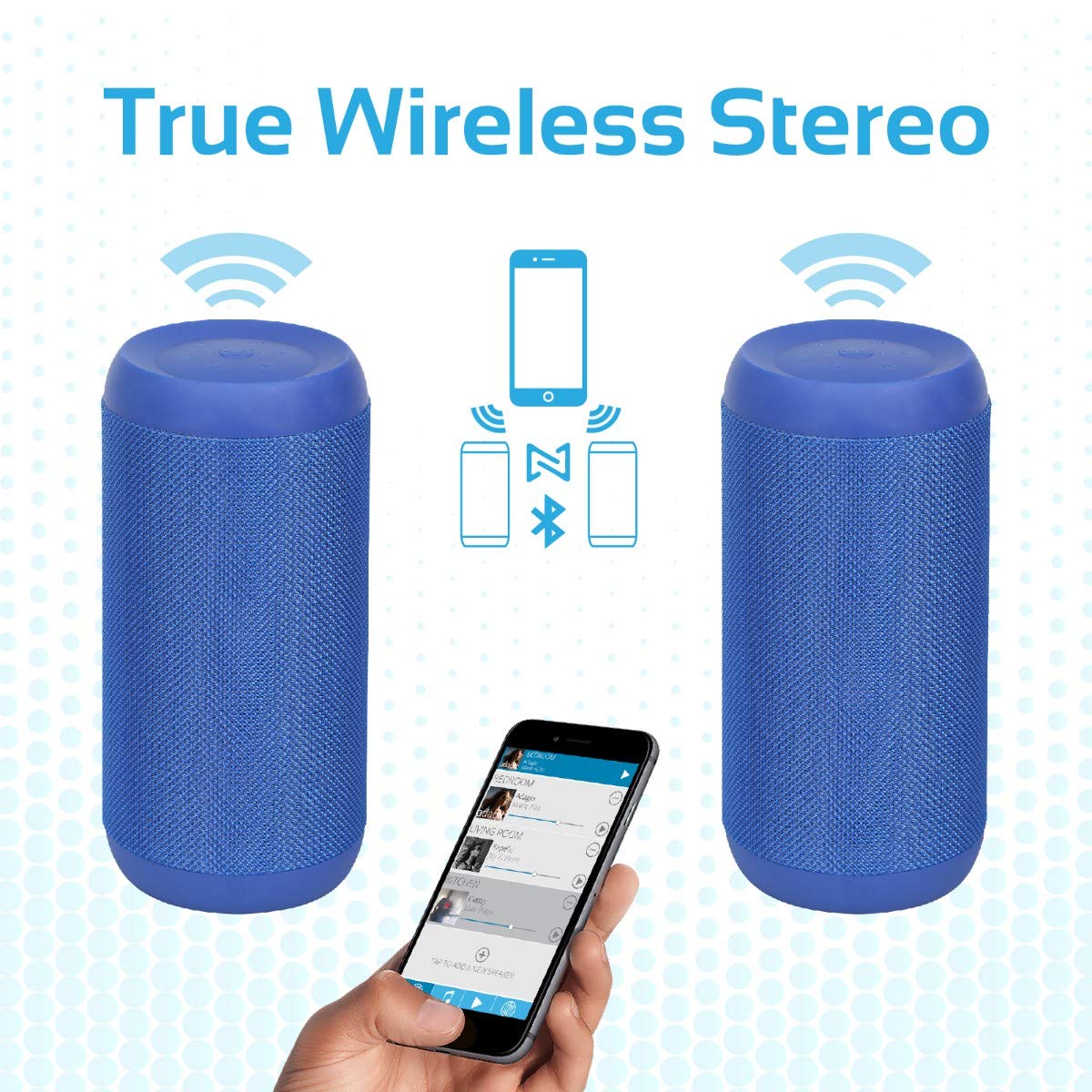
Image 5.2: Promate Silox True Wireless Stereo Pairing. This image visually explains the TWS function, showing two Promate Silox speakers wirelessly connected to a single smartphone, creating a stereo sound setup.
- Ensure both Promate Silox speakers are powered on and in Bluetooth pairing mode (LED flashing).
- On one of the speakers (this will be the primary speaker), double-press the Power button. The speaker will emit a sound indicating it's searching for another TWS speaker.
- The two speakers will automatically connect to each other. Once connected, the primary speaker's LED will flash slowly, and the secondary speaker's LED will remain solid.
- Now, connect your Bluetooth device to the primary speaker as described in "5.3 Bluetooth Pairing".
- Zvuk će se sada reprodukovati u stereo formatu preko oba zvučnika.
6. Uputstvo za upotrebu
6.1 Bluetooth režim
- After successful pairing (see 5.3), play music from your connected device.
- Koristite dugme Reprodukuj/Pauziraj na zvučniku za kontrolu reprodukcije.
- Press Volume Up/Down buttons to adjust volume.
- Hold Volume Up/Down buttons to skip tracks.

Image 6.1: Promate Silox Speaker Music Amplified. This image shows the speaker placed on a sofa armrest, playing music from a tablet, illustrating its use in a home environment.
6.2 Režim FM radija
- Press the 'M' (Mode) button repeatedly until you hear the FM radio prompt.
- Pritisnite dugme Reprodukuj/Pauziraj jednom da biste automatski skenirali i sačuvali dostupne FM stanice.
- Koristite tipke za pojačavanje/smanjivanje jačine zvuka za navigaciju između sačuvanih stanica.
- Press and hold Volume Up/Down buttons to fine-tune the frequency.
6.3 Reprodukcija s Micro SD kartice
- Insert a Micro SD card (with MP3/WMV audio files) into the Micro SD card slot.
- The speaker will automatically switch to Micro SD mode and begin playing music. If not, press the 'M' button to select Micro SD mode.
- Use the Play/Pause, Volume Up/Down, and track skip buttons as in Bluetooth mode.
6.4 Reprodukcija s USB-a
- Insert a USB flash drive (with MP3/WMV audio files) u USB priključak.
- The speaker will automatically switch to USB mode and begin playing music. If not, press the 'M' button to select USB mode.
- Use the Play/Pause, Volume Up/Down, and track skip buttons as in Bluetooth mode.
6.5 AUX ulaz
- Connect one end of the 3.5mm audio cable to the speaker's AUX input port.
- Drugi kraj priključite na audio izlaz vašeg eksternog uređaja (npr. MP3 plejera, laptopa).
- Press the 'M' button to switch to AUX mode.
- Kontrolirajte reprodukciju i jačinu zvuka sa svog eksternog uređaja.
6.6 Pozivi bez upotrebe ruku
- Kada primite poziv dok ste povezani putem Bluetootha, muzika će se pauzirati.
- Press the Call button once to answer the call.
- Ponovo pritisnite dugme za poziv da biste prekinuli poziv.
- Press and hold the Call button to reject an incoming call.
- Ugrađeni mikrofon omogućava jasnu komunikaciju.
7. Održavanje
- čišćenje: Obrišite zvučnik mekom, suhom krpom. Ne koristite abrazivna sredstva za čišćenje ili rastvarače.
- Skladištenje: Čuvajte zvučnik na hladnom i suhom mjestu kada ga ne koristite duži period.
- Održavanje baterije: To prolong battery life, charge the speaker fully before storing it for a long time and recharge it every 3-6 months.
- Otpornost na vodu: The speaker is IPX6 water-resistant, meaning it can resist gentle water spray and splashes. Do not submerge it in water. Ensure the port cover is securely closed to maintain water resistance.

Image 7.1: Promate Silox Speaker IPX6 Water-Resistant. This image shows the speaker with water splashing on it, accompanied by an IPX6 water-resistant logo, demonstrating its durability against splashes.
8. Otkrivanje problema
| Problem | Mogući uzrok | Rješenje |
|---|---|---|
| Zvučnik se ne uključuje. | Niska baterija. | Potpuno napunite zvučnik. |
| Nije moguće uparivanje putem Bluetootha. | Zvučnik nije u načinu uparivanja; Bluetooth uređaja isključen; previše udaljeni. | Ensure speaker is in Bluetooth pairing mode (flashing LED). Turn on Bluetooth on your device. Move device closer to speaker (within 10 meters). |
| Nema zvuka. | Jačina zvuka je preniska; odabran je pogrešan način rada; uređaj ne reproducira zvuk. | Increase speaker and device volume. Ensure correct mode (Bluetooth, AUX, SD, USB) is selected. Check if music is playing on the source device. |
| Slab FM radio prijem. | Slab signal; smetnje iz okoline. | Move the speaker to a different location. Perform auto-scan again. |
| Uparivanje TWS-a nije uspjelo. | Zvučnici su previše udaljeni; jedan zvučnik je već povezan s uređajem. | Ensure both speakers are in pairing mode and close to each other. Disconnect any Bluetooth devices from both speakers before initiating TWS pairing. |
9. Specifikacije
- Model: Silox
- Vrsta zvučnika: Vanjski, prijenosni
- Tehnologija povezivanja: Bluetooth 4.2, Auxiliary (3.5mm), USB, Micro SD Card
- Maksimalna izlazna snaga zvučnika: 20 Watts
- Način audio izlaza: Stereo (sa TWS-om)
- Otpornost na vodu: IPX6
- Trajanje baterije: Approximately 7 hours (playback time)
- Metoda kontrole: Dodirna dugmad
- Ugrađeni mikrofon: Da (za hands-free pozive)
- FM radio: Da
- Kompatibilni uređaji: Laptop, Smartphone, Tablet, Music Players
- Dimenzije proizvoda: 11.9 x 15.4 x 26.7 cm
- Težina artikla: 1 kg
- Boja: Plava

Image 9.1: Promate Silox Speaker 20W Output. This image emphasizes the speaker's powerful 20-watt audio output, showing the speaker with visual effects representing sound waves and a "20 Watt Hi-Definition Stereo Quality Sound" label.
10. Garancija i podrška
The Promate Silox True Wireless Stereo Speaker comes with a 2 godine garancije od datuma kupovine. Ova garancija pokriva nedostatke u proizvodnji i izradi pri normalnoj upotrebi.
For technical support, warranty claims, or further assistance, please visit the official Promate website or contact your local Promate customer service.
You can visit the Promate Store for more information: Promate trgovina na Amazonu